
How to Remove Reflections from Glass Photos — Magic Eraser
Remove unwanted reflections from glass, windows, mirrors, and glossy surfaces in photos using AI. Step-by-step guide for cleaning glare from architectural, museum, and product photography.

Product Marketing
Reviewed by Magic Eraser Editorial ·
Table of Contents
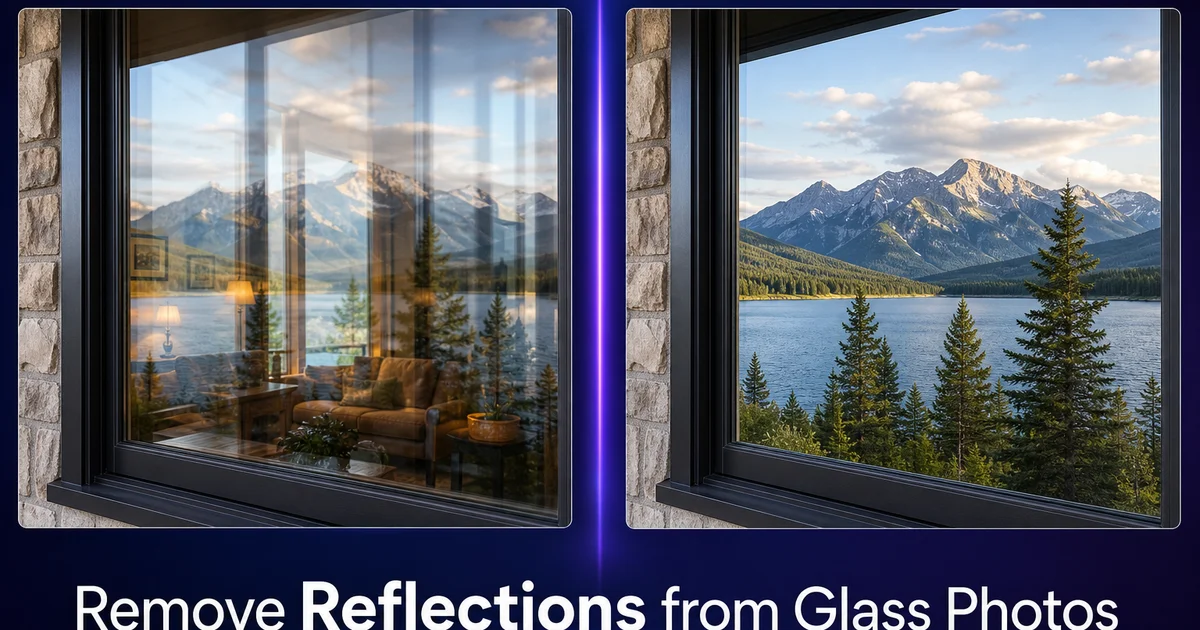
Reflections in glass are one of photography's most persistent frustrations. Whether you are shooting through a window, photographing a framed painting, capturing products in a glass display case, or documenting architecture with large glass facades, unwanted reflections of the photographer, the room, overhead lights, or the surroundings overlay the subject and degrade the image. Even with careful angle selection and lighting control, glass surfaces reflect whatever is opposite them. And that often includes you and your camera.
Traditional solutions at capture time — polarizing filters, specific shooting angles, controlled lighting — help reduce reflections but rarely eliminate them completely. Polarizers only work on reflections at certain angles (Brewster's angle, around 53 degrees for glass). Repositioning is not always possible when shooting through museum cases, storefront windows, or vehicle glass. In post-processing, manual reflection removal requires painstaking cloning and healing work because the reflection overlays and blends with the scene behind it, making simple erasure look patchy and unnatural.
AI-powered reflection removal works at its core differently from manual techniques. Instead of cloning nearby pixels over the reflected area, the AI uses the visible portions of the interior, artwork, product, or landscape to infer what the scene behind the glass should look like, then reconstructs the obscured areas with plausible detail, color, and texture. This guide covers techniques for removing reflections from windows, display cases, framed artwork, mirrors, and glossy product surfaces.
- AI reconstruction generates the actual scene behind the glass rather than cloning nearby pixels, producing natural results even on large reflection areas.
- Works on all reflection types: specular highlights from point lights, broad reflections of the photographer and room, and partial overlays on transparent surfaces.
- Handles the blended, semi-transparent nature of glass reflections where the reflection and the subject behind the glass are mixed together.
- Effective on windows, museum display cases, framed artwork, vehicle glass, storefront photography, and glossy product surfaces.
- AI Enhance as a finishing step restores natural glass surface gradients and edge darkening that reflections interrupt.
Why glass reflections are uniquely difficult to remove
Glass reflections differ from other photographic obstructions because they are semi-transparent overlays, not opaque objects. When you remove a power line from a sky, the sky behind it is fully hidden by the opaque wire and must be generated from scratch. When you remove a reflection from glass, the scene behind the glass is partially visible through the reflection. The subject and the reflection are blended together at varying opacities across the glass surface. This means the AI must separate two superimposed images and keep only the one behind the glass.
The intensity and character of the reflection varies across the glass surface based on the angle of view, the curvature of the glass, and the distance from the light source creating the reflection. A reflection might be nearly opaque at one point (where a bright light source hits the glass at a direct angle) and nearly invisible a few inches away. This gradient means a single removal setting does not work uniformly across the affected area. The AI must adapt its approach pixel by pixel based on how much of the reflection versus the underlying scene is present at each point.
Color contamination adds another layer of complexity. The reflection does not just overlay the scene — it shifts the colors beneath it. A warm room reflection on a cool-toned landscape outside the window pushes the visible landscape colors toward warmth in the reflected zone. Removing the reflection and restoring accurate color beneath it requires the AI to not only regenerate missing detail but also correct the color shift that the blended reflection caused in the partially visible areas.
- Glass reflections are semi-transparent overlays where the subject and reflection blend at varying opacities — not simple opaque obstructions.
- Reflection intensity varies across the glass surface based on viewing angle, glass curvature, and light source distance, requiring adaptive per-pixel processing.
- Color contamination from the reflected scene shifts the colors of the subject behind the glass, requiring correction beyond simple removal.
- These factors make glass reflection removal one of the most complex image restoration tasks, ideally suited for AI rather than manual techniques.
Removing reflections from windows and architectural glass
Architectural and real estate photography frequently involves shooting through or toward large glass surfaces. Office building facades, storefront windows, residential windows showing interior staging, and glass-enclosed atriums all create broad reflections that can cover the entire window plane, including the photographer, their equipment, nearby buildings, sky, and street-level activity. The reflected image can be as detailed as the scene behind the glass, creating a confusing double-exposure effect.
For windows where you want to show the interior (a staged home viewed from outside, a restaurant interior photographed from the sidewalk), select the entire window area including the glass frame edges. Magic Eraser will reconstruct the interior scene by referencing any visible portions and understanding typical interior content like furniture, walls, and lighting. For large windows where the interior is partially visible through the reflection, the AI blends its generated content with the existing visible portions to create a seamless, reflection-free view.
For glass building facades where the glass should appear as a solid architectural surface rather than a window, the approach differs. Here, you want the glass to look like clean, reflective architecture — not to see through it. Remove specific unwanted reflections (your tripod, a construction crane, a passing truck) while keeping the intentional reflections of sky and clouds that give the facade its characteristic look. Use a targeted brush selection on just the unwanted elements rather than selecting the entire glass surface.
- Select entire window areas including frame edges when removing reflections to reveal interior scenes behind residential or commercial glass.
- The AI references visible interior portions through the reflection to reconstruct a seamless, reflection-free view of the space behind the glass.
- For architectural facades, selectively remove only unwanted reflections while preserving intentional sky and cloud reflections that define the building's character.
- Use targeted brush selections on specific reflections rather than whole-surface selection when the glass itself is part of the architectural aesthetic.
Cleaning up museum, gallery, and display case photography
Museum and gallery photography presents some of the most frustrating reflection challenges because the glass is there specifically to protect the subject, and you cannot remove it physically. Display cases, painting glass, and protective vitrines all produce reflections of overhead gallery lighting, other visitors, the room setting, and the photographer. Museums often prohibit flash photography, so you cannot overpower the reflections with your own lighting. The result is that many museum photos show a ghostly overlay of the gallery space on top of the artwork or artifact.
For framed paintings and photographs behind glass, the reflection usually appears as bright patches from ceiling lights and a diffuse overlay of the room. Select the entire glass surface area and let AI Fill reconstruct the artwork beneath. The AI can reference the visible portions of the painting, especially areas where the reflection is weakest, to understand the style, color palette, and content, then generate the missing portions that the reflection obscures. This works remarkably well for art with consistent style, like oil paintings, watercolors, and photographs.
Display cases with three-dimensional objects require more careful selection. The reflection may overlay only part of the object. The glass surface exists at a different focal plane than the object. Select just the reflected areas that overlap the artifact, leaving the clean portions untouched. Work in sections if the reflection covers a large area. Process the top half first, then the bottom — to give the AI the best possible reference from clean adjacent areas. After removal, AI Enhance unifies the lighting and color across the case to eliminate any patchwork look.
- Museum conditions — no flash, protective glass, overhead lighting — make reflections unavoidable in gallery and artifact photography.
- AI Fill reconstructs artwork hidden under gallery reflections by referencing the painting's visible style, palette, and content from unreflected areas.
- Three-dimensional objects in display cases benefit from selective, sectioned reflection removal rather than whole-surface processing.
- AI Enhance after removal unifies lighting and color across the cleaned glass surface to eliminate patchwork artifacts between processed and unprocessed areas.
Handling reflections on mirrors, glossy products, and vehicle glass
Mirrors present a philosophical challenge: a mirror's entire purpose is to reflect. Removing the reflection means generating whatever scene the mirror would show if there were no photographer in front of it. For interior design and real estate photography, this usually means generating a continuation of the room on the other side. AI Fill can create a plausible room continuation that matches wall color, floor material, and furniture style, replacing your camera-wielding reflection with a clean interior view. The result does not need to be architecturally accurate; it needs to look natural in the photograph.
Glossy product photography — electronics, sunglasses, watches, ceramics, and polished metal — generates reflections of the shooting setting on curved surfaces. These reflections are often small, localized highlights rather than full-scene overlays, making them well-suited for Magic Eraser's targeted brush. For a watch with a reflection of the studio light in its crystal, or sunglasses reflecting the photographer in their lenses, paint over just the reflected element with a tight brush. The AI will fill with the right surface texture — crystal clarity, lens gradient, or metallic sheen — from the surrounding product surface.
Vehicle glass — windshields, side windows, and sunroofs — combines the challenges of flat window glass with curved surfaces. Dashboard reflections in the windshield, photographer reflections in the side windows of a car listing. Sky glare on sunroofs all interfere with clean automotive photography. Process vehicle glass the same way as architectural glass: select the reflection area, let the AI reconstruct what is behind or on the glass surface. Use AI Enhance to unify the result. For interior car photos shot from outside, the AI reconstructs the dashboard, seats, and interior visible through the reflection-free glass.
- Mirror reflections in interior photography can be replaced with AI-generated room continuations that match wall color, floor material, and furniture style.
- Glossy product reflections are typically small, localized highlights well-suited for targeted Magic Eraser brush removal.
- Vehicle glass combines flat and curved reflection challenges — process windshields, side windows, and sunroofs as architectural glass with AI reconstruction.
- AI Enhance as a final pass unifies the surface appearance across cleaned areas, restoring natural glass gradients and reflective properties.
How to do it
- 1
Identify the type and extent of the reflection
Assess whether the reflection is a bright specular highlight (a point-source light bounce), a broad diffuse reflection (your own image or the room reflected in the glass), or a partial transparency where you can see through the glass but a reflection overlays it. Each type requires a slightly different removal approach.
- 2
Select the reflection area in Magic Eraser
Use the brush tool to paint over the reflected area. For specular highlights, a small precise selection works well. For broad reflections covering large areas of glass, select the entire affected zone. Include the full extent of the reflection including its faded edges, not just the brightest center. Leaving partial reflection edges looks worse than the original.
- 3
Let the AI reconstruct what lies behind the glass
Magic Eraser analyzes the visible portions of the scene behind the glass and generates what the reflection is obscuring. For windows, it reconstructs the interior room or exterior view. For display cases, it fills in the object details hidden by the reflection. For framed artwork, it regenerates the painting or photograph surface beneath the glare.
- 4
Use AI Fill for large reflections over detailed subjects
When a reflection covers a major portion of a detailed subject, such as your reflection in a museum display case obscuring half a painting, switch to AI Fill. It uses broader scene context and content understanding to reconstruct complex details like artwork, text, product displays, and architectural elements that Magic Eraser alone may not fully resolve.
- 5
Enhance the final image to unify tones across the cleaned glass
Run AI Enhance to smooth any tonal inconsistencies where the reflection was removed. Glass surfaces have subtle color gradients and edge darkening that the reflection may have interrupted. A global boost pass restores these transitions so the glass surface reads as a single, steady plane.
Sources
- Optical Physics of Reflection and Refraction in Photography — B&H Photo
- Architectural Photography Techniques for Glass and Reflective Surfaces — American Institute of Architects
- Museum and Gallery Photography: Handling Reflective Cases and Framed Works — American Alliance of Museums