
Prepare a Passport Photo Background with AI
Remove a distracting background and replace it with a clean solid color for a passport, visa, or ID photo. Because requirements vary by document and country, confirm the current official color, crop, size, and submission rules before you apply.
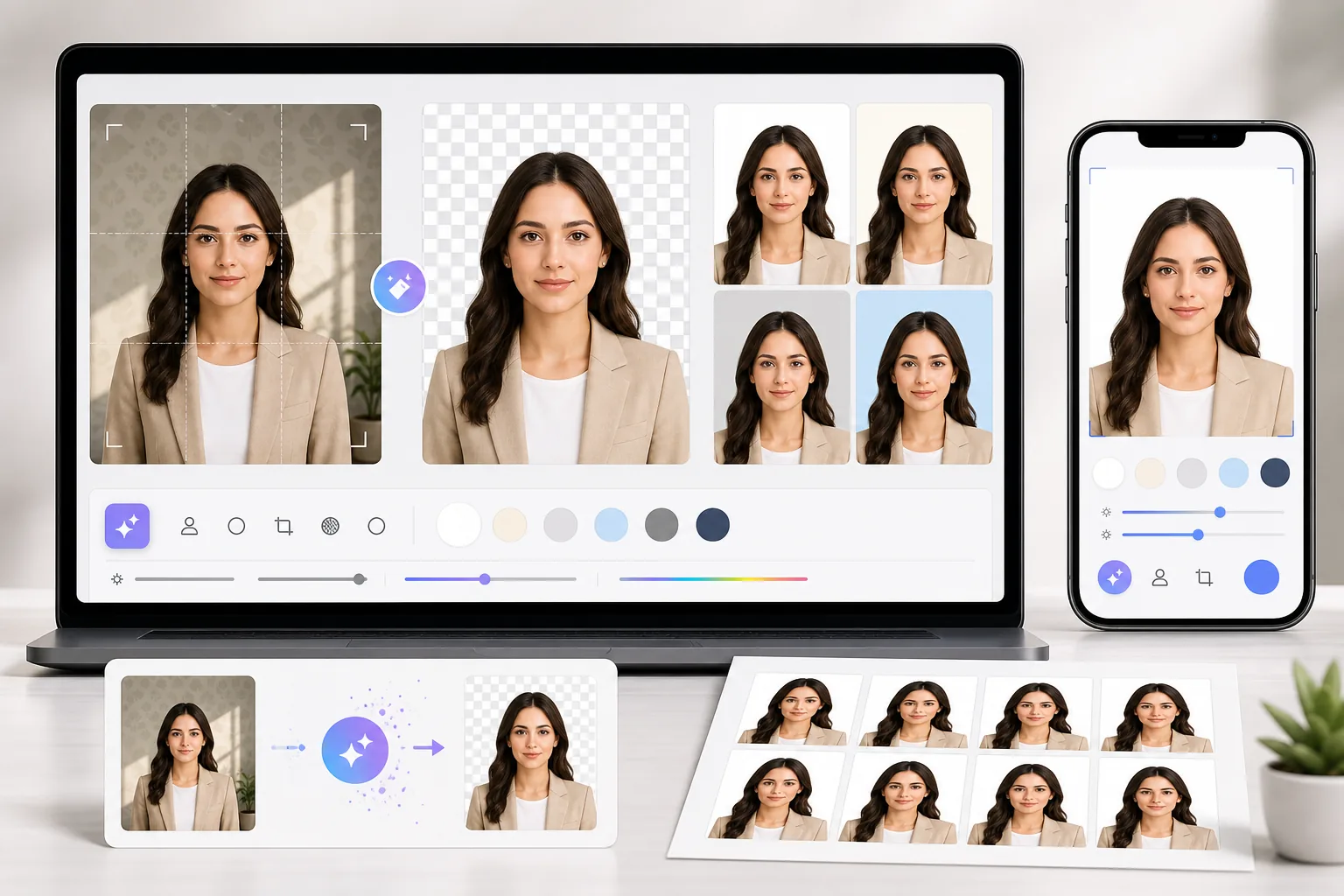
Rejected Photos Waste Time and Money
Passport and ID photo background rules vary by country and document. A shadow, patterned wall, or incorrect color can cause problems. Magic Eraser helps create a clean, uniform background, but you should compare the complete photo with the issuing authority’s current rules.
A Reshoot Is Not Always Convenient
If the original portrait is otherwise suitable, replacing a distracting background can be a practical first step before printing or uploading. Check whether the issuing authority permits digital background editing; some applications require an unaltered photo or an approved photographer.
Last-Minute Travel Means No Time for Retakes
When a deadline is close, start with a suitable recent headshot and clean up only the background. Then review every official requirement; changing the background does not correct pose, expression, lighting, crop, or image-age issues.
How to Create a Passport Photo with Magic Eraser
Take or Upload Your Headshot
Snap a photo against any wall using your phone, or upload an existing headshot. Make sure your face is well-lit, centered, and both ears are visible.
Remove the Background
Magic Eraser's AI detects your face and hair precisely, removing the background with clean edges — no green screen needed.
Choose Your Background Color
Choose the solid background color listed by the relevant passport or visa authority. Requirements vary by country and document, so verify the current official guidance instead of relying on a general preset.
Download and Print
Export at the dimensions and file format required by the issuing authority. Before printing or uploading, verify the current crop, head position, resolution, and submission rules.
Frequently Asked Questions
Will my passport photo pass official requirements?
+
Magic Eraser can help create a clean, solid-color background, but it cannot guarantee acceptance. The issuing authority evaluates the entire photo, including recency, pose, expression, lighting, crop, dimensions, file format, and whether digital editing is permitted. Check its current official guidance before submitting.
What background color do I need for a US passport photo?
+
The US State Department requires a plain white or off-white background. Choose that color, then check the current official guidance for all other photo requirements before submitting.
Can I use this for visa and ID card photos too?
+
Yes. Magic Eraser works for any type of ID photo — passports, visa applications, national ID cards, driver's licenses, and professional headshots. Just select the background color required by your document type.
Does it work with photos taken on my phone?
+
Absolutely. Modern smartphone cameras produce more than enough resolution for passport photos. Just make sure your lighting is even and your face is clearly visible.
Create Your Passport Photo Now
Remove the background, choose the required solid color, and compare the finished photo with your issuing authority’s current rules before downloading.
Try it freeRelated use cases
See how professionals use these tools in real-world workflows.
Listing photos cluttered with personal items, parked cars, or construction equipment can turn buyers away. Magic Eraser uses AI to clean up your property photos instantly — no Photoshop skills required.
Product listings need clear images before shoppers can judge the item. Magic Eraser helps sellers remove messy backgrounds, table edges, labels, props, glare, and other distractions so each product photo is easier to review before publishing.
You need eye-catching collages, banners, and flyers — but you don't have the budget for a designer or the time to learn Photoshop. Magic Eraser gives you layout tools, AI-generated backgrounds, and one-click cutouts so you can create scroll-stopping marketing visuals in minutes.
Related comparisons
See how Magic Eraser compares to similar tools.
TouchRetouch is a popular paid mobile app for removing objects and blemishes. Magic Eraser offers free AI-powered editing on any device with no install required. See how they compare across features, pricing, and ease of use.
Cleanup.pictures is a free web tool with one generic eraser brush. Magic Eraser gives you 100+ purpose-built removal tools — one for emoji, glasses, watermarks, sky, power lines, and dozens more — plus background removal, AI enhance, and mobile apps, in 16 languages. See how breadth changes the result.
remove.bg is the market leader for background removal, offering a powerful API and integrations with Photoshop and Figma. Magic Eraser goes further with eight AI-powered editing tools — from object removal and generative fill to AI enhance and design — all in one editor.
Two powerful AI photo editors with different strengths. Magic Eraser offers a broader set of generative AI tools for creative editing, while Photoroom excels at e-commerce product photography and batch processing. See which fits your workflow.
Related guides
Explore more guides and editorial content related to this workflow.
Learn how to use Magic Eraser to remove objects, people, text, and distractions from photos with cleaner AI editing results.
Learn how to remove people from photos using AI in seconds. Step-by-step guide for travel photos, real estate shots, and product images.
Step-by-step guide to removing watermarks from your own photos using AI. Learn when it is appropriate, the best techniques, and how Magic Eraser handles it.