
Daycare & School Photos: Parent Communication, Marketing & Enrollment
Daycare centers and preschools take more photos than almost any other small business — daily activity documentation for parents, enrollment marketing for their website and social media, seasonal event documentation, and milestone celebrations. The challenge is that classrooms are visually chaotic environments: primary-colored furniture, cluttered art stations, snack remnants, cubbies overflowing with backpacks, and other children who may not have photo release permission in the background. Background Eraser creates clean, warm compositions that focus on the activity and the child, while AI Enhance corrects the fluorescent classroom lighting that makes every phone photo look institutional.
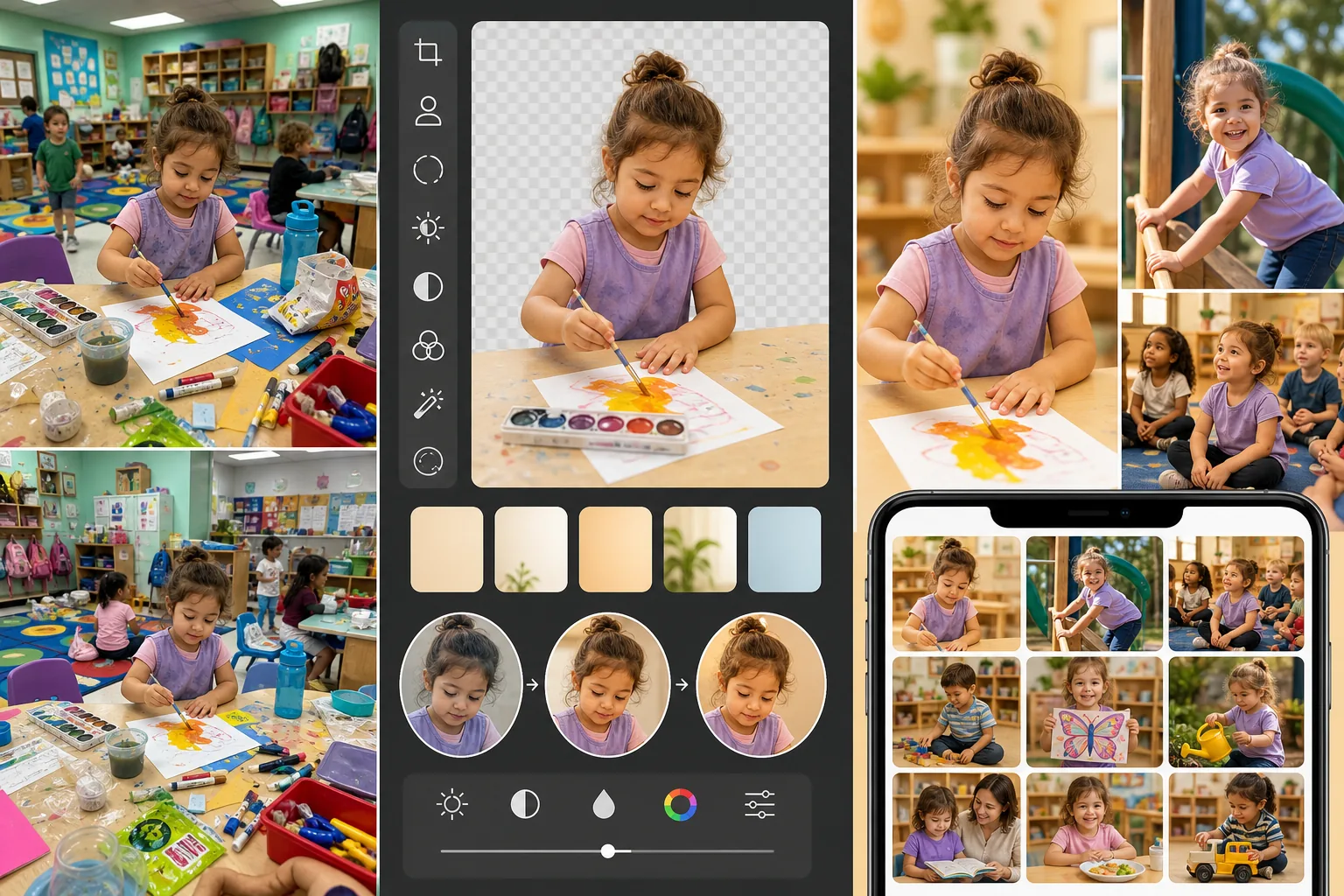
Classroom backgrounds are visually chaotic and undermine professional presentation
A preschool classroom is designed for children, not photography. The background of any given shot contains toy bins, art supplies, half-finished craft projects, snack tables, diaper-changing stations, and the accumulated visual noise of a space used intensively by 15-25 small children. Parents receiving these photos for daily updates see the mess rather than their child's creative moment. Enrollment-marketing photos with cluttered classroom backgrounds signal disorganization rather than the enriching learning environment the center works hard to create. Background Eraser isolates the child and the activity from the classroom chaos, placing them against clean backgrounds that let the moment shine.
Other children without photo releases appear in nearly every shot
In a class of 15-20 children, typically 2-5 do not have photo release permission from their parents. These children appear in the background of almost every activity photo, classroom shot, and outdoor play capture. Each photo must be reviewed and either rejected or manually edited to remove or obscure non-released children before it can be shared with other parents or used in any marketing context. This per-image privacy review is a significant time burden on teachers and administrators who are already stretched thin. Background Eraser can isolate the consented child from the group context, creating a shareable image without the compliance risk.
Fluorescent classroom lighting makes photos look institutional rather than warm
Daycare and preschool facilities use overhead fluorescent or LED panel lighting for safety and visibility. This lighting casts a cool, flat, institutional quality on every photo — skin tones look pale, the room feels sterile, and the warmth of children engaged in play or learning is completely lost. Parents reviewing daily photos on their phone see a clinical environment, not the nurturing, joyful space they visited during their enrollment tour. AI Enhance corrects the color temperature to add natural warmth, recovers the vibrancy of children's artwork and colorful materials, and produces images that communicate the energy and care of the classroom.
How Magic Eraser fits the daycare photo workflow
Integrate photo capture into the daily activity routine
Designate specific moments for photo capture that align with natural activity transitions — during art projects, outdoor play, circle time, and meal preparation. Teachers capture 5-10 quick phone photos during these moments, focusing on children who are engaged and expressive. Do not disrupt activities for posed photos; candid engagement shots communicate the learning environment far more effectively than staged compositions. Maintain a quick-reference list of which children have photo releases so teachers can frame accordingly.
Review and select the strongest daily captures
At the end of each day or during nap time, a designated staff member reviews the day's captures and selects the 3-5 strongest images per child for parent sharing and the 1-2 best overall activity shots for marketing consideration. Check each selected photo for non-released children in the frame. Flag images that need background cleanup or have non-released children visible for the AI editing step.
Background Eraser for privacy compliance and visual cleanup
Use Background Eraser on flagged photos to isolate consented children from group contexts where non-released children are visible. Replace the background with warm, clean solid colors or gentle gradients that complement the activity (soft blue for water play, warm yellow for art projects, green for outdoor activities). This simultaneously solves the privacy compliance problem and the visual clutter problem — the resulting image shows the child engaged in the activity against a clean, warm background that communicates joy and engagement.
Enhance and distribute across parent and marketing channels
Run AI Enhance on the selected daily photos to correct fluorescent lighting, warm skin tones, and brighten the overall image. Share the enhanced photos with parents through your parent-communication app (Brightwheel, HiMama, Tadpoles, ClassDojo). Save the strongest enhanced images for marketing use — website gallery updates, social media posts, enrollment brochures, and seasonal newsletters. Over time, this workflow builds a library of warm, professional photos that showcase the center's activities and environment far more effectively than unedited classroom snapshots.
Frequently Asked Questions
How do we handle photo releases and privacy at scale?
+
Integrate a photo-and-social-media release into your enrollment paperwork with three tiers: (1) internal parent sharing only, (2) parent sharing plus website and social media, (3) no photo permission. Maintain a current release roster accessible to all photographing staff — update it whenever a family's consent status changes. For group activities where a mix of release levels is present, Background Eraser can isolate consented children after capture, but it is more efficient to frame photos to naturally exclude non-released children when possible. Quarterly re-confirmation of consent status keeps the roster current and demonstrates compliance diligence.
How many photos should we share with parents daily?
+
Research on parent-communication apps shows that 2-4 photos per child per day is the engagement sweet spot — enough to give parents a window into their child's day without overwhelming their notifications. Quality matters more than quantity: one warm, well-enhanced photo of a child engaged in a learning activity communicates more than five blurry snapshots. For marketing purposes, aim to produce 2-3 strong, enhanced activity photos per week that can be posted to social media and added to the website gallery. Consistency over time builds the visual library that drives enrollment inquiries.
Can the staff handle this workflow given their existing responsibilities?
+
The workflow is designed for time-constrained childcare staff, not professional photographers. Photo capture adds 2-3 minutes per activity period (5-10 quick phone snaps during natural moments). AI editing adds 10-15 minutes per day for the review-select-enhance cycle. The total daily investment is 15-25 minutes, which most centers can integrate into nap time or after-hours administrative time. Some centers designate one staff member per classroom as the weekly 'photo lead' on a rotating basis, distributing the effort. The AI tools handle the technical quality — staff only need to capture the moments.
Should we use stock photos or real classroom photos for enrollment marketing?
+
Real classroom photos, enhanced to professional quality, dramatically outperform stock photos for enrollment marketing. Parents evaluating daycares want to see the actual children, actual staff, and actual activities at your center — stock photos of model children in pristine environments feel generic and raise questions about what the real facility looks like. The AI enhancement workflow closes the quality gap between a phone snapshot and a professional photo, so your real classroom images are visually competitive with stock while carrying the authenticity that drives enrollment decisions. Centers that switched from stock to enhanced-real photos consistently report higher inquiry-to-tour conversion rates.
Share the warmth of your classroom with every parent
Background Eraser can reduce distracting classroom clutter, while AI Enhance improves fluorescent-lit snapshots for parent updates and enrollment materials. Editing does not replace consent checks: review every image against your current photo-release policy before sharing.
Try Magic Eraser freeRelated use cases
See how professionals use these tools in real-world workflows.
Listing photos cluttered with personal items, parked cars, or construction equipment can turn buyers away. Magic Eraser uses AI to clean up your property photos instantly — no Photoshop skills required.
Product listings need clear images before shoppers can judge the item. Magic Eraser helps sellers remove messy backgrounds, table edges, labels, props, glare, and other distractions so each product photo is easier to review before publishing.
Remove a distracting background and replace it with a clean solid color for a passport, visa, or ID photo. Because requirements vary by document and country, confirm the current official color, crop, size, and submission rules before you apply.
Related comparisons
See how Magic Eraser compares to similar tools.
TouchRetouch is a popular paid mobile app for removing objects and blemishes. Magic Eraser offers free AI-powered editing on any device with no install required. See how they compare across features, pricing, and ease of use.
Cleanup.pictures is a free web tool with one generic eraser brush. Magic Eraser gives you 100+ purpose-built removal tools — one for emoji, glasses, watermarks, sky, power lines, and dozens more — plus background removal, AI enhance, and mobile apps, in 16 languages. See how breadth changes the result.
remove.bg is the market leader for background removal, offering a powerful API and integrations with Photoshop and Figma. Magic Eraser goes further with eight AI-powered editing tools — from object removal and generative fill to AI enhance and design — all in one editor.
Two powerful AI photo editors with different strengths. Magic Eraser offers a broader set of generative AI tools for creative editing, while Photoroom excels at e-commerce product photography and batch processing. See which fits your workflow.
Related guides
Explore more guides and editorial content related to this workflow.
Learn how to use Magic Eraser to remove objects, people, text, and distractions from photos with cleaner AI editing results.
Learn how to remove people from photos using AI in seconds. Step-by-step guide for travel photos, real estate shots, and product images.
Step-by-step guide to removing watermarks from your own photos using AI. Learn when it is appropriate, the best techniques, and how Magic Eraser handles it.