
Online Dating Photos: Better Profile Pictures for Tinder, Hinge, Bumble & More
Turn recent group shots, dim indoor photos, and cluttered selfies into clearer dating profile pictures. Remove other people or distractions, clean up the background, and improve lighting while keeping your face, body, and overall appearance true to life.
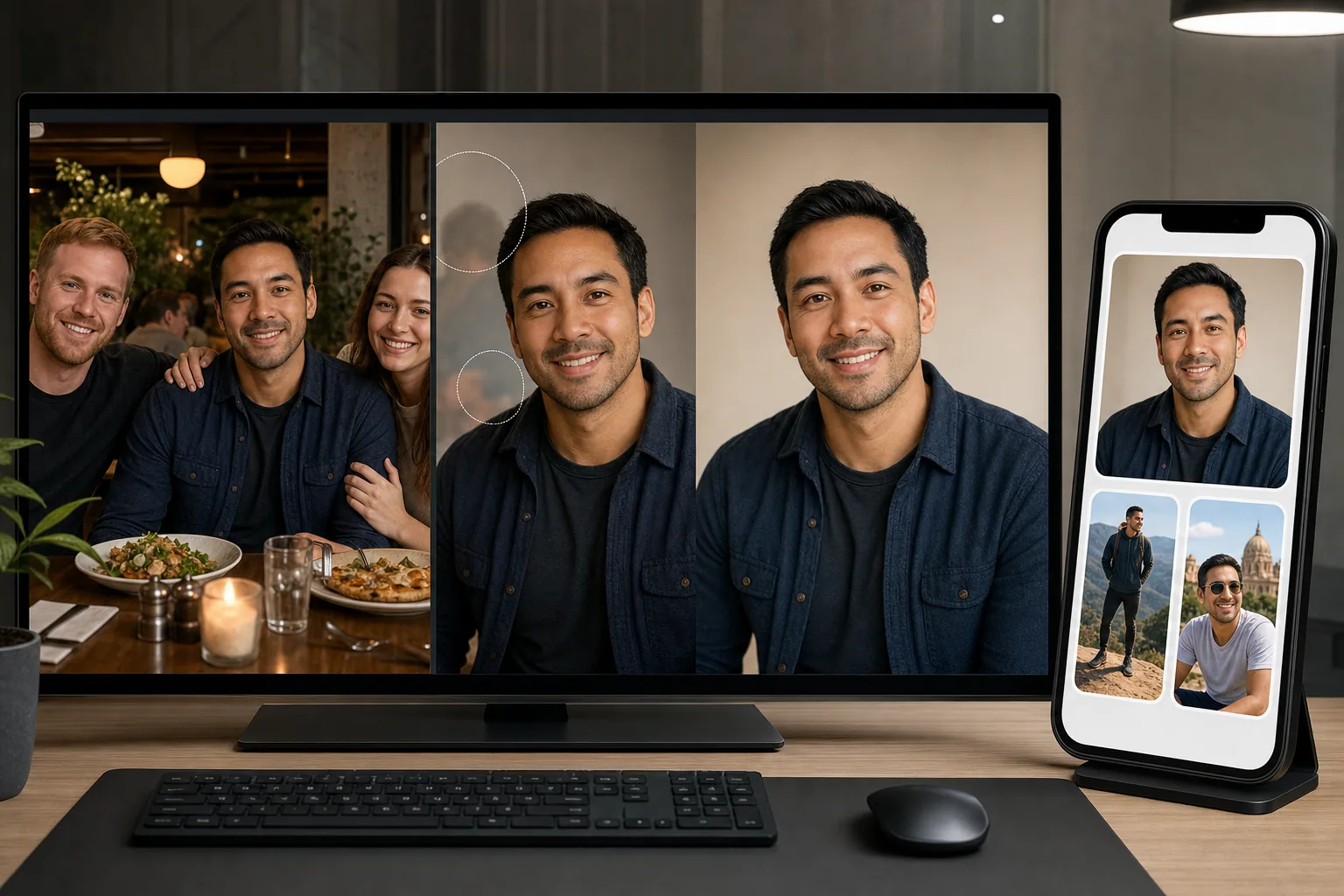
Most people's best recent photos include other people who should not be in the profile
The most flattering recent photos most people have were taken at social events — weddings, parties, dinners, vacations with friends or former partners. These photos capture natural smiles, good outfits, and relaxed expressions that posed selfies rarely achieve. But they also include other people: the ex who should not appear in any dating context, the friend group that makes it unclear which person is the profile owner, and strangers in the background who create visual noise. Cropping aggressively degrades resolution and creates awkward compositions. Magic Eraser removes specific people from the photo while preserving the background and the subject's natural, relaxed expression — turning a group dinner photo into a clean solo portrait.
Indoor and nightlife photos have poor lighting that undermines the subject
Bars, restaurants, and indoor social venues have warm tungsten or dim ambient lighting that phone cameras compensate for with high ISO and aggressive processing. The result: grainy, yellow-cast, soft images where skin tones look unnatural and facial features lack definition. These are often the only recent full-body or activity photos available — taken during the social contexts where people naturally look their best in terms of outfit and energy. AI Enhance recovers detail from low-light captures, corrects the color cast to reveal natural skin tones, and sharpens facial features and expression without creating the over-processed look that signals heavy filtering.
Messy rooms, cluttered backgrounds, and bathroom mirrors undermine profile perception
The dating-app ecosystem has trained users to evaluate backgrounds as personality signals: a messy bedroom background signals different things than a clean outdoor setting. Mirror selfies in bathrooms, gym selfies with locker-room backgrounds, and living-room selfies with visible clutter all create negative associations regardless of how the person looks. Background Eraser replaces the problematic background with a clean, neutral setting — not a fake luxury backdrop that would look artificial, but a clean removal that shifts visual focus entirely to the person.
How Magic Eraser fits the dating profile photo workflow
Audit your existing photo library for the strongest candidates
Review your camera roll and social media tagged photos from the past 12-18 months for photos where you look natural, relaxed, and genuinely happy — not posed or forced. Prioritize photos from social events, outdoor activities, travel, and any context where you were engaged and enjoying yourself. Select 8-12 candidates across different contexts: one clear face shot, one full-body shot, one activity or hobby shot, and one social or travel shot at minimum. Accept that most candidates will have background issues, other people, or lighting problems — these will be addressed in the editing steps.
Remove other people and distracting elements with Magic Eraser
Use Magic Eraser to remove exes, friends, strangers, and photobombers from the selected photos. For group shots where you want to isolate yourself, remove the other people and let the AI fill with the surrounding environment. For photos with an ex, remove them completely — partial crops that leave a mystery arm or shoulder are a well-known red flag on dating profiles. For background distractions (trash cans, clutter, other diners at adjacent tables), remove specific elements that compete for attention or create negative associations.
Fix backgrounds and enhance lighting
For photos with problematic backgrounds (messy rooms, bathroom mirrors, gym locker rooms), use Background Eraser to replace the background with a clean, natural-looking alternative. For low-light indoor and nightlife photos, run AI Enhance to recover detail, correct color casts, and sharpen the image. The goal is enhancement, not transformation — the photo should look like a well-lit, well-composed version of reality, not an airbrushed fantasy. Avoid the temptation to over-enhance; dating profiles perform best when the in-person meeting matches the photos.
Assemble a profile that tells a complete visual story
Select 4-6 of the best edited photos for your dating profile, ensuring variety: one clear headshot with good eye contact (primary photo), one full-body shot showing build and style accurately, one activity or hobby photo showing personality, and one social context photo showing you in a relaxed, engaging setting. Avoid selecting 6 photos that all look like the same face shot — variety in context and angle signals a full, interesting life. Upload at the highest resolution the platform supports, as compression artifacts are more visible on profile photos displayed at full-screen during evaluation.
Frequently Asked Questions
Is editing dating profile photos catfishing?
+
No — editing for quality (lighting correction, background cleanup, person removal) is categorically different from editing for deception (altering body proportions, smoothing away all skin texture, making yourself look like a different person). The standard is simple: would the person recognize you immediately at a coffee date based on your photos? Removing your ex from a vacation photo, correcting the yellow cast from bar lighting, and cleaning up a cluttered background all improve photo quality without misrepresenting your appearance. Avoid using AI tools to slim, reshape, or significantly alter your physical appearance — matches that feel misled on the first date do not convert to second dates.
How recent do my dating profile photos need to be?
+
Use photos from the last 12-18 months that accurately represent your current appearance — weight, hairstyle, facial hair, and general presentation. Photos from 3-5 years ago, even if you prefer how you looked, set expectations the first meeting cannot meet. If your best photos are older, use them as reference for what works (angle, lighting, expression, context) and recreate similar setups with current photos, then enhance the new captures with AI Enhance. The goal is to present your current, authentic self in the most flattering accurate light — not to present a past version or an aspirational version.
What types of photos work best as the primary profile image?
+
Research from dating platforms consistently shows that the highest-performing primary photos share these characteristics: clear face visibility (no sunglasses, no heavy shadow), genuine smile or natural expression (not posed or forced), good lighting on the face (natural light or well-corrected indoor light), clean background that does not compete for attention, and high image quality (sharp, well-exposed, not pixelated from aggressive cropping). AI Enhance and Background Eraser can bring an otherwise-good photo up to this standard — correcting lighting, cleaning the background, and sharpening detail so the face is clear and the expression reads at swipe speed.
Should I use the same edited photos across all dating apps?
+
You can use the same base set across platforms, but consider that different apps have different cultures: Hinge emphasizes personality and prompts alongside photos, so include more activity and context photos. Tinder is more visual-first, so lead with your strongest face photo. Bumble's verification system means your photos need to closely match your live appearance. Prepare 6-8 edited photos total and select 4-6 per platform, adjusting the lead photo and mix to match the platform's emphasis. All platforms benefit equally from the same AI enhancement and cleanup — better-quality photos perform better universally.
Put your best photo forward — honestly
AI Enhance fixes the lighting. Background Eraser cleans up the background. Magic Eraser removes the ex. Better dating profile photos from the photos you already have, without misleading edits. Free tier on web, iOS, and Android.
Try Magic Eraser freeRelated use cases
See how professionals use these tools in real-world workflows.
Listing photos cluttered with personal items, parked cars, or construction equipment can turn buyers away. Magic Eraser uses AI to clean up your property photos instantly — no Photoshop skills required.
Product listings need clear images before shoppers can judge the item. Magic Eraser helps sellers remove messy backgrounds, table edges, labels, props, glare, and other distractions so each product photo is easier to review before publishing.
Photobombers ruining your travel pics? Messy backgrounds killing your selfie game? Stop wasting hours in Photoshop. Magic Eraser removes distractions, cleans up cluttered shots, and expands your photos to fit any platform format — all in one tap.
Related comparisons
See how Magic Eraser compares to similar tools.
TouchRetouch is a popular paid mobile app for removing objects and blemishes. Magic Eraser offers free AI-powered editing on any device with no install required. See how they compare across features, pricing, and ease of use.
Cleanup.pictures is a free web tool with one generic eraser brush. Magic Eraser gives you 100+ purpose-built removal tools — one for emoji, glasses, watermarks, sky, power lines, and dozens more — plus background removal, AI enhance, and mobile apps, in 16 languages. See how breadth changes the result.
remove.bg is the market leader for background removal, offering a powerful API and integrations with Photoshop and Figma. Magic Eraser goes further with eight AI-powered editing tools — from object removal and generative fill to AI enhance and design — all in one editor.
Two powerful AI photo editors with different strengths. Magic Eraser offers a broader set of generative AI tools for creative editing, while Photoroom excels at e-commerce product photography and batch processing. See which fits your workflow.
Related guides
Explore more guides and editorial content related to this workflow.
Learn how to use Magic Eraser to remove objects, people, text, and distractions from photos with cleaner AI editing results.
Learn how to remove people from photos using AI in seconds. Step-by-step guide for travel photos, real estate shots, and product images.
Step-by-step guide to removing watermarks from your own photos using AI. Learn when it is appropriate, the best techniques, and how Magic Eraser handles it.