
Plant Nursery Catalog: True-Color Foliage, Clean Backgrounds & Consistent Listings
Online plant sales have grown into a multi-billion-dollar category, and nurseries competing for orders on their own e-commerce sites, Etsy, Amazon, and wholesale platforms need product photos that accurately represent foliage color, plant health, and specimen size — the three attributes customers evaluate when deciding whether to pay $12 for a 4-inch pot or $85 for a specimen-size plant. The photography challenge is that plants are photographed in greenhouse environments with filtered light, surrounded by hundreds of other plants competing for visual attention, and the foliage color that defines a cultivar's appeal shifts dramatically under different light temperatures. Background Eraser and AI Enhance produce the clean, color-accurate catalog photography that drives online plant sales without requiring a photo studio separate from the growing operation.
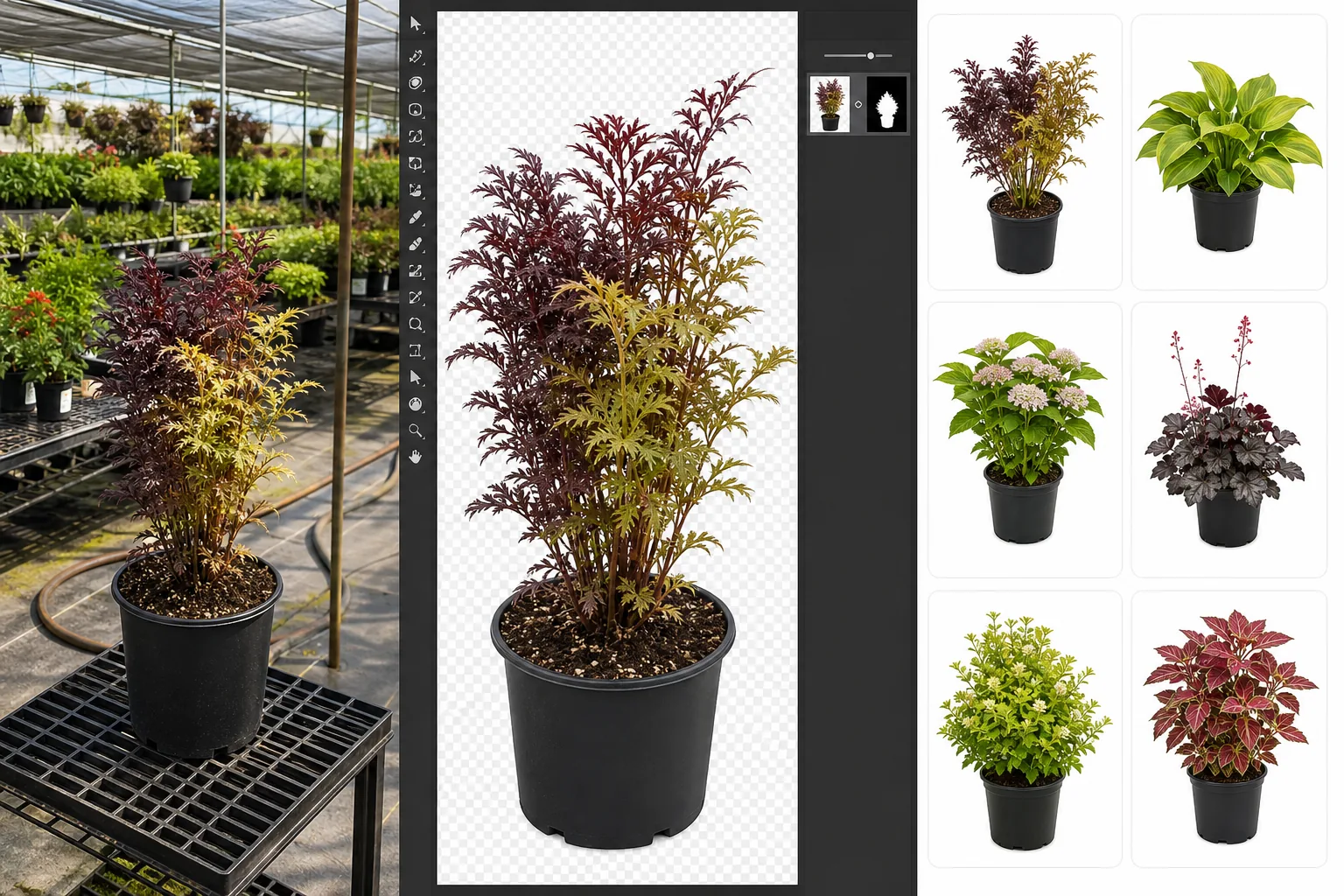
Greenhouse backgrounds are visually chaotic and confuse the product listing
Plants are photographed where they grow — in greenhouses and shade houses surrounded by benches of other plants, irrigation lines, shade cloth, structural posts, hanging baskets, and gravel floors. The visual chaos of a working greenhouse means the specific plant being listed is competing for the viewer's attention with everything else in the frame. On an e-commerce product listing, the customer should see only the plant they're considering purchasing, not the nursery's entire inventory. For wholesale catalogs, where buyers are evaluating 200-500 varieties in a single order session, cluttered backgrounds slow the evaluation process and obscure the cultivar differences that drive selection decisions.
Greenhouse lighting shifts foliage color away from the cultivar's true appearance
Greenhouse shade cloth, polycarbonate panels, and poly film filter and shift the color temperature of natural light, producing photographs where foliage appears more yellow-green or blue-green than its actual color in open sunlight. A 'Crimson Queen' Japanese maple that is deep burgundy in the landscape photographs as muddy brown under shade cloth. A chartreuse-foliage hosta that sells on the vibrancy of its lime-green color photographs as washed-out yellow under polycarbonate. Since foliage color is the primary visual attribute customers use to select cultivars — especially when choosing between similar varieties — color inaccuracy directly causes wrong-cultivar orders, returns, and negative reviews.
Seasonal availability means plants must be photographed and listed quickly
Many nursery crops are available for a window of 2-6 weeks during their peak season, and the e-commerce listing needs to go live as soon as the crop is sale-ready. The photography-to-listing turnaround can't accommodate sending plants to a separate studio or waiting for ideal weather conditions for outdoor photography. Plants need to be photographed in the greenhouse, processed, and listed within a day or two of reaching sale quality — a timeline that makes manual background editing in Photoshop impractical for a catalog of 100-500 varieties.
How Magic Eraser fits the plant nursery catalog workflow
Photograph each cultivar at peak presentation in the greenhouse
Select the best specimen of each cultivar — the plant that most accurately represents what the customer will receive — and photograph it from three angles: the hero shot showing the full plant form and habit, a three-quarter angle showing the plant's dimensionality and branching structure, and a detail close-up of the foliage texture, flower form, or distinguishing cultivar characteristic. Rotate the plant to show its best side. For size-comparison context, include a hand or a common reference (the nursery pot size is typically sufficient). Shoot during the brightest part of the day to minimize the greenhouse-lighting color shift.
Run Background Eraser to isolate the plant from the greenhouse environment
Open each plant photo in Background Eraser and remove the greenhouse background — the surrounding plants, benches, irrigation, shade cloth, and structural elements. Replace with a clean white background for marketplace listings (Etsy, Amazon, wholesale platforms) or a branded background for the nursery's own e-commerce site. The AI handles the complex edge detection that makes plant photography uniquely challenging — separating delicate leaf edges, fine branch tips, and airy grass blades from a visually busy background that often includes other green foliage at similar color values.
Run AI Enhance to correct foliage color and sharpen botanical detail
Apply AI Enhance to correct the greenhouse color shift so foliage renders at its true cultivar color as it will appear in the customer's garden. Correct the yellow-green bias from shade-cloth lighting, restore the burgundy depth of red-leafed cultivars, recover the vibrant chartreuse of lime-foliage varieties, and normalize the blue-green cast from polycarbonate-panel filtration. Sharpen the leaf venation, bark texture, flower petal detail, and thorn structure that customers zoom in on when evaluating plant quality. For variegated cultivars, where the variegation pattern is the selling point, ensure the contrast between the green and variegated portions renders clearly.
Export for e-commerce listings, printed catalogs, and wholesale order sheets
Export each processed photo at the dimensions required for each sales channel: 2000x2000px white-background squares for Etsy and Amazon listings, 1200x1200px or 1200x1600px for the nursery's own Shopify or WooCommerce product pages, 300 DPI CMYK for printed wholesale catalogs and availability lists, and 1080x1080px for Instagram and Facebook product posts. For wholesale buyers who order from printed availability lists, embed the cultivar name and pot-size code in the file name so the catalog-layout process is streamlined.
Frequently Asked Questions
How do I photograph plants accurately when foliage color varies by season?
+
Photograph each cultivar during its peak-color period — spring emergence color, summer mature color, and fall color are often distinctly different, and the listing photo should represent the color the customer will see when the plant arrives. For spring-shipped plants, use spring-color photos; for fall-shipped plants, use fall-color photos. Many nurseries maintain separate seasonal photo libraries for key cultivars and swap listing images seasonally to match shipping windows. AI Enhance corrects the greenhouse color shift but doesn't change the seasonal color stage — the photo represents whatever stage the plant was in when captured.
Should I show the plant in a decorative pot or the nursery container?
+
For retail e-commerce (direct to consumer), showing the plant in an attractive cache pot or in a garden setting can increase conversion because it helps customers visualize the plant in their space. For wholesale (nursery to nursery or nursery to garden center), the standard is to show the plant in its nursery container because buyers need to identify the pot size and understand exactly what they're receiving. Background Eraser works with both — you can photograph in the nursery pot and place against a clean background for wholesale, or photograph in a decorative pot for retail. Just be consistent within each sales channel.
Can Background Eraser handle the complex edges of grasses, ferns, and airy plants?
+
Ornamental grasses, ferns, and plants with fine or translucent foliage are the most challenging subjects for background separation in any photography workflow, because the leaf edges are thin enough to be semi-transparent and the negative space between blades allows the background to show through. Background Eraser handles these cases by detecting edge boundaries at the pixel level. For the most complex subjects (fine-textured grasses like Muhlenbergia or Stipa, lace-leaf ferns), the result may require a small amount of manual cleanup — but it's still dramatically faster than manually masking these subjects in Photoshop, which can take 15-30 minutes per image for a complex grass specimen.
Build a plant catalog that sells as well as your plants grow
Background Eraser isolates plants from greenhouse clutter and AI Enhance corrects the color shift that misrepresents your cultivars — so online customers see exactly the plant they'll receive. Free tier on web, iOS, and Android.
Try Magic Eraser freeRelated use cases
See how professionals use these tools in real-world workflows.
Listing photos cluttered with personal items, parked cars, or construction equipment can turn buyers away. Magic Eraser uses AI to clean up your property photos instantly — no Photoshop skills required.
Product listings need clear images before shoppers can judge the item. Magic Eraser helps sellers remove messy backgrounds, table edges, labels, props, glare, and other distractions so each product photo is easier to review before publishing.
Remove a distracting background and replace it with a clean solid color for a passport, visa, or ID photo. Because requirements vary by document and country, confirm the current official color, crop, size, and submission rules before you apply.
Related comparisons
See how Magic Eraser compares to similar tools.
TouchRetouch is a popular paid mobile app for removing objects and blemishes. Magic Eraser offers free AI-powered editing on any device with no install required. See how they compare across features, pricing, and ease of use.
Cleanup.pictures is a free web tool with one generic eraser brush. Magic Eraser gives you 100+ purpose-built removal tools — one for emoji, glasses, watermarks, sky, power lines, and dozens more — plus background removal, AI enhance, and mobile apps, in 16 languages. See how breadth changes the result.
remove.bg is the market leader for background removal, offering a powerful API and integrations with Photoshop and Figma. Magic Eraser goes further with eight AI-powered editing tools — from object removal and generative fill to AI enhance and design — all in one editor.
Two powerful AI photo editors with different strengths. Magic Eraser offers a broader set of generative AI tools for creative editing, while Photoroom excels at e-commerce product photography and batch processing. See which fits your workflow.
Related guides
Explore more guides and editorial content related to this workflow.
Learn how to use Magic Eraser to remove objects, people, text, and distractions from photos with cleaner AI editing results.
Learn how to remove people from photos using AI in seconds. Step-by-step guide for travel photos, real estate shots, and product images.
Step-by-step guide to removing watermarks from your own photos using AI. Learn when it is appropriate, the best techniques, and how Magic Eraser handles it.