
Sports Photography: Action Shots, Team Photos & Athlete Portraits
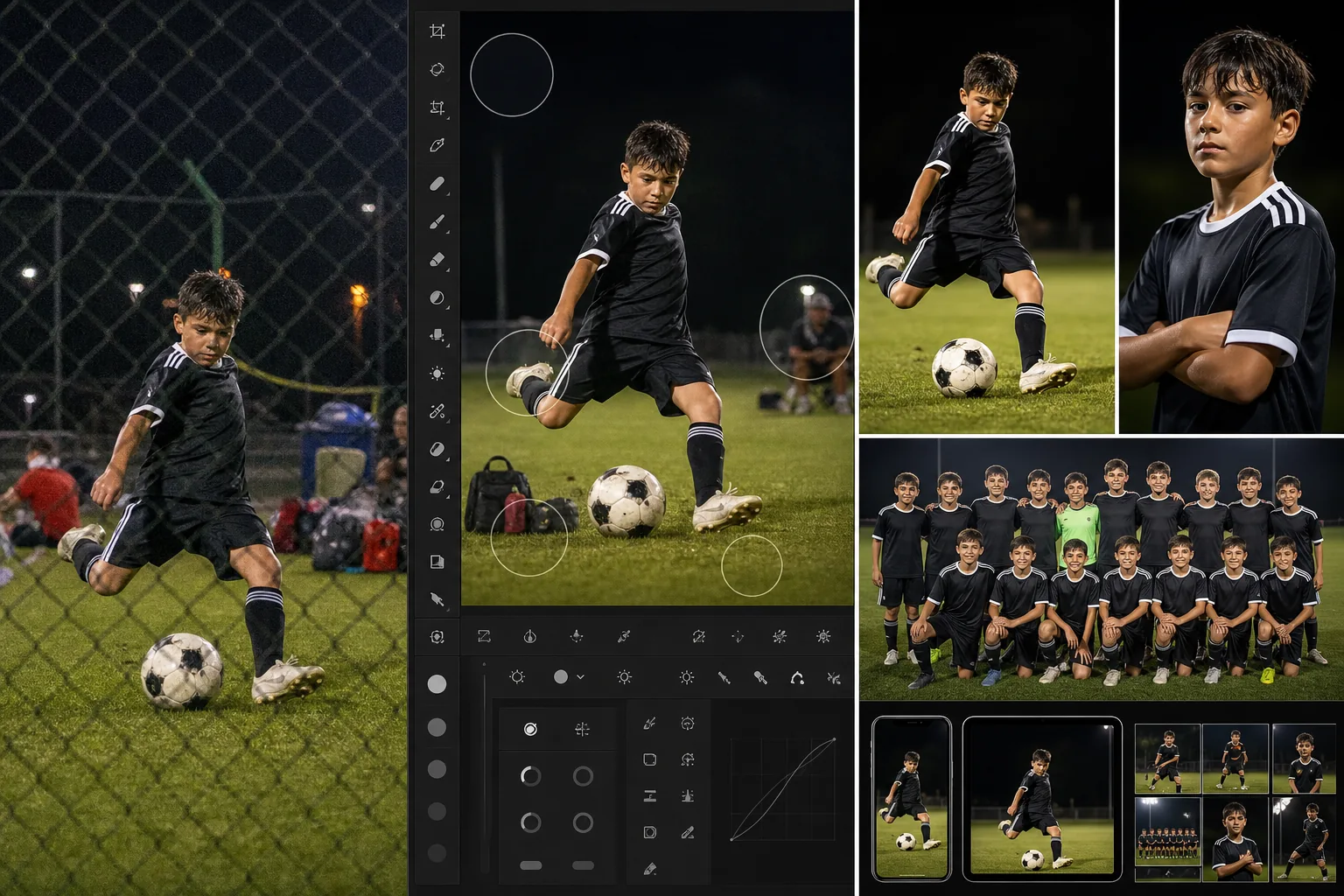
Sports photography demands technical precision under the worst possible conditions — fast-moving subjects under stadium mixed lighting, shooting through chain-link fences and safety netting, capturing peak action moments at 1/1000s+ shutter speeds that force high ISO and thin depth of field. The captures that survive the cull often need significant post-production: fence removal, noise reduction from high-ISO shooting, distraction cleanup from sideline clutter, and enhancement to recover detail the camera sacrificed for shutter speed. Magic Eraser and AI Enhance handle these sports-specific post-production challenges so the final images match the intensity of the moment captured.
Chain-link fences and safety netting obstruct the best shooting positions
Youth sports, baseball, softball, hockey, and indoor facilities force photographers to shoot through chain-link fences, dugout netting, plexiglass barriers, and safety screens. Even with a long lens and wide aperture that throws the fence partially out of focus, the obstruction leaves a visible pattern overlay — hexagonal blur from chain-link, streaking from netting, reflections from plexiglass. Traditional removal requires painstaking manual work with frequency separation and clone stamping. Magic Eraser can remove fence patterns and netting artifacts from the frame, recovering the clean image underneath.
High-ISO noise from fast shutter speeds in indoor and night venues
Freezing a basketball layup or a soccer strike at 1/1000s under gymnasium fluorescent lighting or night-game field lights forces ISO 3200-12800. The resulting noise degrades skin tones, uniform detail, and background clarity — particularly visible in shadow areas and darker uniform colors. Aggressive noise reduction in Lightroom or Photoshop smooths the noise but also destroys the texture detail that makes sports images compelling (grass blades, jersey fabric, sweat, facial expressions). AI Enhance reduces noise while preserving the fine detail that traditional noise reduction sacrifices.
Sideline clutter and background distractions undermine peak-action shots
The perfect catch, the game-winning goal, the celebration moment — these peak-action captures are often surrounded by sideline chaos: equipment bags, water coolers, other photographers, parent spectators, advertising banners the team does not want in their highlight gallery, and officials crossing the frame. Cropping tighter sacrifices the compositional context that makes the action shot powerful. Magic Eraser removes specific sideline distractions while preserving the field, court, or arena context that tells the story of the moment.
How Magic Eraser fits the sports photography workflow
Capture with shutter-speed priority and accept the ISO trade-off
In sports photography, shutter speed is non-negotiable — 1/500s minimum for moderate action (baseball batting stance, basketball free throw), 1/1000s for fast action (sprinting, diving, striking), 1/2000s+ for peak freeze (water splashes, ball contact). Accept the ISO trade-off required by the venue lighting and shoot in burst mode through the action sequence. Do not compromise shutter speed to reduce ISO — the noise is recoverable in post-production, but motion blur is not.
Cull for peak action and expression, not technical perfection
Sports culling is about the moment, not the noise level. Select images where the athlete is at peak extension, the ball is in frame, the expression captures the intensity, and the composition tells the story. Reject misfires, missed focus, and dead-ball moments, but keep any peak-action capture regardless of noise or obstruction artifacts. The technical cleanup happens in the next steps — do not reject a once-in-a-game moment because of fence blur or high ISO.
AI Enhance for noise recovery and detail sharpening
Run AI Enhance on the selected action shots to reduce high-ISO noise while preserving fine detail — grass texture, jersey fabric, facial expressions, and ball surface detail. This step is particularly critical for indoor sports (basketball, volleyball, wrestling, swimming) where gymnasium lighting forces ISO 6400-12800 and for night games under field lights. The enhancement should recover the detail the high ISO degraded without introducing the plastic smoothing that aggressive traditional noise reduction produces.
Magic Eraser for fence removal, netting cleanup, and sideline distractions
Apply Magic Eraser to the hero shots that need obstruction and distraction removal. For chain-link fence patterns, brush over the fence overlay across the frame — the AI reconstructs the image underneath. For safety netting, target the visible net lines. For sideline clutter, remove specific distracting elements (equipment bags, spectators crossing the background, advertising banners). For team-photo and portrait variants, remove background distractions that would not be present in a studio setting.
Deliver to teams, athletes, and media with appropriate formats
Export action shots for team social media (1080x1350 for Instagram, 1920x1080 for Twitter/X, full resolution for team websites). Export individual athlete highlights for player and parent purchases. Export press-resolution files for media outlets covering the event. For youth sports leagues, prepare both individual-athlete action galleries and team-composite layouts. The AI-enhanced, distraction-free images are the versions that teams post, parents purchase, and athletes use for recruiting portfolios.
Frequently Asked Questions
Can Magic Eraser completely remove a chain-link fence from a photo?
+
Magic Eraser can significantly reduce or remove chain-link fence patterns, particularly when the fence is partially defocused by a wide aperture (f/2.8-f/4). Fences that are sharp and in focus across the entire frame are more challenging because the obstruction covers more image data. For best results, shoot with the longest focal length and widest aperture available to throw the fence as far out of focus as possible — this gives the AI more underlying image data to work with during removal. Some complex overlapping patterns may require multiple passes.
How much noise can AI Enhance recover from high-ISO sports shots?
+
AI Enhance produces strong results on images captured at ISO 3200-6400 and meaningful improvement at ISO 6400-12800. Beyond ISO 12800, the noise-to-signal ratio may be too extreme for full recovery, though enhancement still improves the image over the unprocessed capture. The key factor is proper exposure at capture — an image shot at ISO 6400 with correct exposure recovers far better than an underexposed image shot at ISO 3200 and pushed two stops in post, because underexposure amplifies shadow noise disproportionately.
Is this workflow practical for youth sports parents, not just professional sports photographers?
+
Absolutely. Youth sports parents face even more constrained shooting conditions than professionals — phone cameras instead of fast telephotos, fence-line positions instead of sideline access, and no control over venue lighting. AI Enhance compensates for phone-camera limitations in low light, and Magic Eraser removes the fence patterns that are unavoidable when shooting from the stands or the fence line. The per-image editing time is minutes, not hours, making it practical for a parent processing 20-50 images from a weekend tournament.
Recover the detail the camera sacrificed for the moment
AI Enhance recovers high-ISO noise from fast-action captures. Magic Eraser removes chain-link fences, safety netting, and sideline distractions. The peak-action moment deserves a clean, sharp final image. Free tier on web, iOS, and Android.
Try Magic Eraser freeRelated use cases
See how professionals use these tools in real-world workflows.
Listing photos cluttered with personal items, parked cars, or construction equipment can turn buyers away. Magic Eraser uses AI to clean up your property photos instantly — no Photoshop skills required.
Product listings need clear images before shoppers can judge the item. Magic Eraser helps sellers remove messy backgrounds, table edges, labels, props, glare, and other distractions so each product photo is easier to review before publishing.
Photobombers ruining your travel pics? Messy backgrounds killing your selfie game? Stop wasting hours in Photoshop. Magic Eraser removes distractions, cleans up cluttered shots, and expands your photos to fit any platform format — all in one tap.
Related comparisons
See how Magic Eraser compares to similar tools.
TouchRetouch is a popular paid mobile app for removing objects and blemishes. Magic Eraser offers free AI-powered editing on any device with no install required. See how they compare across features, pricing, and ease of use.
Cleanup.pictures is a free web tool with one generic eraser brush. Magic Eraser gives you 100+ purpose-built removal tools — one for emoji, glasses, watermarks, sky, power lines, and dozens more — plus background removal, AI enhance, and mobile apps, in 16 languages. See how breadth changes the result.
remove.bg is the market leader for background removal, offering a powerful API and integrations with Photoshop and Figma. Magic Eraser goes further with eight AI-powered editing tools — from object removal and generative fill to AI enhance and design — all in one editor.
Two powerful AI photo editors with different strengths. Magic Eraser offers a broader set of generative AI tools for creative editing, while Photoroom excels at e-commerce product photography and batch processing. See which fits your workflow.
Related guides
Explore more guides and editorial content related to this workflow.
Learn how to use Magic Eraser to remove objects, people, text, and distractions from photos with cleaner AI editing results.
Learn how to remove people from photos using AI in seconds. Step-by-step guide for travel photos, real estate shots, and product images.
Step-by-step guide to removing watermarks from your own photos using AI. Learn when it is appropriate, the best techniques, and how Magic Eraser handles it.