
Funeral & Memorial Photos: Obituary Portraits, Tributes & Remembrance
When a family is preparing for a funeral or memorial service, the search for the right photos happens under the worst possible emotional and time conditions. The ideal portrait — the one that captures the person as their family wants to remember them — is often a decades-old print, a faded snapshot from a family gathering, or the only good photo from a period when the person was healthy and vibrant. These source photos frequently need significant restoration: fading, color shifts, physical damage, and low resolution from the era they were captured. AI Enhance restores memorial photos with the dignity and care the moment requires, while Magic Eraser removes unwanted elements to create the portrait the family envisions.
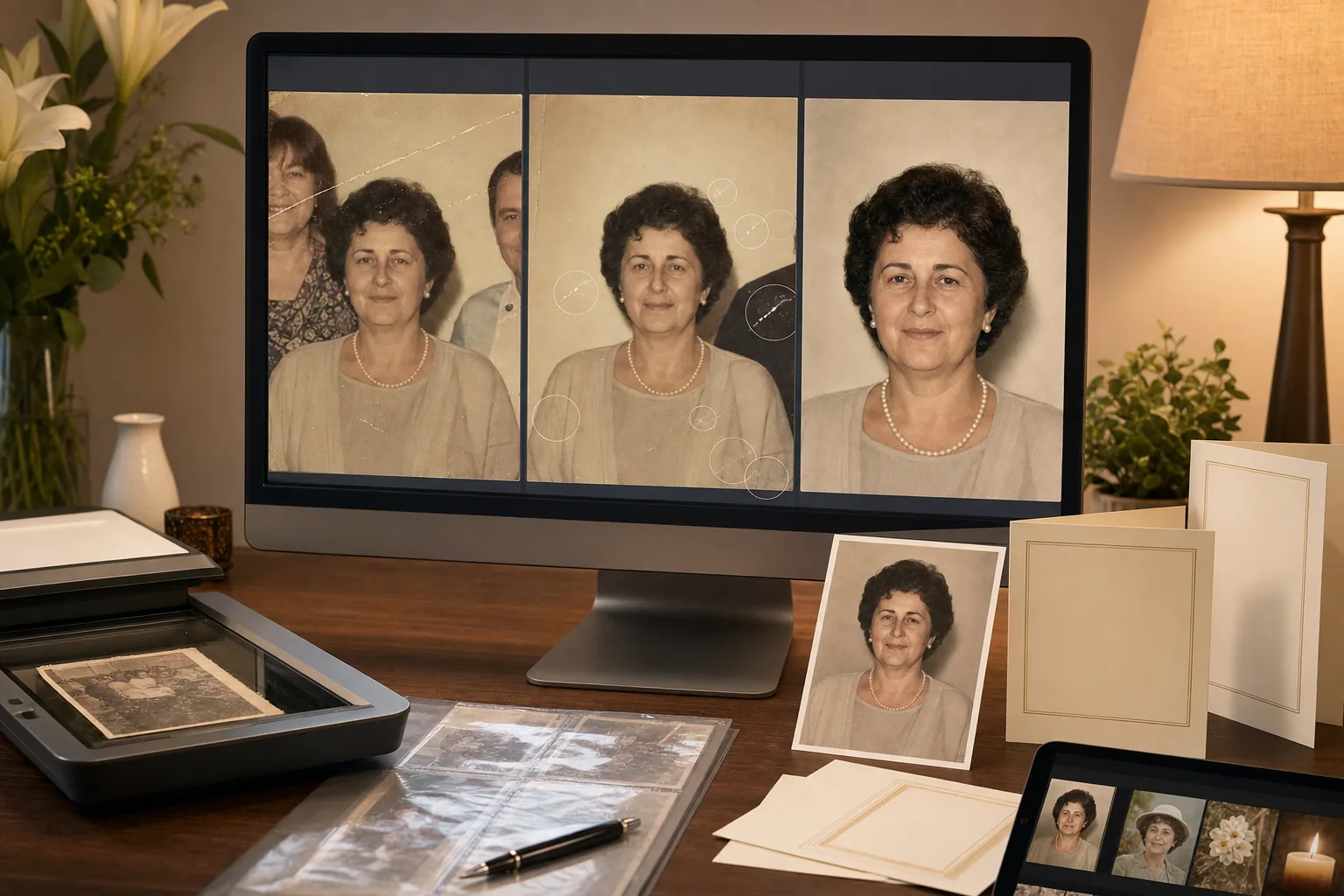
The best available photo is decades old, faded, or physically damaged
Families often reach for a photo from the deceased's younger years or a period of good health — a wedding portrait from the 1980s, a military service photo from the 1970s, a family gathering snapshot from a time before the illness that changed their appearance. These photos have endured decades of handling, storage, and environmental exposure: color shifts toward yellow or magenta, fading that washes out contrast, physical scratches and creases from years in wallets and albums, water damage stains, and the general softness of film prints scanned at low resolution. AI Enhance restores color fidelity, recovers contrast and detail, and sharpens the image to produce a memorial portrait with the visual quality the moment deserves.
The only suitable photo includes other people or distracting context
The photo that best captures the deceased's personality and appearance is often from a social context — a dinner party, a holiday gathering, a vacation — where other people are in the frame. Cropping to isolate the individual often results in an awkwardly composed, low-resolution portrait. Sometimes the photo includes a former spouse, an estranged family member, or someone whose presence in the memorial display would cause distress during an already difficult time. Magic Eraser can remove other individuals from the photo while preserving the deceased's natural expression and the surrounding context, creating a dignified solo portrait from a group photo.
Time pressure is extreme — funeral homes need photos within 24-48 hours
Funeral arrangements typically compress into 2-5 days. The funeral home needs a portrait for the memorial display, the obituary needs a photo for publication, the memorial program needs images for the tribute pages, and the family may want a photo slideshow for the service. This all happens while the family is grieving, managing logistics, and gathering from different locations. Professional photo restoration services typically require 3-7 business days — too slow for funeral timelines. The AI workflow delivers restoration-quality results in minutes per image, giving families the time they need to focus on planning the memorial rather than wrestling with photo quality.
How Magic Eraser fits the memorial photo workflow
Gather and digitize the strongest available source photos
Work with the family to identify the photos that best represent the deceased as the family wants to remember them. Scan physical prints at the highest resolution available — 600 DPI minimum for prints, 1200 DPI for wallet-sized photos. For photos that exist only on old phones, Facebook profiles, or in other family members' possession, gather the highest-resolution versions available. Even a phone photo of a framed print can serve as a starting point when the original is the only option. Collect 3-5 candidate photos to give the family choices in the final selection.
Restore color, contrast, and detail with AI Enhance
Run each candidate through AI Enhance to restore faded colors, recover contrast, sharpen detail softened by age and scanning, and correct the color shifts common in decades-old prints (yellow cast from aging paper, magenta shift from certain film stocks, green cast from fluorescent-lit environments). For severely faded photos, the enhancement can recover the tonal range that makes a face recognizable and expressive. For photos with mild physical damage (light scratches, minor creases), the enhancement may partially correct these; severe damage requires the Magic Eraser brush in the next step.
Remove unwanted elements and repair damage with Magic Eraser
Use Magic Eraser brush to remove other people from group photos (when a solo portrait is needed), repair visible scratches and creases that AI Enhance did not fully resolve, remove date stamps printed on the photo, clean up stains and water damage marks, and remove any contextual elements that do not belong in a memorial portrait (a cigarette in hand, a brand logo on clothing, background elements the family finds inappropriate). Work with care and sensitivity — the family will see these images during one of the most difficult periods of their lives.
Prepare outputs for memorial, obituary, and tribute use
Export the restored portrait in multiple formats for the funeral home's needs: high-resolution print file for the memorial display (typically 8x10 or 11x14), web-resolution for the online obituary, and medium-resolution for the printed memorial program. If the family wants a photo slideshow for the service, process 10-20 additional family photos through AI Enhance to create a consistent visual quality across the tribute. Deliver all files to the family and the funeral home within the 24-48 hour window that memorial planning demands.
Frequently Asked Questions
How damaged can a photo be and still produce a usable memorial portrait?
+
AI Enhance and Magic Eraser can recover photos with moderate fading, color shifts, light-to-medium scratches, creases, small tears, water stains, and age-related degradation. Photos where the face is severely obscured by damage (large tears through the face, heavy water damage that dissolved the image, extreme fading where facial features are no longer distinguishable) are more challenging and may not produce a fully satisfying result. For severely damaged photos, the AI tools can still improve the image significantly even if full restoration is not possible. Start with the least-damaged area of the face and work outward.
Can this workflow help funeral homes offer photo restoration as a service?
+
Yes. A funeral home can add this as an assisted editing step alongside scanning, printing, and slideshow preparation. Review every result, confirm the family's preferences, keep the original file, and test the final image at its intended print or screen size. Processing time, export options, and account limits vary, so verify the current product interface before promising delivery times or pricing.
Is it appropriate to modify memorial photos — removing people, fixing damage?
+
The guiding principle is the family's wishes and the deceased's dignity. Restoring age-related damage (fading, scratches, color shifts) to reveal the original photo as it was taken is universally appropriate. Removing other people to create a solo portrait when the family requests it is standard funeral-home practice. Removing elements the family identifies as inappropriate for the memorial context (a cigarette, a brand logo, an estranged person) is acceptable when the family specifically requests it. What is not appropriate is altering the deceased's appearance — slimming, de-aging, or otherwise changing how they looked. The memorial portrait should honor who they were, not present an edited version.
Honor their memory with the photo they deserve
Improve clarity and contrast with AI Enhance, then use Magic Eraser to remove selected distractions. Review faces and fine details, preserve the original file, and obtain the family's approval before printing or sharing the memorial portrait.
Try Magic Eraser freeRelated use cases
See how professionals use these tools in real-world workflows.
Listing photos cluttered with personal items, parked cars, or construction equipment can turn buyers away. Magic Eraser uses AI to clean up your property photos instantly — no Photoshop skills required.
Product listings need clear images before shoppers can judge the item. Magic Eraser helps sellers remove messy backgrounds, table edges, labels, props, glare, and other distractions so each product photo is easier to review before publishing.
Photobombers ruining your travel pics? Messy backgrounds killing your selfie game? Stop wasting hours in Photoshop. Magic Eraser removes distractions, cleans up cluttered shots, and expands your photos to fit any platform format — all in one tap.
Related comparisons
See how Magic Eraser compares to similar tools.
TouchRetouch is a popular paid mobile app for removing objects and blemishes. Magic Eraser offers free AI-powered editing on any device with no install required. See how they compare across features, pricing, and ease of use.
Cleanup.pictures is a free web tool with one generic eraser brush. Magic Eraser gives you 100+ purpose-built removal tools — one for emoji, glasses, watermarks, sky, power lines, and dozens more — plus background removal, AI enhance, and mobile apps, in 16 languages. See how breadth changes the result.
remove.bg is the market leader for background removal, offering a powerful API and integrations with Photoshop and Figma. Magic Eraser goes further with eight AI-powered editing tools — from object removal and generative fill to AI enhance and design — all in one editor.
Two powerful AI photo editors with different strengths. Magic Eraser offers a broader set of generative AI tools for creative editing, while Photoroom excels at e-commerce product photography and batch processing. See which fits your workflow.
Related guides
Explore more guides and editorial content related to this workflow.
Learn how to use Magic Eraser to remove objects, people, text, and distractions from photos with cleaner AI editing results.
Learn how to remove people from photos using AI in seconds. Step-by-step guide for travel photos, real estate shots, and product images.
Step-by-step guide to removing watermarks from your own photos using AI. Learn when it is appropriate, the best techniques, and how Magic Eraser handles it.