
Pet Photo Editing with AI Tools
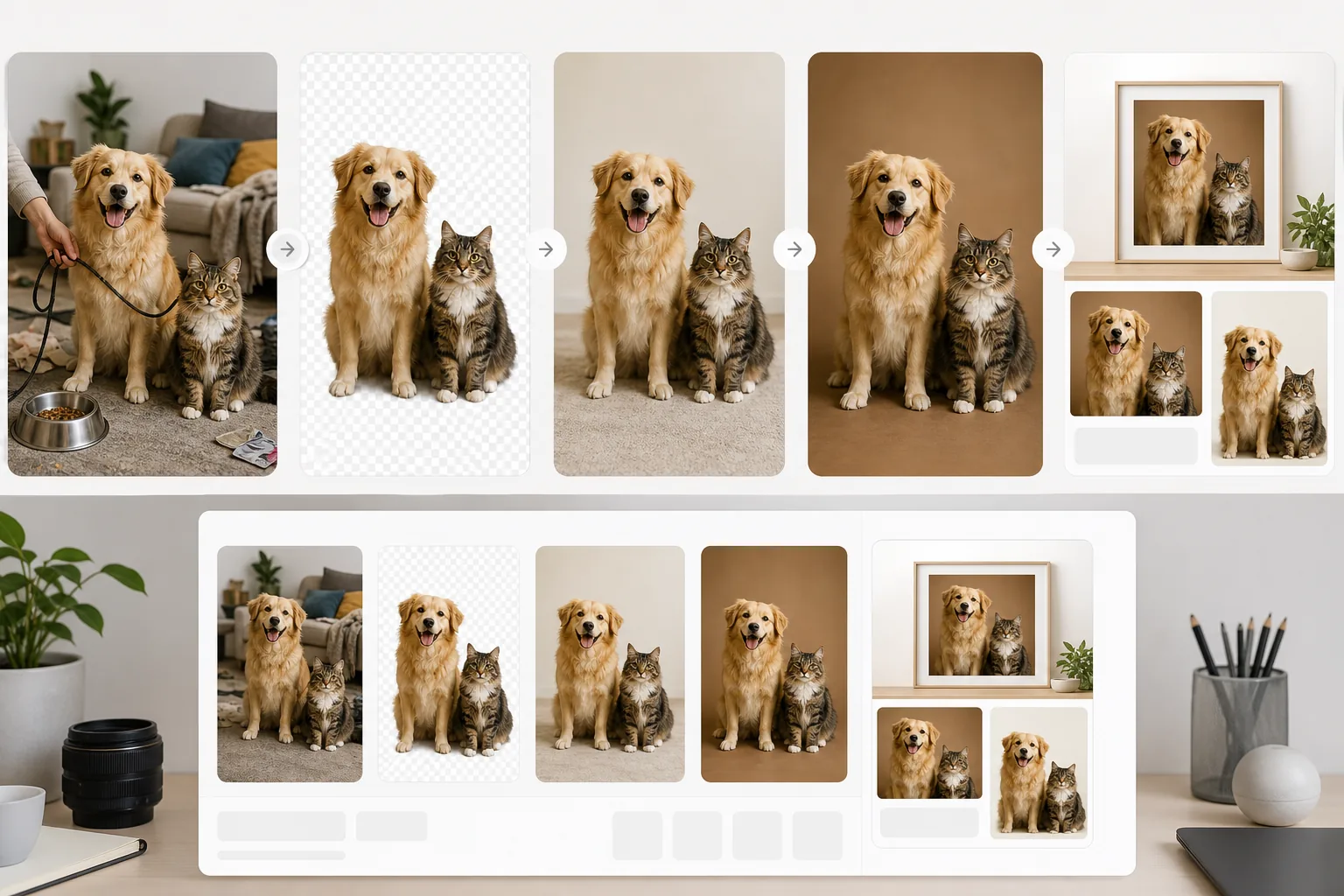
Pet photos rarely come out the way you want. The dog moves, the cat is half in shadow, the background is full of clutter. Magic Eraser handles all of that in seconds — background swaps, leash removal, blur cleanup, sharper fur — without manual masking or expensive software.
Cluttered home backgrounds
Pet photos taken indoors usually capture more than the pet — couches, toys, food bowls, half-folded laundry. The visual noise pulls focus away from the animal and makes the photo unusable for prints, social posts, adoption listings, or pet brand content.
Leashes, harnesses, and hands in frame
Outdoor pet portraits often have a leash arcing across the frame or a hand holding the collar. Cropping cuts off the pet; manually editing them out in Photoshop takes patience most pet owners don't have.
Motion blur and low light
Pets don't pose. The best shots are usually the ones where the pet was mid-movement, which means slight blur, soft focus, or grain from a high ISO indoors. The expression is right but the technical quality isn't.
Fur detail and edge masking
Fur is the hardest thing to mask cleanly. Long-haired dogs, fluffy cats, and feathery tails all need pixel-level edge handling that manual selection tools fumble. AI background removal handles fur edges natively.
How Magic Eraser Helps with Pet Photos
Upload the pet photo
Open Magic Eraser and upload the photo from your phone, camera roll, or desktop. JPG, PNG, and HEIC formats are all supported.
Remove the background
Run background removal to isolate the pet. The AI handles long fur, whiskers, and floppy ears without manual masking. Drop the cutout onto a solid color, a branded backdrop, or a transparent PNG for print or e-commerce.
Erase leashes, hands, and clutter
Brush over leashes, food bowls, owner hands, or distracting objects. The eraser tool reconstructs the background underneath using surrounding context, so the pet stays sharp while the distractions disappear.
Sharpen blur and enhance fur detail
Apply AI enhancement to recover detail from slightly blurry shots and lift dark areas without crushing fur texture. The result is print-ready without retouching every pixel by hand.
Export for prints, social, or listings
Export at full resolution for canvas prints or photo books, square crops for Instagram, transparent PNGs for adoption listings, or web-optimized sizes for pet-brand product pages.
Frequently Asked Questions
Can Magic Eraser remove leashes from dog photos?
+
Yes. Brush over the leash with the eraser tool and the AI fills in the background underneath. It works for thin leads, retractable leashes, and harness straps that arc through the frame.
Does background removal work on long-haired pets?
+
Yes. The AI background remover handles fur edges natively — long-haired dogs, fluffy cats, and feathery tails come out cleanly without manual edge refinement. For very fine fur, you can blend in a soft drop shadow after the cutout.
Can I fix blurry pet photos with AI?
+
Yes — within limits. AI enhancement recovers detail from mild motion blur and softens noise from high-ISO indoor shots. Severe motion blur where the pet was running across the frame can be improved but not fully reconstructed.
Is this useful for animal shelters or rescues?
+
Yes. Shelters use pet photo editing to standardize adoption listings: clean backgrounds, even lighting, no distracting clutter. A consistent background can make the animal easier to see across a shelter’s adoption gallery; results still depend on the original photo and edit quality.
Can I use this for pet brand product photography?
+
Yes. Pet-brand e-commerce shots benefit from the same workflow as any product photography: isolate the pet (or the pet wearing the product), drop onto a brand-consistent background, and export at marketplace-required dimensions.
Does it work for cats as well as dogs?
+
The tools can be used on photos of dogs, cats, rabbits, horses, birds, and other pets. Results around whiskers, feathers, and very fine fur vary with contrast, lighting, and image resolution.
Can I remove other pets or people from a group shot?
+
Yes. If you want a clean solo portrait of one pet from a multi-pet photo, brush over the others with the eraser and the AI reconstructs the background. Works for removing handlers or other animals from the frame.
Turn snapshot pet photos into portraits
Magic Eraser cleans up cluttered backgrounds, removes leashes and hands, sharpens fur detail, and makes pet photos print-ready in seconds.
Try Magic Eraser freeRelated use cases
See how professionals use these tools in real-world workflows.
Listing photos cluttered with personal items, parked cars, or construction equipment can turn buyers away. Magic Eraser uses AI to clean up your property photos instantly — no Photoshop skills required.
Product listings need clear images before shoppers can judge the item. Magic Eraser helps sellers remove messy backgrounds, table edges, labels, props, glare, and other distractions so each product photo is easier to review before publishing.
Photobombers ruining your travel pics? Messy backgrounds killing your selfie game? Stop wasting hours in Photoshop. Magic Eraser removes distractions, cleans up cluttered shots, and expands your photos to fit any platform format — all in one tap.
Related comparisons
See how Magic Eraser compares to similar tools.
TouchRetouch is a popular paid mobile app for removing objects and blemishes. Magic Eraser offers free AI-powered editing on any device with no install required. See how they compare across features, pricing, and ease of use.
Cleanup.pictures is a free web tool with one generic eraser brush. Magic Eraser gives you 100+ purpose-built removal tools — one for emoji, glasses, watermarks, sky, power lines, and dozens more — plus background removal, AI enhance, and mobile apps, in 16 languages. See how breadth changes the result.
remove.bg is the market leader for background removal, offering a powerful API and integrations with Photoshop and Figma. Magic Eraser goes further with eight AI-powered editing tools — from object removal and generative fill to AI enhance and design — all in one editor.
Two powerful AI photo editors with different strengths. Magic Eraser offers a broader set of generative AI tools for creative editing, while Photoroom excels at e-commerce product photography and batch processing. See which fits your workflow.
Related guides
Explore more guides and editorial content related to this workflow.
Learn how to use Magic Eraser to remove objects, people, text, and distractions from photos with cleaner AI editing results.
Learn how to remove people from photos using AI in seconds. Step-by-step guide for travel photos, real estate shots, and product images.
Step-by-step guide to removing watermarks from your own photos using AI. Learn when it is appropriate, the best techniques, and how Magic Eraser handles it.