
Band & Musician Promo: EPKs, Social Media, Gig Posters & Merch
Musicians and bands need a constant supply of visual assets — electronic press kit photos for venue and festival submissions, social media content to maintain audience engagement between releases, gig posters and flyers for upcoming shows, and merchandise designs for an increasingly important revenue stream. Professional photo shoots cost $300-$1,500 per session, and the results age quickly as lineups change, looks evolve, and the visual identity needs refreshing for each release cycle. Background Eraser isolates band and artist photos from venue and rehearsal-space clutter. AI Filter applies stylized treatments that establish visual identity. AI Enhance recovers detail from low-light live performance captures. Together, they maintain a professional visual presence on the budget reality of working musicians.
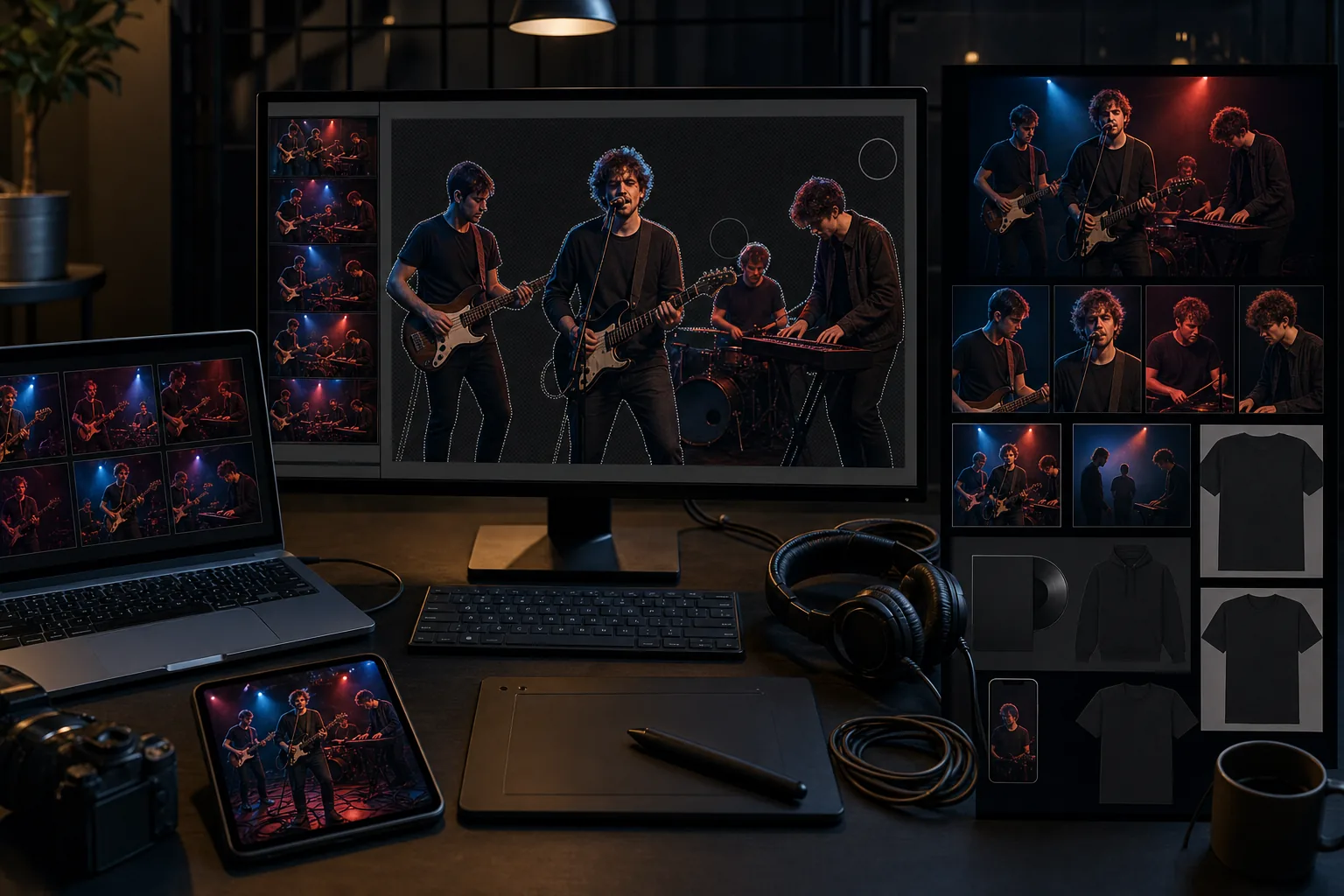
EPK photos need professional quality but photo shoot budgets compete with gear and recording
An electronic press kit is required for venue bookings, festival submissions, press outreach, and booking-agent inquiries. The EPK needs 3-5 high-quality promotional photos: a full-band hero shot, individual headshots, a live performance shot, and often a casual behind-the-scenes photo. A professional photo shoot to produce this set costs $300-$1,500, and the results have a shelf life of 6-18 months before lineup changes, visual evolution, or a new release cycle demand fresh assets. For bands already stretching budgets across gear, recording, rehearsal space, and touring costs, the recurring photo-shoot expense often gets deferred — resulting in an EPK with years-old photos that undermine the band's current positioning. The AI workflow produces EPK-quality photos from existing captures at a fraction of the cost.
Live performance photos are captured in the worst possible lighting conditions
Live music venues are lighting nightmares: colored stage washes (red, blue, magenta) that destroy skin tones and instrument detail, extreme contrast between spotlight and shadow, flickering and strobing effects, and low ambient light that forces phone cameras to ISO 6400+. The resulting photos capture the energy of the performance but are too noisy, color-shifted, and soft for promotional use. Discarding live photos and relying only on studio shoots means losing the most authentic, energetic visual content a musician has. AI Enhance recovers detail and corrects color from live-performance captures, turning the raw energy of a show photo into a usable promotional asset.
Rehearsal spaces and DIY venues have backgrounds that undermine professional positioning
Band photos taken in rehearsal spaces show exposed pipes, concrete walls, sound panels, cable tangles, and the general visual disorder of a working music space. DIY venue photos show institutional ceilings, exit signs, and stage setups that range from charming to chaotic. Backyard and garage photos communicate 'amateur band' even when the music is professional-caliber. These environments produce photos with authentic energy and natural band dynamics — but the backgrounds position the band below their actual caliber. Background Eraser isolates the band or artist from the rehearsal-space clutter and replaces it with a background treatment that matches the project's visual identity — dark and moody for heavy genres, clean and modern for pop, textured and warm for folk and Americana.
How Magic Eraser fits the musician promo workflow
Build a source-photo library from live shows, rehearsals, and casual shoots
Designate a friend, bandmate's partner, or fellow musician as the photographer at 3-5 shows and 1-2 rehearsals over a month. The goal is to capture natural, unposed moments: performing on stage, interaction between band members, candid backstage and load-in moments, and natural group dynamics during breaks. Supplement with one casual daytime shoot — 30 minutes in an outdoor location or interesting architectural setting with a friend using portrait mode. You are building a raw library of 50-100 captures from which you will select and enhance the 5-10 hero images for your EPK and promo needs.
Enhance live performance captures with AI Enhance
Select the strongest live-show captures — peak performance moments, compelling expressions, good composition — and run them through AI Enhance. The enhancement corrects the colored stage-wash distortion to reveal more natural tones while preserving the atmospheric quality of stage lighting, reduces high-ISO noise from low-light captures, and sharpens the image to recover detail the phone camera sacrificed for shutter speed. The goal is not to make the live photo look like a studio photo but to make it usable for promotional purposes — sharp enough for a poster, clean enough for an EPK, and vibrant enough for social media.
Background Eraser and AI Filter for the EPK and promo hero set
For the EPK hero shots and promotional imagery, use Background Eraser to isolate the band or artist from rehearsal-space and venue backgrounds. Replace with a background treatment that matches your project's visual identity. Then apply AI Filter to establish a consistent color grade and mood across all promo images — the same filter treatment across your EPK photos, social media, and poster images creates the visual coherence that professional bands achieve through art direction. Save the filter preset so every new promo photo gets the same treatment, maintaining identity consistency as you add images over time.
Deploy across EPK, social media, poster, and merch channels
Export the enhanced and styled promo photos for each channel: high-resolution files for the EPK (venues and festivals need print-resolution for programs and promotional materials), social-media-optimized versions for Instagram, Facebook, and TikTok (platform-specific crops and aspect ratios), poster and flyer templates with the promo photos integrated, and merchandise-ready files (high-contrast, limited-color treatments work best for t-shirt and sticker printing). The consistent AI Filter treatment across all channels means the band's visual identity is cohesive from the Instagram grid to the gig poster on the venue wall to the t-shirt at the merch table.
Frequently Asked Questions
How often should a band refresh their promo photos?
+
At minimum, refresh with every release cycle (new single, EP, or album) and whenever the lineup changes. In practice, successful bands on social media need fresh visual content every 2-4 weeks. The AI workflow supports this cadence: capture raw photos at every show and rehearsal, and process the best 2-3 from each session into polished promo assets. This continuous content pipeline means the EPK always has recent photos and social media always has fresh, on-brand imagery — without scheduling dedicated photo shoots more than once or twice a year for the hero set.
Can AI Filter replace having a visual brand identity or art direction?
+
AI Filter is a tool for implementing a visual identity, not a substitute for deciding what that identity is. Before applying filters, decide the visual mood that matches your music: dark and moody (metal, goth, emo), bright and saturated (pop, indie), warm and textured (folk, Americana, jazz), gritty and high-contrast (punk, hip-hop). Once you have the direction, AI Filter makes it consistent and efficient — apply the same grade to every promo photo so the audience builds visual recognition. The filter preset becomes your visual-identity shorthand, the same way a consistent color palette and typography work for brands.
Are phone photos good enough for EPK submissions, or do we need a professional photographer?
+
For most venue bookings and regional festival submissions, AI-enhanced phone photos are sufficient — especially when the band's music, draw numbers, and booking history are strong. For national festival submissions, major label press kits, and national press outreach, professional photography is worth the investment because the visual expectations at that tier are higher and the stakes (a $5,000-$50,000 festival slot) justify the cost. The AI workflow serves the 90% of promotional needs that do not require professional studio quality, freeing budget to invest in professional shoots for the 10% of opportunities where it matters most.
How do we handle merchandise designs from promo photos?
+
The best merch designs from photos are high-contrast, limited-color treatments — which AI Filter excels at producing. Start with a strong promo photo (live performance shots with dramatic lighting work particularly well), apply a high-contrast black-and-white or duotone filter, and use Background Eraser to isolate the subject for placement on a t-shirt, sticker, or poster template. Screen printing typically requires 1-3 color separations, so the filter treatment should reduce the image to a limited palette. The same source photo can produce an EPK version (full color, enhanced), a social media version (branded filter), and a merch version (high-contrast, limited color) — three assets from one capture.
Look like you sound — without the studio budget
Background Eraser isolates band photos from venue clutter. AI Filter establishes visual identity across every channel. AI Enhance recovers the energy from live-show captures. EPK-ready promo imagery from the photos you already have. Free tier on web, iOS, and Android.
Try Magic Eraser freeRelated use cases
See how professionals use these tools in real-world workflows.
Listing photos cluttered with personal items, parked cars, or construction equipment can turn buyers away. Magic Eraser uses AI to clean up your property photos instantly — no Photoshop skills required.
Product listings need clear images before shoppers can judge the item. Magic Eraser helps sellers remove messy backgrounds, table edges, labels, props, glare, and other distractions so each product photo is easier to review before publishing.
Photobombers ruining your travel pics? Messy backgrounds killing your selfie game? Stop wasting hours in Photoshop. Magic Eraser removes distractions, cleans up cluttered shots, and expands your photos to fit any platform format — all in one tap.
Related comparisons
See how Magic Eraser compares to similar tools.
TouchRetouch is a popular paid mobile app for removing objects and blemishes. Magic Eraser offers free AI-powered editing on any device with no install required. See how they compare across features, pricing, and ease of use.
Cleanup.pictures is a free web tool with one generic eraser brush. Magic Eraser gives you 100+ purpose-built removal tools — one for emoji, glasses, watermarks, sky, power lines, and dozens more — plus background removal, AI enhance, and mobile apps, in 16 languages. See how breadth changes the result.
remove.bg is the market leader for background removal, offering a powerful API and integrations with Photoshop and Figma. Magic Eraser goes further with eight AI-powered editing tools — from object removal and generative fill to AI enhance and design — all in one editor.
Two powerful AI photo editors with different strengths. Magic Eraser offers a broader set of generative AI tools for creative editing, while Photoroom excels at e-commerce product photography and batch processing. See which fits your workflow.
Related guides
Explore more guides and editorial content related to this workflow.
Learn how to use Magic Eraser to remove objects, people, text, and distractions from photos with cleaner AI editing results.
Learn how to remove people from photos using AI in seconds. Step-by-step guide for travel photos, real estate shots, and product images.
Step-by-step guide to removing watermarks from your own photos using AI. Learn when it is appropriate, the best techniques, and how Magic Eraser handles it.