
Pinterest Pin Design for Bloggers, Creators, and Small Brands
Pinterest is a visual search engine, not a social feed — pins keep earning impressions for 6-18 months on evergreens and 2-5 years on seasonal evergreens like holiday recipes and gift guides. That long-tail traffic only compounds if every pin is built for the 2:3 vertical canvas at 1000×1500 displayed at ~320px on mobile (85%+ of Pinterest traffic). Magic Eraser's AI tools turn a landscape source photo library into pin-ready vertical compositions in 2-3 minutes per pin instead of 20-40 minutes in Photoshop.
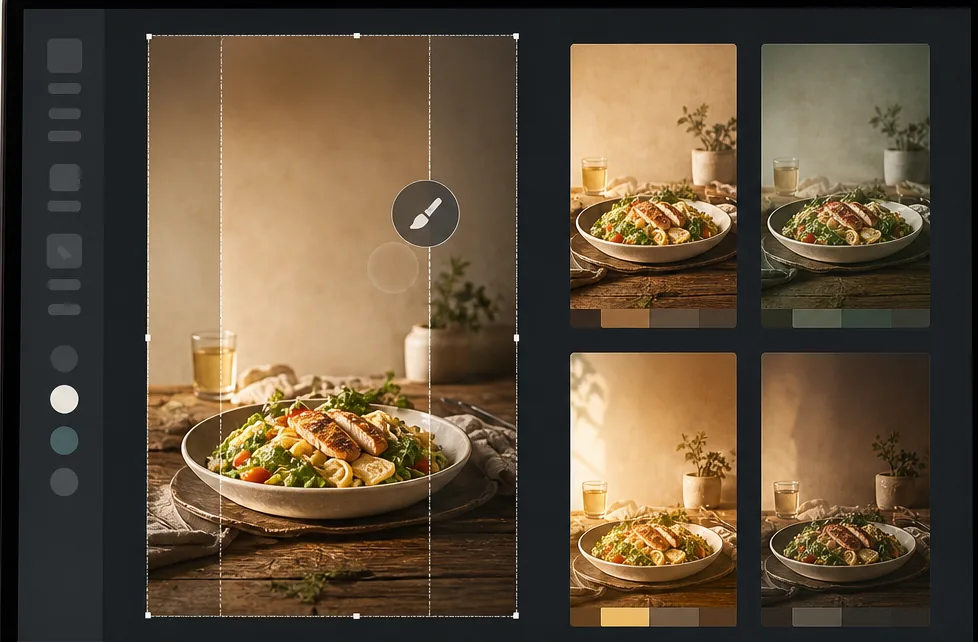
Most source photos are landscape, but Pinterest needs 2:3 vertical
Phone cameras default to vertical, but blog hero images, recipe finished-shots, DIY in-progress photos, and stock libraries are overwhelmingly landscape (3:2, 4:3, or 16:9). Pinterest's standard pin format is 1000×1500 (2:3), and pins that letterbox or stretch a landscape source perform 30-60% worse in the algorithm because they look unprofessional in the home-feed scroll. The traditional fix — cropping a landscape source to 2:3 — throws away 50%+ of the original composition.
Pinterest headline structure is different from YouTube or Instagram
Pinterest viewers spend 4-8 seconds per pin in search results (versus 1-2 seconds on a YouTube thumbnail or 0.5-1 second on an Instagram grid post). That longer dwell time means Pinterest headlines need to be informative, not teasing — 8-12 words that describe the value ("30-Minute Sheet-Pan Salmon with Lemon and Capers") rather than 3-5 word YouTube-style teasers ("This Salmon Changed Everything"). Headlines also need 60-80 point sans-serif typography to be readable on mobile at 320px display width.
One pin per blog post is leaving 60-80% of traffic on the table
Pinterest's algorithm rewards variant production — 3-5 different pins per blog post tested across color, headline, and crop axes typically produce 3-8x the total traffic of a single pin. The variant pipeline is what separates Pinterest-as-traffic-channel from Pinterest-as-archive. But producing 3-5 unique pins from one source photo manually takes 60-120 minutes; pin creators stop at one because the cost-per-additional-pin is too high.
Seasonal pins need annual republish to compound across years
Pinterest's seasonal evergreens (Christmas cookies, Easter brunch, back-to-school crafts, Halloween costumes) earn 70-90% of their lifetime impressions during a 6-8 week window each year. Republishing the same pin with a refreshed color grade and updated headline reset is what triggers the algorithm to surface it again in the new season. Without an efficient refresh workflow, seasonal pins get buried after their first year instead of compounding into 5-10 year evergreens.
How Magic Eraser fits the Pinterest pin design workflow
Pick a vertical-friendly source photo from the existing blog library
Before opening any tool, pick a source photo where the vertical 2:3 crop will work without losing critical content. Top-down food shots and flat-lays work best because the food fills the bottom 60-70% and the empty surface above accepts a headline. Finished-result DIY photos (cushion cover, painted shelf, organized drawer) work when the subject is centered. Portrait subjects with eyes in the middle-third of the frame work for personality-driven niches. Landscape group shots and cluttered scenes typically don't outpaint cleanly.
Outpaint landscape source photos to 2:3 vertical with AI Fill
For landscape source photos, run AI Fill in outpaint mode to extend the scene above and below the original frame until the composition is 2:3 (1000×1500). The AI generates additional ceiling, sky, foreground, table surface, or wall texture that matches the original photo's lighting, color palette, and surface materials. The result is a vertical composition that preserves the original subject framing instead of a tight crop that throws away half the source. Total time: 60-90 seconds per source photo.
Clean backgrounds and remove distractions with Background Eraser and Magic Eraser
Pinterest pins read best on mobile when the background is calm — distracting clutter, kitchen counter edges, electrical cords, and stray watermarks all compete with the headline. Run Background Eraser for full background swaps (warm wood texture, painted concrete, marble surface) when the source background is busy or off-brand. Run Magic Eraser to brush over individual distractions (stray utensils, unfinished edges of the surface, distant background objects) for lighter cleanup. The cleaner background also gives the headline 30-40% of the canvas to sit on legibly.
Apply category-aware color grading with AI Filter
Pinterest categories have different visual conventions and the algorithm matches color signature to category — warm golden tones for food and lifestyle pins, muted earthy palettes for home decor, vibrant saturated colors for fashion and DIY craft, soft pastels for parenting and wedding. Pick the AI Filter preset that matches your blog's category, apply it consistently across all pins so your boards look like a cohesive brand, and adjust the strength based on platform feedback (Pinterest analytics surfaces which pin styles drive saves and clicks). Consistent color grading is a top-3 ranking signal in the Pinterest algorithm.
Add headline typography at 60-80 point sans-serif
Add the headline text in 60-80 point sans-serif (Roboto, Inter, Montserrat, Poppins) for legibility at 320px mobile display. Use 8-12 words that describe the value clearly: "15-Minute Sheet-Pan Salmon with Lemon and Capers" beats "Easy Weeknight Dinner." Headline placement should be top-third or bottom-third of the pin, on top of the cleaned background area where it has 80%+ contrast against the surface. Add a 1-2 line subhead in 30-40 point for context ("Gluten-free · Dairy-free · 4 ingredients") and an unobtrusive brand mark in the bottom corner.
Produce 3-5 variants from one master across color, headline, and crop axes
From a single master pin, produce 3-5 variants by rotating one axis at a time. Variant A: different headline ("30-Minute Sheet-Pan Salmon" vs "The Easiest Salmon Dinner"). Variant B: different color grade (warm vs cool AI Filter preset on the same composition). Variant C: different crop (full top-down vs zoomed-in close-up of the finished plate). Variant D: different headline placement (top vs bottom). Variant E: different background (marble vs wood). Each variant takes 5-8 minutes versus 60-90 minutes for an original pin, and the 3-8x traffic multiplier from variant testing is the main lever between a Pinterest archive and a Pinterest traffic channel.
Schedule across 30-45 days and republish seasonal pins annually
Schedule the 3-5 variants 30-45 days apart in a Pinterest scheduler (Tailwind, Pinterest native scheduler) so the algorithm has time to read engagement signals on each variant before the next one publishes. For seasonal evergreens, mark the pin for annual republish with a refreshed AI Filter color grade and updated headline — the republish triggers the algorithm to re-surface it during the new season, compounding the pin into a multi-year evergreen instead of a one-year flash. Keep a simple spreadsheet of which variants have shipped and which are scheduled to ship.
Frequently Asked Questions
Does Pinterest still drive meaningful blog traffic in 2026?
+
Yes, especially for content niches Pinterest historically dominates: recipes, home decor, DIY and crafts, wedding planning, parenting, fashion lookbooks, and small-business storefronts (Etsy, Shopify). Pinterest's distinctive value is its compound traffic model — pins keep earning impressions for 6-18 months on evergreens and 2-5 years on seasonal evergreens, versus Instagram's 24-72 hour decay window or TikTok's 7-14 day window. For blogs that publish anything Pinterest-eligible, the platform typically delivers 15-40% of total monthly traffic with a 2-3 hour-per-week production investment.
What's the ideal pin size and aspect ratio in 2026?
+
Standard pin format is 1000×1500 (2:3) — that's Pinterest's recommended and best-performing format for both static images and idea pins. Story pins / idea pins use 9:16 (1080×1920) which is also acceptable. Avoid square 1:1 pins (they get cropped to 2:3 in the feed) and avoid pins taller than 2:3 (Pinterest cropped down to 2:3 in 2023 and never reverted). The 2:3 ratio at 1000×1500 displayed at ~320px on mobile means typography needs to be 60-80 point to read clearly — pins designed at the wrong typography size are the #1 reason pins fail in the algorithm.
How is Pinterest headline style different from YouTube or TikTok?
+
Pinterest viewers spend 4-8 seconds per pin in search and feed (versus 1-2 seconds on YouTube thumbnails and 0.5-1 second on TikTok). That longer dwell time means Pinterest headlines should be informative rather than teasing. "30-Minute Sheet-Pan Salmon with Lemon and Capers" outperforms "This Salmon Changed Everything." Use 8-12 words that describe the actual value, include searchable keywords ("sheet-pan," "30-minute," "gluten-free"), and add a 1-2 line subhead with constraints ("4 ingredients · 1 pan · ready in 30 min"). Pinterest's search algorithm reads pin titles and descriptions, so descriptive headlines double as SEO.
How do I produce 3-5 variants efficiently?
+
The variant pipeline starts from a single master pin and rotates one axis per variant. Save the master as a layered file (in your design tool) so each variant only changes one thing — different headline text, different AI Filter color grade, different crop, different background, different headline placement. Each variant should take 5-8 minutes once the master is built. The trap to avoid is starting each variant from scratch (which puts production cost at 60-90 minutes per variant and kills the math). With Magic Eraser's AI tools, the color-grade and background-swap variants are 30-60 seconds each.
What does the seasonal annual republish workflow look like?
+
For seasonal evergreens (Christmas cookies, Easter brunch, back-to-school crafts, Halloween costumes, Father's Day gifts), keep the same composition and source photo but refresh the AI Filter color grade and update the headline year-over-year. Pinterest's algorithm reads the republish as a new pin and surfaces it again during the relevant season, compounding the pin's lifetime traffic across multiple years. A seasonal pin republished annually for 5 years typically produces 8-15x the lifetime traffic of the same pin published once. Mark seasonal pins in your tracker with a republish date (60-90 days before peak season) and an AI Filter color update note ("warmer for autumn," "cooler for winter").
Can I use Magic Eraser for idea pins (the vertical video format)?
+
Yes — idea pins are essentially short vertical video at 1080×1920 (9:16). For the static image components of an idea pin (cover frame, section dividers, ending CTA frame), the same Magic Eraser / Background Eraser / AI Filter workflow applies. For the video segments between static frames, you'll still need a video editor (CapCut, InShot, Premiere Rush) — Magic Eraser handles still images, not video frames. The hybrid workflow is: produce static frames in Magic Eraser, produce video segments in a video editor, assemble in Pinterest's native idea-pin builder. Cover frames matter most because they decide whether the pin gets opened at all.
How does Pinterest pin design fit with the broader blog content workflow?
+
For most blogs, the workflow is: write the blog post first, identify 2-3 source photos from the post that work as vertical compositions, produce a master pin per source photo, then produce 3-5 variants per master. Total Pinterest production per blog post: 60-90 minutes for 6-15 pins. Schedule those pins 30-45 days apart in Tailwind or Pinterest's native scheduler so the algorithm has time to read engagement on each variant. For seasonal blog posts, mark the pins for annual republish with refreshed color grade. The result is a Pinterest channel that compounds in parallel with the blog instead of being a separate full-time job.
Build a Pinterest channel that compounds for years
Magic Eraser's AI tools turn a landscape source photo library into pin-ready 2:3 vertical compositions in 2-3 minutes per pin. AI Fill outpaints to vertical, Background Eraser cleans busy backgrounds, AI Filter applies category-aware color grading. Same workflow on phone or laptop.
Try Magic Eraser freeRelated use cases
See how professionals use these tools in real-world workflows.
Listing photos cluttered with personal items, parked cars, or construction equipment can turn buyers away. Magic Eraser uses AI to clean up your property photos instantly — no Photoshop skills required.
Product listings need clear images before shoppers can judge the item. Magic Eraser helps sellers remove messy backgrounds, table edges, labels, props, glare, and other distractions so each product photo is easier to review before publishing.
Photobombers ruining your travel pics? Messy backgrounds killing your selfie game? Stop wasting hours in Photoshop. Magic Eraser removes distractions, cleans up cluttered shots, and expands your photos to fit any platform format — all in one tap.
Related comparisons
See how Magic Eraser compares to similar tools.
TouchRetouch is a popular paid mobile app for removing objects and blemishes. Magic Eraser offers free AI-powered editing on any device with no install required. See how they compare across features, pricing, and ease of use.
Cleanup.pictures is a free web tool with one generic eraser brush. Magic Eraser gives you 100+ purpose-built removal tools — one for emoji, glasses, watermarks, sky, power lines, and dozens more — plus background removal, AI enhance, and mobile apps, in 16 languages. See how breadth changes the result.
remove.bg is the market leader for background removal, offering a powerful API and integrations with Photoshop and Figma. Magic Eraser goes further with eight AI-powered editing tools — from object removal and generative fill to AI enhance and design — all in one editor.
Two powerful AI photo editors with different strengths. Magic Eraser offers a broader set of generative AI tools for creative editing, while Photoroom excels at e-commerce product photography and batch processing. See which fits your workflow.
Related guides
Explore more guides and editorial content related to this workflow.
Learn how to use Magic Eraser to remove objects, people, text, and distractions from photos with cleaner AI editing results.
Learn how to remove people from photos using AI in seconds. Step-by-step guide for travel photos, real estate shots, and product images.
Step-by-step guide to removing watermarks from your own photos using AI. Learn when it is appropriate, the best techniques, and how Magic Eraser handles it.