
Hair Salon Portfolio: Stylists, Colorists & Barbershops
For hair stylists and colorists, the portfolio is the primary client-acquisition tool. New clients choose their stylist based on Instagram galleries, Google Business Profile photos, and the salon's website portfolio. The quality of these photos directly determines whether a potential client books a $150-$400 color appointment or scrolls past. The problem is that salon environments — mirrors reflecting the photographer, mixed warm and cool lighting that shifts color perception, cluttered station backgrounds, and other clients in frame — fight against accurate color representation at every turn. Magic Eraser's toolset solves the specific visual challenges that prevent salon photos from showcasing the actual quality of the work.
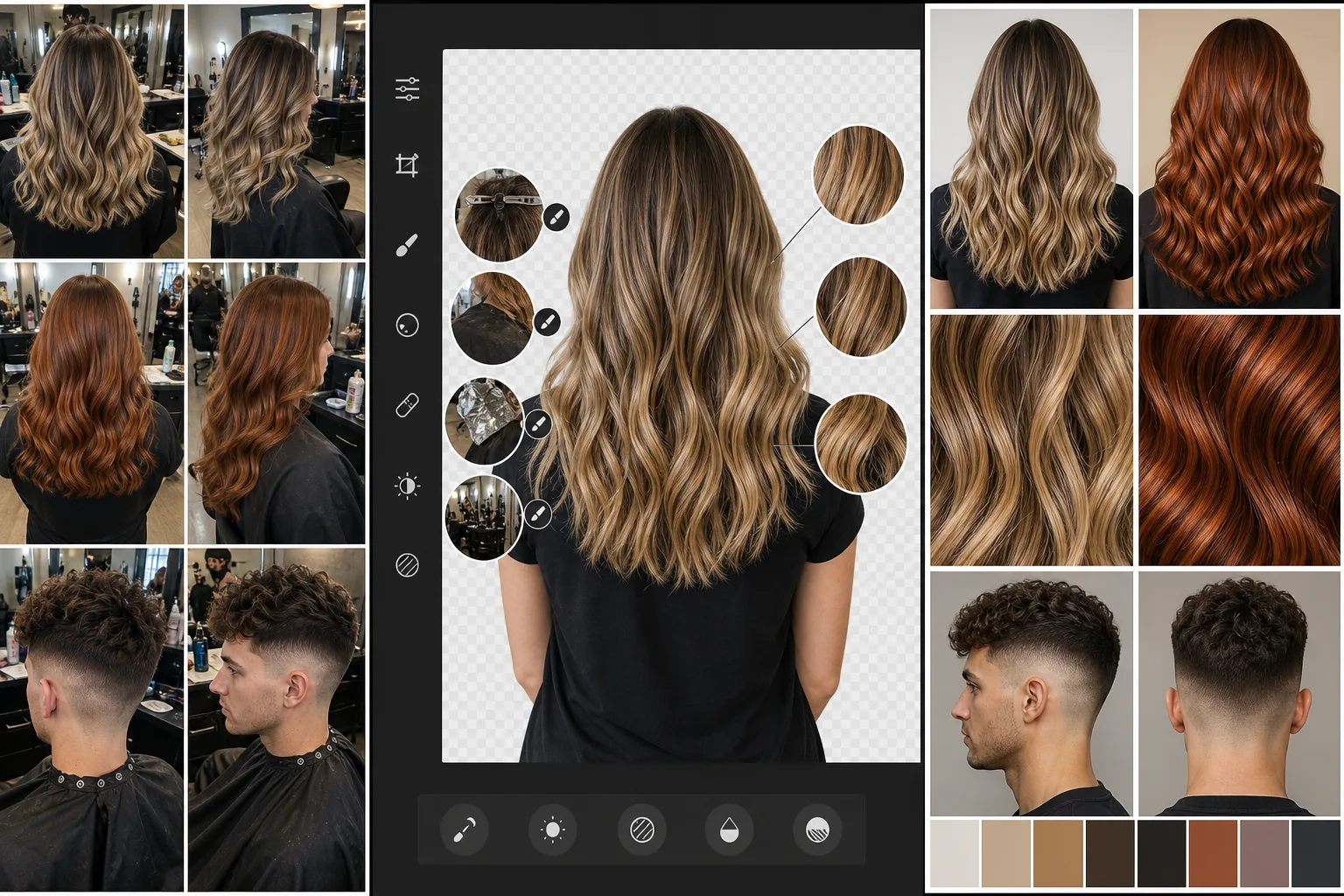
Salon lighting distorts the hair color that stylists work hours to perfect
Hair colorists spend 2-4 hours formulating and applying color, then photograph the result under salon lighting that shifts the color representation by 10-30% from what the eye sees. Warm tungsten station lights add gold tones that make cool-toned balayage look brassy. Cool LED overhead panels drain the vibrancy from copper and red tones. Mixed lighting (window light on one side, tungsten on the other) creates different color temperature across the same head of hair. When the potential client sees the portfolio photo, they are evaluating a color that does not accurately represent the work — leading to miscommunication during consultations and unrealistic expectations that no amount of formulation skill can meet. AI Enhance corrects the color temperature to reveal the actual hair color as it appears in balanced natural light.
Mirrors, stations, and salon clutter fill the background of every shot
Hair salon photos are taken at the station — which means the background contains mirrors (reflecting the photographer, other clients, the ceiling, and the back of the station), product bottles, foil trays, color bowls, cape clips, and the visual noise of a working salon floor. Even a careful framing attempt captures some reflection or background clutter. For Instagram and portfolio use, the background should focus attention on the hair, not the environment. Background Eraser isolates the client and the hair from the salon environment, replacing the cluttered background with a clean, gallery-style presentation that puts 100% of visual focus on the color and style work.
Stray foils, clips, and cape edges survive the styling but not the photo
Post-color, the stylist photographs the finished result before the client leaves. But the styling process leaves artifacts: a clip holding a section visible at the nape, a cape edge intruding at the bottom of the frame, a foil fragment caught in the hair, product residue visible on the hairline, a stray smock tie across the shoulder. These small details are invisible in the salon but obvious in a portfolio photo displayed at full-screen on a phone. Magic Eraser brush removes these process artifacts from the otherwise-beautiful finished result without reshooting — which is often impossible because the client is already heading to checkout.
How Magic Eraser fits the salon portfolio workflow
Photograph the finished result at the station before the client leaves
Capture 3-5 angles of the finished hair immediately after styling and before the client stands up — back of head (the money shot for color work), three-quarter angles from each side, and a front-facing shot showing face-framing layers or bangs if relevant. Use portrait mode if available to naturally blur the background. Move the client's chair to catch the best available light if the station allows it. Do not delay — clients are ready to leave, and the window for capturing styled hair at its peak is 5-10 minutes before natural movement begins to shift the style.
Correct color accuracy with AI Enhance
Run the strongest 2-3 captures through AI Enhance to correct the salon lighting's color distortion. The goal is to represent the hair color as it appears in balanced, natural daylight — the standard under which clients will actually live with and evaluate their color. Pay particular attention to balayage and highlight work where the dimension between light and dark tones is the artistry: salon lighting often compresses this dimension, making highlights and lowlights look closer in value than they are. Enhancement should recover the full range of tonal variation the colorist created.
Clean backgrounds and remove process artifacts
Use Background Eraser on the hero shot to isolate the hair and client from the salon environment. Replace with a clean, non-distracting background — soft neutral tones or the salon's brand colors work well. Then apply Magic Eraser brush to remove any visible clips, cape edges, foil fragments, product residue, or other styling-process artifacts from all selected images. For mirror-reflection photos that show the front and back simultaneously (a popular salon-portfolio format), use Magic Eraser to clean up the reflection rather than replacing the entire background.
Post to portfolio channels with consistent visual presentation
Deploy the enhanced and cleaned images to Instagram (primary portfolio platform for most stylists), the salon's Google Business Profile, the website's stylist portfolio pages, and any booking-platform profiles (StyleSeat, Vagaro, Fresha). Maintain a consistent background treatment and enhancement style across all portfolio images so the stylist's feed has visual cohesion. Tag the specific services (balayage, highlights, color correction, precision cut, men's fade) so potential clients can find examples of the exact service they are considering. Over 3-6 months, this workflow builds a portfolio that accurately represents the stylist's color and technique work rather than the salon's lighting conditions.
Frequently Asked Questions
Will color correction make the portfolio photos look unrealistic?
+
No — the opposite. Salon lighting distorts the actual hair color, so the uncorrected photo is the inaccurate representation. AI Enhance corrects the color temperature toward balanced daylight, which is the lighting condition under which the client will actually see their hair every day. The goal is not to make the color look 'better' than reality but to represent it as the colorist formulated it and as the client will experience it outside the salon. This actually reduces consultation miscommunication because the portfolio reference photo matches the real-world result more closely.
How do I get client consent for portfolio and social media use?
+
Integrate a simple photo release into your new-client intake form or digital booking confirmation. Most clients are happy to have their hair featured — it is inherently flattering, and many will share the post to their own followers, extending your reach. For social media specifically, ask permission at the time of photographing and offer to tag them in the post. Clients who decline should not be pressured, and their photos should be immediately deleted. Some salons offer a small service discount (10-15%) in exchange for social media permission, which works well for color-transformation content that has high engagement value.
Should every stylist at the salon maintain their own portfolio, or one salon feed?
+
Both. Individual stylist portfolios on their own Instagram accounts drive direct bookings with specific stylists — clients who found a stylist through their personal portfolio are pre-qualified as wanting that stylist's specific skill set. The salon's feed and Google Business Profile showcase the collective team's range and quality, driving bookings to the salon generally. The same enhanced photos serve both channels: post to the stylist's personal portfolio with individual branding, and reshare or cross-post to the salon's feed with salon branding. This dual-channel approach is particularly effective for attracting new clients who are searching for the salon by location and for stylists by style specialty.
How many portfolio photos should a stylist post per week?
+
For Instagram specifically, 3-5 portfolio posts per week maintains visibility in the algorithm without overwhelming followers. Prioritize quality over quantity — one beautifully enhanced color-transformation photo generates more engagement and booking inquiries than five mediocre phone snapshots. Supplement portfolio posts with Stories showing the process (before, during, after), which humanizes the stylist and builds the trust that converts followers into booked clients. The AI editing workflow makes producing 3-5 high-quality portfolio images per week sustainable even on the busiest schedule, because the editing adds only 5-10 minutes per client versus 20-30 minutes of manual retouching.
Let your color work speak for itself
AI Enhance corrects salon lighting to show the true color you formulated. Background Eraser creates clean portfolio presentations. Magic Eraser removes clips, capes, and process artifacts. Build a portfolio that books the clients your work deserves. Free tier on web, iOS, and Android.
Try Magic Eraser freeRelated use cases
See how professionals use these tools in real-world workflows.
Listing photos cluttered with personal items, parked cars, or construction equipment can turn buyers away. Magic Eraser uses AI to clean up your property photos instantly — no Photoshop skills required.
Product listings need clear images before shoppers can judge the item. Magic Eraser helps sellers remove messy backgrounds, table edges, labels, props, glare, and other distractions so each product photo is easier to review before publishing.
Photobombers ruining your travel pics? Messy backgrounds killing your selfie game? Stop wasting hours in Photoshop. Magic Eraser removes distractions, cleans up cluttered shots, and expands your photos to fit any platform format — all in one tap.
Related comparisons
See how Magic Eraser compares to similar tools.
TouchRetouch is a popular paid mobile app for removing objects and blemishes. Magic Eraser offers free AI-powered editing on any device with no install required. See how they compare across features, pricing, and ease of use.
Cleanup.pictures is a free web tool with one generic eraser brush. Magic Eraser gives you 100+ purpose-built removal tools — one for emoji, glasses, watermarks, sky, power lines, and dozens more — plus background removal, AI enhance, and mobile apps, in 16 languages. See how breadth changes the result.
remove.bg is the market leader for background removal, offering a powerful API and integrations with Photoshop and Figma. Magic Eraser goes further with eight AI-powered editing tools — from object removal and generative fill to AI enhance and design — all in one editor.
Two powerful AI photo editors with different strengths. Magic Eraser offers a broader set of generative AI tools for creative editing, while Photoroom excels at e-commerce product photography and batch processing. See which fits your workflow.
Related guides
Explore more guides and editorial content related to this workflow.
Learn how to use Magic Eraser to remove objects, people, text, and distractions from photos with cleaner AI editing results.
Learn how to remove people from photos using AI in seconds. Step-by-step guide for travel photos, real estate shots, and product images.
Step-by-step guide to removing watermarks from your own photos using AI. Learn when it is appropriate, the best techniques, and how Magic Eraser handles it.