
Tattoo Artist Portfolio: Sharp Ink Detail, Clean Backgrounds & Accurate Color
A tattoo artist's portfolio is the primary factor clients use when choosing an artist — prospective clients scroll through Instagram feeds and portfolio websites evaluating line quality, color saturation, shading technique, and style fit before they ever contact the shop. The gap between the tattoo's actual quality and what the portfolio photo conveys costs artists bookings every day. Studio lighting creates glare on fresh ink and skin, smartphone cameras soften the fine line detail that distinguishes skilled work, and studio backgrounds with equipment, ink bottles, and supply clutter distract from the artwork. AI Enhance and Magic Eraser close this gap so the portfolio photo represents the tattoo's actual quality.
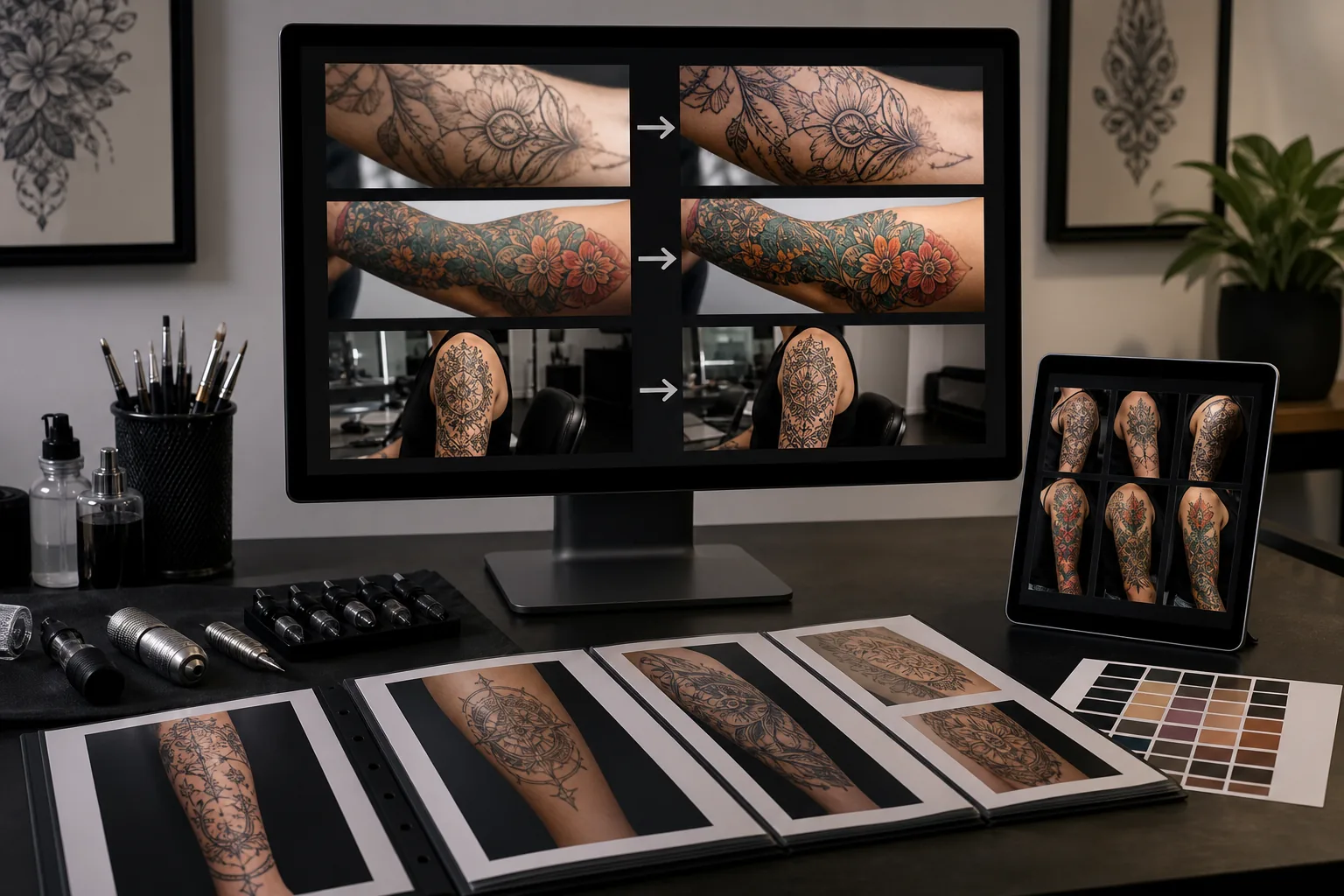
Skin glare and moisture on fresh tattoos obscure ink detail in photos
Fresh tattoos are photographed immediately after completion when the skin is covered in a thin layer of ointment, plasma, and excess ink residue. This moisture layer creates specular highlights — bright glare spots that wash out the underlying ink detail, especially on color work and shading gradients. The artist wipes the tattoo for the photo, but skin continues to weep and the ointment application creates a sheen that the camera catches under studio lighting. The result is a photo where the tattoo looks less crisp and less saturated than it actually is, which misrepresents the artist's line quality and color work to potential clients evaluating the portfolio.
Fine line work and subtle shading gradients get lost in smartphone compression
The technical skill that separates exceptional tattoo work from average work lives in details that are 1-3mm wide: the consistency of line weight, the smoothness of shading gradients, the precision of dot-work spacing, the clarity of lettering serifs, and the control of color transitions. Smartphone cameras apply noise reduction and compression that smooth out exactly these details, making a technically masterful tattoo look identical in the photo to a merely competent one. For artists whose competitive advantage is technical precision — fine-line specialists, micro-realists, ornamental artists — this detail loss directly costs them the clients who would pay premium rates for that precision.
Studio backgrounds and tattoo-in-progress context look unprofessional in the portfolio
Tattoo photos are captured mid-session or immediately after in the work station, which means the background includes the tattoo machine, ink caps, paper towels stained with ink, the chair or table, gloves, power supply cords, and other equipment. While this context is authentic, it creates a cluttered visual frame that pulls the viewer's eye away from the tattoo itself. Instagram portfolios where every photo has a clean, consistent background outperform visually cluttered feeds in follower growth and client inquiries because the tattoo — not the studio — is the product being marketed.
How Magic Eraser fits the tattoo-artist portfolio workflow
Capture the fresh tattoo with attention to angle and lighting
Photograph the completed tattoo from the angle that shows the design most completely — this usually means positioning the camera perpendicular to the skin surface rather than at an oblique angle that foreshortens the design. Wipe the tattoo surface gently to minimize ointment glare, but don't delay the photo excessively — fresh tattoos photograph with the most vibrant color before the healing process begins. Capture multiple shots: the full tattoo in context on the body, a closer composition showing the complete design, and macro-level detail shots of the areas that demonstrate technical skill (line intersections, color transitions, shading gradients).
Run AI Enhance to sharpen line detail and restore color accuracy
Open each tattoo photo in AI Enhance to recover the detail that smartphone capture and skin-surface conditions suppressed. The AI sharpens fine line work to its actual crispness, restores color saturation that skin glare washed out, clarifies shading gradients that camera compression flattened, and normalizes the skin tone so the ink-to-skin contrast reads accurately. For black-and-gray work, the enhancement reveals the full tonal range from deep black to subtle gray wash. For color work, it restores the saturation and hue accuracy that distinguishes your color-packing technique.
Use Magic Eraser to remove studio clutter and skin-surface distractions
Remove background studio elements that distract from the tattoo: ink caps, paper towels, equipment, cords, and other work-station items. On the skin itself, remove any residual ink spots outside the tattoo boundary, stencil remnants, skin-marker guidelines, and reference-image printouts visible in the frame. For tattoos photographed in context on the body, remove any background elements (other people, furnishings, signage) that distract from the artwork while preserving the body-placement context that shows how the design flows with anatomy.
Export for Instagram feed, portfolio website, and booking-platform profiles
Export the cleaned and enhanced photos at platform-optimized dimensions: 1080x1080px square for the Instagram grid (the format that creates the most impactful portfolio grid when browsing an artist's profile), 1080x1350px portrait for maximum feed-scroll impact, high-resolution 3000px+ for the portfolio website where clients zoom in to evaluate detail, and the dimensions required by booking platforms like Tattoodo or Fresha. Maintain consistent export quality and color profile (sRGB for web) so the tattoo's colors render accurately across devices.
Frequently Asked Questions
Should I also photograph healed tattoos for my portfolio?
+
Yes — healed photos are arguably more important than fresh photos for building client trust, because every experienced tattoo client knows that fresh tattoos look better than healed ones. A portfolio that shows only fresh work raises the question of how the tattoos look once healed. Ask clients to send a photo at 4-6 weeks healed, then enhance it with the same workflow. Healed tattoo photos typically need more AI Enhancement because clients photograph them on phones in home lighting without any attention to angle or clarity. A fresh-and-healed pair for your best pieces is the strongest portfolio format because it demonstrates confidence in the lasting quality of your work.
Is it misleading to enhance tattoo portfolio photos?
+
Correcting camera and lighting limitations is not misleading — it makes the photo match what the tattoo actually looks like in person. Smartphone cameras under studio fluorescents systematically misrepresent tattoo quality: they soften lines that are actually crisp, desaturate colors that are actually vibrant, and add glare that hides detail that's actually visible to the naked eye. Enhancement that corrects these camera artifacts brings the photo closer to reality, not further from it. What would be misleading is digitally adding detail, saturating beyond the actual ink density, or smoothing blowouts — altering the work itself rather than the photo's representation of it.
How many portfolio photos do I need for effective client acquisition?
+
For Instagram, the minimum effective portfolio is 30-45 posts showing your strongest work across the styles and placements you want to attract. Prospective clients typically scroll through 9-15 photos (the first one to two grid rows) before deciding whether to inquire. Your most recent 9 posts should represent your current skill level and the styles you want to book — this is your visual storefront. For a portfolio website, 40-80 photos organized by style category (black-and-gray, color realism, fine line, traditional, etc.) gives clients enough to evaluate your range and consistency within each style.
Let your ink quality speak through your portfolio
AI Enhance recovers the line detail, color accuracy, and shading precision that smartphone cameras and studio lighting obscure, while Magic Eraser removes the background clutter that distracts from your work. Free tier on web, iOS, and Android.
Try Magic Eraser freeRelated use cases
See how professionals use these tools in real-world workflows.
Listing photos cluttered with personal items, parked cars, or construction equipment can turn buyers away. Magic Eraser uses AI to clean up your property photos instantly — no Photoshop skills required.
Product listings need clear images before shoppers can judge the item. Magic Eraser helps sellers remove messy backgrounds, table edges, labels, props, glare, and other distractions so each product photo is easier to review before publishing.
Photobombers ruining your travel pics? Messy backgrounds killing your selfie game? Stop wasting hours in Photoshop. Magic Eraser removes distractions, cleans up cluttered shots, and expands your photos to fit any platform format — all in one tap.
Related comparisons
See how Magic Eraser compares to similar tools.
TouchRetouch is a popular paid mobile app for removing objects and blemishes. Magic Eraser offers free AI-powered editing on any device with no install required. See how they compare across features, pricing, and ease of use.
Cleanup.pictures is a free web tool with one generic eraser brush. Magic Eraser gives you 100+ purpose-built removal tools — one for emoji, glasses, watermarks, sky, power lines, and dozens more — plus background removal, AI enhance, and mobile apps, in 16 languages. See how breadth changes the result.
remove.bg is the market leader for background removal, offering a powerful API and integrations with Photoshop and Figma. Magic Eraser goes further with eight AI-powered editing tools — from object removal and generative fill to AI enhance and design — all in one editor.
Two powerful AI photo editors with different strengths. Magic Eraser offers a broader set of generative AI tools for creative editing, while Photoroom excels at e-commerce product photography and batch processing. See which fits your workflow.
Related guides
Explore more guides and editorial content related to this workflow.
Learn how to use Magic Eraser to remove objects, people, text, and distractions from photos with cleaner AI editing results.
Learn how to remove people from photos using AI in seconds. Step-by-step guide for travel photos, real estate shots, and product images.
Step-by-step guide to removing watermarks from your own photos using AI. Learn when it is appropriate, the best techniques, and how Magic Eraser handles it.