
Construction Progress Photos: Clearer Documentation for Clients, Lenders & Marketing
Construction progress photography serves multiple critical functions simultaneously — client update reports, lender draw-request documentation, subcontractor coordination records, dispute resolution evidence, code-inspection support, and the firm's portfolio marketing. The photos are captured by project managers and superintendents on smartphones during site walks, in conditions optimized for building rather than photography: dust, scaffolding, temporary lighting, weather exposure, and the constant visual clutter of an active construction site. Magic Eraser and AI Enhance transform these site-walk captures into documentation that communicates clearly to every audience — clients, lenders, inspectors, attorneys, and prospective customers — without requiring a photographer on the project budget.
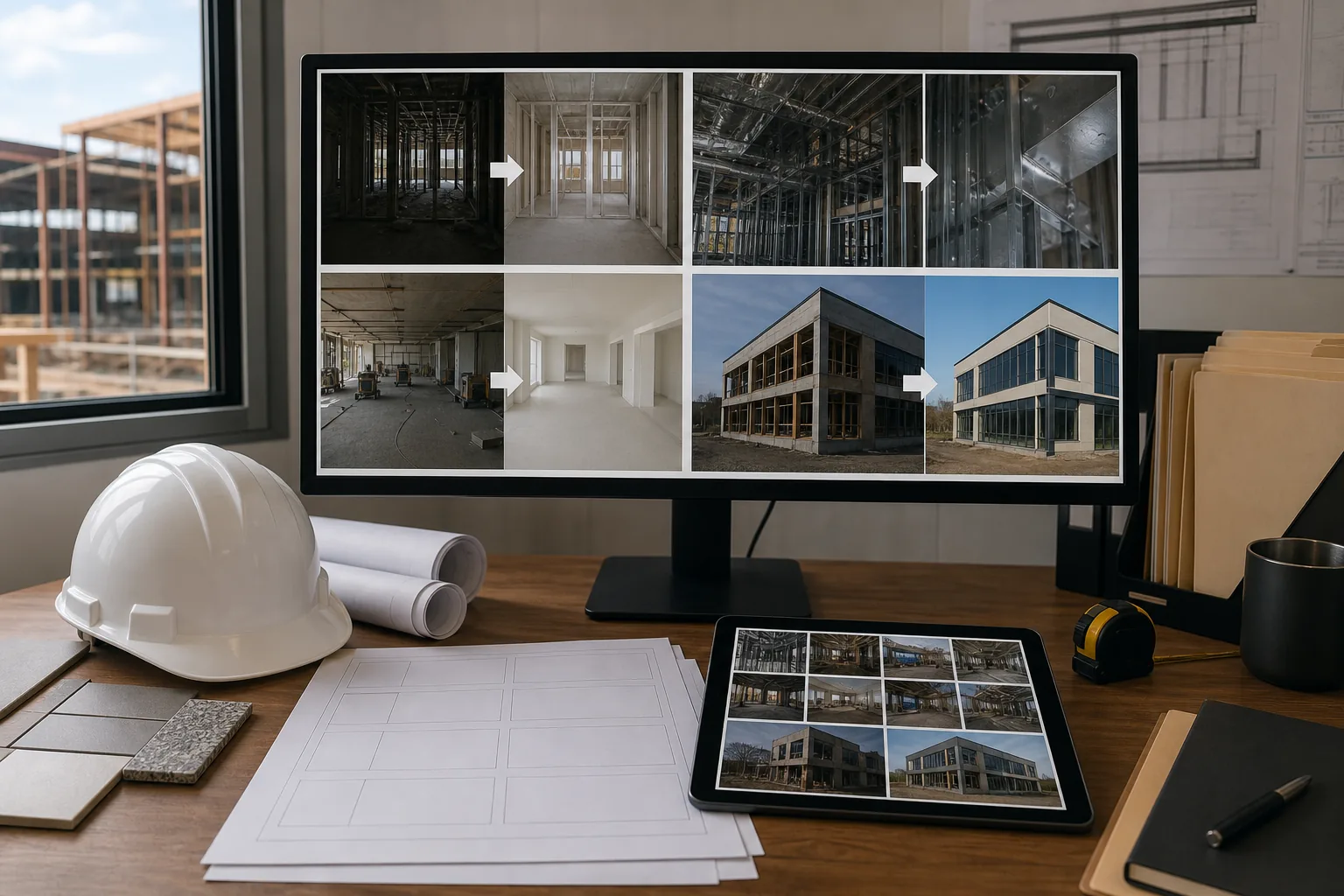
Temporary site elements obscure the permanent work being documented
Progress photos of framing, mechanical rough-in, insulation, drywall, and finish work are captured while the site is actively under construction, meaning every photo includes scaffolding, temporary bracing, construction debris, material staging areas, tool carts, extension cords, temporary lighting rigs, and safety barriers. These temporary elements obscure the permanent work that the photo is supposed to document — the client, lender, or inspector needs to evaluate the installed framing, the plumbing rough-in, or the finish quality, but they're looking through a visual thicket of job-site infrastructure that will be gone when the project is complete.
Interior construction photos are dark, noisy, and color-inaccurate
Interior progress photos before permanent lighting installation are captured under temporary work lights (high-intensity, directionally harsh) or with smartphone flash (flat, close-range only) in spaces that may not yet have windows installed or have windows covered with protective film. The resulting photos are dark with hard shadows, high in digital noise from the smartphone's high-ISO compensation, and color-inaccurate because temporary lighting has irregular spectral characteristics. When these photos accompany a draw request for $200,000 of interior-finish work, their quality doesn't match the seriousness of the financial documentation they support.
Marketing-quality project photos require a separate photography session the budget rarely includes
The construction firm's website and proposal materials need portfolio photos that showcase completed projects at their best — but professional architectural photography runs $1,500-5,000 per project and requires scheduling a separate session after substantial completion, before the owner moves in or commences operations. Many projects close out without this session happening, leaving the firm with only the job-site progress photos as the visual record. Those progress photos could serve as portfolio material if they were cleaned up and enhanced, but raw site-walk captures look too rough for client-facing marketing.
How Magic Eraser fits the construction documentation workflow
Capture progress photos systematically during every site walk
Integrate photo documentation into the regular site-walk cadence: capture each work area from a consistent vantage point at each milestone (foundation, framing, mechanical rough-in, insulation, drywall, finish). Include overall room shots from each corner, detail shots of critical connections and installations, and exterior progress from the same angles used in previous visits so the progression is directly comparable. A consistent capture protocol takes an extra 10-15 minutes per site walk and produces the raw material for every downstream documentation need.
Run AI Enhance to correct job-site lighting conditions
Open the progress photos in AI Enhance to address the lighting conditions inherent to construction-site photography: brighten dark interior spaces to make installed work visible, correct the harsh directional shadows from temporary work lights, reduce the digital noise from smartphone high-ISO captures, normalize color accuracy so materials photograph true (paint colors, wood species, tile, stone, and metal finishes), and sharpen detail to make connection points, fastener patterns, and installation quality legible. For exterior shots, correct the overexposure from direct sunlight and the flat gray tone of overcast conditions.
Use Magic Eraser to remove temporary site elements for clean documentation
For photos intended for client reports, lender documentation, and marketing use, remove the temporary construction elements that obscure the permanent work: scaffolding, temporary bracing that's not structural, construction debris, tool carts, extension cords, material staging, and protective coverings. Preserve the permanent construction elements (structural members, installed systems, finish materials) and the spatial context (room dimensions, ceiling heights, adjacencies). The result is a photo that shows what the finished space will look like, not what the active construction site looks like.
Organize documentation by phase and purpose for each audience
Export processed photos organized by the documentation purpose they serve. For client update reports: enhanced photos with temporary clutter removed, organized chronologically by work area. For lender draw requests: enhanced photos with enough site context to verify work completion, organized by cost-code category matching the draw schedule. For the marketing portfolio: the most compelling enhanced and cleaned photos from each project phase, organized as a before-during-after transformation sequence. For the permanent project record: both original captures and enhanced versions, organized by date and location for future reference in warranty claims or dispute resolution.
Frequently Asked Questions
Is it appropriate to edit construction documentation photos used for lender draw requests?
+
Enhancement for clarity — lighting correction, noise reduction, sharpness improvement — is appropriate and helps lenders and inspectors evaluate the work more accurately. Removing temporary scaffolding or debris that obscures the installed work can also improve communication. What should not be edited is the construction work itself — don't remove visible defects, add elements that aren't installed, or alter the scope of completed work. For draw-request documentation specifically, the enhanced photos should be a clearer view of the actual installed work, supplemented by the original unedited captures in the project file for reference.
How can cleaned-up progress photos help with dispute resolution?
+
Construction disputes often hinge on photographic evidence of site conditions at a specific date — was the waterproofing membrane installed before the cladding? Were the anchor bolts placed per specification before the concrete pour? Raw progress photos with clutter and poor lighting can be ambiguous, and ambiguity favors the party contesting the claim. Enhanced photos that correct lighting to reveal the actual installation detail, combined with the original timestamped captures, provide both the legally defensible original record and the clearly legible interpretation that supports the firm's position.
Can we use enhanced progress photos as portfolio material instead of hiring an architectural photographer?
+
Enhanced progress photos can effectively supplement professional architectural photography, and for many project types (renovations, commercial interiors, infrastructure) they can serve as the primary portfolio material. The key is capturing at the right moment — substantial-completion photos taken before temporary protection is removed and before the owner's furniture and operations are in place, enhanced and cleaned through the AI workflow, can rival mid-range professional photography for website and proposal use. For showcase projects where the architecture itself is the selling point, professional photography is still worth the investment — but enhanced progress photos give you portfolio coverage for every project rather than just the few you budget for professional sessions.
Turn site-walk captures into professional project documentation
Magic Eraser removes temporary construction clutter and AI Enhance corrects job-site lighting — so your progress photos communicate clearly to clients, lenders, and prospective customers without a photographer on the project budget. Free tier on web, iOS, and Android.
Try Magic Eraser freeRelated use cases
See how professionals use these tools in real-world workflows.
Listing photos cluttered with personal items, parked cars, or construction equipment can turn buyers away. Magic Eraser uses AI to clean up your property photos instantly — no Photoshop skills required.
Product listings need clear images before shoppers can judge the item. Magic Eraser helps sellers remove messy backgrounds, table edges, labels, props, glare, and other distractions so each product photo is easier to review before publishing.
Photobombers ruining your travel pics? Messy backgrounds killing your selfie game? Stop wasting hours in Photoshop. Magic Eraser removes distractions, cleans up cluttered shots, and expands your photos to fit any platform format — all in one tap.
Related comparisons
See how Magic Eraser compares to similar tools.
TouchRetouch is a popular paid mobile app for removing objects and blemishes. Magic Eraser offers free AI-powered editing on any device with no install required. See how they compare across features, pricing, and ease of use.
Cleanup.pictures is a free web tool with one generic eraser brush. Magic Eraser gives you 100+ purpose-built removal tools — one for emoji, glasses, watermarks, sky, power lines, and dozens more — plus background removal, AI enhance, and mobile apps, in 16 languages. See how breadth changes the result.
remove.bg is the market leader for background removal, offering a powerful API and integrations with Photoshop and Figma. Magic Eraser goes further with eight AI-powered editing tools — from object removal and generative fill to AI enhance and design — all in one editor.
Two powerful AI photo editors with different strengths. Magic Eraser offers a broader set of generative AI tools for creative editing, while Photoroom excels at e-commerce product photography and batch processing. See which fits your workflow.
Related guides
Explore more guides and editorial content related to this workflow.
Learn how to use Magic Eraser to remove objects, people, text, and distractions from photos with cleaner AI editing results.
Learn how to remove people from photos using AI in seconds. Step-by-step guide for travel photos, real estate shots, and product images.
Step-by-step guide to removing watermarks from your own photos using AI. Learn when it is appropriate, the best techniques, and how Magic Eraser handles it.