
Landscape Contractor Portfolio: Hardscape, Design & Lawn Care Projects
Landscape contractors sell their next project based on photos of their last one. Homeowners evaluating contractors compare portfolio images side by side — the contractor whose patio installation, retaining wall, or planting design looks cleanest and most professional in photos wins the bid, often regardless of price difference. The challenge is that landscape work is photographed on active job sites and in real neighborhoods where construction debris, neighbor clutter, parked cars, trash cans, garden hoses, and utility boxes all compete for attention in the frame. Magic Eraser removes the real-world distractions that undermine portfolio presentation, while AI Enhance compensates for overcast skies and harsh midday shadows that flatten the dimensionality of hardscape and planting work.
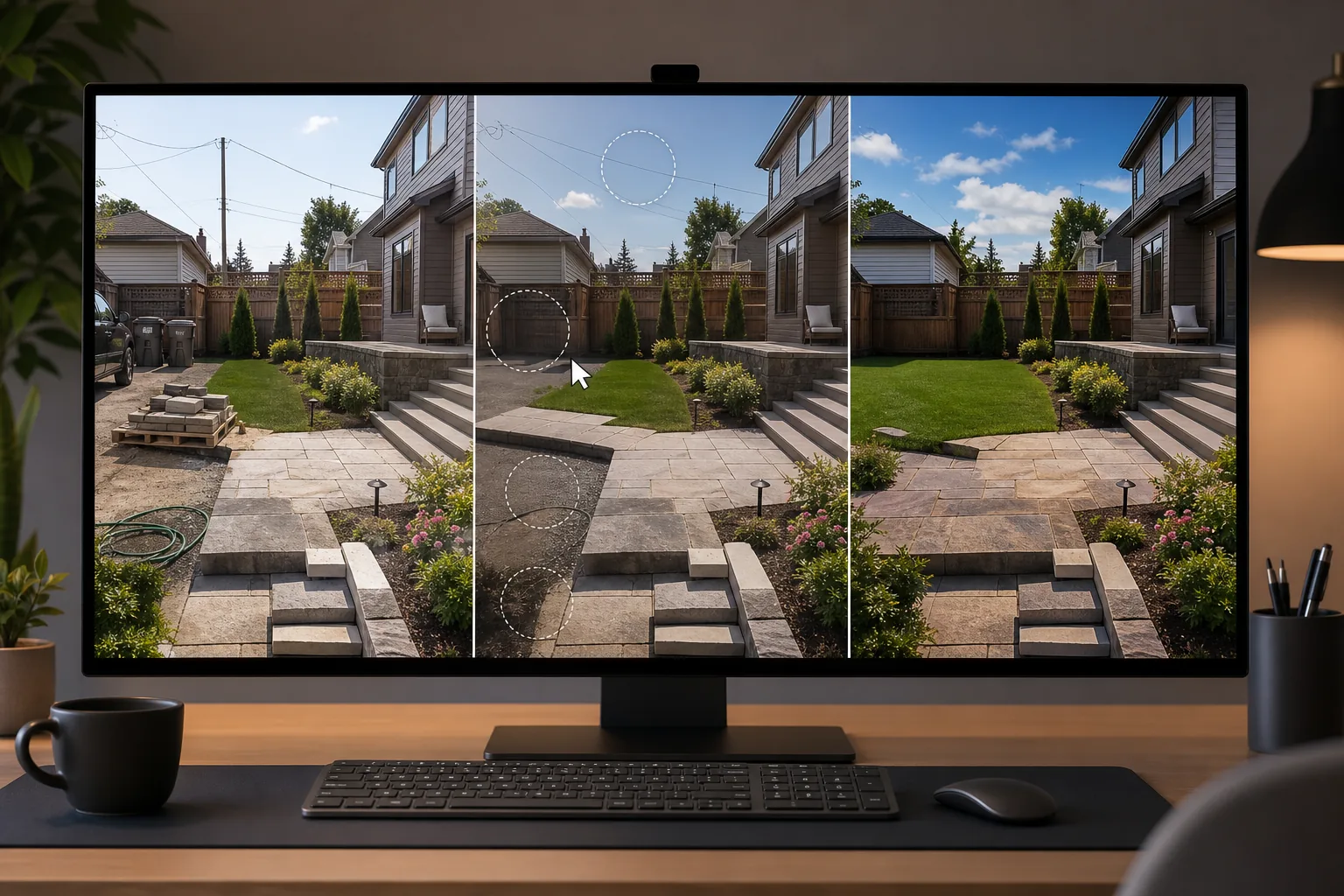
Job-site debris and construction remnants appear in completion photos
The moment a landscape project reaches visual completion, the job site still has evidence of construction: material pallets in the driveway, cut-stone remnants along the perimeter, equipment marks on the lawn, contractor vehicles and trailers in the background, and leftover materials staged for removal. Waiting for full site cleanup delays the portfolio photo by days — and weather, lighting, or client scheduling may prevent a return visit. Magic Eraser removes construction debris, equipment, and remnants from completion photos taken on the last day of the project, giving the contractor portfolio-ready images without a separate return trip.
Neighboring properties introduce clutter the contractor cannot control
Landscape photography inherently includes context — the house, the street, and the neighboring properties. A beautifully designed patio installation is undermined in photos by the neighbor's overflowing trash cans, a rusty chain-link fence in the adjacent yard, an above-ground pool visible over the fence, parked cars on the street, and utility poles and overhead wires cutting across the sky. The contractor cannot control adjacent property appearance, and tight cropping to exclude it often cuts the project out of its full visual context. Magic Eraser removes specific neighboring-property distractions while preserving the project's landscape context.
Weather and lighting conditions rarely align with the project's best presentation
Landscape work is best photographed in the golden hour (early morning or late afternoon) under partly cloudy skies that provide soft, dimensional lighting. In practice, contractors photograph when the project is complete — often at midday under harsh overhead sun that creates hard shadows and washes out colors, or under overcast skies that flatten stone textures and make plantings look dull. Returning to a completed project specifically for golden-hour photography is rarely practical in a contractor's schedule. AI Enhance recovers dimension in flat-lit photos, deepens color saturation in stone and plant materials, and corrects the harsh contrast of midday captures to produce images that look naturally well-lit.
How Magic Eraser fits the landscape contractor portfolio workflow
Photograph the completed project from multiple angles before leaving the site
On the final day of the project, capture 10-20 photos from multiple angles: the wide establishing shot from the street or yard entry that shows the full scope, mid-range shots of each major element (patio surface, retaining wall, planting beds, walkways, water features), detail shots of craftsmanship (stone joints, mortar work, plant groupings, lighting fixtures), and a before photo if possible (taken at the project start for the before/after comparison that drives the most engagement on social media). Accept that the site is not pristine — construction remnants and neighboring clutter will be addressed in post.
Remove site debris and neighboring distractions with Magic Eraser
Open the hero shots in Magic Eraser and remove construction debris (pallets, cut stone remnants, equipment marks), neighboring-property distractions (trash cans, rusty fences, vehicles, utility infrastructure), and any temporary elements that are part of the construction context but not the finished design (caution tape, temporary stakes, reference strings). Focus on the 5-8 hero images that will represent the project in your portfolio — wide shots and mid-range compositions where background distractions are most visible and most impactful.
Enhance lighting and material detail with AI Enhance
Run AI Enhance on the cleaned hero shots to recover dimension and color accuracy. For overcast-day captures, the enhancement adds depth to stone textures, enriches the green palette of plantings, and restores the dimensional quality that flat lighting suppresses. For harsh-midday captures, the enhancement softens hard shadow transitions and recovers shadow detail in shaded areas. For detail shots, the enhancement sharpens stone joints, mortar lines, plant leaf texture, and lighting-fixture detail that demonstrates craftsmanship quality.
Build the portfolio across bidding and marketing channels
Deploy the enhanced project photos to your website portfolio organized by project type (patios, retaining walls, planting design, outdoor kitchens, complete landscapes), Google Business Profile (which directly influences local search ranking and homeowner evaluation), Instagram and Facebook (tagged by project type and neighborhood for local visibility), and your bid-presentation materials (PDF proposals, tablet presentations during client consultations). Include before/after pairs wherever available — they are the highest-engagement content type for landscape contractors on social media and the most persuasive element in bid presentations.
Frequently Asked Questions
Should I remove all context and just show the landscape work in isolation?
+
No. Context is important for landscape portfolio photos because homeowners need to envision similar work on their own property. Keep the house, the yard proportions, and the general setting visible — remove only the distractions that detract from the project's presentation (construction debris, neighbor clutter, utility infrastructure, parked cars). The goal is a clean, professional photo that shows the landscape work in its real-world context, not an isolated product shot. Homeowners trust portfolio photos that look like real completed projects more than photos that look like they were shot in a controlled environment.
How important are before/after photos compared to finished-project-only images?
+
Before/after pairs are the single highest-performing content type for landscape contractor marketing. They communicate transformation — which is what the homeowner is buying. A finished patio photo is attractive; a before photo of the bare, muddy yard next to the finished patio is compelling. Train your crews to capture a before photo at the project start from the same angles you will photograph at completion. Even a quick phone snapshot of the pre-project state, enhanced with AI Enhance to match the visual quality of the completion photo, creates a before/after pair that outperforms any single-image portfolio post on engagement and inquiry conversion.
How do seasonal photos factor into the portfolio?
+
Landscape work looks different across seasons, and the strongest portfolios show projects in multiple seasonal contexts. A patio with a fire pit photographed in autumn with fall foliage communicates differently than the same patio in summer with green plantings. If you maintain ongoing relationships with clients (maintenance contracts, seasonal plantings), photograph key projects across at least two seasons. AI Enhance is particularly valuable for winter and early-spring captures where bare trees and dormant plantings make even excellent hardscape work look less inviting — the enhancement can bring out the stone and hardscape detail that carries the visual appeal when the plantings are not at peak.
Show your landscape work without the job-site distractions
Magic Eraser removes construction debris, neighbor clutter, and utility infrastructure from completion photos. AI Enhance recovers material texture and color under any lighting condition. Build the portfolio that wins bids. Free tier on web, iOS, and Android.
Try Magic Eraser freeRelated use cases
See how professionals use these tools in real-world workflows.
Listing photos cluttered with personal items, parked cars, or construction equipment can turn buyers away. Magic Eraser uses AI to clean up your property photos instantly — no Photoshop skills required.
Product listings need clear images before shoppers can judge the item. Magic Eraser helps sellers remove messy backgrounds, table edges, labels, props, glare, and other distractions so each product photo is easier to review before publishing.
Photobombers ruining your travel pics? Messy backgrounds killing your selfie game? Stop wasting hours in Photoshop. Magic Eraser removes distractions, cleans up cluttered shots, and expands your photos to fit any platform format — all in one tap.
Related comparisons
See how Magic Eraser compares to similar tools.
TouchRetouch is a popular paid mobile app for removing objects and blemishes. Magic Eraser offers free AI-powered editing on any device with no install required. See how they compare across features, pricing, and ease of use.
Cleanup.pictures is a free web tool with one generic eraser brush. Magic Eraser gives you 100+ purpose-built removal tools — one for emoji, glasses, watermarks, sky, power lines, and dozens more — plus background removal, AI enhance, and mobile apps, in 16 languages. See how breadth changes the result.
remove.bg is the market leader for background removal, offering a powerful API and integrations with Photoshop and Figma. Magic Eraser goes further with eight AI-powered editing tools — from object removal and generative fill to AI enhance and design — all in one editor.
Two powerful AI photo editors with different strengths. Magic Eraser offers a broader set of generative AI tools for creative editing, while Photoroom excels at e-commerce product photography and batch processing. See which fits your workflow.
Related guides
Explore more guides and editorial content related to this workflow.
Learn how to use Magic Eraser to remove objects, people, text, and distractions from photos with cleaner AI editing results.
Learn how to remove people from photos using AI in seconds. Step-by-step guide for travel photos, real estate shots, and product images.
Step-by-step guide to removing watermarks from your own photos using AI. Learn when it is appropriate, the best techniques, and how Magic Eraser handles it.