
Car Photo Editing for Dealerships and Sellers
Clean, professional photos help shoppers assess a vehicle listing without background distractions. Magic Eraser helps dealers, private sellers, and automotive marketers remove background clutter, fix reflections, and enhance car images without a photo studio.
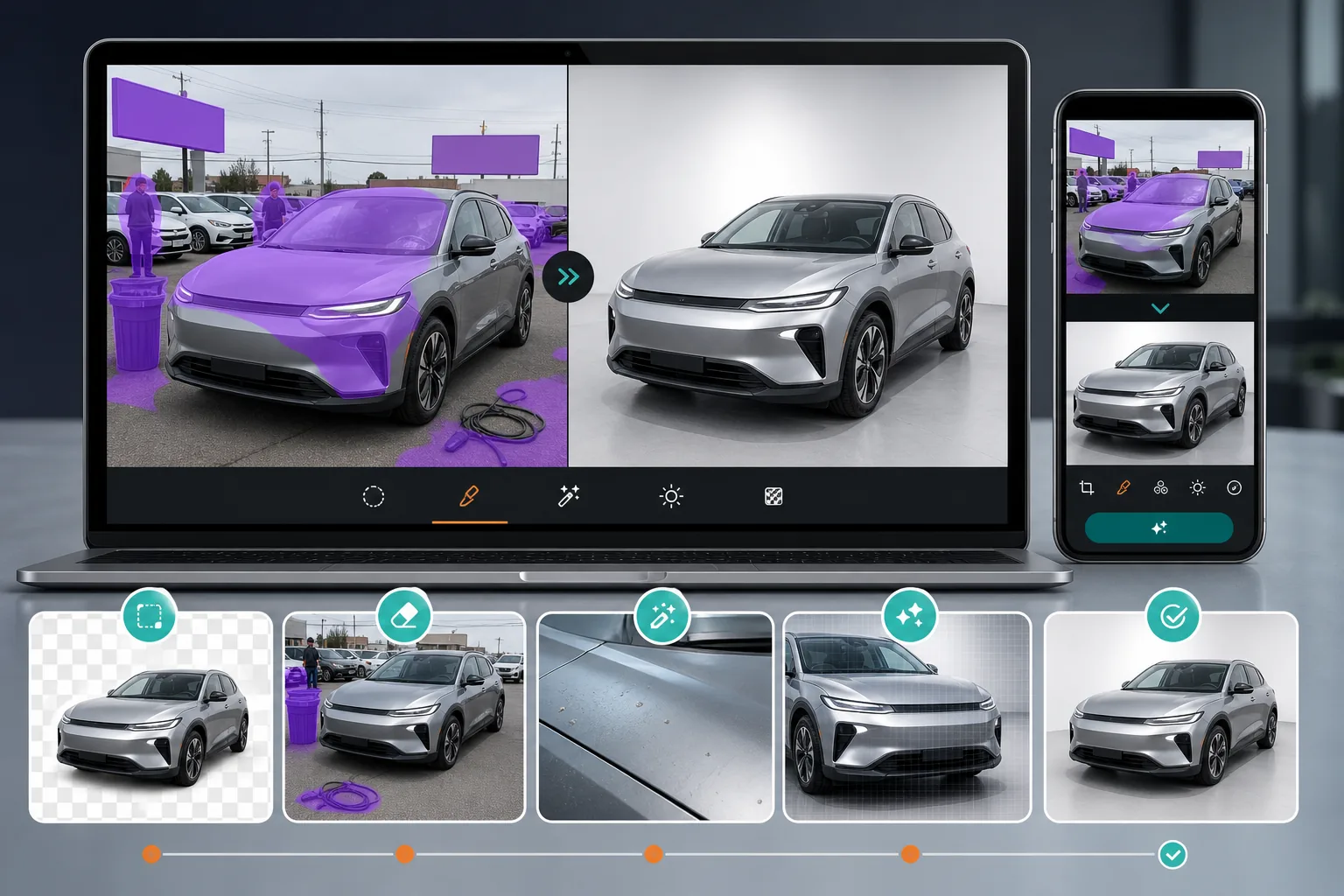
Cluttered lot and street backgrounds
Cars photographed on lots, driveways, and streets have distracting elements like other vehicles, signs, trash cans, and pedestrians that reduce the professional look of listings.
Reflections and blemishes on paint
Windshield reflections, minor paint scratches, and parking lot debris on the car surface make the vehicle look worse than it is in person.
High volume of inventory photos
Dealerships photograph dozens of vehicles per week. Spending time on manual cleanup for each listing image slows down inventory turnover.
How Magic Eraser Helps with Car Photos
Upload the vehicle photo
Open Magic Eraser and upload a car photo taken on-lot, at a customer location, or anywhere that needs cleanup.
Remove background distractions
Erase other cars, signs, people, and clutter from behind and around the vehicle to isolate it cleanly.
Clean surface details
Remove minor blemishes, reflections, or debris on the vehicle surface that detract from its appearance in listings.
Enhance and publish
Use AI enhancement to improve color accuracy and sharpness, then export the image for your listing platform.
Frequently Asked Questions
Can Magic Eraser remove the background from car photos?
+
Yes. You can remove the entire background or selectively erase distracting elements like other vehicles, signs, and people from around the car.
Is this useful for auto dealerships?
+
Yes. Dealerships use Magic Eraser to quickly clean up lot photos and produce more professional listing images without hiring a photographer for every vehicle.
Can I fix reflections on car windows?
+
The eraser tool can reduce or remove visible reflections on windshields and windows, especially when the reflected objects are clearly distracting.
Does it work for motorcycle and truck photos too?
+
Yes. Magic Eraser works with any vehicle type including cars, trucks, motorcycles, boats, and RVs.
Can I use Magic Eraser on my phone at the lot?
+
Yes. Magic Eraser works on mobile devices, so you can clean up photos right after taking them without switching to a desktop.
Make every vehicle listing look showroom-ready
Try Magic Eraser free and turn lot photos into clean, professional vehicle images ready for your listings.
Try Magic Eraser freeRelated use cases
See how professionals use these tools in real-world workflows.
Listing photos cluttered with personal items, parked cars, or construction equipment can turn buyers away. Magic Eraser uses AI to clean up your property photos instantly — no Photoshop skills required.
Product listings need clear images before shoppers can judge the item. Magic Eraser helps sellers remove messy backgrounds, table edges, labels, props, glare, and other distractions so each product photo is easier to review before publishing.
Photobombers ruining your travel pics? Messy backgrounds killing your selfie game? Stop wasting hours in Photoshop. Magic Eraser removes distractions, cleans up cluttered shots, and expands your photos to fit any platform format — all in one tap.
Related comparisons
See how Magic Eraser compares to similar tools.
TouchRetouch is a popular paid mobile app for removing objects and blemishes. Magic Eraser offers free AI-powered editing on any device with no install required. See how they compare across features, pricing, and ease of use.
Cleanup.pictures is a free web tool with one generic eraser brush. Magic Eraser gives you 100+ purpose-built removal tools — one for emoji, glasses, watermarks, sky, power lines, and dozens more — plus background removal, AI enhance, and mobile apps, in 16 languages. See how breadth changes the result.
remove.bg is the market leader for background removal, offering a powerful API and integrations with Photoshop and Figma. Magic Eraser goes further with eight AI-powered editing tools — from object removal and generative fill to AI enhance and design — all in one editor.
Two powerful AI photo editors with different strengths. Magic Eraser offers a broader set of generative AI tools for creative editing, while Photoroom excels at e-commerce product photography and batch processing. See which fits your workflow.
Related guides
Explore more guides and editorial content related to this workflow.
Learn how to use Magic Eraser to remove objects, people, text, and distractions from photos with cleaner AI editing results.
Learn how to remove people from photos using AI in seconds. Step-by-step guide for travel photos, real estate shots, and product images.
Step-by-step guide to removing watermarks from your own photos using AI. Learn when it is appropriate, the best techniques, and how Magic Eraser handles it.