
Podcaster Photo Workflow: Cover Art, Guest Graphics, Per-Season Refresh
Podcasting is a uniquely visual-poor medium that lives or dies by its visual surfaces. The cover art is the most-viewed surface of every podcast brand, displayed at 56-100px in feed where new listeners decide whether to tap in under a second. The supporting graphic set per episode (Instagram squares, Stories, TikTok, YouTube audiogram covers, email-newsletter inline imagery) is where the show's growth happens between episodes. Magic Eraser handles the full podcaster visual stack — 3000×3000 cover art, host-portrait libraries, per-episode guest graphics, per-season AI refreshes, supporting graphic sets — without a designer on staff, on the laptop or phone you record episodes with.
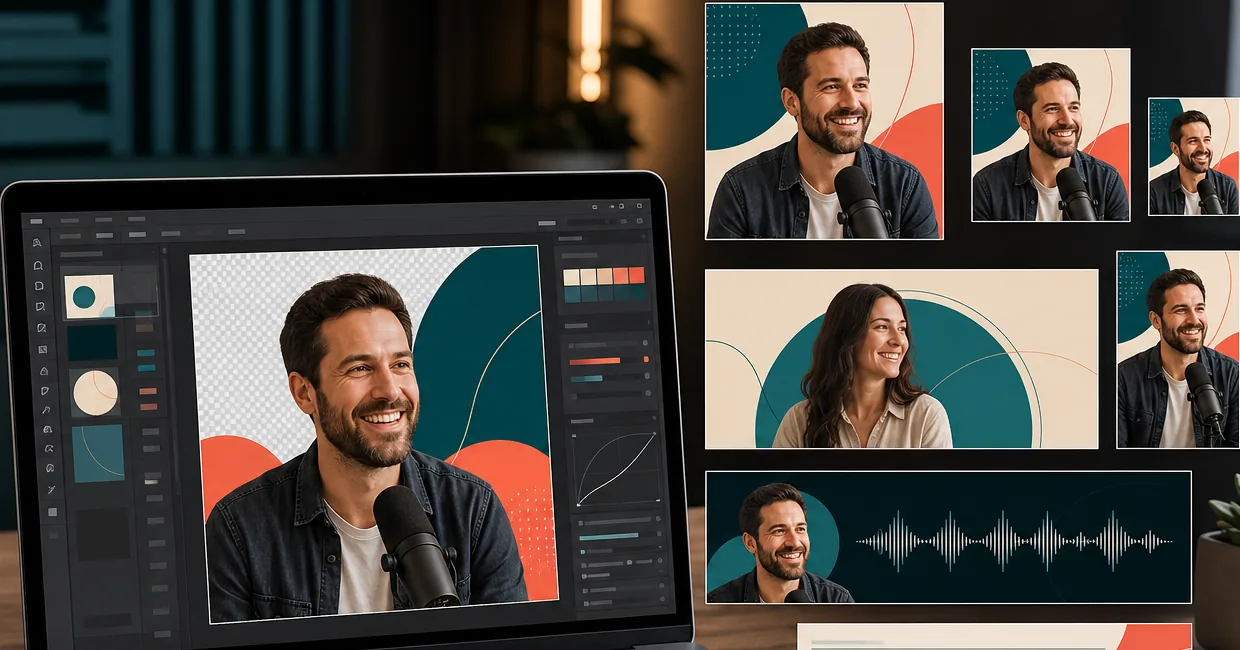
Cover art is the most-viewed surface and the least-discussed launch deliverable
Apple Podcasts and Spotify render cover art at three sizes — 3000×3000 on the show landing page, 1024×1024 on tablet directories, and 56-100px in feed and search results. The 56-100px feed thumbnail is the decisive surface: new listeners spend 0.5-1.5 seconds scanning search results, and cover art has to telegraph genre and tone in that window. Most podcast launches defer the cover-art deliverable to the end ('we'll figure out the art after we record the first three episodes'), which means the art gets made under time pressure by someone untrained in product positioning. The result is undifferentiated genre-default art that doesn't help listeners decide to tap. The opportunity cost compounds across every recommendation impression the show gets for its full lifetime.
Host headshots get reused for years and age out without anyone noticing
Podcasters typically commission one host headshot at launch and use the same photo for the cover art, the show website, the LinkedIn About section, every press feature, every podcast-network appearance, and every guest-host swap on other shows. Two to three years later, the photo is materially out of sync with the host's current appearance, current style, and the platform's current visual conventions — but it's everywhere, so updating it requires editing 30-80 surfaces simultaneously. The right approach is to commission a master headshot library upfront (4-6 angles in one focused session) and run AI Filter color-grade refreshes per-season so the visual identity stays fresh without constant re-shoots.
Per-episode guest graphics need to ship before the episode goes live, and 90-180 minutes of designer time per episode isn't sustainable
A typical weekly-publishing podcast with a strong guest format needs 4-8 supporting graphic surfaces per episode — Instagram square (1080×1080) featuring the guest, Stories/TikTok vertical (1080×1920), YouTube audiogram cover (1920×1080), email-newsletter inline hero (1200×600), and platform share cards for X / LinkedIn / Pinterest. Each surface needs the guest's photo prepped (background swap, consistent color grade matching the show's brand), the episode title overlaid in the show's typography template, and consistent visual identity across all surfaces. Producing this set manually runs 90-180 minutes per episode, which most shows can't sustain at weekly cadence — so the supporting set gets skipped, and the show relies entirely on platform algorithms for discovery instead of compounding social cross-promotion.
Per-season refresh signals 'still being made' to the algorithm, but re-shoots aren't realistic on creator budgets
Shows that have run more than 2-3 seasons need a cover-art refresh — listener perception of 'is this show still active' and algorithm signals around 'fresh creative' both favor recently-updated cover art over stale legacy creative. But commissioning a new photo session per season costs $300-800 and 4-6 hours of host time per season, which is unrealistic for the majority of podcasts that aren't network-supported. The AI refresh workflow (same master photo + different AI Filter grade + different background color + small typography refresh) produces visually-distinct refreshed cover art without re-shooting — fresh enough for the algorithm and the listener, without the budget and time of a new shoot per season.
How Magic Eraser fits the podcaster visual workflow
Build the master host-portrait library before the launch (or before the next season refresh)
Spend one focused 30-45 minute photo session producing the master source library — 2-3 host headshots (front-facing direct-gaze for cover art and platform profiles, three-quarter angle for show-website About sections, casual smile if the show tone supports it), 2-3 stylized object compositions (the microphone, the topic-prop, the visual icon associated with your show), and 1-2 atmospheric scene shots if your show uses narrative imagery. Shoot in even natural window light against a clean wall. Background Eraser will handle background swaps to brand-color solids, AI Enhance will handle sharpening and upscaling. From this 5-8 photo library, the AI workflow produces every cover-art variation, every per-episode graphic, every per-season refresh, and every social-promo crop for the show's full lifetime.
Ship the 3000×3000 cover art that passes the 100×100 thumbnail test
Open the strongest master photo in Magic Eraser. Background Eraser swaps the original background for a solid brand color (saturation matched to your genre — high-saturation primary colors for comedy and pop-culture, muted earth tones for narrative and serious commentary, dark backgrounds with single-light-source spot for true crime, clean white or cream for interview and expert shows). AI Fill outpaints if the source isn't already square. AI Enhance upscales to crisp 3000×3000. Add 80-100 point sans-serif title typography (3-5 words max, high-contrast color). Before exporting, mentally scale the composition to 100×100 — if the subject, the genre signal, and the title-as-text-shape don't all read, recompose with more centered framing and re-export. Upload at full quality to Apple Podcasters and Spotify for Podcasters; both platforms handle the downsampling.
Run per-episode guest graphics as a batch through the AI workflow
For each episode, prep the guest photo through the same workflow as host portraits: Background Eraser swaps the guest's original background (which usually isn't brand-aligned) to a consistent brand-color solid, AI Enhance recovers and sharpens (guest-supplied photos are often phone-camera quality), AI Filter applies the show's color-grade preset. From that single prepped guest photo, batch-produce the full supporting set: Instagram square (1080×1080) with episode title and guest name overlay, Stories/TikTok vertical (1080×1920) with the AI Fill outpaint extending to portrait aspect, YouTube audiogram cover (1920×1080) with AI Fill outpaint extending to landscape, email-newsletter inline hero (1200×600), and platform share cards for X (1200×675), LinkedIn (1200×627), and Pinterest pin (1000×1500). Total time per episode: 15-30 minutes versus 90-180 manually.
Refresh cover art per-season without re-shooting
When the show enters a new season (typically every 8-13 episodes for serialized shows, every 12 months for evergreen monologue shows), pull the same master host headshot from the library. Apply a different AI Filter color-grade preset (warmer for a summer-themed season, cooler for winter, more saturated for an upbeat season, more muted for a serious or investigative season). Apply a different Background Eraser background color from the brand-consistent palette (rotate through 2-4 colors across seasons so the brand stays recognizable while the cover stays fresh). Apply a small typography refresh (font weight adjustment, season indicator, color update). Re-export at 3000×3000, re-upload, and the show reads as 'actively produced' to both the algorithm and the listener without the budget and time of a new shoot.
Maintain visual continuity across formats (main feed + bonus episodes + special series)
Multi-format shows benefit from a visual system that maintains brand continuity while differentiating each format. The main feed uses the primary brand color and the primary host portrait. Bonus episodes use a secondary accent color from the brand palette with the same host portrait. Special-series episodes use a distinct compositional treatment (different background pattern, different framing) with the same master photo so listeners can tell the formats apart in their episode list without the show losing its visual identity. Magic Eraser's preset-saving lets the host save the main / bonus / special-series presets and apply each consistently across the show's full episode library.
Prep the show-website and platform-profile imagery from the same library
Beyond the podcast platforms themselves, podcasters need imagery for the show website (hero photo, About-section host portrait, episode-list thumbnails), platform profiles (LinkedIn header, Twitter/X profile, Instagram bio image), guest-appearance promotional graphics for other shows the host appears on, and press features. From the same master library, AI Fill outpaints to each required aspect ratio, Background Eraser maintains brand-color consistency, AI Filter applies the show's grade. The discipline of one-library-powers-everything keeps the host's visual identity coherent across every surface where the show appears — show landing pages, guest appearances, conference speaker slots, press features — without each surface requiring its own dedicated photo session.
Frequently Asked Questions
What's the minimum viable cover-art setup for a new podcast launch?
+
Start with the master host-portrait session — 30-45 minutes in even natural window light producing 4-6 host headshots and 2-3 object compositions. Total source-material cost: a phone or DSLR, window light, a clean wall (Background Eraser will handle the swap), one hour of focused shooting. From this 6-9 photo library, the AI workflow produces the launch 3000×3000 cover art and the supporting graphic set for the first 10-15 episodes — enough to ship the launch with strong cover art and the per-episode promo discipline that compounds discovery. Total cost: the 30-45 minutes of source photography plus Magic Eraser's free tier or $29.99/year Premium. Compared to hiring a designer for cover art ($200-800) plus a per-episode graphic package ($50-150 per episode × 10 episodes = $500-1500), the AI workflow is the difference between launching at all and waiting for budget.
How do I pick the right composition class for my show's genre?
+
Audit the top-30 shows in your genre on Apple Podcasts. Across the top-200 charts, cover-art compositions cluster into four classes: interview shows (single host portrait centered on solid brand-color background), narrative shows (atmospheric scene-setting compositions with type-driven hierarchy), monologue shows (stylized object iconography — microphone, typewriter, coffee cup), and co-host shows (two-portrait split or matched silhouette duos). Pick the class that matches your show format — a true-crime narrative show with a cheerful illustrated host reads as comedy in feed, and a commentary monologue show with two portraits reads as an interview. The AI workflow lets you produce a strong example in 2-3 different classes from the same master library and pick against the genre rather than commit blind.
How often should I refresh the cover art?
+
For active multi-season shows: every 1-2 seasons for a full visual refresh (new color grade + new background palette + small typography update from the same master library) and every 24-36 months for a fresh master photo shoot if the host's appearance or the show's tone has materially evolved. For evergreen monologue or expertise shows without season gates: every 12-18 months for the AI-driven refresh. The signal to refresh sooner is a measurable drop in tap-through rate from feed impressions or a listener-survey comment about the cover looking dated. The AI workflow makes the refresh cycle low-cost enough that erring on the side of more-frequent refresh is the safer operational default.
Can I prep guest photos that the guest supplied themselves, even if the source quality is poor?
+
Yes — this is one of the most common podcaster workflows. Guests typically supply phone-camera photos of variable quality (low-light, casual backgrounds, mixed sharpness). The AI workflow handles the recovery: AI Enhance sharpens and upscales the low-resolution source, Background Eraser swaps the casual background for a brand-consistent color, Magic Eraser brush removes any distractions or background clutter, and AI Filter applies the show's color-grade preset for visual consistency. The output is a guest photo that reads as brand-aligned without requiring the guest to commission their own studio shoot. For high-profile guests whose existing professional headshots are already available, use the supplied photo and apply only the color-grade pass to preserve the guest's brand.
Do I need to do anything special for shows distributed on YouTube as well as audio platforms?
+
Yes. YouTube companion uploads for podcasts use a 1920×1080 thumbnail (16:9 aspect, different from the 1:1 podcast cover art), and the YouTube algorithm rewards thumbnail discipline that's distinct from podcast platform cover-art conventions. Prep YouTube companion thumbnails as a separate deliverable per episode: AI Fill outpaints the host or guest photo to 16:9, Background Eraser swaps to a saturation +30-50% background for dark-mode YouTube feed visibility, AI Filter applies a higher-contrast color grade than the audio-platform cover, and 80-100 point bold sans-serif text overlay carries the 3-5 word hook. For shows with significant YouTube audience overlap, the YouTube thumbnail and the audio-platform cover are different products with different optimization targets and shouldn't be reused 1:1.
What about audiograms for clip-based promotion?
+
Audiograms (the short audio clip + waveform animation + episode-cover-art backdrop) are produced in dedicated audiogram tools (Headliner, Wavve, Descript) but the cover-art backdrop and the static title-card frames are Magic Eraser deliverables. Prep audiogram backdrops as a 1920×1080 horizontal or 1080×1920 vertical based on the target platform (1920×1080 for YouTube and Twitter, 1080×1920 for Instagram Reels / TikTok / Stories). From the master library photo, AI Fill outpaints to the target aspect, AI Filter applies the show's color grade, Background Eraser preserves brand-color consistency, and a static title-card overlay block reserves space for the audiogram tool's waveform animation. The cleaner the backdrop, the more legible the waveform reads at small social-feed sizes.
How does this scale to network-supported shows with multiple producers and hosts?
+
For multi-host shows and network-supported shows (academies, podcast networks, multi-show production houses), build a shared master library covering all hosts with the same Background Eraser background treatment and AI Filter brand preset. Every downstream asset (cover art, episode graphics, audiograms, social promo) references the shared library, so visual identity stays consistent regardless of which host is featured in which episode. Magic Eraser's preset sharing on the team plan handles the consistency leg; the editorial decisions (which host leads which episode, which guest gets featured) are the production team's. For networks running 3-12 shows, the shared-library discipline plus per-show color-grade variation produces the network's visual identity without requiring a designer per show.
Ship podcast cover art and per-episode graphics without a designer
Magic Eraser preps the full podcaster visual stack — 3000×3000 cover art that passes the 100×100 thumbnail test, per-episode guest graphic sets across 4-8 surfaces in 15-30 minutes, per-season AI refreshes without re-shoots, and platform-profile imagery from one shared master library. Free tier on web, iOS, and Android.
Try Magic Eraser freeRelated use cases
See how professionals use these tools in real-world workflows.
Listing photos cluttered with personal items, parked cars, or construction equipment can turn buyers away. Magic Eraser uses AI to clean up your property photos instantly — no Photoshop skills required.
Product listings need clear images before shoppers can judge the item. Magic Eraser helps sellers remove messy backgrounds, table edges, labels, props, glare, and other distractions so each product photo is easier to review before publishing.
Photobombers ruining your travel pics? Messy backgrounds killing your selfie game? Stop wasting hours in Photoshop. Magic Eraser removes distractions, cleans up cluttered shots, and expands your photos to fit any platform format — all in one tap.
Related comparisons
See how Magic Eraser compares to similar tools.
TouchRetouch is a popular paid mobile app for removing objects and blemishes. Magic Eraser offers free AI-powered editing on any device with no install required. See how they compare across features, pricing, and ease of use.
Cleanup.pictures is a free web tool with one generic eraser brush. Magic Eraser gives you 100+ purpose-built removal tools — one for emoji, glasses, watermarks, sky, power lines, and dozens more — plus background removal, AI enhance, and mobile apps, in 16 languages. See how breadth changes the result.
remove.bg is the market leader for background removal, offering a powerful API and integrations with Photoshop and Figma. Magic Eraser goes further with eight AI-powered editing tools — from object removal and generative fill to AI enhance and design — all in one editor.
Two powerful AI photo editors with different strengths. Magic Eraser offers a broader set of generative AI tools for creative editing, while Photoroom excels at e-commerce product photography and batch processing. See which fits your workflow.
Related guides
Explore more guides and editorial content related to this workflow.
Learn how to use Magic Eraser to remove objects, people, text, and distractions from photos with cleaner AI editing results.
Learn how to remove people from photos using AI in seconds. Step-by-step guide for travel photos, real estate shots, and product images.
Step-by-step guide to removing watermarks from your own photos using AI. Learn when it is appropriate, the best techniques, and how Magic Eraser handles it.