
Veterinary Practice Photos: Clinic Marketing, Patient Galleries & Social Media
Veterinary practices depend heavily on trust — pet owners choose their vet based on perceived warmth, competence, and genuine care for animals. The visual communication of that trust happens through the practice's website, social media, and Google Business Profile, where photos of happy patients, caring staff, and a clean welcoming facility signal everything words cannot. The problem is that veterinary clinics are clinical environments: stainless steel tables, medical equipment, fluorescent overhead lighting, and animals that are often anxious or restrained. Magic Eraser's Background Eraser and AI Enhance transform clinical snapshots into the warm, approachable imagery that builds the trust pet owners are looking for.
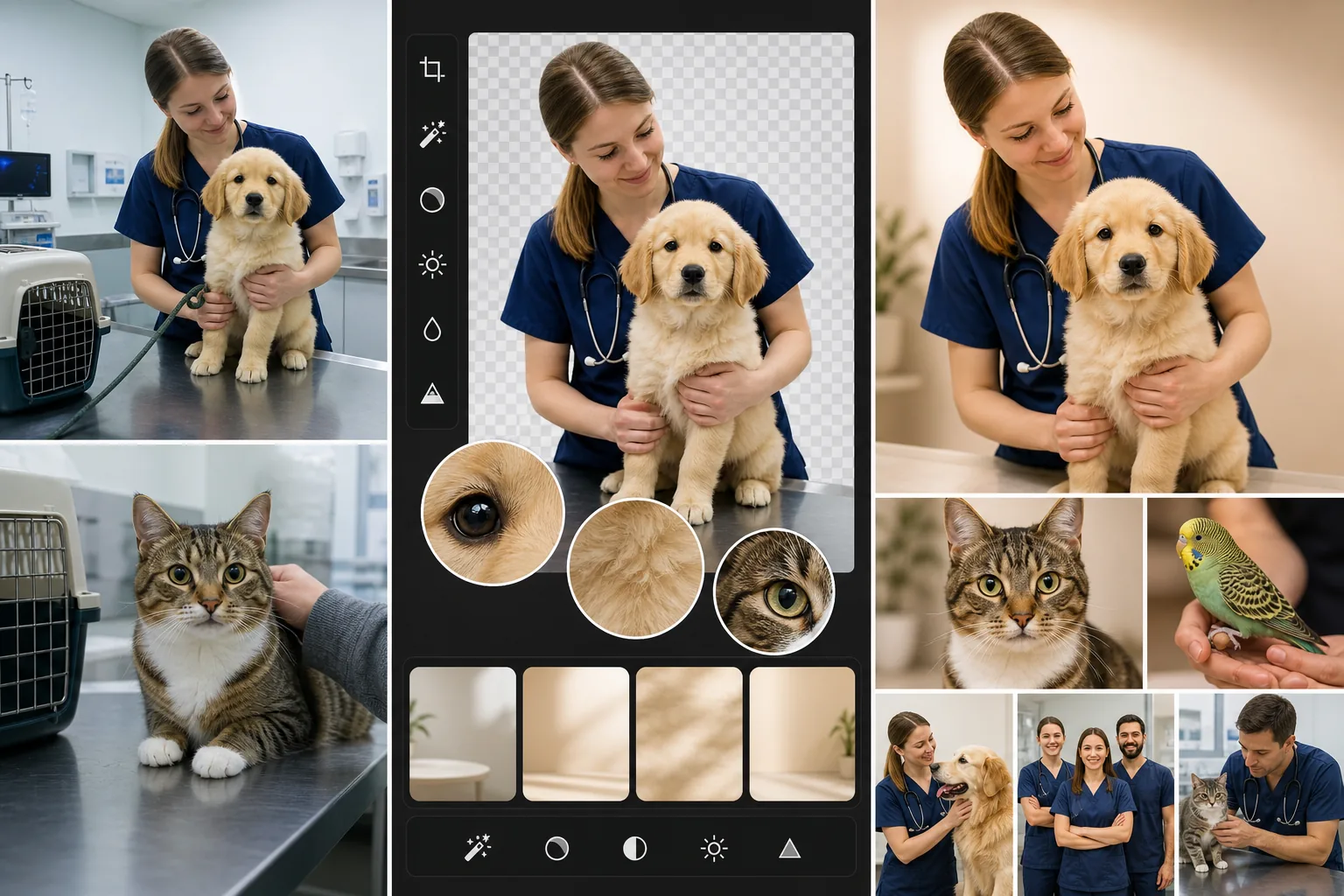
Clinical backgrounds undermine the warmth the practice wants to communicate
A photo of a veterinarian holding a puppy should radiate warmth and care. But when the background shows an exam table with medical instruments, a sharps container on the wall, fluorescent ceiling tiles, and a computer monitor displaying lab results, the image communicates 'medical procedure' instead of 'trusted caregiver.' Pet owners scrolling Google search results or the practice's Instagram do not consciously process the background, but it shapes their emotional response to the image. Background Eraser isolates the veterinarian-and-patient subject from the clinical environment and replaces it with clean, warm-toned backgrounds that communicate the care relationship rather than the medical setting.
Fluorescent clinic lighting produces unflattering, cold-toned photos
Veterinary clinics use overhead fluorescent and LED panel lighting designed for medical examination — bright, even, and high color-temperature. This lighting is excellent for clinical work and terrible for photography: it washes out skin tones, creates harsh under-eye shadows on staff, produces green or blue color casts, and makes animal fur and feathers look dull. Staff phone-camera photos taken under clinic lighting consistently look institutional rather than inviting. AI Enhance corrects the color temperature, recovers warmth in skin and fur tones, and softens the harsh lighting effect to produce images that look like they were taken in a well-lit, welcoming environment.
Getting good photos of animals in a clinical setting is inherently difficult
Animals at the vet are often anxious, restrained, or sedated — not the bright-eyed, happy patient photos the practice wants for marketing. The window for a good photo is narrow: the 10-30 seconds when the animal is calm, alert, and looking at the camera between the stress of the exam table and the relief of returning to the owner. Staff capture dozens of attempts to get one usable shot, and even the best attempt often has a restraint hand in frame, a muzzle partially visible, or a leash at an awkward angle. Magic Eraser removes restraint equipment and awkward elements from the otherwise-good patient photos without re-shooting.
How Magic Eraser fits the veterinary practice photo workflow
Build a patient-photo capture habit into the appointment workflow
Train front-desk and technician staff to capture 2-3 quick phone photos of cooperative patients during or after appointments — with owner permission, which should be integrated into the intake paperwork as a media-release checkbox. The best moments are post-exam when the animal is calmer, during treats and positive reinforcement, and during the greeting with the veterinarian. Do not force photo opportunities with anxious or uncooperative patients. Over a week of appointments, the practice accumulates 20-50 raw patient photos to work with.
Remove clinical backgrounds and distracting elements
Review the week's patient photos and select the 5-10 best candidates — animals that are alert, calm, and engaging with staff or the camera. Use Background Eraser to isolate the animal (and the staff member, if it is a staff-with-patient shot) from the clinical background. Replace with a warm, clean background: soft solid colors that complement the animal's coloring, or the practice's brand colors. Use Magic Eraser brush to remove any visible restraint equipment, leash tangles, or clinical items that are on the subject but not part of the desired composition.
Enhance lighting, warmth, and fur/feather detail
Run AI Enhance on the background-swapped images to correct fluorescent color casts, add warmth to skin and fur tones, sharpen fur and feather detail that phone cameras under fluorescent light tend to flatten, and brighten the overall image. The goal is imagery that looks naturally warm and welcoming — not over-processed or filtered, but noticeably better than the raw clinic snapshot. Pay particular attention to the animal's eyes, which should be bright and alert in the final image.
Deploy across marketing channels with consistent visual identity
Post the best patient photos to Instagram and Facebook (2-3 per week is sufficient for engagement), update the Google Business Profile photo gallery monthly, refresh the website's team and patient photo sections quarterly, and use the strongest images in email newsletters and appointment-reminder communications. Maintain a consistent background-color palette and enhancement style across all images so the practice's visual identity is cohesive. A veterinary practice with 6-12 months of consistently warm, professional patient photos builds a visual trust library that meaningfully differentiates it from competitors using stock photos or unedited clinical snapshots.
Frequently Asked Questions
Do we need owner permission to use patient photos in marketing?
+
Yes. Integrate a photo-and-social-media release into your new-client intake paperwork and make it easy for existing clients to opt in at check-in. Most pet owners are happy to have their pet featured on the practice's social media — many will actively share and tag the posts, which extends your reach organically. For sensitive cases (end-of-life care, emergency presentations, behavioral cases), do not photograph without explicit specific consent regardless of the general release on file. Keep the release records accessible so you can verify consent if a post is questioned.
How do we get good photos of cats and other anxious patients?
+
Cats, exotic pets, and anxious dogs require a lighter touch. For cats, the best photo window is often in the carrier with the top removed, where they feel partially enclosed and secure, or on a familiar blanket from home. For anxious dogs, post-treat moments and greeting-the-owner moments after the exam are the calmest windows. For exotic pets (rabbits, birds, reptiles), photograph in the owner's hands when possible. Accept that only 1 in 5 attempts will produce a usable photo with anxious patients — the volume approach works because you only need one good shot per patient visit, and AI enhancement can recover a lot from an imperfect but well-timed capture.
Should we use these photos or professional stock photos on our website?
+
Real patient and staff photos can feel more credible than generic stock photos in veterinary practice marketing. Pet owners choosing a vet want to see the actual people and animals at the actual practice — stock photos of models in lab coats holding photogenic golden retrievers signal 'generic corporate veterinary chain,' not 'our family's trusted vet.' Even an AI-enhanced phone photo of a real patient with a real staff member builds more trust than a professionally shot stock image. The enhancement workflow bridges the quality gap so your real photos are visually competitive with stock while maintaining the authenticity that drives new-client conversion.
Show pet owners the warmth behind the clinic
Background Eraser removes clinical backgrounds from patient photos. AI Enhance corrects fluorescent lighting and brings out the warmth in fur, feathers, and staff interactions. Build visual trust with real patients and real care. Free tier on web, iOS, and Android.
Try Magic Eraser freeRelated use cases
See how professionals use these tools in real-world workflows.
Listing photos cluttered with personal items, parked cars, or construction equipment can turn buyers away. Magic Eraser uses AI to clean up your property photos instantly — no Photoshop skills required.
Product listings need clear images before shoppers can judge the item. Magic Eraser helps sellers remove messy backgrounds, table edges, labels, props, glare, and other distractions so each product photo is easier to review before publishing.
Remove a distracting background and replace it with a clean solid color for a passport, visa, or ID photo. Because requirements vary by document and country, confirm the current official color, crop, size, and submission rules before you apply.
Related comparisons
See how Magic Eraser compares to similar tools.
TouchRetouch is a popular paid mobile app for removing objects and blemishes. Magic Eraser offers free AI-powered editing on any device with no install required. See how they compare across features, pricing, and ease of use.
Cleanup.pictures is a free web tool with one generic eraser brush. Magic Eraser gives you 100+ purpose-built removal tools — one for emoji, glasses, watermarks, sky, power lines, and dozens more — plus background removal, AI enhance, and mobile apps, in 16 languages. See how breadth changes the result.
remove.bg is the market leader for background removal, offering a powerful API and integrations with Photoshop and Figma. Magic Eraser goes further with eight AI-powered editing tools — from object removal and generative fill to AI enhance and design — all in one editor.
Two powerful AI photo editors with different strengths. Magic Eraser offers a broader set of generative AI tools for creative editing, while Photoroom excels at e-commerce product photography and batch processing. See which fits your workflow.
Related guides
Explore more guides and editorial content related to this workflow.
Learn how to use Magic Eraser to remove objects, people, text, and distractions from photos with cleaner AI editing results.
Learn how to remove people from photos using AI in seconds. Step-by-step guide for travel photos, real estate shots, and product images.
Step-by-step guide to removing watermarks from your own photos using AI. Learn when it is appropriate, the best techniques, and how Magic Eraser handles it.