
Edit Photos for Instagram, TikTok & Social Media with AI
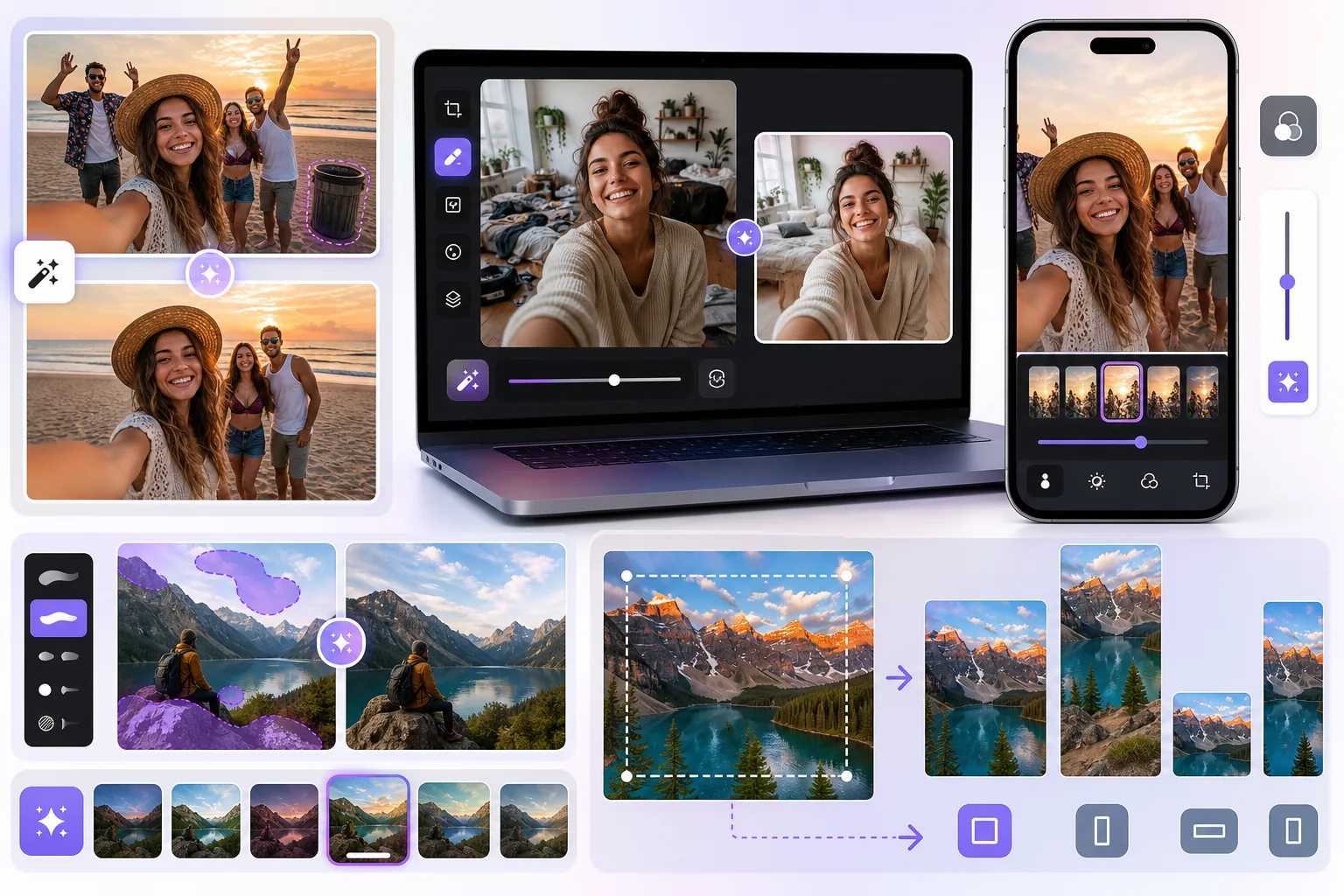
Photobombers ruining your travel pics? Messy backgrounds killing your selfie game? Stop wasting hours in Photoshop. Magic Eraser removes distractions, cleans up cluttered shots, and expands your photos to fit any platform format — all in one tap.
Strangers & Photobombers in Your Shots
That perfect sunset photo from your trip — except for the random tourist walking through the frame. Group photos where someone blinked or an uninvited stranger appeared in the background. AI object removal erases unwanted people in seconds, no manual masking required.
Messy Backgrounds in Selfies & Stories
Your outfit is fire but the pile of laundry behind you isn't. Cluttered rooms, dirty mirrors, and distracting backgrounds tank your engagement. Clean up or completely replace backgrounds so your content looks studio-quality every time.
Resizing Photos Across Platform Formats
One photo, five formats: square for your feed, 9:16 for Stories and Reels, landscape for Twitter headers, and portrait for Pinterest. AI Expand intelligently extends your image canvas so you never have to awkwardly crop or lose important details.
From Raw Photo to Post-Ready in 4 Steps
Upload Your Photo
Drag and drop or snap a photo directly from your camera roll. Works with JPG, PNG, HEIC, and WebP.
Remove Unwanted Objects
Brush over photobombers, trash cans, power lines, or any distraction. AI fills in the gap with realistic detail.
Clean Up the Background
Smooth out cluttered backgrounds, remove stains, or swap the entire backdrop for something cleaner.
Resize & Export for Any Platform
Choose from preset aspect ratios for Instagram, TikTok, YouTube, or Pinterest. AI Expand fills in the extra canvas naturally.
Removal tools for this workflow
Frequently Asked Questions
Will editing look obvious to my followers?
+
No. Magic Eraser uses generative AI to reconstruct removed areas with realistic textures, lighting, and perspective. The result is seamless — your followers won't be able to tell anything was edited.
Can I batch-edit multiple photos at once?
+
Yes. You can upload and process multiple photos in a single session, which is perfect for content creators who shoot in bulk and need to prep an entire week of posts.
Does it work on photos taken with my phone camera?
+
Absolutely. Magic Eraser works with any photo format from any device — iPhone, Android, DSLR, or screenshots. No special equipment needed.
Can I use AI Expand to make a horizontal photo vertical for Stories?
+
Yes. AI Expand can extend any edge of your image — top, bottom, left, or right — so you can convert a landscape shot into a portrait format for Stories or Reels without cropping out the good parts.
Make Every Post Your Best Post
Upload a social media photo to remove a distraction, clean the background, or expand the canvas. Review the result, then export when it looks right.
Start Editing FreeRelated use cases
See how professionals use these tools in real-world workflows.
Listing photos cluttered with personal items, parked cars, or construction equipment can turn buyers away. Magic Eraser uses AI to clean up your property photos instantly — no Photoshop skills required.
Product listings need clear images before shoppers can judge the item. Magic Eraser helps sellers remove messy backgrounds, table edges, labels, props, glare, and other distractions so each product photo is easier to review before publishing.
Dealing with screenshots cluttered by captions, old photos stamped with dates, or images covered in text overlays? Magic Eraser's AI text remover erases unwanted text from any image and rebuilds the background naturally, so your photos look clean and professional.
Related comparisons
See how Magic Eraser compares to similar tools.
TouchRetouch is a popular paid mobile app for removing objects and blemishes. Magic Eraser offers free AI-powered editing on any device with no install required. See how they compare across features, pricing, and ease of use.
Cleanup.pictures is a free web tool with one generic eraser brush. Magic Eraser gives you 100+ purpose-built removal tools — one for emoji, glasses, watermarks, sky, power lines, and dozens more — plus background removal, AI enhance, and mobile apps, in 16 languages. See how breadth changes the result.
Two powerful AI photo editors with different strengths. Magic Eraser offers a broader set of generative AI tools for creative editing, while Photoroom excels at e-commerce product photography and batch processing. See which fits your workflow.
We tested and compared the top AI photo editing tools so you don't have to. From object removal to background replacement, see which editor delivers the best results for your workflow.
Related guides
Explore more guides and editorial content related to this workflow.
Learn how to use Magic Eraser to remove objects, people, text, and distractions from photos with cleaner AI editing results.
Learn how to remove people from photos using AI in seconds. Step-by-step guide for travel photos, real estate shots, and product images.
Step-by-step guide to removing watermarks from your own photos using AI. Learn when it is appropriate, the best techniques, and how Magic Eraser handles it.