
Wedding Photo Editing Made Faster with AI
Wedding photos deserve perfection, but manual retouching takes hours. Magic Eraser helps photographers and couples remove distracting elements, clean backgrounds, and enhance details so every shot looks its best.
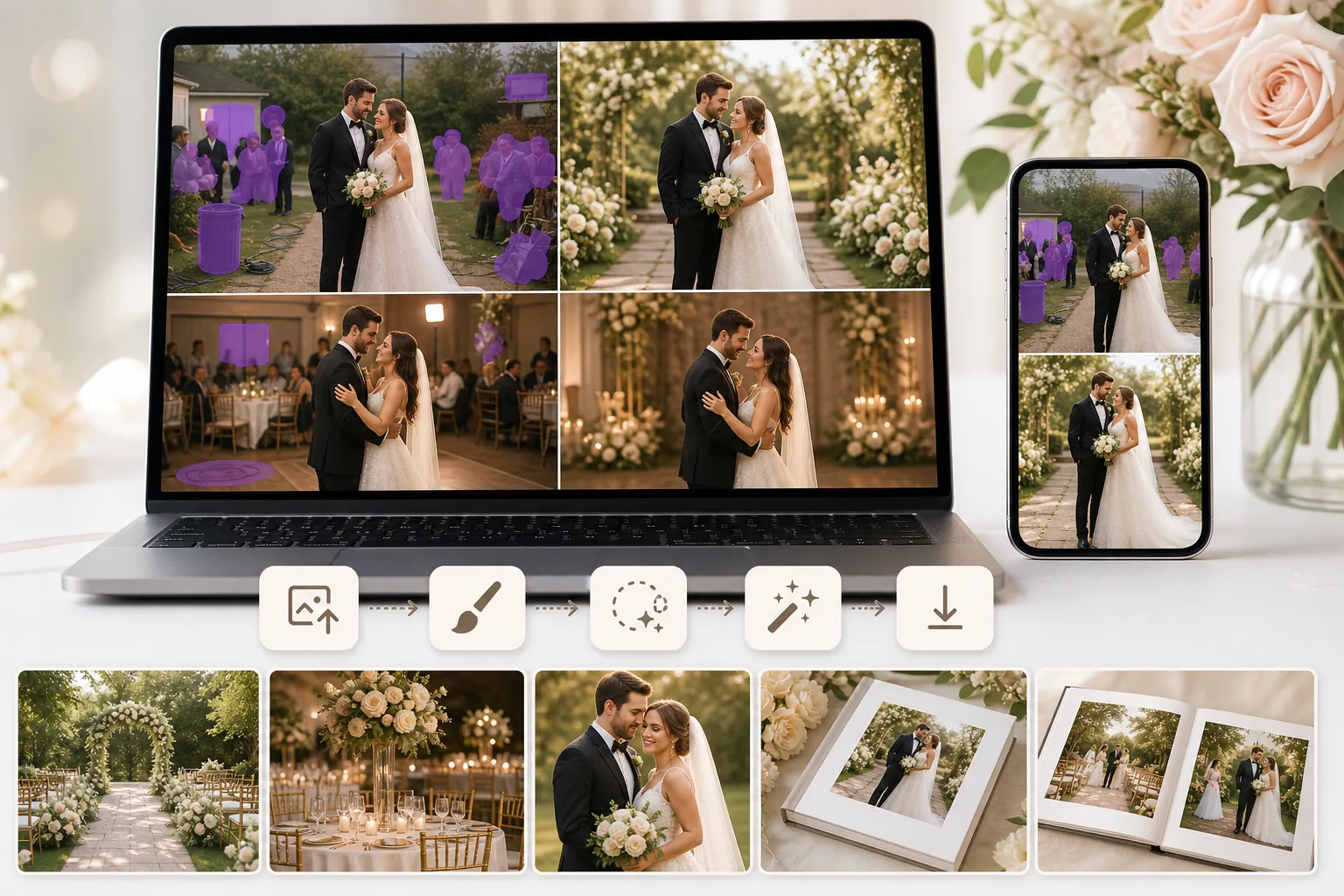
Unwanted people in the background
Exit signs, strangers, and photobombers distract from the couple. Manually cloning them out in Photoshop is tedious, especially across hundreds of ceremony and reception shots.
Inconsistent lighting across the day
Wedding events span indoor ceremonies, outdoor portraits, and evening receptions. Balancing exposure and color across these conditions eats up editing time.
Volume of photos to deliver
Photographers deliver hundreds of images per wedding. Spending several minutes on each distraction removal adds up fast and pushes delivery timelines.
How Magic Eraser Helps with Wedding Photos
Upload the photo
Open Magic Eraser in your browser or on your phone and upload the wedding image you want to clean up.
Brush over distractions
Use the eraser tool to paint over unwanted guests, signs, trash cans, cables, or any object that takes attention away from the couple.
Enhance and polish
Use AI enhancement to sharpen details, improve lighting balance, and bring out colors for a polished final image.
Download and deliver
Export the cleaned image at full resolution, ready for albums, prints, or online galleries.
Frequently Asked Questions
Can Magic Eraser remove people from wedding photos?
+
Yes. Brush over unwanted guests or photobombers and Magic Eraser removes them while reconstructing the background naturally.
Will the edited area look natural?
+
Magic Eraser uses AI to fill the removed area with context-aware content that matches the surrounding scene, so the result looks clean and seamless.
Can I edit wedding photos on my phone?
+
Yes. Magic Eraser works on both web and mobile, so you can make quick fixes from your phone right after the event.
Is this useful for professional wedding photographers?
+
Yes. Professional photographers use Magic Eraser to speed up culling and cleanup workflows, especially for high-volume wedding shoots.
Can I also fix the background behind the couple?
+
Yes. You can remove the background entirely or clean up specific distractions behind the couple using the eraser and fill tools together.
Make every wedding photo album-ready
Try Magic Eraser free and remove distractions, enhance details, and deliver polished wedding images faster.
Try Magic Eraser freeRelated use cases
See how professionals use these tools in real-world workflows.
Listing photos cluttered with personal items, parked cars, or construction equipment can turn buyers away. Magic Eraser uses AI to clean up your property photos instantly — no Photoshop skills required.
Product listings need clear images before shoppers can judge the item. Magic Eraser helps sellers remove messy backgrounds, table edges, labels, props, glare, and other distractions so each product photo is easier to review before publishing.
Photobombers ruining your travel pics? Messy backgrounds killing your selfie game? Stop wasting hours in Photoshop. Magic Eraser removes distractions, cleans up cluttered shots, and expands your photos to fit any platform format — all in one tap.
Related comparisons
See how Magic Eraser compares to similar tools.
TouchRetouch is a popular paid mobile app for removing objects and blemishes. Magic Eraser offers free AI-powered editing on any device with no install required. See how they compare across features, pricing, and ease of use.
Cleanup.pictures is a free web tool with one generic eraser brush. Magic Eraser gives you 100+ purpose-built removal tools — one for emoji, glasses, watermarks, sky, power lines, and dozens more — plus background removal, AI enhance, and mobile apps, in 16 languages. See how breadth changes the result.
remove.bg is the market leader for background removal, offering a powerful API and integrations with Photoshop and Figma. Magic Eraser goes further with eight AI-powered editing tools — from object removal and generative fill to AI enhance and design — all in one editor.
Two powerful AI photo editors with different strengths. Magic Eraser offers a broader set of generative AI tools for creative editing, while Photoroom excels at e-commerce product photography and batch processing. See which fits your workflow.
Related guides
Explore more guides and editorial content related to this workflow.
Learn how to use Magic Eraser to remove objects, people, text, and distractions from photos with cleaner AI editing results.
Learn how to remove people from photos using AI in seconds. Step-by-step guide for travel photos, real estate shots, and product images.
Step-by-step guide to removing watermarks from your own photos using AI. Learn when it is appropriate, the best techniques, and how Magic Eraser handles it.