
Virtual Staging with AI
Empty listings sit on the market longer because buyers struggle to visualize the space. Virtual staging with AI fills the rooms with furniture in the style your buyer wants — modern, transitional, coastal, traditional — in minutes per room instead of days. Magic Eraser handles the pre-staging cleanup (paint touch-ups, painter's tape, debris) and the post-staging polish (lighting refinement, edge cleanup).
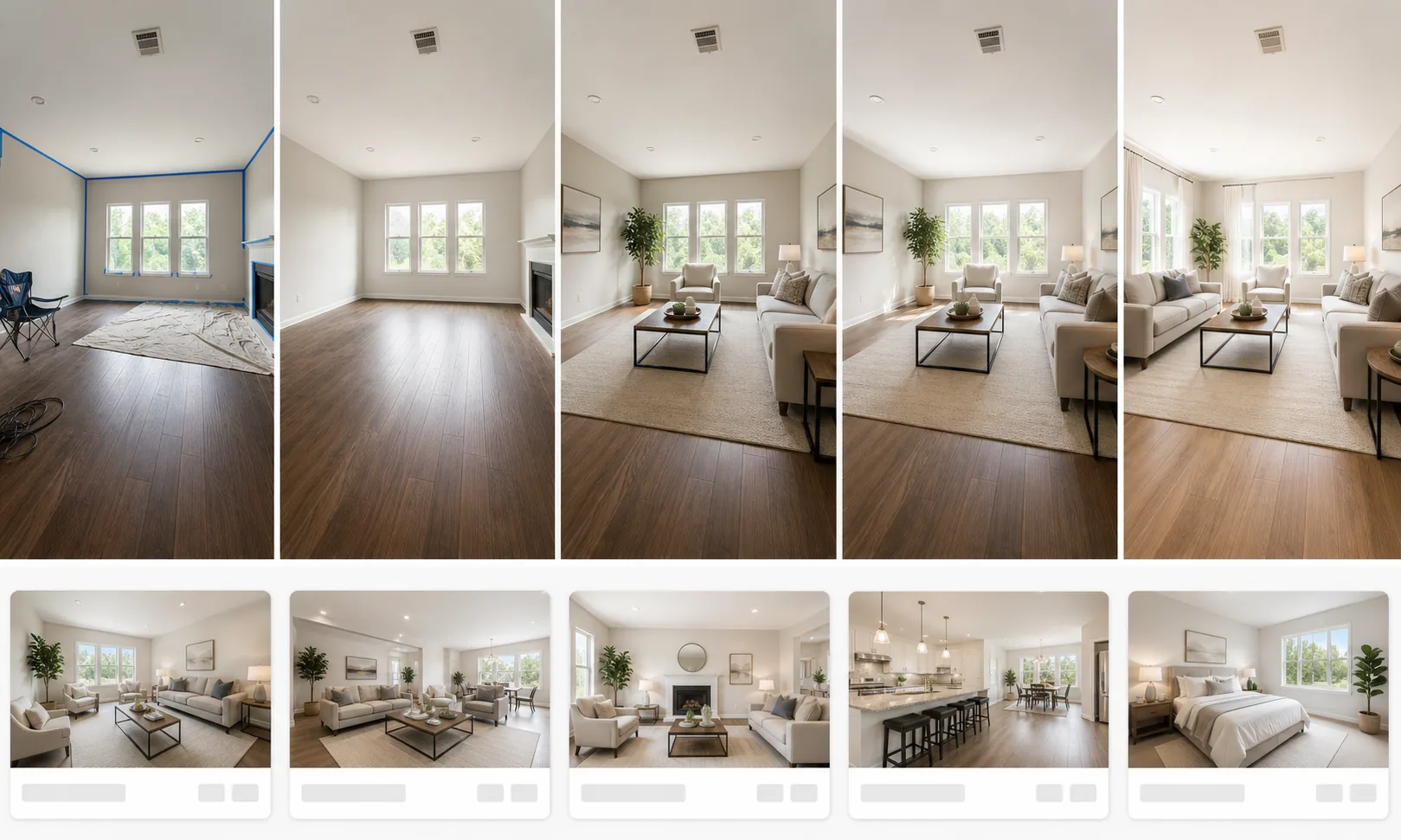
Vacant rooms sit on the market longer
Listings without furniture consistently score lower on engagement metrics. Buyers struggle to estimate scale and imagine a layout when the rooms are empty, so they scroll past. Industry data on virtual staging shows 1–3% price lift and 15–30 day reduction in days-on-market when vacant rooms are furnished, even virtually.
Professional staging costs $1,500–$3,000 per month
Physical staging requires renting furniture, paying the staging company, and absorbing the cost across an unpredictable time-on-market window. For starter homes and rental units, the math rarely works. Virtual staging produces the same listing-engagement lift for a fraction of the cost.
Dated existing furniture hurts buyer perception
Some listings come with the seller's existing furniture in place, which reads as dated, cluttered, or simply mismatched to the target buyer demographic. Replacing it for a shoot is impractical; editing it out and re-staging digitally is faster and produces a more consistent style across rooms.
Buyer demographics vary by listing
A first-time-buyer condo and a downsizer townhouse target different styles. Virtual staging lets the agent generate the same room in multiple styles (modern minimalist for the condo, transitional for the townhouse) and use the version that fits each listing without paying for two physical shoots.
How Magic Eraser fits into the virtual staging workflow
Upload the empty (or to-be-cleared) room photo
Open Magic Eraser and drop in the wide-angle room photo. JPEG, PNG, HEIC, and full-resolution camera RAW conversions are all supported. For multi-room shoots, batch upload the full set so the staging style stays consistent across rooms.
Clean up paint touch-ups, tape, and debris
Brush over painter's tape at trim edges, paint touch-up marks on walls, leftover construction debris, drop cloths, electrical-outlet covers being replaced, and stray cables. Magic Eraser rebuilds the wall, floor, or ceiling underneath. This pre-staging cleanup pass produces a cleaner canvas for the AI furniture generator.
Remove existing dated or mismatched furniture
If the room came furnished and you want to re-stage, brush over the existing furniture. The AI rebuilds the floor, wall, and corner detail underneath. This is the highest-leverage step: replacing the seller's outdated couch with generated modern furniture often changes the listing's buyer-demographic appeal entirely.
Generate furniture in the target style
Send the cleaned-up room to your virtual staging tool of choice. Specify the style (modern, transitional, coastal, traditional, scandinavian, mid-century) and the room function (bedroom, living, dining, home office). Most tools take 30–90 seconds per room to generate a furnished version with consistent perspective and lighting.
Refine lighting and edge detail
Run a final Magic Eraser pass on any generated furniture that intersects oddly with original architecture, or where the lighting on the generated furniture doesn't match the existing window light. AI Enhance can lift slightly-flat shadows and recover detail in the room's original windows and trim that should still read as the real photo.
Add disclosure footer and export MLS-ready
MLS policy and the NAR Code of Ethics Article 12 require disclosure that staging is virtual. Add a small footer caption ('Virtually staged') in your listing software or burn it into the corner of the image. Export at the resolution your MLS requires (typically 1024×768 or higher; some require 1500×1000) and upload.
Frequently Asked Questions
Is virtual staging allowed by the MLS?
+
Yes, but disclosure is required. NAR Code of Ethics Article 12 and most MLS handbooks require that virtually staged photos be clearly labeled as such. The standard approach is a small 'Virtually staged' caption on the image and a note in the listing description. Check your local MLS policy for the exact wording.
How is this different from physical staging?
+
Physical staging puts real furniture in the room and is photographed in place. Virtual staging adds the furniture digitally to a photo of the empty room. Buyers see the furnished version online; the actual room they tour is empty (or as it was). Physical staging costs $1,500–$3,000 per month; virtual staging is typically $25–$50 per photo with AI tools, and seconds per photo with a self-serve workflow.
How long does virtual staging take per room?
+
With a self-serve AI workflow, expect 5–15 minutes per room end-to-end: 2–3 minutes of Magic Eraser cleanup, 1–2 minutes of furniture generation, 2–5 minutes of refinement. A 6-room listing takes about an hour. Outsourced services typically deliver within 24–48 hours per listing.
What styles work best for which listings?
+
Modern and minimalist for urban condos and first-time-buyer starter homes. Transitional for mid-priced suburban listings. Coastal for waterfront properties. Traditional for older homes and downsizer townhouses. Scandinavian and mid-century pull strongly with younger buyers. The right answer is usually the style that matches your local comparable sales — buyers want to see furniture that signals the listing fits their target neighborhood.
Can I virtually un-stage as well as stage?
+
Yes, and this is often more valuable. Removing the seller's existing dated furniture, mismatched decor, or family photos from a listing photo lets you re-stage in a target buyer style, or simply show the room cleaner. Magic Eraser handles the furniture removal pass; the AI furniture generator handles the replacement.
Does this work for commercial real estate too?
+
Yes. Empty offices, retail spaces, and restaurants benefit even more from virtual staging than residential listings, because commercial tenants are imagining a specific layout. Generated furniture for offices (desks, partitions, meeting tables) and retail (display fixtures, register stations) makes the space leasable instead of empty-and-confusing.
What about exterior shots — can I add patio furniture?
+
Yes, the same workflow applies. Empty patios, decks, and yards become more compelling when the AI adds outdoor furniture, planters, or string lights. The cleanup pass for exteriors usually focuses on removing trash bins, hoses, and seasonal yard debris before the staging tool generates the outdoor scene.
Prepare cleaner photos for virtual staging
Use Magic Eraser to clean the original room photo and refine awkward edges after furniture is generated. Review the result for accuracy and disclose virtual staging according to your local listing rules.
Open Magic EraserRelated use cases
See how professionals use these tools in real-world workflows.
Listing photos cluttered with personal items, parked cars, or construction equipment can turn buyers away. Magic Eraser uses AI to clean up your property photos instantly — no Photoshop skills required.
Product listings need clear images before shoppers can judge the item. Magic Eraser helps sellers remove messy backgrounds, table edges, labels, props, glare, and other distractions so each product photo is easier to review before publishing.
Photobombers ruining your travel pics? Messy backgrounds killing your selfie game? Stop wasting hours in Photoshop. Magic Eraser removes distractions, cleans up cluttered shots, and expands your photos to fit any platform format — all in one tap.
Related comparisons
See how Magic Eraser compares to similar tools.
TouchRetouch is a popular paid mobile app for removing objects and blemishes. Magic Eraser offers free AI-powered editing on any device with no install required. See how they compare across features, pricing, and ease of use.
Cleanup.pictures is a free web tool with one generic eraser brush. Magic Eraser gives you 100+ purpose-built removal tools — one for emoji, glasses, watermarks, sky, power lines, and dozens more — plus background removal, AI enhance, and mobile apps, in 16 languages. See how breadth changes the result.
remove.bg is the market leader for background removal, offering a powerful API and integrations with Photoshop and Figma. Magic Eraser goes further with eight AI-powered editing tools — from object removal and generative fill to AI enhance and design — all in one editor.
Two powerful AI photo editors with different strengths. Magic Eraser offers a broader set of generative AI tools for creative editing, while Photoroom excels at e-commerce product photography and batch processing. See which fits your workflow.
Related guides
Explore more guides and editorial content related to this workflow.
Learn how to use Magic Eraser to remove objects, people, text, and distractions from photos with cleaner AI editing results.
Learn how to remove people from photos using AI in seconds. Step-by-step guide for travel photos, real estate shots, and product images.
Step-by-step guide to removing watermarks from your own photos using AI. Learn when it is appropriate, the best techniques, and how Magic Eraser handles it.