
Self-Published Author Photo Workflow: Covers, Headshots, BookTok, Series
Indie authors compete with traditional publishing on Amazon's discovery surface where the same algorithms, the same readers, and the same 100-150px mobile-thumbnail decision window apply equally to both. The difference is the production budget — traditional publishers have in-house art departments and marketing teams; indie authors have to handle covers, author headshots, BookTok and Instagram promo, A+ Content modules, and series-consistent visual identity themselves. Magic Eraser preps the full self-published author visual stack — book covers that survive the thumbnail render, author headshots for back covers and bios, social-promo across BookTok / Instagram / Pinterest, Amazon A+ Content modules, and series-consistent presets across 3-12 books — in minutes per asset instead of $400-1500 of designer time per book.
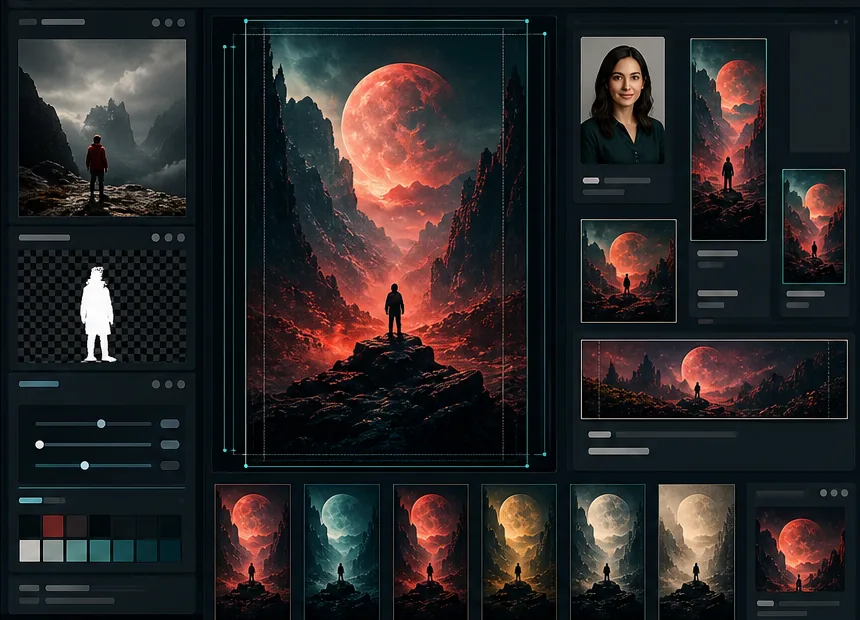
The cover is the most expensive product-marketing decision in the launch — and the easiest to get wrong
Commissioning a designer-grade book cover runs $400-1500 per book, plus 4-8 weeks of design cycles, plus the per-revision back-and-forth when the first draft doesn't match the author's vision. For series authors with 3-12 books, the cover-budget total runs $5K-15K across the catalog — meaningful budget that could otherwise fund ad spend, audiobook production, developmental editing, or cover refreshes. And the cover is also the easiest decision to get wrong, because most indie authors evaluate the cover at 6×9 print render where it looks impressive and ship it without ever running the 100-150px Amazon-mobile-thumbnail test where it actually has to perform. The AI workflow reframes the economics: cover prep in 4-12 hours of design work using Magic Eraser, with the same Amazon-thumbnail discipline a Big-Five art department would apply, at the cost of the subscription plus stock licensing.
Author headshots reused across years on back covers, bios, and platform profiles
Indie authors typically commission one author headshot at launch and reuse the same photo across every back-cover bio, every Amazon Author Central page, every platform profile (LinkedIn, X, Instagram, Facebook, Pinterest, BookTok, Substack), every podcast or speaking-event promo, every press feature, and every guest-blog appearance. Three to five years later, the photo is materially out of sync with the author's current appearance and the platform's current visual conventions — but it's embedded in 30-80 surfaces, so updating it requires editing every surface simultaneously. The right approach is to commission a master headshot library upfront (4-6 angles in one focused session) and run AI Filter color-grade refreshes per-year so the visual identity stays fresh without constant re-shoots.
BookTok, Instagram, and Pinterest promo runs on a per-book launch cadence that designer-budget can't sustain
Modern indie-book launches need a supporting graphic set across BookTok (vertical 1080×1920 with 3-5 per book), Instagram (4:5 portrait 1080×1350 carousels and 1080×1080 squares, 5-10 per book), Pinterest (2:3 vertical 1000×1500 pins, 3-5 per book), Twitter/X (1200×675 share cards, 2-3 per book), and email-newsletter inline imagery (1200×600 hero plus 600×300 supporting, 3-5 per launch sequence). Total per-book promo set: 30-60 distinct visual assets. Designer cost: $1000-3000 per book promo set; AI workflow cost: 4-8 hours of batch production through Magic Eraser plus the subscription. For series authors launching 1-3 books per year, the AI workflow is the difference between full-cadence promo and skipping promo on books two through nine.
Series consistency across 3-12 books over years requires recipe discipline indie authors don't have
Series authors face a visual-identity problem traditional publishing solves with imprint art departments: book seven needs to look like the same family as book one, even when production happened years apart, the trends have shifted, and the original designer may no longer be available. Without recipe discipline (saved AI Filter presets, Background Eraser palette, AI Fill outpaint dimensions, title typography template), book seven often looks like a different series from book one — which confuses returning readers, breaks the catalog's visual story in BookTok and Pinterest grids, and undermines the cumulative-brand-equity value of the series. Magic Eraser's preset persistence handles the recipe leg; the editorial decisions (which book gets which color grade, which series-element overlay rolls forward) are the author's.
How Magic Eraser fits the indie-author workflow
Build the master author-headshot library and the cover source-image library before any specific book launch
Spend one focused 30-45 minute photo session producing the master author-headshot library — 4-6 author headshots covering the angles you'll need across back covers, bios, platform profiles, and promo (confident direct-gaze for cover and platform profiles, three-quarter angle for bio pages, casual smile for social and email, thoughtful pose for press features). In parallel, build the cover source-image library — 3-5 hero candidates for the cover concept (photographic for literary, illustrated for cozy mystery and romance, typographic for thrillers and business non-fiction) plus 2-4 supporting elements (textures, palette references, secondary imagery). For series authors planning 3-12 books, the source-library investment scales — build for series one with enough variation in mood, color, and composition that AI Filter variation and AI Fill recomposition can produce visually-distinct-but-related covers across the full series.
Audit the subgenre top-20 before designing each book's cover
Before designing any specific cover, open Amazon and audit the top-20 bestsellers in your book's exact subgenre — not just 'fiction' but 'cozy mystery,' 'rural noir,' 'sweet romance,' 'historical thriller,' 'epic fantasy.' Identify the shared visual code (typeface family, color palette, imagery class, title-to-author-name proportion, texture treatment). Designing 'different' is anti-marketing for self-published fiction; designing 'on-genre with one memorable element' is the right approach because the Amazon-thumbnail decision window (1-2 seconds against 20-30 competing covers) filters out off-genre covers before the title is processed. The audit takes 15-30 minutes per book and is the single highest-ROI 30 minutes in the cover-design process.
Prep the cover's visual core in Magic Eraser with the series recipe
Open the strongest source image in Magic Eraser. Run Background Eraser if the subject needs to isolate on a solid color or stylized background. Run AI Fill if the source aspect needs outpainting to the book's trim ratio (ebook 2560×4096 for 6×9, 2133×3413 for 5×8; paperback wraps need front + spine + back). Run Magic Eraser brush for distraction or watermark cleanup. Run AI Enhance for sharpening and upscaling phone-camera source photos to print resolution. Run AI Filter for the series color-grade preset (saved from book one). Add title typography sized for the THUMBNAIL render (200-400pt proportional title size, 60-150pt author-name size). Export and run the 100×150 thumbnail test before committing to print production.
Run the per-book promo set in batch from the cover and headshot library
Once the cover is final, the hero asset becomes the source for the supporting graphic set: BookTok vertical 1080×1920 (3-5 per book with AI Fill outpaint to vertical), Instagram 4:5 portrait carousels and 1080×1080 squares (5-10 per book), Pinterest 2:3 vertical pins 1000×1500 (3-5 per book), Twitter/X share cards 1200×675 (2-3 per book), email-newsletter inline 1200×600 hero plus 600×300 supporting (3-5 per launch sequence), Amazon A+ Content modules 970×600 (3-7 per book). From the same hero asset and the author-headshot library, batch-produce the full 30-60 asset set in 4-8 hours via AI versus 30-60 hours manually. AI Filter applies the consistent series color grade across all assets so the BookTok grid, the Pinterest feed, and the Amazon product page read as one coherent launch.
Maintain series consistency with saved preset recipes across years
Save the per-series recipe in Magic Eraser: the AI Filter color-grade preset, the Background Eraser palette, the AI Fill outpaint dimensions for the series trim, and the title-typography template. Apply the same recipe to every subsequent book in the series. Per-book color variation comes from AI Filter adjustment (book one warm, book two cooler, book three muted, book four richer) which signals book-specific identity while preserving the series family. Per-book background swaps come from Background Eraser palette rotation. The hero element varies per book; the recipe wrapper stays constant. Across a 3-12 book series produced over 2-5 years, the saved-recipe discipline keeps the visual family coherent even as design trends shift and original references fade from active use.
Refresh covers and author headshot every 24-36 months on the AI workflow
Indie books that stay in print for 24-36 months benefit from a cover refresh that signals 'this book is still being supported by the author' — for Amazon's algorithmic ranking, for category re-categorization as subgenre conventions shift, and for cross-promotion to newer readers. Author headshots benefit from a similar refresh cadence so the back-cover and platform-profile photos don't age into obsolescence. The AI refresh: same hero photo or master headshot, different AI Filter color grade matching current category norms, refreshed title typography matching current type conventions (typefaces trend on 3-5 year cycles), updated author-name treatment. Investment: 30-60 minutes of AI workflow time per cover or headshot refresh versus $400-1500 for a new commissioned cover or $200-600 for a new commissioned headshot session.
Frequently Asked Questions
What's the minimum viable visual budget for a self-published author launching their first book?
+
Start with one focused 30-45 minute photo session producing 4-6 master author headshots plus 3-5 cover-concept hero candidates (sourced through licensed stock at Unsplash / Pexels free or Adobe Stock / Shutterstock paid, or commissioned through Fiverr or Reedsy if illustrated). Total source-material cost: $0-200 (free stock if you can find right-fit photos, $50-200 if you license Adobe Stock for a few hero candidates, $200-600 if you commission an illustrator for an illustrated cover concept). From this library, the AI workflow produces the launch cover, author back-cover and bio headshot, and the 30-60 asset promo set across BookTok / Instagram / Pinterest / Twitter / email / Amazon A+ Content. Compared to hiring a designer for the cover ($400-1500) plus a per-book promo package ($1000-3000), the AI workflow is the difference between launching at all and waiting for budget.
Can the AI workflow handle cover prep for both ebook and paperback wraps?
+
Yes, with workflow adjustments for the paperback wrap. Ebook covers are single-image front-cover only (2560×4096 for 6×9 trim, 2133×3413 for 5×8). Paperback wraps need front cover + spine + back cover in one continuous image with the dimensions defined by the trim size and page count (KDP provides the exact dimensions via their cover calculator). The AI workflow: prep the front cover in Magic Eraser as described, then use AI Fill to outpaint the front cover's hero into the spine and back-cover panels with matching texture / pattern / palette, and overlay the back-cover copy (author bio, blurb, ISBN, price) and the spine title typography manually. For series authors, save the recipe so each book's paperback wrap uses the same outpaint discipline and spine typography template.
How do I handle author headshots if I'm a private author not comfortable showing my face publicly?
+
Many successful indie authors don't show their face — pen-name authors, privacy-conscious authors, and authors in genres where the brand is the books rather than the person (epic fantasy, certain thriller subgenres, business non-fiction with a pseudonym). For these authors, the 'author-headshot' surface is replaced with an authorial-identity visual element: a stylized object iconography (typewriter, vintage book stack, fountain pen, atmospheric landscape), an illustrated avatar, or a signature-typography mark. Magic Eraser preps these the same way it preps photographic headshots — Background Eraser swaps to a brand-color background, AI Filter applies the series color grade, AI Enhance handles upscaling for print and platform-profile use. The same surface needs (back-cover bio, Amazon Author Central, platform profiles, promo) get filled with the authorial-identity visual instead of a face.
Does this workflow scale to a series of 5-12 books published over multiple years?
+
Yes, and series-consistency is one of the highest-value applications of the AI workflow for indie authors. Build the source library and the AI Filter / Background Eraser / typography recipe at book one, save the presets in Magic Eraser, and apply the same recipe to every subsequent book. Per-book variation comes from AI Filter color adjustment within the family palette and Background Eraser color swaps within the brand-palette set. The hero element varies per book; the wrapper recipe stays constant. For series running 5-12 books over 2-5 years, this discipline is the difference between a coherent visual catalog that compounds in readers' recognition and a catalog that looks like 7 different books from 7 different authors. The recipe persistence in Magic Eraser handles the 'how the recipe is implemented' leg; the editorial decisions (which book gets which color, which series-element rolls forward) are yours.
Can I produce Amazon A+ Content modules in Magic Eraser?
+
Yes. Amazon A+ Content is the brand-story / enhanced-product-page feature available to authors enrolled in KDP Select or KDP Print, displayed below the product description on Amazon's PDP. The modules support 970×600 standard images plus comparison-table images and various module-specific dimensions. The AI workflow preps A+ Content from the cover and author-headshot library: AI Fill outpaints hero photos to 970×600 horizontal, Background Eraser swaps backgrounds for the brand-color treatment that matches the cover, AI Filter applies the consistent series grade, and a typography template overlays the section headings and key call-out text. For series authors, A+ Content modules are particularly high-value because they cross-promote the full series on every book's PDP — produced once per series and applied to every book.
What about audiobook covers? They need different dimensions than ebook covers.
+
Audiobook covers are 3000×3000 square (the same dimension as podcast cover art, and produced under the same product-marketing-at-small-thumbnail discipline). The audiobook cover renders on Audible, Apple Books, Spotify Audiobooks, and various other audiobook platforms at thumbnail sizes between 56-100px in feed and search results. From the ebook cover hero asset, AI Fill outpaints to the 3000×3000 square (cropping from the 6×9 ebook trim usually requires recomposition to center the visual elements), AI Enhance handles the upscale, and the title typography is re-laid for the square canvas with the same proportional sizing rules as the ebook cover (200-400pt title in proportional terms, optimized for the 100×100 thumbnail render). Save the audiobook-cover recipe separately from the ebook-cover recipe so each book's audiobook variant maintains consistency with the series.
How does this fit into a hybrid workflow with a commissioned cover designer?
+
Many indie authors run a hybrid model: commission a designer for the launch cover of a tentpole release (the high-investment debut, the series-opener, the breakout book), and use the AI workflow for everything else (subsequent books in the series, refreshes, promo graphics, A+ Content, BookTok and Instagram batch sets, author-headshot variations). The hybrid model gives the launch cover the polish a commissioned designer provides while keeping the per-book operational cost sustainable across the catalog. Magic Eraser slots into the hybrid model as the production tool for everything after the launch cover lands — once the designer delivers the cover, the rest of the visual stack is AI workflow.
Run a self-publishing catalog without designer-budget overhead
Magic Eraser preps the full indie-author visual stack — book covers that survive Amazon's mobile-thumbnail render, author headshots for back covers and bios, BookTok and Instagram promo sets, Pinterest pins, Amazon A+ Content modules, and series-consistent presets across 3-12 books — in 4-12 hours per book instead of $400-1500 of designer time per book. Free tier on web, iOS, and Android.
Try Magic Eraser freeRelated use cases
See how professionals use these tools in real-world workflows.
Listing photos cluttered with personal items, parked cars, or construction equipment can turn buyers away. Magic Eraser uses AI to clean up your property photos instantly — no Photoshop skills required.
Product listings need clear images before shoppers can judge the item. Magic Eraser helps sellers remove messy backgrounds, table edges, labels, props, glare, and other distractions so each product photo is easier to review before publishing.
Photobombers ruining your travel pics? Messy backgrounds killing your selfie game? Stop wasting hours in Photoshop. Magic Eraser removes distractions, cleans up cluttered shots, and expands your photos to fit any platform format — all in one tap.
Related comparisons
See how Magic Eraser compares to similar tools.
TouchRetouch is a popular paid mobile app for removing objects and blemishes. Magic Eraser offers free AI-powered editing on any device with no install required. See how they compare across features, pricing, and ease of use.
Cleanup.pictures is a free web tool with one generic eraser brush. Magic Eraser gives you 100+ purpose-built removal tools — one for emoji, glasses, watermarks, sky, power lines, and dozens more — plus background removal, AI enhance, and mobile apps, in 16 languages. See how breadth changes the result.
remove.bg is the market leader for background removal, offering a powerful API and integrations with Photoshop and Figma. Magic Eraser goes further with eight AI-powered editing tools — from object removal and generative fill to AI enhance and design — all in one editor.
Two powerful AI photo editors with different strengths. Magic Eraser offers a broader set of generative AI tools for creative editing, while Photoroom excels at e-commerce product photography and batch processing. See which fits your workflow.
Related guides
Explore more guides and editorial content related to this workflow.
Learn how to use Magic Eraser to remove objects, people, text, and distractions from photos with cleaner AI editing results.
Learn how to remove people from photos using AI in seconds. Step-by-step guide for travel photos, real estate shots, and product images.
Step-by-step guide to removing watermarks from your own photos using AI. Learn when it is appropriate, the best techniques, and how Magic Eraser handles it.