
Event Photographer Workflow: Conferences, Galas, Corporate & Social Events
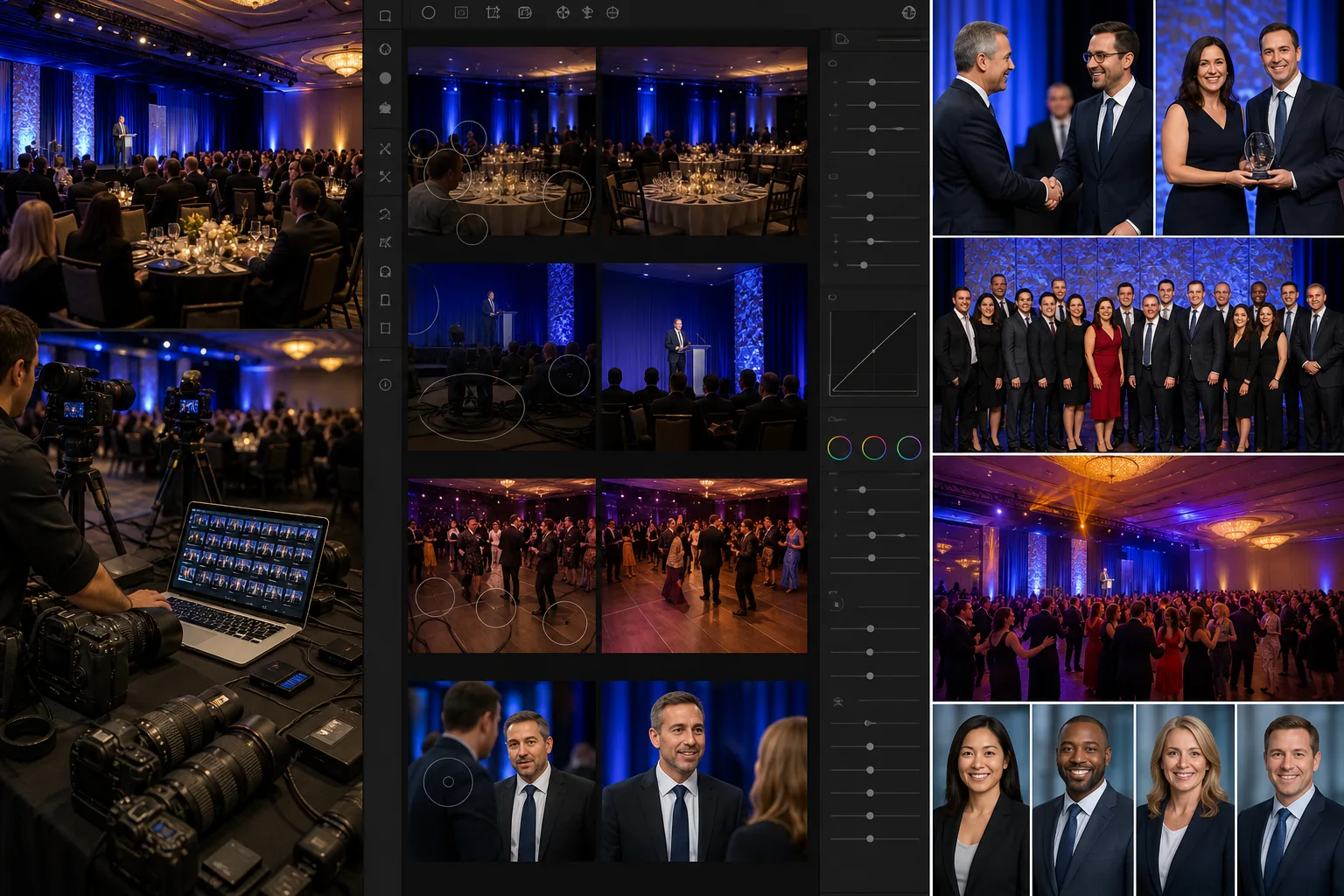
Event photographers face a unique production bottleneck: hundreds to thousands of images captured in a single session under mixed lighting, crowded venues, and unpredictable conditions — all due for delivery within 24-72 hours. The margin between a profitable event photography business and an unsustainable one lives in post-production speed. Magic Eraser handles the repetitive cleanup work — removing photobombers, exit signs, stray cables, and branded clutter from venue backgrounds — so you can focus on color grading and creative selects instead of pixel-level retouching.
Photobombers and bystanders in every high-value shot
Conference keynotes, gala dance floors, and cocktail receptions are crowded by design. Your best candid of the CEO shaking hands with a keynote speaker has three strangers mid-chew in the background. Your award-ceremony captures have wait staff crossing the frame. Manually cloning out bystanders from 50-100 hero shots per event costs 2-5 minutes each — that is 3-8 hours of retouching labor on bystander removal alone before you even start color correction. Magic Eraser's brush removes photobombers and bystanders in seconds per image, preserving the venue background naturally.
Venue clutter that undermines the client's brand investment
Corporate clients spend $20,000-$500,000 on event production and expect the photography to reflect that investment. But even the most carefully designed venue has exit signs, fire extinguishers, stacked chairs in the periphery, AV cable runs across the stage, and branded sponsor banners the client does not want in their internal gallery. Cleaning up venue clutter across a 500-image delivery set is the kind of tedious, repetitive retouching that consumes entire post-production days. The AI eraser tool handles these systematic distractions in batch, letting you deliver a polished gallery that matches the event's production quality.
Mixed and low-light conditions degrade image quality across the set
Event venues combine tungsten house lights, LED stage washes, fluorescent service-area lighting, and window spill into a color-temperature nightmare. Ballroom receptions shot at ISO 3200-6400 produce visible noise. Conference breakout rooms with drop ceilings create flat, unflattering light. The result is a delivery set with inconsistent white balance, noise, and sharpness across hundreds of images — and manually correcting each one breaks the 24-72 hour delivery window. AI Enhance recovers detail from high-ISO noise and normalizes exposure across the set, cutting per-image correction time significantly.
Headshot and portrait requests embedded in the event workflow
Corporate events increasingly include a headshot station or request individual portraits of speakers, executives, and VIPs. These portraits need clean, professional backgrounds — but you are shooting them against whatever wall or corner the venue provides, not a studio backdrop. Background Eraser isolates subjects from venue walls, pop-up banners, and hallway backgrounds, replacing them with clean solids or corporate-branded backdrops without requiring a portable studio setup at the venue.
How Magic Eraser fits the event photography workflow
Ingest and cull the raw capture set
Import the full capture set (typically 500-3,000 raw files per event day) into your catalog tool. Run a first-pass cull to eliminate technical rejects — out-of-focus shots, flash misfires, duplicate bursts. Reduce the working set to the 200-800 images that will form the delivery gallery. This cull pass is editorial, not retouching — save all retouching for the Magic Eraser workflow.
Run batch AI Enhance for exposure and noise recovery
Apply AI Enhance across the working set to normalize exposure, recover high-ISO noise, and sharpen images captured in challenging venue lighting. This step replaces the manual per-image exposure and noise-reduction pass in Lightroom or Capture One, cutting batch correction from 1-2 hours to minutes. Focus the enhancement on the most problematic lighting zones — ballroom receptions, breakout rooms, and hallway candids typically need the most recovery.
Magic Eraser brush for per-image distraction removal
Work through the hero selects — keynote moments, award presentations, executive portraits, group shots — and apply Magic Eraser brush to remove photobombers, exit signs, AV cables, stacked chairs, branded clutter the client flagged, and any other distractions. Prioritize the 50-100 images most likely to appear in the client's internal communications, social media, and press releases. At 15-30 seconds per distraction versus 2-5 minutes of manual clone-stamp work, the time savings compound across the hero set.
Background Eraser for on-site headshots and VIP portraits
Isolate subjects from venue backgrounds on any headshot-station captures or VIP portraits. Replace with clean white, corporate-branded solid colors, or subtle gradient backgrounds that match the client's brand guidelines. Export these separately from the event gallery as individual high-resolution portraits for the client's internal directory, LinkedIn updates, or speaker bio pages.
Export, deliver, and archive with turnaround discipline
Export the final gallery at the client's specified resolution and format — typically full-resolution JPEG for the online gallery and web-optimized versions for social media. Deliver within the contracted turnaround window (24 hours for social highlights, 48-72 hours for the full gallery). Archive the working files with your Magic Eraser edits intact so you can revisit if the client requests additional retouching on specific images post-delivery.
Frequently Asked Questions
How many images can I realistically process through Magic Eraser for a single event?
+
For a typical corporate event delivering 300-800 images, the AI Enhance batch pass handles the full set. Magic Eraser brush work is focused on the 50-150 hero images that need specific distraction removal — you do not need to brush every image, only the ones with distracting elements that would not pass client review. Background Eraser applies to the headshot and portrait subset, typically 20-50 images. The total workflow addition is 1-3 hours of AI-assisted editing versus 6-15 hours of equivalent manual retouching.
Will AI editing affect the natural look of event photography?
+
Magic Eraser's removal brush fills naturally from surrounding context — a removed photobomber is replaced with the venue background that was behind them, not a synthetic patch. AI Enhance recovers detail and reduces noise without the plastic, over-processed look that aggressive noise reduction produces. The goal is invisible editing: the client sees a clean, professional gallery without noticing any individual edit. If you are delivering to press or editorial clients with strict no-manipulation policies, disclose your AI-assisted workflow in your delivery terms.
Can I use this workflow for weddings and social events too?
+
Yes. Wedding and social event photography have the same core production challenges — high volume, mixed lighting, crowd distractions, and tight turnarounds. The workflow adapts directly: AI Enhance for reception and dance-floor low-light recovery, Magic Eraser for removing Uncle Jerry from the first-dance background, Background Eraser for formal portrait variants. Wedding photographers delivering 500-1,500 images benefit even more from the batch enhancement pass because the lighting variance across ceremony, reception, and outdoor portraits is extreme.
Does this replace my existing Lightroom or Capture One workflow?
+
No — Magic Eraser complements your existing catalog and color-grading workflow. Use Lightroom or Capture One for culling, white-balance correction, and your creative color grade. Use Magic Eraser for the tasks those tools handle slowly or not at all: object and person removal, background replacement for portraits, and AI-driven enhancement for problematic exposures. The two workflows layer: catalog tool for editorial and color, Magic Eraser for cleanup and enhancement.
Deliver event galleries faster without sacrificing quality
Magic Eraser handles the repetitive post-production work that slows down event photography delivery — photobomber removal, venue clutter cleanup, low-light recovery, and on-site headshot background replacement. Free tier on web, iOS, and Android.
Try Magic Eraser freeRelated use cases
See how professionals use these tools in real-world workflows.
Listing photos cluttered with personal items, parked cars, or construction equipment can turn buyers away. Magic Eraser uses AI to clean up your property photos instantly — no Photoshop skills required.
Product listings need clear images before shoppers can judge the item. Magic Eraser helps sellers remove messy backgrounds, table edges, labels, props, glare, and other distractions so each product photo is easier to review before publishing.
Photobombers ruining your travel pics? Messy backgrounds killing your selfie game? Stop wasting hours in Photoshop. Magic Eraser removes distractions, cleans up cluttered shots, and expands your photos to fit any platform format — all in one tap.
Related comparisons
See how Magic Eraser compares to similar tools.
TouchRetouch is a popular paid mobile app for removing objects and blemishes. Magic Eraser offers free AI-powered editing on any device with no install required. See how they compare across features, pricing, and ease of use.
Cleanup.pictures is a free web tool with one generic eraser brush. Magic Eraser gives you 100+ purpose-built removal tools — one for emoji, glasses, watermarks, sky, power lines, and dozens more — plus background removal, AI enhance, and mobile apps, in 16 languages. See how breadth changes the result.
remove.bg is the market leader for background removal, offering a powerful API and integrations with Photoshop and Figma. Magic Eraser goes further with eight AI-powered editing tools — from object removal and generative fill to AI enhance and design — all in one editor.
Two powerful AI photo editors with different strengths. Magic Eraser offers a broader set of generative AI tools for creative editing, while Photoroom excels at e-commerce product photography and batch processing. See which fits your workflow.
Related guides
Explore more guides and editorial content related to this workflow.
Learn how to use Magic Eraser to remove objects, people, text, and distractions from photos with cleaner AI editing results.
Learn how to remove people from photos using AI in seconds. Step-by-step guide for travel photos, real estate shots, and product images.
Step-by-step guide to removing watermarks from your own photos using AI. Learn when it is appropriate, the best techniques, and how Magic Eraser handles it.