
Jewelry Photography: Clean Backgrounds, Gemstone Detail & Catalog Consistency
Jewelry is one of the most photographically demanding product categories — customers purchasing a $200 ring or a $5,000 necklace online are making the decision almost entirely from photos, and they expect to see the precise color of the gemstone, the quality of the metalwork, the clasp mechanism, and the scale on a human hand or neck. The technical challenge is that jewelry is small, reflective, and transparent in ways that confuse smartphone cameras and even entry-level DSLRs: gemstones refract light unpredictably, polished metal reflects everything in the environment, and the scale demands macro-level sharpness that consumer cameras struggle to deliver. Background Eraser, AI Enhance, and Magic Eraser solve the three core jewelry-photography problems — background consistency, detail sharpness, and reflection cleanup — so independent jewelers and Etsy sellers can produce catalog-quality product photos without a dedicated studio.
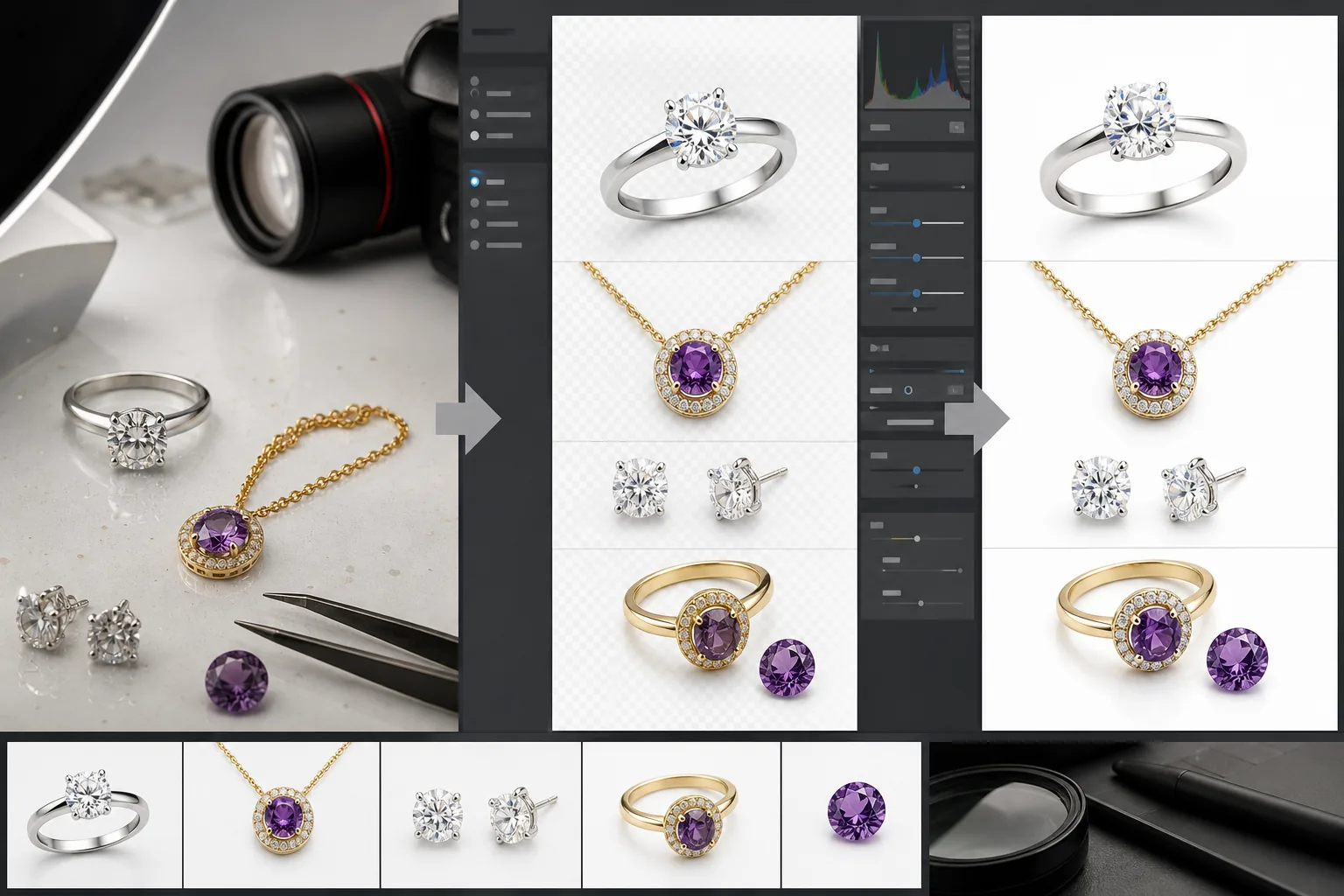
Reflective surfaces turn every background element into a visible distraction
Polished gold, silver, platinum, and rhodium-plated surfaces act as mirrors — every object in the shooting environment reflects in the metal: the photographer's hands, the phone or camera, room lights, colored walls, and the shooting surface texture. These reflections embed environmental distractions directly into the product surface, making it impossible to isolate the piece visually by controlling only the background. Even with a white backdrop, the reflections in the metal carry the room's visual information into the product image, undermining the clean, professional presentation that e-commerce platforms and customers expect.
Gemstone color and clarity are impossible to represent accurately with smartphone cameras
A sapphire's specific shade of blue, a ruby's red-to-pink ratio, an emerald's green saturation, and a diamond's fire and brilliance are the primary value drivers that customers evaluate in product photos. Smartphone cameras apply automatic white balance and exposure adjustments that shift gemstone colors unpredictably — the same sapphire photographs as navy under tungsten light, cornflower blue under daylight, and teal under fluorescent light. Color inaccuracy in jewelry product photos directly causes returns, disputes, and lost customer trust — a customer who receives a ring with a noticeably different stone color than the product photo is a refund request and a negative review.
Maintaining catalog consistency across dozens or hundreds of SKUs
An independent jeweler or Etsy seller with 50-500 active listings needs every product photo to share the same visual standard: same background (white for marketplace compliance, branded for the independent website), same lighting quality, same level of detail sharpness, and same color accuracy. When products are photographed over weeks or months as new pieces are added, under different lighting conditions and sometimes with different cameras, the catalog develops visual inconsistencies that make the shop look unprofessional compared to competitors with studio-shot catalogs.
How Magic Eraser fits the jewelry photography workflow
Capture each piece with diffused lighting and multiple angles
Set up a simple shooting environment: a white foam-core background, diffused light (a desk lamp through a sheet of white paper, or a cloudy window), and the piece positioned on a clean surface or a display prop. Capture each piece from the front/top hero angle, a three-quarter angle showing dimension, a detail shot of the setting or clasp mechanism, and a scale reference shot on a hand, neck, or ear. Use the smartphone's macro mode or get as close as the camera will focus for detail shots. Shoot more angles than you think you need — it's faster to capture now and select later than to re-set up a piece for a missing angle.
Run Background Eraser for clean, marketplace-compliant product backgrounds
Open each product photo in Background Eraser and remove the original background. For marketplace listings (Etsy, Amazon Handmade, eBay), replace with pure white — most marketplace algorithms favor white-background product photos for search placement, and Etsy's search relevance factors include image quality signals. For your independent website and social media, use a branded background color or a subtle texture that matches your shop's visual identity. Consistent backgrounds across the catalog create the visual cohesion that signals professional quality.
Run AI Enhance to sharpen gemstone detail and correct color accuracy
Apply AI Enhance to every product photo to address the sharpness and color challenges specific to jewelry: sharpen the facet edges and internal inclusions of gemstones to the clarity level that customers need for evaluation, correct the white-balance shift that made the gemstone color inaccurate, bring out the metalwork detail (filigree, engraving, prong setting, solder joints), and reduce the digital noise that smartphone cameras add in macro mode. For gemstone-forward pieces, the color correction is the most important step — the photo needs to represent the stone's actual color as it appears in natural daylight.
Use Magic Eraser to clean up reflections and surface imperfections
Review each enhanced photo for the reflection and surface issues that jewelry photography inherits: remove the photographer's reflection in polished metal surfaces, clean up dust particles that the macro lens magnified into visible specks on gemstone surfaces, remove fingerprints on metal that appeared invisible to the naked eye but show up under directed light, and clear any residual background elements that the Background Eraser didn't fully separate (shadows, edge artifacts, support structures). These final cleanups take 30-60 seconds per photo and are the difference between an adequate product photo and a professional one.
Frequently Asked Questions
How do I photograph diamonds and show their brilliance without professional lighting?
+
Diamonds are the hardest gemstone to photograph because their value proposition — fire, brilliance, and scintillation — is dynamic and light-dependent. For static photos, use a single point light source (a small LED or direct sunlight through a window) positioned above and slightly behind the stone to create the light-return pattern that shows brilliance. Capture 3-5 photos with slightly different light angles and select the one that shows the most fire. AI Enhance will sharpen the facet pattern and light-return detail that the smartphone camera softened, making the diamond's optical performance more visible in the static image.
What background color works best for jewelry product photos?
+
Pure white (#FFFFFF) is the default for marketplace compliance and the safest choice for catalog consistency. Light gray (#F0F0F0 to #E0E0E0) adds subtle depth without competing with the jewelry. Black works for high-end gold and diamond pieces where the contrast dramatizes the metal's warmth and the stone's light return. For social media and branded content, your brand's palette color can work if it doesn't clash with the gemstone colors in your collection. The most important factor isn't the specific color — it's consistency across the catalog.
How do I show accurate scale in jewelry product photos?
+
The most effective scale references are contextual: a ring on a finger, a necklace on a neck, earrings on an ear, a bracelet on a wrist. These are more intuitively readable than ruler-and-coin references (though including dimensions in the listing text is also important). For pieces too small for easy modeling — stud earrings, delicate chains, single stones — photograph them next to a universally familiar object like a coin. AI Enhance helps with scale-reference photos specifically because the person wearing the piece and the piece itself both need to be sharp, which requires depth of field that smartphones handle poorly.
Can I use this workflow for custom-order and one-of-a-kind pieces?
+
Custom and one-of-a-kind pieces actually benefit the most from this workflow because there's no opportunity to re-photograph them if the first attempt is inadequate — once the piece ships to the customer, the photography window is closed. Capture extensively (10-15 angles per piece rather than 5-8) to ensure full coverage, then process the best selections through the full workflow. For custom commissions, the processed photos also serve as the delivery documentation and the portfolio evidence of your custom-work capability for future commissions.
Photograph jewelry that sells itself
Background Eraser delivers marketplace-compliant white backgrounds, AI Enhance sharpens gemstone detail and corrects color accuracy, and Magic Eraser cleans up reflections — so your product photos match the quality of your craftsmanship. Free tier on web, iOS, and Android.
Try Magic Eraser freeRelated use cases
See how professionals use these tools in real-world workflows.
Listing photos cluttered with personal items, parked cars, or construction equipment can turn buyers away. Magic Eraser uses AI to clean up your property photos instantly — no Photoshop skills required.
Product listings need clear images before shoppers can judge the item. Magic Eraser helps sellers remove messy backgrounds, table edges, labels, props, glare, and other distractions so each product photo is easier to review before publishing.
Photobombers ruining your travel pics? Messy backgrounds killing your selfie game? Stop wasting hours in Photoshop. Magic Eraser removes distractions, cleans up cluttered shots, and expands your photos to fit any platform format — all in one tap.
Related comparisons
See how Magic Eraser compares to similar tools.
TouchRetouch is a popular paid mobile app for removing objects and blemishes. Magic Eraser offers free AI-powered editing on any device with no install required. See how they compare across features, pricing, and ease of use.
Cleanup.pictures is a free web tool with one generic eraser brush. Magic Eraser gives you 100+ purpose-built removal tools — one for emoji, glasses, watermarks, sky, power lines, and dozens more — plus background removal, AI enhance, and mobile apps, in 16 languages. See how breadth changes the result.
remove.bg is the market leader for background removal, offering a powerful API and integrations with Photoshop and Figma. Magic Eraser goes further with eight AI-powered editing tools — from object removal and generative fill to AI enhance and design — all in one editor.
Two powerful AI photo editors with different strengths. Magic Eraser offers a broader set of generative AI tools for creative editing, while Photoroom excels at e-commerce product photography and batch processing. See which fits your workflow.
Related guides
Explore more guides and editorial content related to this workflow.
Learn how to use Magic Eraser to remove objects, people, text, and distractions from photos with cleaner AI editing results.
Learn how to remove people from photos using AI in seconds. Step-by-step guide for travel photos, real estate shots, and product images.
Step-by-step guide to removing watermarks from your own photos using AI. Learn when it is appropriate, the best techniques, and how Magic Eraser handles it.