
Antique Dealer Catalog Photos: Inventory, Auctions & Online Sales
Antique dealers move inventory constantly — acquiring at estate sales, auctions, and picker networks, then listing across multiple platforms (eBay, Ruby Lane, Etsy, 1stDibs, Chairish, LiveAuctioneers, their own website) with photos that must communicate condition, provenance quality, and value. The photography challenge is unique: items are photographed in cluttered booths, packed storage units, and show floors where isolating a single item visually is nearly impossible without a dedicated studio setup most dealers do not have. Magic Eraser's toolset handles the antique dealer's specific photo challenges — isolating items from cluttered backgrounds, enhancing detail in patina and maker's marks, and removing price tags and display clutter for clean catalog presentation.
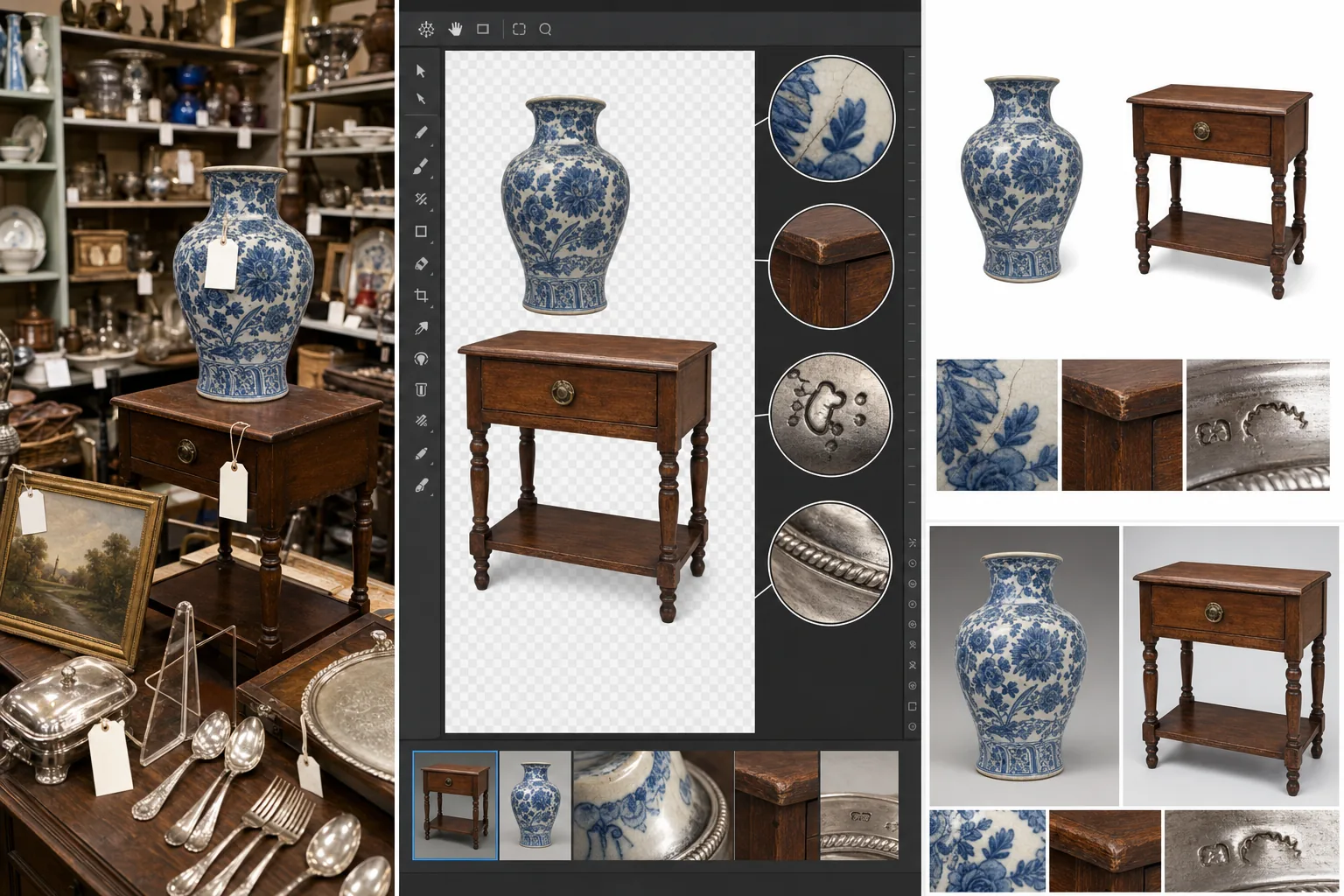
Cluttered booth and storage backgrounds make individual items hard to see
An antique dealer's booth at a show or mall has dozens to hundreds of items packed together. Photographing a single piece — a Stickley side table, a Roseville vase, a set of sterling flatware — means the photo background is filled with other inventory, price tags from adjacent items, display shelving, and neighboring dealers' merchandise. The buyer's eye cannot focus on the item being sold when the background is a visual cacophony of competing objects. Background Eraser isolates the item from the cluttered environment and places it on a clean white or neutral background that marketplace platforms prefer and that lets the item's form, color, and condition speak for itself.
Condition detail and maker's marks are critical but hard to capture clearly
Antique and vintage buyers evaluate condition from photos — hairline cracks in pottery glaze, wear patterns on furniture finishes, patina consistency on metalwork, foxing on prints, and maker's marks or signatures that establish attribution and value. These details are often subtle, low-contrast, and difficult to capture with a phone camera under booth lighting. A buyer who cannot clearly see the condition detail either passes on the item or asks for additional photos, both of which slow the sale cycle. AI Enhance sharpens fine detail, increases contrast in subtle surface textures, and brightens the image so condition-critical elements are clearly visible in the listing photos.
Price tags, stickers, and display hardware need removal for online listings
Items photographed in a booth have price tags attached, often with multiple stickers from previous dealers in the chain. Show items have lot numbers. Consignment pieces have shop tags. These tags need to be removed for online listings — physically removing and reattaching tags for every photo session is impractical when you are photographing 20-50 items in a single session at a show or in your booth. Magic Eraser removes price tags, stickers, lot numbers, and display hardware (plate stands, easel backs, hanging wires) from photos without physically touching the item, saving significant handling time across a large inventory.
High inventory turnover demands photography speed across hundreds of items
Active antique dealers turn 50-200 items per month across their sales channels. Each item needs 3-8 listing photos (overview, detail shots, marks, condition notes). That is 150-1,600 photos per month that need to be captured, edited, and uploaded. Professional product photography at $5-$15 per image would cost $750-$24,000 monthly — economically impossible for most dealers' margins. The AI workflow enables phone-camera capture in the field (estate sale, auction preview, booth, storage) with post-processing that elevates the photos to marketplace-competitive quality in minutes per item rather than the 15-30 minutes per item that manual editing requires.
How Magic Eraser fits the antique dealer catalog workflow
Photograph items in place without setting up a dedicated studio
Capture 3-8 photos per item wherever the item currently sits — in your booth, at the estate sale, in storage, at the auction preview. Shoot the overview from the buyer's natural viewing angle, then capture the details that matter for the category: maker's marks, signatures, condition issues (cracks, repairs, wear), hardware, and any labels or provenance documentation. Use your phone's macro mode for marks and detail shots. Accept the cluttered background — you will clean it up in post.
Isolate items from cluttered backgrounds with Background Eraser
Run the overview and three-quarter shots through Background Eraser to isolate the item on a clean background. White backgrounds are standard for eBay, Ruby Lane, and most marketplace listings. Neutral gray or warm-toned backgrounds work well for 1stDibs and Chairish where the presentation is more gallery-style. For items with complex silhouettes (chairs with spindles, chandeliers, items with transparent glass elements), review the edge detection and touch up any areas where the background bleeds through fine details.
Enhance detail and remove tags with AI Enhance and Magic Eraser
Run AI Enhance on detail shots to sharpen maker's marks, surface textures, patina, and condition-relevant features. The enhancement should make condition visible enough that the buyer can evaluate from the listing photos without requesting additional images. Then use Magic Eraser brush to remove price tags, stickers, lot numbers, display hardware, and any other elements that are part of the display context but not part of the item itself. For items with multiple stickers in a chain-of-dealers history, one pass of the eraser brush handles what would be 10-15 minutes of physical sticker removal and residue cleaning.
Batch-upload across platforms with category-appropriate presentation
Export the cleaned and enhanced photos and upload to your active sales channels. Adapt the background treatment to each platform's conventions: white for eBay and Amazon, clean neutral for 1stDibs and Chairish, styled for Etsy and Instagram. For items listed on auction platforms (LiveAuctioneers, Invaluable), the clean catalog photos serve double duty as both the auction listing images and the post-sale archive documentation. Maintain a photo archive organized by item for provenance documentation, insurance records, and reuse if the item is consigned or re-listed.
Frequently Asked Questions
Will removing the background hide condition issues that buyers need to see?
+
Background Eraser removes the environment around the item, not the item's surface condition. Cracks, chips, repairs, wear, patina, and any condition characteristics remain fully visible — in fact, they are often more visible against a clean background than they were against a cluttered booth. For transparent items (glass, crystal) and items where the background context matters for scale (large furniture), consider keeping one in-situ photo alongside the clean-background catalog shots so the buyer can assess both the item's presentation and its scale in context.
How do I handle photographing items at estate sales and auctions where I cannot control the environment?
+
This is exactly the workflow's strongest use case. At an estate sale or auction preview, you have minutes per item, no control over lighting or background, and often cannot move items to a better location. Photograph quickly: overview shot, detail shots of marks and condition, done. The cluttered, poorly-lit estate-sale photo becomes a clean catalog image through Background Eraser and AI Enhance in post-production. Many successful online antique dealers photograph their entire acquisition pipeline in the field and do all their visual processing later — the AI workflow makes this field-to-listing pipeline practical at volume.
What about items that are too large to photograph against a clean background — furniture, architectural salvage, large artwork?
+
Large items benefit from Background Eraser even more than small ones because the alternative — finding or creating a clean background for a 6-foot armoire or an 8-foot architectural column — is impractical in most dealer spaces. Photograph the item where it stands, then use Background Eraser to isolate it. For very large items with complex silhouettes (ornate furniture, chandeliers, iron gates), the edge detection may need manual touch-up around fine details. For context shots that show scale, keep one original-background image in the listing alongside the clean-background catalog shots.
Does this workflow scale for dealers with 500+ active listings?
+
Yes. The workflow is designed for volume. A dealer photographing 20-50 items per session can batch-process the entire session in 1-2 hours of AI editing — Background Eraser for overviews, AI Enhance for details, Magic Eraser brush for tags and display hardware. At 5-10 minutes per item in post-production versus 15-30 minutes of manual editing per item, a 500-listing catalog that would require 125-250 hours of manual editing reduces to 40-80 hours of AI-assisted processing. The time savings compound as the dealer scales inventory because the per-item workflow is consistent and repeatable.
Photograph inventory in the field and list it like a gallery
Background Eraser isolates antiques from cluttered booths and estate sales. AI Enhance reveals maker's marks and condition detail. Magic Eraser removes price tags and display hardware. Catalog-quality listings from phone-camera field photos. Free tier on web, iOS, and Android.
Try Magic Eraser freeRelated use cases
See how professionals use these tools in real-world workflows.
Listing photos cluttered with personal items, parked cars, or construction equipment can turn buyers away. Magic Eraser uses AI to clean up your property photos instantly — no Photoshop skills required.
Product listings need clear images before shoppers can judge the item. Magic Eraser helps sellers remove messy backgrounds, table edges, labels, props, glare, and other distractions so each product photo is easier to review before publishing.
Photobombers ruining your travel pics? Messy backgrounds killing your selfie game? Stop wasting hours in Photoshop. Magic Eraser removes distractions, cleans up cluttered shots, and expands your photos to fit any platform format — all in one tap.
Related comparisons
See how Magic Eraser compares to similar tools.
TouchRetouch is a popular paid mobile app for removing objects and blemishes. Magic Eraser offers free AI-powered editing on any device with no install required. See how they compare across features, pricing, and ease of use.
Cleanup.pictures is a free web tool with one generic eraser brush. Magic Eraser gives you 100+ purpose-built removal tools — one for emoji, glasses, watermarks, sky, power lines, and dozens more — plus background removal, AI enhance, and mobile apps, in 16 languages. See how breadth changes the result.
remove.bg is the market leader for background removal, offering a powerful API and integrations with Photoshop and Figma. Magic Eraser goes further with eight AI-powered editing tools — from object removal and generative fill to AI enhance and design — all in one editor.
Two powerful AI photo editors with different strengths. Magic Eraser offers a broader set of generative AI tools for creative editing, while Photoroom excels at e-commerce product photography and batch processing. See which fits your workflow.
Related guides
Explore more guides and editorial content related to this workflow.
Learn how to use Magic Eraser to remove objects, people, text, and distractions from photos with cleaner AI editing results.
Learn how to remove people from photos using AI in seconds. Step-by-step guide for travel photos, real estate shots, and product images.
Step-by-step guide to removing watermarks from your own photos using AI. Learn when it is appropriate, the best techniques, and how Magic Eraser handles it.