
How to Edit Sports Action Photos: AI Enhancement and Cleanup Guide
Learn how to edit sports and action photos with AI tools. Enhance sharpness, fix stadium lighting, remove sideline distractions, and deliver professional-quality game photos faster.

Product Marketing
Reviewed by Magic Eraser Editorial ·
Table of Contents
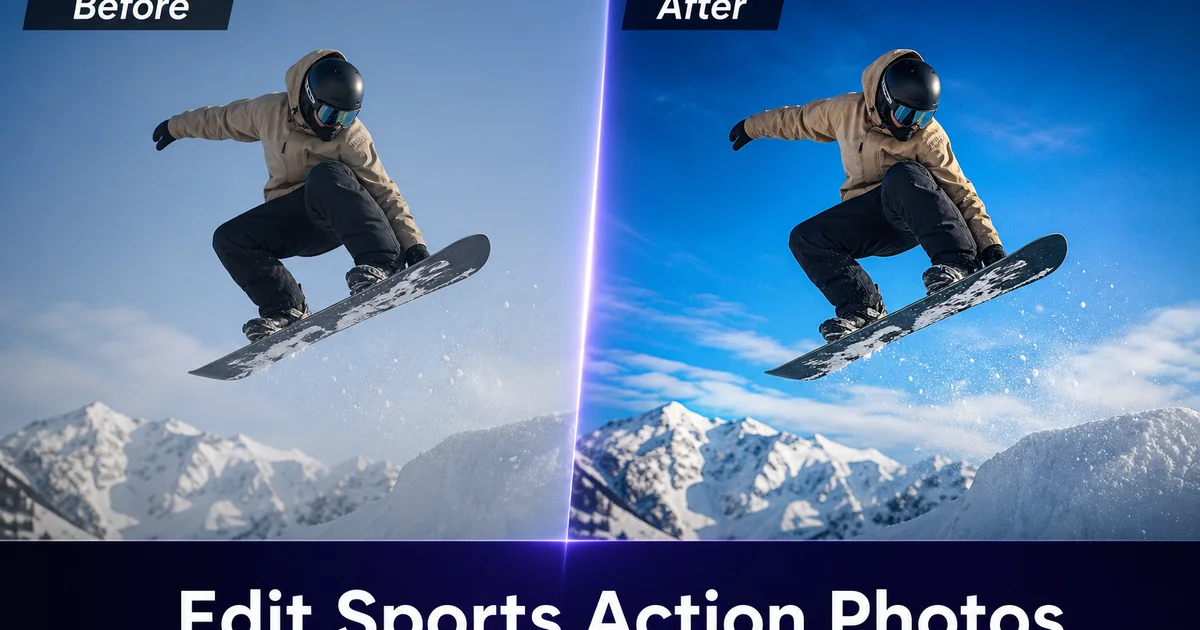
Sports photography is one of the most technically demanding genres. You are shooting fast-moving subjects under mixed and often harsh lighting conditions, tracking action through a long lens. Hoping the autofocus locks on the right athlete at the right instant. Even experienced sports photographers come back from a game with hundreds of frames and only a handful that are genuinely sharp, well-composed, and free of unwanted elements.
The editing phase is where good sports photos become great ones. Sharpening the athlete, correcting the orange cast from sodium vapor stadium lights, lifting detail out of shadowed faces under helmet brims, and removing the clutter that often appears on sidelines and in backgrounds. These edits separate the shots that end up in team portfolios and media galleries from the ones that stay on the memory card.
AI-powered editing tools have greatly accelerated this workflow. What used to require 10-15 minutes of careful manual work per image in Lightroom and Photoshop can now be accomplished in 1-2 minutes. This guide covers the specific challenges of sports action photo editing and the AI techniques that solve them.
- AI enhancement sharpens athlete detail, lifts shadow areas under helmet brims and visors, and corrects stadium lighting color casts in one pass.
- Object removal eliminates sideline distractions — water bottles, equipment bags, cones, partial figures — that pull attention from the action.
- Background cleanup removes exit signs, scoreboard glare, and brightly dressed spectators that compete with the subject.
- Mixed lighting correction handles the sodium vapor, LED, and natural light combinations common in sports venues.
- Batch enhancement lets you process a full game's selects in under an hour instead of an entire afternoon.
- AI editing maintains the authenticity of the action moment while removing incidental distractions that weaken the composition.
The unique challenges of sports photo editing
Sports photography pushes camera technology to its limits. Shutter speeds of 1/1000s or faster freeze action but demand wide apertures and high ISO settings, which introduce noise and reduce depth of field. The shallow depth of field that isolates athletes from crowds also means focus accuracy is critical. A miss by a few inches puts the face slightly soft while the shoulder is sharp. High ISO noise degrades detail in shadows, uniforms, and skin tones.
Lighting at sports venues is rarely photographer-friendly. Indoor arenas use sodium vapor, metal halide, or LED banks that produce different color temperatures — sometimes on the same court. Outdoor stadiums have sections in direct sun and sections in deep shadow from upper deck overhangs. Night games under artificial lighting create sharp overhead shadows on faces while flattening depth on the playing surface. Every one of these conditions requires post-processing correction.
Then there is the setting itself. Sidelines are cluttered with benches, medical kits, water coolers, cables, officials, and substitutes. Backgrounds include advertising boards, scoreboard displays, spectators in every color of clothing, and arena infrastructure. The human eye focuses on the athlete and ignores the rest. The camera captures everything, and all that visual noise weakens the impact of even a perfectly timed action shot.
- High ISO and wide apertures introduce noise and extremely shallow depth of field.
- Mixed venue lighting creates color casts and uneven exposure across the frame.
- Sideline clutter and background distractions are unavoidable at live sporting events.
- Focus accuracy on fast-moving subjects means many frames are slightly soft where it matters most.
AI enhancement for sharpness and exposure
AI Enhance addresses the three most common technical issues in sports photos at once. First, it sharpens the primary subject. Pulling detail out of faces, jersey numbers, equipment, and body position that may be slightly soft from motion or narrow depth of field. This is not the same as traditional sharpening that amplifies noise. The AI selectively enhances detail where it matters while suppressing noise in uniform areas like grass, ice, or court surfaces.
Second, it lifts shadow exposure. Sports photos frequently have shadowed faces — athletes wearing helmets, visors, or caps in overhead-lit venues. Traditional exposure lifting brightens the entire image and blows out already-bright areas. AI Enhance selectively opens shadows while keeping highlights, revealing facial expression and eye detail that makes the photo engaging.
Third, it corrects color. Stadium sodium vapor lights produce a strong orange-yellow cast. LED banks vary from warm to cool depending on the manufacturer and setting. Natural light in outdoor venues shifts throughout the game as the sun moves. AI Enhance normalizes white balance across all of these conditions, restoring accurate skin tones, uniform colors, and field or court surface color.
- Selective sharpening enhances athlete detail without amplifying high-ISO noise in backgrounds.
- Shadow lifting reveals faces under helmets and visors without blowing out highlights.
- Color correction normalizes sodium vapor, LED, and mixed natural light across the entire image.
- One enhancement pass corrects most sports photos; heavily underexposed shots benefit from a second.
Removing sideline and background distractions
The difference between a good sports photo and a portfolio-quality one is often what is not in the frame. A perfectly timed catch loses impact when a bright orange water cooler sits at the athlete's elbow. A diving save on the soccer pitch is weakened by a referee's striped shirt bisecting the background. These distractions are not compositional failures. They are the reality of shooting live events where you cannot control the setting.
Magic Eraser handles sideline cleanup efficiently. Brush over water bottles, equipment bags, training cones, cables, and partial figures of people at frame edges. The AI reconstructs the field, court, or track surface where the object was, matching grass texture, lane markings, or hardwood grain. For background distractions — exit signs, sponsor banners that clash with the composition, brightly dressed spectators — the same technique works against the bokeh and crowd textures typical of sports backgrounds.
An important ethical note: sports photo editing should enhance the image's visual quality without altering what happened. Removing a water bottle from the sideline is compositional cleanup. Removing a defender from the frame changes the story. The NPPA ethics guidelines are clear on this distinction, and reputable sports media organizations enforce it. Stick to removing incidental distractions and enhancing technical quality. Never alter the action or competitive situation depicted in the image.
Editing workflow for game-day volume
A single game produces hundreds of raw frames. A high school football game might yield 400-600 shots; a professional basketball game can exceed 2000. The editing workflow needs to handle this volume efficiently while maintaining quality.
Start with aggressive culling. Review the full take at thumbnail size and flag frames with sharp focus on the primary subject, dynamic body positions, and clean moments of peak action. Reject duplicates, misfires, and soft frames right away. This often reduces your working set to 30-80 images depending on the sport and event.
Process the selects in two passes. First, run all flagged images through AI Enhance for sharpness, exposure, and color correction. This takes 10-15 seconds per image and handles the technical baseline. Second, review each enhanced image and apply targeted Magic Eraser cleanup where sideline or background distractions weaken the composition. Not every image needs cleanup, but the hero shots destined for social media, team websites, or media galleries deserve the extra 30-60 seconds of attention.
- Cull aggressively: a typical game produces 400-2000 frames but only 30-80 merit editing.
- First pass: batch AI Enhance for sharpness, exposure, and color correction across all selects.
- Second pass: targeted Magic Eraser cleanup on hero shots with distracting elements.
- A full game's selects can be processed in under an hour with this two-pass approach.
Sport-specific editing considerations
Different sports present different editing challenges. Indoor sports like basketball, volleyball, and hockey have the worst mixed lighting. Arena LEDs combine with scoreboard displays and sometimes camera flashes from spectators, so the color correction pass is especially important here. Ice hockey adds the challenge of reflective white ice that fools camera metering, often underexposing the skaters while the ice surface is blown out.
Outdoor field sports — football, soccer, lacrosse, rugby — contend with sun-shadow transitions as athletes move across the field. One side of a football play may be in full sun while the other is in the shadow of a press box. AI Enhance handles these exposure differences well, but very high-contrast frames may need selective attention. Track and field and swimming have clean backgrounds (track surface, water) that simplify editing but critical timing. A fraction of a second makes the difference between a striking action pose and an awkward mid-stride frame.
Combat and racquet sports — tennis, boxing, MMA, fencing — are often shot at closer range with tighter framing. Background distractions are less of an issue but facial expression sharpness is paramount. These sports benefit most from the AI sharpening and shadow-lifting capabilities that reveal expression and intensity in the athlete's face.
- Indoor sports need aggressive color correction for mixed LED, fluorescent, and ambient lighting.
- Outdoor field sports require exposure balancing across sun-shadow transitions.
- Track, swimming, and combat sports prioritize timing and facial sharpness over background cleanup.
- Each sport has specific environmental distractions — tailor your cleanup approach accordingly.
How to do it
- 1
Import your best action frames
Review your burst sequence and select the frames with the sharpest focus on the athlete, the most dynamic body position, and the cleanest separation from the background. For a typical game, you might shoot 500-1000 frames and select 30-50 for editing.
- 2
Enhance sharpness, exposure, and color
Run each selected frame through AI Enhance. The tool lifts underexposed shadow areas. Common in stadium photography with overhead lighting — sharpens the athlete's face and uniform detail, and corrects the color cast from mixed artificial lighting. One pass handles most indoor and outdoor conditions.
- 3
Remove sideline distractions
Use Magic Eraser to brush over unwanted sideline elements: water bottles, towels, equipment bags, stray cones, advertising boards that pull the eye from the action. Partial figures of officials or bystanders at frame edges. The AI fills these areas with the field, court, or track surface.
- 4
Clean up background clutter
Address background distractions that compete with the subject. Exit signs, scoreboard glare, sponsor banners that clash with the composition, and spectators in bright clothing that draw the eye. Magic Eraser removes these elements and reconstructs the background with matching tones and textures.
- 5
Crop and straighten for impact
Tighten the crop to emphasize the action. Sports photos gain impact when the athlete fills more of the frame. Straighten any horizon tilt — common when tracking fast-moving subjects — and ensure the athlete has leading space in the direction of movement.
- 6
Export for web, print, and social media
Save high-resolution versions for print and team archives. Export web-optimized versions for social media, team websites, and league platforms. Maintain the original aspect ratio for print but create square and vertical crops for Instagram and stories.