
How to Create Tilt-Shift Miniature Effects with AI — Magic Eraser
Transform regular photos into stunning tilt-shift miniature diorama effects using AI. Learn selective blur techniques, saturation boosting, and perspective tricks that make real scenes look like tiny models.
SEO & Growth
Reviewed by Magic Eraser Editorial ·
Table of Contents
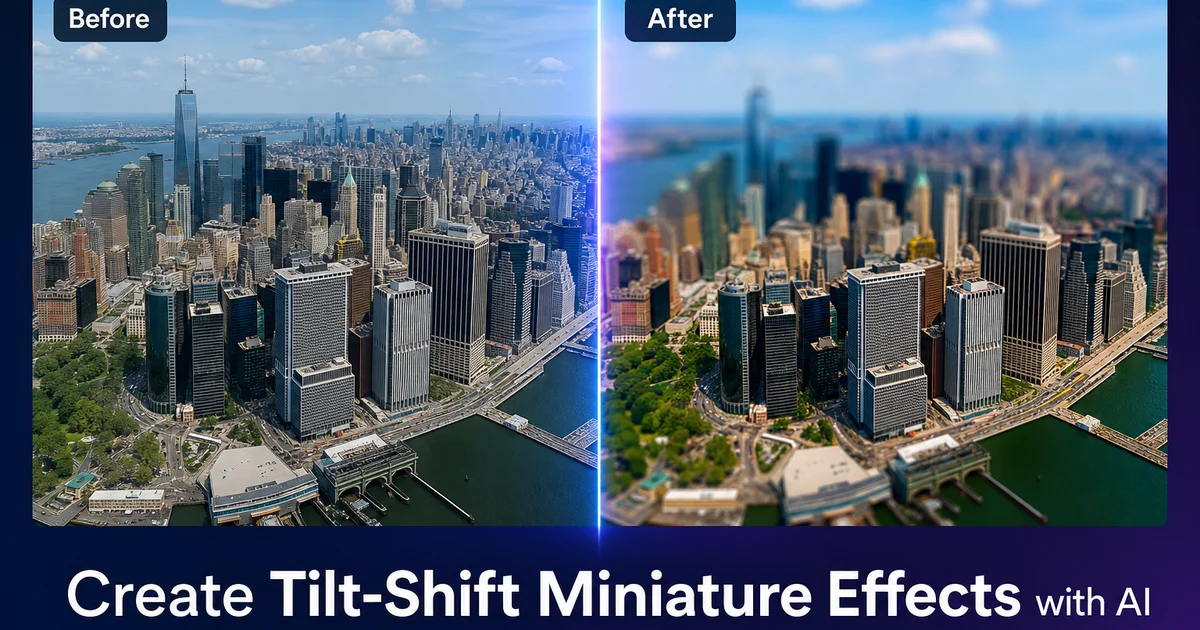
Tilt-shift miniature photography is one of the most visually striking effects in photo editing because it can transform a sprawling cityscape, a busy highway, or a packed stadium into what appears to be a tiny handcrafted diorama. The effect exploits a quirk of human visual perception: we associate very shallow depth of field with macro photography of small objects. When a full-scale scene is rendered with the same shallow focus, our brain interprets it as a miniature model.
Traditional tilt-shift effects required either an expensive specialty lens that physically tilts the focal plane, or careful post-processing in Photoshop using manual blur gradients and masking. The lens approach costs over a thousand dollars and only works from specific angles. The Photoshop approach requires skill with layer masks and gradient tools, and it often produces unconvincing results because simple linear blur gradients do not follow the actual depth geometry of the scene.
AI-powered tools can create more convincing tilt-shift effects because they can analyze the actual depth structure of the scene. Rather than applying a flat gradient blur from top to bottom, the AI identifies which elements are at different distances. A building in the foreground, a park in the middle ground, mountains in the background — and applies the right blur to each depth layer on its own. This produces the physically correct shallow depth of field that makes the miniature illusion genuinely convincing.
- AI analyzes actual scene depth rather than applying flat linear blur gradients, producing physically correct shallow depth of field for a more convincing miniature illusion.
- Intelligent saturation boosting targets surfaces like roofs, vehicles, and vegetation to replicate the vivid painted look of miniature models.
- Works with any high-angle photo from smartphones, drones, or observation decks — no specialty tilt-shift lens required.
- Selective sharpening of the focal band mimics the extreme crispness of real macro photography of small objects.
- Scale-revealing elements like readable signs and recognizable people can be removed to strengthen the diorama perception.
The perceptual science behind the miniature illusion
The tilt-shift miniature effect works because of deeply ingrained perceptual assumptions about depth of field and scale. When we photograph a small object like a model train from close range, even with the lens stopped down, the depth of field is very shallow. Only a thin slice of the scene is sharp. Our visual system has learned this association from a lifetime of looking at small objects up close: shallow depth of field equals small subject. The tilt-shift technique reverses this logic, applying shallow depth of field to large scenes to trigger the small-subject interpretation.
The high angle is equally important. We look down at tabletop models, toy sets, and dioramas from above. A street-level photograph of a city will not produce a convincing miniature effect regardless of how much blur is applied. We never view miniature models from that perspective. The ideal shooting angle is 20 to 45 degrees from horizontal. The natural angle of looking down at a table or display case. This is why rooftop, hillside, and drone shots work so well for the effect.
Color saturation contributes a third perceptual cue. Miniature models are painted with pigments that are more vivid than real-world surfaces. Model grass is brighter green than real turf, model roofing is more intensely colored than weathered shingles. Model vehicles are candy-bright rather than dusty and sun-faded. Boosting saturation in a real photograph replicates this painted quality, adding another layer that tells the viewer's brain this is a model, not reality.
- Shallow depth of field triggers a learned perceptual association with close-up photography of small objects, making the brain interpret the scene as miniature.
- High shooting angles between 20 and 45 degrees from horizontal replicate how we naturally view tabletop dioramas and model displays.
- Boosted color saturation mimics the vivid painted surfaces of miniature models, which are brighter and more uniform than weathered real-world materials.
- The combination of all three cues — shallow focus, high angle, and saturated color — produces a much stronger illusion than any single technique alone.
Choosing the right source photos for maximum impact
Not every photograph works equally well for the tilt-shift miniature effect. The ideal source image has a clear ground plane visible from above, multiple small-scale elements that resemble model pieces, and enough depth variation for the selective blur to read convincingly. Urban scenes with buildings, vehicles, and pedestrians are classic subjects because all of these elements have obvious miniature counterparts. The viewer's brain right away maps them to model buildings, toy cars, and figurines.
Scenes with visible human activity produce the strongest effect. Construction sites, train stations, markets, parking lots, and sports fields all contain moving elements that look remarkably like posed miniature figurines when the tilt-shift blur is applied. The slight motion blur that moving people and vehicles naturally have in photographs actually enhances the illusion, mimicking the stop-motion animation look of miniature filming where tiny movements create similar blur patterns.
Avoid scenes dominated by large uniform surfaces like open water, clear sky, or bare pavement. These areas provide no depth cues for the blur to act on. They lack the small-scale detail that reads as miniature model elements. The best tilt-shift subjects are visually dense with many distinct objects at varying depths. Think a harbor full of boats, a hillside covered in houses, or an aerial view of a stadium during a game.
- Urban scenes with buildings, vehicles, and pedestrians map naturally to miniature counterparts — model buildings, toy cars, and figurines.
- Human activity makes the effect stronger because moving people look like posed figurines, especially with natural motion blur.
- High vantage points from rooftops, hillsides, drones, and observation towers provide the ideal downward perspective.
- Avoid large uniform surfaces like open water or clear sky — visually dense scenes with many small objects at varying depths produce the strongest miniature illusion.
Fine-tuning the effect for different scene types
The blur intensity and focus band width should vary based on the scene geometry and desired effect strength. For a wide cityscape taken from a distant hillside, a broad focus band covering about one-third of the image height with moderate blur creates a subtle, elegant miniature look. For a tight overhead shot of an intersection, a narrow focus band covering only 15-20% of the frame with heavy blur produces a more dramatic toy-like effect. Match the blur intensity to the scene scale.
Vertical elements require special attention. Buildings, trees, and light poles extend from the ground plane upward through multiple depth zones. A simple horizontal blur gradient would blur the top of a building while keeping its base sharp, which looks wrong. The entire building is at the same distance from the camera. AI Filter handles this by analyzing the scene geometry and keeping connected vertical structures at consistent blur levels, avoiding the most common artifact of crude tilt-shift processing.
Post-processing adjustments can push the effect further. Adding a slight warm color temperature shift makes the scene look like it is lit by model-railroad display lighting rather than natural sunlight. Reducing highlight brightness and lifting shadow values flattens the dynamic range toward what indoor photography of a model would produce. A subtle vignette draws attention to the focused center band, mimicking the light falloff of macro lenses used to photograph actual miniatures.
- Adjust focus band width from 15% for tight overhead shots to 33% for wide cityscapes — narrower bands create more dramatic toy effects.
- AI-aware blur keeps vertical structures like buildings consistently sharp rather than incorrectly blurring their tops while keeping their bases sharp.
- Warm color temperature shifts mimic model-display indoor lighting, adding another perceptual cue that reinforces the miniature illusion.
- Flattened dynamic range and subtle vignettes replicate the look of macro photography under controlled studio conditions.
How to do it
- 1
Choose a photo shot from a high angle looking down at the scene
The miniature effect works best on images taken from an elevated vantage point looking downward. Rooftops, hillsides, bridges, or aerial shots. This bird's-eye perspective already resembles how we naturally look at model train sets and dioramas. Is the perceptual foundation of the entire tilt-shift illusion.
- 2
Apply AI Filter to add selective blur that mimics a tilt-shift lens
Use AI Filter to apply a graduated blur that keeps a narrow horizontal band in sharp focus while progressively blurring the top and bottom of the frame. Unlike simple linear blur gradients, AI Filter analyzes depth cues in the scene to apply blur that follows the actual ground plane, creating a more convincing shallow depth of field.
- 3
Boost color saturation to replicate the look of painted miniatures
Increase color saturation and vibrancy using AI Filter. Real miniature models have paint that is more vivid than natural surfaces. Grass is brighter green, roofs are more intensely red, cars are candy-colored. Pushing saturation 20-40% beyond natural levels reinforces the illusion that the scene is a small-scale model rather than a full-size landscape.
- 4
Increase contrast and sharpen the in-focus band with AI Enhance
Apply AI Enhance to the sharp center band of the image to increase local contrast and edge definition. Real macro photographs of miniatures have very crisp detail in the focal plane because the subject is physically close to the lens. Boosting contrast and sharpness in the focused area enhances this macro-photography look.
- 5
Remove distracting elements that break the miniature illusion
Use Magic Eraser to remove objects that reveal the true scale. Readable text on signs, distinct brand logos, or people whose proportions look obviously full-sized. Any element that anchors the viewer's perception to real-world scale weakens the miniature effect. Removing these scale cues makes the illusion stronger.
Sources
- The Science of Tilt-Shift Photography and Depth of Field — Cambridge in Colour
- Perception of Scale in Miniature Faking — Journal of Vision
- Selective Focus Techniques in Digital Photography — Adobe Creative Cloud