
How to Create Seamless Photo Panoramas for Virtual Tours: Stitching, Editing, and 360-Degree Optimization
Step-by-step guide to creating seamless panoramic photos for virtual tours of properties and businesses. Learn how to shoot for stitching, normalize exposure, fix seam artifacts, and optimize panoramas for 360-degree viewing platforms.
SEO & Growth
Reviewed by Magic Eraser Editorial ·
Table of Contents
- Why panorama quality matters more in virtual tours than in any other photo format
- Pre-stitching normalization: the step most virtual tour creators skip
- Fixing stitching artifacts: ghosting, misalignment, and seam lines
- Edge gaps and nadir filling with AI Expand
- Multi-room consistency and creating a cohesive virtual tour experience
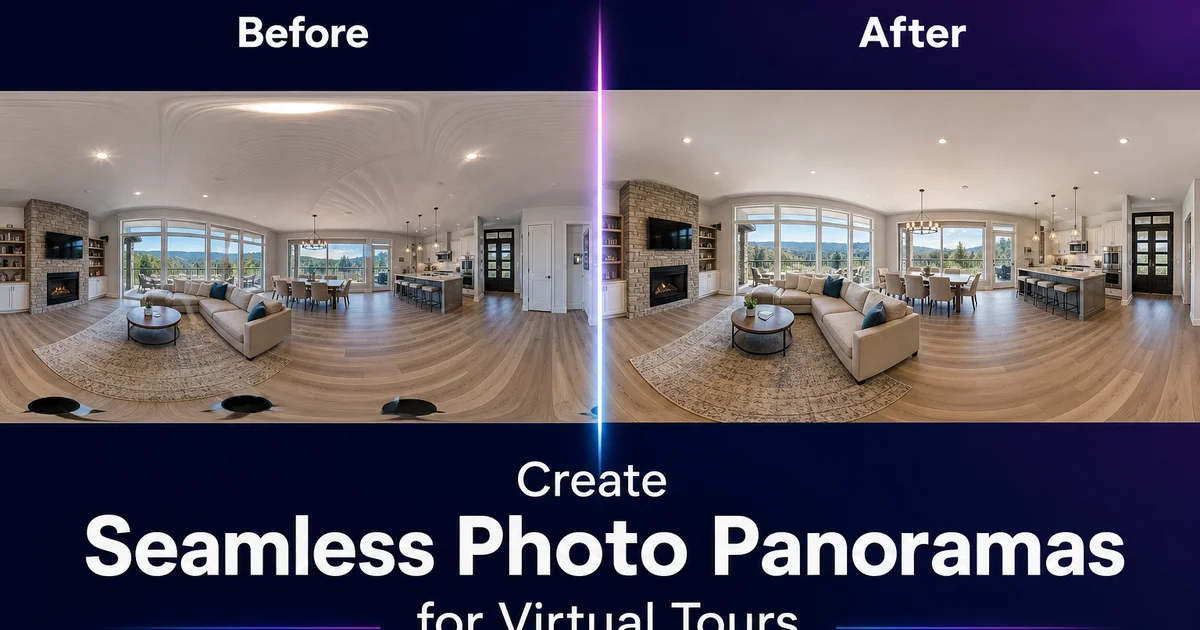
Virtual tours have become a standard expectation in real estate and commercial property marketing. Buyers, renters, and commercial tenants want to explore a space remotely before committing to an in-person visit, and the quality of the virtual tour directly influences whether they schedule that visit. A seamless, immersive panoramic experience signals a well-maintained property and an expert listing. A stitched-together panorama with visible seams, exposure banding, and distorted furniture signals carelessness. And that impression transfers from the photography to the property itself.
Creating panoramic images for virtual tours involves three distinct phases: capturing the source photos with consistent settings and enough overlap, stitching those photos into a steady panoramic image, and editing the stitched result to eliminate the artifacts that stitching introduces. Most tutorials focus on the stitching software and skip the editing step, which is why so many virtual tours contain visible seams, ghosted objects, and brightness jumps that break the immersive experience.
AI photo editing tools address the editing phase with capabilities that manual editing cannot match in time or quality. AI Enhance normalizes exposure and color across source frames before stitching to prevent banding. Magic Eraser removes ghosting artifacts and visible seam lines from the stitched result. AI Expand fills the edge gaps and nadir areas where stitching produces incomplete coverage. This guide covers the complete workflow from capture strategy through final review, with specific attention to the editing steps that transform a raw stitch into a polished virtual tour experience.
- AI Enhance normalizes exposure and white balance across source frames to prevent banding in the stitched panorama.
- Magic Eraser removes ghosting artifacts where objects moved between overlapping source frames.
- AI Expand fills edge gaps and nadir areas where stitching produces incomplete coverage.
- Consistent exposure lock during capture reduces the amount of post-processing correction needed.
- Room-to-room visual consistency is essential for multi-space virtual tours to feel immersive rather than disjointed.
Why panorama quality matters more in virtual tours than in any other photo format
A standard photo is viewed at a fixed perspective. The photographer chose the angle, framing, and focal point, and the viewer sees exactly what the photographer intended. A panoramic image in a virtual tour hands control to the viewer. They can look anywhere in the 360-degree field — up at the ceiling, down at the floor, into every corner. This means that every portion of the panorama is possibly the focal point. Artifacts that might be invisible at the edge of a standard photo become glaringly obvious when the viewer navigates directly to them.
Stitching artifacts are mainly noticeable in virtual tours because viewers unconsciously follow straight lines as they pan around the space. They trace the baseboard from one wall to the next, follow the ceiling line around the room, and scan along the edges of windows and doors. These architectural lines cross seam boundaries between source frames, and any misalignment — even a single pixel — creates a visible break in a line that the viewer's eye is actively tracking. In a static photo, a one-pixel misalignment in a baseboard at the edge of the frame is invisible. In a virtual tour where the viewer is panning along that baseboard, it is right away apparent.
Exposure banding — alternating lighter and darker vertical strips caused by exposure variation between source frames — is the other artifact category that is far more visible in virtual tours than in static panoramas. When viewed as a flat, wide image, subtle brightness variation across the panorama may not be obvious. But when viewed through a virtual tour interface that shows a roughly 90-degree field of view at a time, the viewer can see the brightness shift as they pan slowly across a seam boundary. The effect is like watching the lights dim and brighten as you turn your head. It is profoundly unnatural and right away breaks the immersive illusion that the tour depends on.
- Virtual tour viewers control where they look, making every part of the panorama a potential focal point.
- Architectural lines crossing seam boundaries reveal even single-pixel alignment errors during panning.
- Exposure banding creates visible brightness shifts during slow panning that break immersion.
- Artifacts tolerable in static panoramas become immediately obvious in interactive 360-degree viewing.
Pre-stitching normalization: the step most virtual tour creators skip
The conventional workflow for virtual tour panoramas is: shoot the frames, stitch them in software. Then try to fix any problems in the result. This approach is backwards for one critical issue — exposure and color variation between source frames. Stitching software blends the overlap zones between adjacent frames. It cannot fully eliminate the brightness and color differences between frames that were captured with different effective exposures. The result is banding: subtle but visible stripes in the panorama where each source frame's exposure influence is strongest.
The fix is to normalize exposure and white balance across all source frames before they enter the stitching software. AI Enhance processes each frame one by one, analyzing the lighting conditions and adjusting the exposure, contrast, and color temperature to a consistent baseline across the set. A frame that captured more window light gets darkened to match the others. A frame that faced the darker side of the room gets brightened. A frame that picked up a warm bounce from hardwood floors and a frame that picked up a cool cast from a north-facing window both get corrected to the same neutral white balance.
This pre-stitching normalization transforms the stitching result greatly. When every source frame has matched exposure and color, the stitching software's blending algorithms produce seamless transitions because there is nothing to blend. The frames already agree on brightness and color. The absence of banding is immediately apparent when viewing the result in a 360-degree interface. The room appears to have uniform, natural lighting as the viewer pans around, which is how a real room looks when you physically turn your head. This single preprocessing step eliminates the most common quality issue in virtual tour panoramas.
- Conventional stitch-then-fix workflows cannot fully eliminate banding caused by exposure variation.
- Pre-stitching AI enhancement normalizes exposure and white balance across all source frames.
- Matched frames produce seamless stitching because the blending zones have no brightness or color differences.
- The result is uniform natural lighting as the viewer pans, matching the real-world experience of turning your head.
Fixing stitching artifacts: ghosting, misalignment, and seam lines
Even with perfectly normalized source frames, stitching introduces artifacts at the boundaries between frames. The most visible is ghosting — a semitransparent duplication of objects that moved between shots. A ceiling fan that rotated between frames appears as two overlapping fan positions. A curtain that shifted in a breeze appears as a blurred smear. Even static objects can ghost if the camera position shifted slightly between frames, causing the same object to appear at slightly different positions in overlapping frames. The stitching software blends both positions, creating a translucent double exposure effect.
Magic Eraser removes these ghosting artifacts by analyzing the surrounding content and generating a single clean version of the affected object. For a ghosted ceiling fan, the eraser removes the blended mess and replaces it with a single, sharp fan that matches the style visible in adjacent non-ghosted areas. For a blurred curtain, it generates a clean curtain at a single position. The key is to select the entire ghosted area generously, including any faint secondary edges — so the AI has enough clean surrounding context to generate a convincing replacement.
Straight-line misalignment at seam boundaries is subtler but equally important to fix. Door frames, baseboards, crown molding, window frames, and shelf edges that cross from one source frame to the next may show a slight offset. The line jogs up or down by a pixel or two at the seam location. These misalignments are difficult to fix with traditional clone-stamp editing because the correction needs to smoothly transition between the positions on either side of the seam. Magic Eraser handles this by selecting the misaligned section and letting the AI regenerate a smooth, steady line that connects the positions on both sides naturally.
- Ghosting occurs when objects move between overlapping source frames and the stitcher blends both positions.
- Magic Eraser removes ghosted areas and generates single, clean versions of affected objects.
- Straight-line misalignment at seam boundaries reveals itself when viewers trace architectural lines around the room.
- AI regeneration produces smooth line transitions that manual clone-stamp editing cannot achieve as naturally.
Edge gaps and nadir filling with AI Expand
Panoramic stitching rarely produces a perfectly rectangular result. The top and bottom edges of the stitched panorama often have irregular boundaries where the source frame coverage was incomplete. Curved edges, black triangles in the corners, or zigzag borders where frames did not fully overlap at the extremes. In a flat panoramic image, these edges can be cropped away. In a 360-degree virtual tour, they cannot be cropped without losing coverage. They appear as black patches or distorted zones when the viewer looks straight up or straight down.
AI Expand fills these edge gaps by extending the content visible at the boundary into the missing area. At the top edge, this often means generating extra ceiling surface. Plaster, acoustic tile, exposed beams, or whatever ceiling treatment is visible in the adjacent covered areas. At the bottom edge, it means extending floor surfaces — hardwood, tile, carpet, or concrete. The AI matches the material, pattern, and perspective of the adjacent existing content so the filled area is indistinguishable from the photographed areas.
The nadir — the point directly below the camera in a 360-degree panorama — deserves special attention because it is the location of the tripod. Most source frame sets do not include a photo pointed straight down. The nadir in many virtual tours appears as a black circle, a blurred smear from a hastily grabbed downward photo, or a visible tripod and tripod head. AI Expand or Magic Eraser can address each of these: expanding the surrounding floor into the gap, cleaning up the blurred area to show a convincing floor surface, or removing the tripod fully and filling with matching floor material. A clean nadir is a small detail. Viewers who tilt their view downward and see a tripod or a black hole are right away pulled out of the immersive experience.
- Stitching produces irregular edges at the top and bottom that appear as gaps in 360-degree viewing.
- AI Expand extends visible ceiling and floor surfaces into the missing areas with material-matched content.
- The nadir — directly below the camera — commonly shows the tripod or a coverage gap that needs filling.
- A clean nadir maintains immersion for viewers who look downward during the virtual tour.
Multi-room consistency and creating a cohesive virtual tour experience
A virtual tour of a property or business often includes panoramas from multiple rooms or areas, connected by navigation hotspots that let the viewer move from one space to the next. The transition between panoramas is where tour quality often breaks down. Each room was shot under different lighting conditions. The kitchen has warm overhead lighting, the living room has cool north-facing window light, the bathroom has harsh vanity lighting — and even with individual enhancement, the panoramas may not feel visually consistent when viewed sequentially.
The solution is to enhance the full set of panoramas as a coordinated series rather than as individual images. After normalizing exposure and color within each panorama's source frames, take a second pass to normalize across panoramas. The goal is a consistent color temperature and brightness level across all rooms so that moving from the kitchen panorama to the living room panorama feels like walking between rooms in a naturally lit home, not like jumping between different photography sessions. AI Enhance achieves this by processing each panorama with awareness of the target baseline established across the full set.
Navigation transition quality also depends on spatial accuracy at the connection points. If the viewer clicks a doorway hotspot to move from the hallway to the bedroom, the bedroom panorama should show the hallway through the doorway at roughly the same brightness and color as the hallway panorama they just left. Dramatic differences in how the same doorway looks from either side. Bright from the hallway, dark from the bedroom — create a jarring transition. Matching the treatment of shared architectural elements across connected panoramas produces the smooth, consistent experience that makes a virtual tour feel like actually walking through the space.
- Multi-room virtual tours break immersion when panoramas have inconsistent color temperature and brightness.
- Cross-panorama normalization ensures room-to-room transitions feel like physical movement, not photo switching.
- Shared architectural elements — doorways, hallways — must match visually from both panorama perspectives.
- A cohesive virtual tour experience requires coordinating enhancement across the full panorama set, not individual rooms.
How to do it
- 1
Capture overlapping photos at consistent exposure and height for reliable stitching
Shoot a series of photos around the room or space with 30 to 40 percent overlap between adjacent frames. Lock the exposure and white balance manually so every frame has identical settings. Automatic exposure creates brightness jumps between frames that are visible in the final panorama. Keep the camera at a consistent height, ideally on a tripod with a panoramic head. Rotate around the lens's nodal point to minimize parallax errors. These shooting fundamentals greatly reduce the editing needed in post-production.
- 2
Use AI Enhance to normalize exposure and color across all source frames before stitching
Even with locked exposure settings, slight variations in brightness and color appear between frames due to different amounts of window light, reflective surfaces. Mixed lighting zones entering the lens at different angles. Run all source frames through AI Enhance before stitching to normalize the exposure and white balance across the set. This pre-stitching normalization prevents the visible banding. Alternating lighter and darker strips — that is the most common artifact in panoramic images and the quickest way to make a virtual tour look amateur.
- 3
Stitch the normalized frames and identify seam artifacts where objects cross frame boundaries
After stitching with your panorama software, zoom in along every seam line where two frames meet. Objects that moved between shots — a curtain shifting in a breeze, a ceiling fan between blade positions — create ghosting or duplication at the seam. Straight lines like door frames, baseboards, and ceiling edges may show slight misalignment. Furniture and architectural elements that cross seam boundaries may have visible transitions. Mark each artifact location for cleanup in the next step.
- 4
Apply Magic Eraser and AI Expand to fix seam artifacts and fill edge gaps in the panorama
Use Magic Eraser to remove ghosting artifacts, duplicated objects, and any visible seam lines in the stitched panorama. For edge areas where the stitching produced irregular borders or black gaps at the top and bottom of the panorama, AI Expand fills these regions with content that matches the adjacent ceiling, floor, or wall surface. This is especially useful for the nadir, the bottom of a 360-degree panorama where the tripod and floor directly beneath the camera are often missing or distorted.
- 5
Review the final panorama in a 360-degree viewer to check for spatial distortions and navigation issues
Load the finished panorama into a 360-degree viewer and navigate through it as a user would. Check for spatial distortions where straight lines appear curved, color inconsistencies at former seam locations, and any remaining artifacts that are visible at the viewing resolution. Pay special attention to the transitions between adjacent panoramas in a multi-room virtual tour. The visual style, brightness, and color temperature should feel consistent as the viewer moves from room to room. Inconsistency between rooms breaks the immersive experience and makes the tour feel like a slideshow rather than a spatial walkthrough.
Sources
- Automatic Panoramic Image Stitching Using Invariant Features — International Journal of Computer Vision
- Virtual Tours in Real Estate: Impact on Buyer Engagement and Sale Price — National Association of Realtors
- Best Practices for 360-Degree Photography in Commercial Spaces — Ricoh Theta Documentation