
How to Create Orton Effect with AI — Magic Eraser
Create the dreamy Orton glow effect on landscape and nature photos using AI. Step-by-step guide covering bloom intensity, selective sharpness, and the ethereal soft-focus technique invented by Michael Orton.

Product Marketing
Reviewed by Magic Eraser Editorial ·
Table of Contents
- The history and optical principles behind the Orton effect
- Scene-aware AI processing: why intelligent glow beats uniform blur
- Controlling intensity: from subtle mood enhancement to full painterly transformation
- Best subjects and scenes for the Orton effect
- Common mistakes and how to avoid over-processing the Orton effect
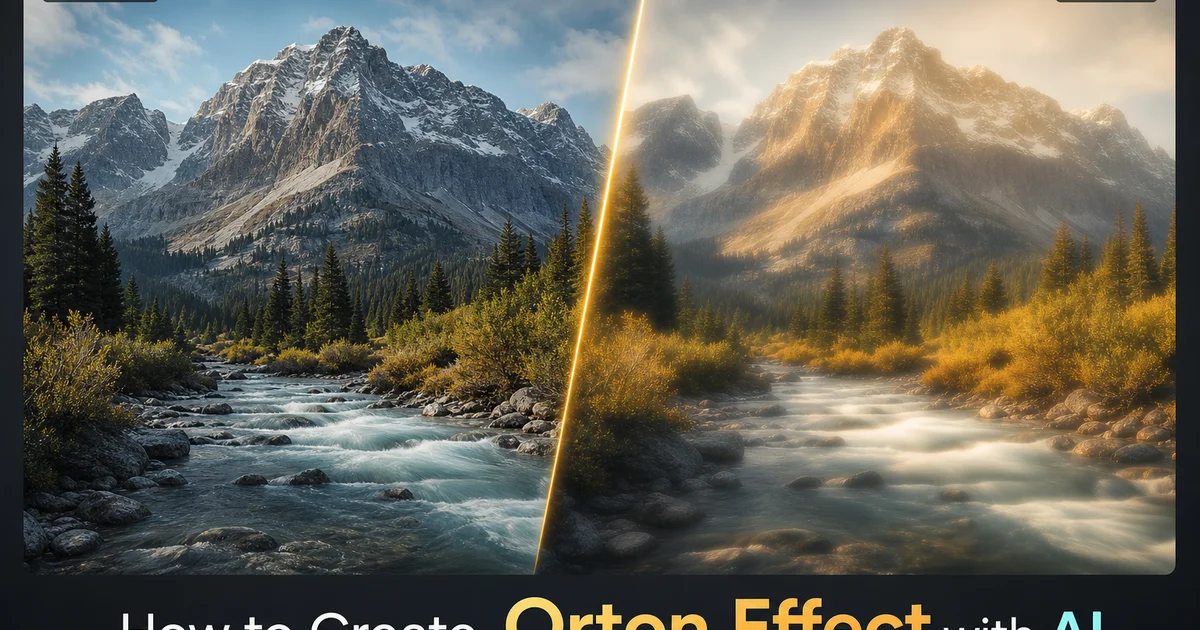
The Orton effect — named after photographer Michael Orton who developed the technique in the 1980s using slide film — is a post-processing method that gives photographs a dreamy, luminous, almost painterly quality by blending a sharp exposure with a blurred, slightly overexposed version of the same image. The result is a photograph that glows, with highlights that bloom softly into surrounding areas and an overall ethereal atmosphere that transforms literal landscape records into something that feels like a half-remembered dream or an impressionist painting. The technique has become one of the most popular landscape photography post-processing effects because it enhances the emotional impact of natural scenes without requiring the compositing, sky replacement, or heavy manipulation that other dramatic effects demand.
Creating the Orton effect manually in Photoshop requires duplicating the image layer, applying Gaussian blur to the top copy, changing the blend mode to Screen or Multiply, adjusting the opacity. Then often masking the effect away from areas where you want to preserve sharpness. The process is straightforward but time-consuming, and getting the right balance between glow intensity, highlight bloom, and preserved sharpness in critical areas requires large experimentation. Each adjustment affects the others — increasing the blur radius changes the glow character, changing the opacity affects the overall brightness. Masking decisions determine where the dreamy quality appears and where sharpness is maintained. A single Orton edit might take fifteen to twenty minutes of iterative adjustment to get right.
AI-powered Orton processing automates and improves this workflow by applying the glow effect with intelligent scene awareness. Rather than applying a uniform blur across the entire image, the AI varies the glow intensity based on what each area contains. Brighter bloom in highlights and sky, preserved contrast in shadows and dark areas, and maintained sharpness in high-detail regions that serve as visual anchors. This scene-aware approach produces a more natural and expert Orton effect than uniform processing. It does so in seconds rather than minutes. This guide covers how to use AI Filter and AI Enhance to create expert Orton effects that range from subtle mood boost to dramatic painterly change.
- The Orton effect blends a sharp exposure with a blurred, overexposed version of the same image, creating a luminous glow that transforms landscape photos into dreamy, painterly compositions.
- AI Filter applies the glow with scene-aware intelligence — more bloom in highlights, preserved contrast in shadows, maintained sharpness in focal areas — rather than a uniform blur overlay.
- Intensity is adjustable from subtle twenty percent glow for realistic mood enhancement to strong eighty percent glow for the full painterly transformation Michael Orton pioneered.
- AI Enhance restores selective sharpness in focal point areas after the glow is applied, creating the sharp-within-soft contrast that expert Orton processing achieves through manual layer masking.
- The technique works best on landscapes, nature scenes, and atmospheric photography — autumn forests, misty waterfalls, golden-hour meadows, and foggy mountain scenes are ideal candidates.
The history and optical principles behind the Orton effect
Michael Orton developed his signature technique in the 1980s while working with Velvia slide film. The original process was fully analog. He would mount his camera on a tripod and take two exposures of the same scene: one sharply focused at the correct exposure. One on purpose defocused and overexposed by about two stops. When these two slides were sandwiched together in a single mount, the sharp exposure provided detail and structure while the overexposed, out-of-focus exposure added the trait bloom and glow. The combined image had a quality that neither exposure possessed alone. The sharpness of a well-focused photograph infused with the luminous, dreamy softness of an overexposed blur.
The optical principle at work is highlight bloom. When a bright area of the defocused exposure overlaps with the corresponding area of the sharp exposure, the brightness from the blurred version extends beyond the original highlight boundaries, creating a halo of light that softens edges and fills shadows with reflected luminosity. This bloom is most pronounced in areas of high contrast. Where a bright sky meets a dark tree line, where sunlight edges around a mountain peak, where water reflects sunlight against dark rocks. The bloom at its core fills in the harsh transitions with soft gradients of light, giving the image the ethereal quality that makes the Orton effect so distinctive and emotionally evocative.
The transition from analog to digital made the technique greatly more accessible. In Photoshop, the two-exposure sandwich is simulated by duplicating the image layer, applying Gaussian blur to the copy. Using Screen or Multiply blend modes to combine the layers. This digital approximation is technically simpler than the original film process, but it produces a subtly different result because the digital blur is mathematically precise while the optical defocus of a real lens has character. The shape of the aperture, the quality of the bokeh, and the optical aberrations of the specific lens all influence the blur quality. AI implementations bridge this gap by emulating the optical traits of real lens defocus rather than applying pure mathematical blur.
- Michael Orton's original 1980s technique sandwiched two slide film exposures. One sharp and correctly exposed, one defocused and overexposed by two stops — creating a glow impossible with a single exposure.
- Highlight bloom is the core optical principle: bright areas from the blurred exposure extend beyond their boundaries, filling harsh transitions with soft gradients of light.
- The digital Photoshop approximation uses Gaussian blur and Screen or Multiply blend modes, but produces a mathematically precise blur that lacks the optical character of real lens defocus.
- AI implementations emulate the optical characteristics of real lens defocus — aperture shape, bokeh quality, and optical aberrations — producing a more natural bloom than pure mathematical blur.
Scene-aware AI processing: why intelligent glow beats uniform blur
The fundamental limitation of traditional Orton processing. Whether analog or digital — is that the blur is applied uniformly across the entire image. Every pixel receives the same blur radius regardless of what it represents. A bright cloud and a dark tree trunk receive identical processing, which often leads to unwanted effects: shadows that lose too much depth and become milky, already-soft sky areas that become formless blobs. Fine details in focal areas that dissolve into mush. The photographer must then spend time masking the effect away from areas where it causes problems. Is the most time-consuming part of a manual Orton edit and the reason many photographers either overprocess or underprocess the effect.
AI-powered Orton processing solves this by analyzing the scene content before applying the glow. The AI categorizes image regions by their content type and tonal traits: bright skies and highlights receive strong bloom because that is where the ethereal luminosity originates and where glow looks most natural. Mid-tone areas like foliage, rock faces, and water receive moderate glow that adds atmosphere without dissolving texture. Dark shadows and foreground elements receive minimal glow to maintain depth and grounding. The contrast between glowing highlights and solid shadows is what gives the Orton effect its three-dimensional quality rather than the flat, hazy look of over-processed implementations.
The AI also identifies structural elements that serve as visual anchors. Tree trunks, mountain ridges, building edges, horizon lines — and preserves their sharpness within the overall glow field. This selective sharpness within softness is what expert landscape photographers achieve through careful layer masking in Photoshop, spending twenty minutes or more painting precise masks to protect focal areas while allowing the glow to affect surrounding regions. The AI produces this result automatically by understanding which elements need to remain sharp for the composition to work. The viewer's eye needs something to focus on within the dreamy glow. The AI ensures those anchor points remain clear.
- Uniform blur causes problems — milky shadows, formless skies, dissolved focal details — requiring manual masking that is the most time-consuming part of traditional Orton processing.
- AI categorizes regions by content: bright areas receive strong bloom, mid-tones receive moderate glow preserving texture, and dark shadows receive minimal processing to maintain depth.
- Structural anchor elements — tree trunks, ridgelines, horizon lines — are automatically identified and kept sharp within the overall glow field to provide visual focus points.
- The AI replicates the selective masking that professional photographers spend twenty-plus minutes creating manually, producing the sharp-within-soft contrast that defines quality Orton work.
Controlling intensity: from subtle mood enhancement to full painterly transformation
The Orton effect exists on a wide spectrum of intensity. The right amount depends on the image, the intended mood, and the viewing context. At the subtle end — fifteen to twenty-five percent glow intensity — the effect adds a gentle warmth and softness that enhances the emotional quality of the scene without announcing itself as a post-processing technique. Highlights gain a slight luminous quality. Shadows warm slightly. Edge transitions soften just enough to reduce the clinical sharpness of a digital capture and replace it with a more organic, film-like quality. This level is ideal for landscape photography that aims for a natural, elevated look. Images that feel better than what the eye saw, but not so processed that the viewer questions whether the scene was real.
At moderate intensity — thirty to fifty percent — the effect becomes visible as a deliberate creative choice. The glow is noticeable, the highlights bloom beyond their natural boundaries. The image takes on a distinctly dreamy quality that shares artistic intent. This range is popular for autumn forest scenes, where the warm orange and gold tones amplify beautifully through the glow. For misty or foggy scenes where the existing mood softness is enhanced by the processing. At this level, the Orton effect transforms the image from a photograph into something closer to a visual poem. The scene is distinct but experienced through a filter of emotional boost that the viewer feels rather than analyzes.
At strong intensity — sixty to eighty percent — the Orton effect fully transforms the photograph into something approaching a painting. Detail is heavily softened, highlights bloom greatly. The image glows with a luminosity that bears little resemblance to the literal scene. This level is right for artistic and gallery work where the photographer's interpretive vision is more important than documentary accuracy. For social media content where the dramatic visual impact stops scrolling and earns engagement. The risk at high intensity is tipping into an overdone, heavy-handed look that sacrifices too much image quality for effect. The image should glow and dream, not look like it was smeared with petroleum jelly. AI Filter's scene-aware processing helps prevent this by maintaining shadow depth and structural sharpness even at high glow settings.
- Subtle fifteen to twenty-five percent glow adds gentle warmth and softness without announcing itself as processing. Ideal for natural landscape photography that aims for an elevated, film-like quality.
- Moderate thirty to fifty percent glow creates a visible dreamy quality that communicates artistic intent — particularly effective for autumn forests and misty or foggy atmospheric scenes.
- Strong sixty to eighty percent glow transforms photographs into painterly renderings approaching impressionist art — appropriate for gallery work and high-impact social media content.
- AI Filter's scene-aware processing prevents the over-processed look at high intensities by maintaining shadow depth and structural sharpness even when bloom is maximized.
Best subjects and scenes for the Orton effect
Landscape photography is the natural home of the Orton effect because natural scenes already possess the organic textures, soft edges. Mood depth that the glow treatment enhances. Autumn forests are perhaps the single best subject because the warm orange, gold. Red tones amplify through the bloom, creating a radiant luminosity that makes the scene glow as if lit from within. Backlit scenes — where sunlight comes through leaves, radiates around mountain peaks, or reflects off water toward the camera — benefit greatly because the backlight creates natural highlights that the Orton bloom extends into surrounding areas, producing halos and light rays that enhance the already-magical quality of backlit golden-hour conditions.
Water scenes respond beautifully to the Orton treatment because the blur softens water surfaces into smooth, luminous expanses while the sharp underlying layer preserves the suggestion of movement and texture. A waterfall processed with Orton glow takes on a silky, eternal quality where the water appears to emit light rather than merely reflect it. Misty lake scenes gain a dreamlike stillness where the boundary between water and air dissolves into a luminous transition. Ocean scenes at golden hour acquire a warm glow that makes the water look like liquid gold. In each case, the softening that the Orton effect applies to water mimics the long-exposure smoothing technique but with the bloom and luminosity that long exposure alone does not provide.
Flower and macro photography also benefit, though the application is different from landscape work. A close-up of a flower processed with moderate Orton glow gains an ethereal, romantic quality where the petals seem to emit soft light and the already-shallow depth of field is enhanced by the bloom's edge softening. The effect transforms botanical records into botanical art. For portrait photography, the Orton effect should be used very sparingly. A subtle ten to fifteen percent glow can add a flattering softness to skin and a dreamy atmosphere to romantic or bridal portraits, but stronger applications quickly look dated and over-processed. The exception is high-fashion and editorial work where the heavily stylized glow is a deliberate artistic statement rather than an attempt at flattery.
- Autumn forests are the ideal Orton subject — warm orange and gold tones amplify through the bloom, creating radiant luminosity that makes the scene appear lit from within.
- Backlit golden-hour scenes benefit dramatically because natural highlights are extended into surrounding areas, producing halos and light rays that enhance existing magical-hour quality.
- Water scenes — waterfalls, misty lakes, golden-hour oceans — gain a silky luminous quality where surfaces appear to emit light rather than merely reflect it, mimicking long exposure with added bloom.
- Portrait use should be very subtle at ten to fifteen percent glow for flattering softness. Stronger applications quickly look dated, with the exception of on purpose stylized high-fashion editorial work.
Common mistakes and how to avoid over-processing the Orton effect
The most common mistake with the Orton effect is applying too much glow too uniformly. Turns a dreamy image into a muddy, hazy one. There is a tipping point where the luminous quality that makes the Orton effect beautiful crosses into a washed-out, foggy look that simply looks like a badly focused photograph. The distinction is contrast: a well-executed Orton effect maintains strong contrast between light and dark areas even as the edges between them soften. The glow should be brightest in the highlights and absent from the deepest shadows. If the shadows start to look milky or grey rather than dark and grounding, the effect has been pushed too far and needs to be dialed back or masked away from the shadow areas.
The second common mistake is applying the Orton effect to images that do not benefit from softening. Architectural photography, product photography, street photography, and sports photography all depend on sharpness and precise detail for their visual impact, and the Orton glow undermines these qualities. Similarly, images with busy, detailed compositions. Dense cityscapes, complex interior rooms, crowded market scenes — tend to look messy rather than dreamy when softened because there are too many competing elements for the glow to resolve into a coherent mood mood. The effect works best on simpler compositions with clear subjects, open spaces. Mood depth where the glow enhances a mood that is already suggested by the scene.
The third mistake is inconsistent processing within a series. If you are presenting a landscape portfolio, gallery show, or social media grid where multiple images appear together, the Orton intensity should be consistent across the series. One image with heavy glow next to one with no glow next to one with moderate glow looks unplanned and aesthetically chaotic. Choose an intensity level that works for the majority of images in the series and apply it always, adjusting slightly for individual images that need more or less treatment but keeping the overall look cohesive. AI Filter's ability to save and reapply custom presets makes this consistency easy to maintain across large batches of images.
- Over-processing crosses the line from dreamy to muddy when shadows lose their depth and turn milky grey — maintain strong shadow contrast even as highlight edges soften and bloom.
- Avoid applying Orton glow to images that depend on sharpness. Architecture, products, street, and sports photography — or to busy compositions with too many competing elements for coherent atmosphere.
- Maintain consistent processing intensity across a portfolio or series — varied Orton levels between images in a set looks unplanned and undermines the artistic coherence of the presentation.
- AI Filter's custom preset saving enables consistent Orton processing across large batches, ensuring cohesive atmospheric treatment throughout a portfolio, gallery, or social media grid.
How to do it
- 1
Select a landscape or nature photo that benefits from a dreamy atmosphere
The Orton effect works best on images where a soft, ethereal quality enhances the mood. Autumn forests, misty waterfalls, backlit meadows, golden-hour landscapes, and foggy mountain scenes are ideal candidates. The effect transforms the literal sharpness of a photograph into a painterly rendering that emphasizes mood and atmosphere over records. Avoid applying it to images where sharpness and detail are the point, such as architecture, product photography, or documentary images. The softening contradicts the viewer's expectation of precision in those genres.
- 2
Apply the AI Orton glow effect through AI Filter
Upload your photo to AI Filter and select the Orton or dreamy glow preset. The AI applies the classic Orton technique. Blending a sharp exposure with a slightly overexposed, heavily blurred version of the same image — but with intelligent awareness of the scene content. Unlike a blanket Gaussian blur overlay, the AI varies the glow intensity across the image based on what each area contains. Highlights receive more bloom because that is where the ethereal luminous quality originates. Shadow areas receive less glow to maintain depth. The result is a more natural-looking Orton effect than uniform processing produces.
- 3
Adjust the glow intensity and highlight bloom to match your vision
The default AI Orton effect provides a moderate glow that works for most landscapes, but the intensity is fully adjustable. Subtle settings — around twenty to thirty percent glow — add just a whisper of softness and warmth that enhances the emotional quality without overtly changing the image character. This level works well for realistic landscape photography where you want mood boost without an obviously processed look. Stronger settings — sixty to eighty percent — create the full dreamy, painterly quality that Orton himself pioneered, transforming the photograph into something closer to an impressionist painting than a documentary image.
- 4
Use AI Enhance to preserve critical sharpness in focal point areas
One of the risks of the Orton effect is losing too much sharpness in the areas where the viewer needs visual anchoring. The peak of a mountain, the trunk of a central tree, a bridge or structure that provides compositional focus. After applying the glow, run AI Enhance selectively on these focal point areas to restore sharpness while leaving the surrounding glow intact. This combination of sharp focal points within an overall soft-glow field is what expert landscape photographers spend large time achieving through manual layer masking in Photoshop.
- 5
Compare subtle and strong versions before committing to the final edit
The Orton effect exists on a spectrum from barely perceptible to heavily stylized. The right amount depends on both the image and the intended use. Create two or three versions at different intensity levels and compare them side by side. The subtle version may be more right for a portfolio print that will be viewed at close range. The soft glow should enhance rather than dominate. The stronger version may work better for social media where the small viewing size and brief attention span favor a more right away striking treatment. Keep both versions — you may find that different contexts call for different intensities of the same image.
Sources
- Michael Orton: The Art of Ethereal Imagery in Landscape Photography — Michael Orton Photography
- Bloom and Glow Effects in Digital Image Processing — ACM SIGGRAPH
- Advanced Landscape Photography Techniques: Soft Glow and Mood Enhancement — Outdoor Photographer