
How to Create an Origami Effect with AI — Magic Eraser
Learn how to create an origami effect with AI, from choosing photos and fold complexity to paper textures, lighting, wet-fold styling, and export settings.

SEO & Growth
Reviewed by Magic Eraser Editorial ·
Table of Contents
- How computational origami algorithms create geometrically valid fold patterns from photographs
- Paper material simulation, from classic kami to textured washi and dual-sided reveals
- Wet-fold versus rigid fold techniques for different subject types
- Lighting and shadow calculations for faceted paper surfaces
- Creative applications from social media content to physical paper craft templates
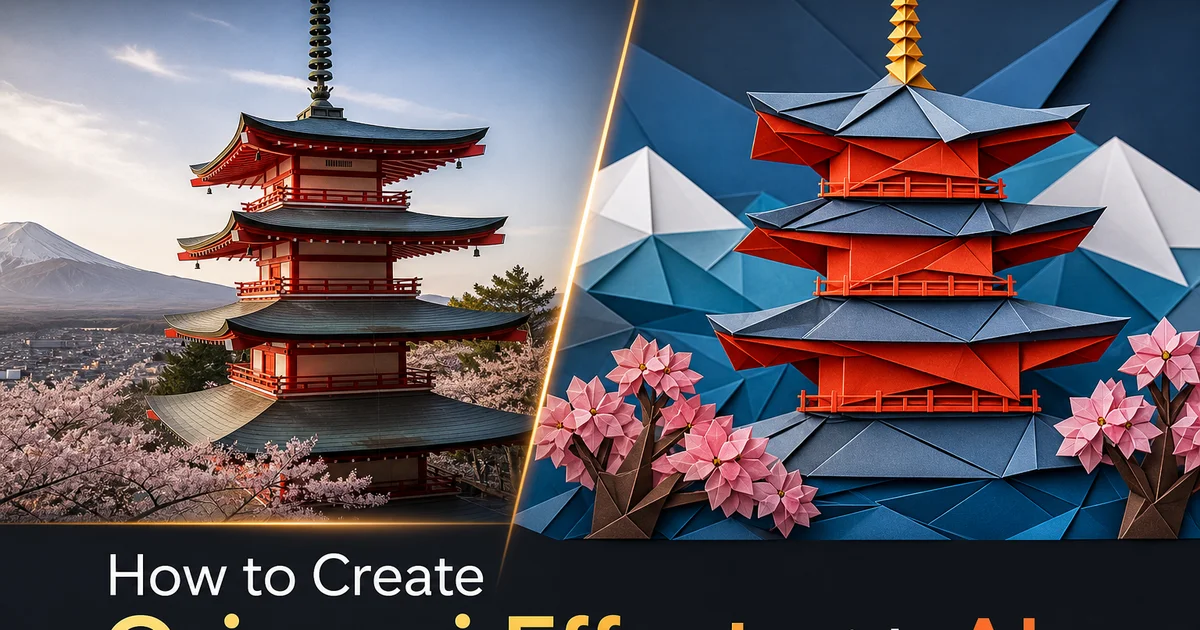
Origami, the Japanese art of paper folding, transforms a flat sheet into intricate three-dimensional sculpture through nothing more than precise geometric folds. No cutting, no gluing, just the systematic manipulation of a single square of paper into forms that range from simple cranes to photorealistic insects with individually articulated legs and antennae. This transformation from two dimensions to three through pure geometry has fascinated mathematicians, artists, and engineers for centuries, and the aesthetic of visible faceted planes meeting at crisp fold lines has become one of the most distinct visual styles in modern design. The origami look appears in architecture, fashion, product packaging, automotive design. Now digital art, where AI makes it possible to transform any photograph into an image that looks like it was folded from paper.
Creating convincing origami effects in digital images has historically required either 3D modeling expertise — manually constructing a faceted mesh that approximates the subject and then rendering it with paper material properties — or tedious manual illustration work drawing each facet, fold line, and shadow by hand. Both approaches demand major technical skill and time investment, putting the origami aesthetic out of reach for most photographers and content creators. Generic low-poly filters available in photo editors reduce images to triangular facets but miss the key traits that distinguish origami from arbitrary geometric simplification: the fold lines that connect facets in ways consistent with paper physics, the dual-sided color reveals at crease points, and the specific way flat paper planes catch and reflect light differently from other materials.
AI-powered origami transformation bridges this gap by combining computer vision with computational origami algorithms that understand the geometric constraints of paper folding. The AI analyzes your photograph, identifies the three-dimensional structure of the subject, and generates a mesh of flat planes connected by fold lines that could theoretically be constructed from a real sheet of paper. This geometric realism is what separates the result from low-poly art. Every crease follows rules consistent with real paper folding, and every facet sits at an angle achievable through sequential folds from a flat sheet. This guide covers the complete workflow from uploading a photograph through configuring fold complexity, paper materials, and lighting to exporting expert-quality origami artwork.
- AI generates geometrically authentic fold patterns that follow real paper-folding constraints, ensuring every crease and facet could theoretically be constructed from an actual sheet of paper.
- Three complexity tiers from bold 15-fold abstractions to detailed 200-fold near-photorealism let you choose the level of geometric simplification that best serves your creative intent.
- Paper material options include solid color, patterned washi, dual-sided reveals at creases, and photographic texture mapping onto folded surfaces for diverse visual styles.
- Wet-fold simulation allows gentle paper curves alongside sharp traditional creases, enabling organic forms like faces and animals that rigid flat-fold origami cannot achieve.
- Multi-angle export renders the three-dimensional origami mesh from different perspectives and can generate rotating animation GIFs that showcase the full dimensional quality of the paper sculpture.
How computational origami algorithms create geometrically valid fold patterns from photographs
The mathematical foundation of computational origami rests on flat-foldability theorems that determine whether a given crease pattern can fold from a flat sheet into a three-dimensional form without the paper intersecting itself. The Kawasaki-Justin theorem states that at any interior vertex of a flat-fold crease pattern, the alternating angles between creases must sum to 180 degrees. The Maekawa-Justin theorem requires that at each vertex, the number of mountain folds and valley folds differ by exactly two. The AI encodes these and other geometric constraints to ensure that every crease pattern it generates for your photograph is mathematically valid, meaning the resulting origami could theoretically be folded from real paper, not just rendered as an arbitrary collection of triangles.
The conversion process begins with depth estimation that determines the three-dimensional shape of the subject in the photograph. The AI constructs a simplified 3D mesh of the subject and then applies crease pattern improvement algorithms that find the fold lines producing the closest approximation to that 3D shape using flat paper planes. This is a computationally complex problem. Finding the optimal crease pattern for a given target shape is related to the protein folding problem in computational biology — but modern AI solves it efficiently by learning from thousands of real origami designs. The resulting crease patterns reference actual origami bases (early base, bird base, frog base, waterbomb base) that human folders have developed over centuries.
The distinction between geometrically valid origami and generic low-poly art becomes visually apparent in the fold line patterns. Low-poly art divides surfaces into arbitrary triangles with no physical logic connecting adjacent facets. Origami fold patterns show clear hierarchical structure. Primary creases that define the major form, secondary creases that add detail, and tertiary creases that refine specific features — all connected in a graph that traces back to the original flat sheet. When viewed from above, the crease pattern of an AI-generated origami face would resemble a real origami crease pattern diagram, with the trait radiating lines from base vertices and the systematic alternation of mountain and valley folds that paper folders would right away recognize as authentic.
- Kawasaki-Justin and Maekawa-Justin theorems enforce mathematical validity at every fold vertex, ensuring crease patterns could theoretically fold from real paper without self-intersection.
- Depth estimation constructs a 3D mesh of the photographic subject, then crease pattern optimization finds fold lines that best approximate that shape using flat planes.
- AI references real origami bases — preliminary, bird, frog, waterbomb — learned from thousands of existing designs, producing crease patterns that human folders would recognize as authentic.
- Hierarchical fold structure with primary, secondary, and tertiary creases creates visual coherence that distinguishes origami from arbitrary low-poly triangulation.
Paper material simulation, from classic kami to textured washi and dual-sided reveals
The visual character of an origami model depends as much on the paper material as on the fold pattern. Classic kami — the thin solid-color paper most commonly associated with origami — produces clean flat facets with uniform color and minimal texture, creating the bold geometric aesthetic familiar from traditional paper cranes and other iconic models. AI Filter's kami simulation renders perfectly flat color planes with slight variation in brightness based on each facet's angle to the light source. The fold edges appear as thin dark lines where the paper bends. This clean minimal look works well for subjects being reduced to bold graphic representations. Logos, icons, simplified portraits where the geometric abstraction itself is the artistic statement.
Washi paper introduces rich surface texture that adds visual depth and cultural realism to the origami effect. Real washi is handmade from plant fibers. Kozo (mulberry), gampi, or mitsumata — and has a distinctive irregular texture with visible fiber inclusions that catches light differently across the surface. AI Filter mimics this by overlaying procedurally generated fiber textures onto each facet, with the fiber direction following the grain of the simulated paper and the density varying to match different washi weights. Patterned washi adds another dimension, applying traditional Japanese designs. Wave patterns, cherry blossom prints, geometric tessellations — that wrap around the origami facets with proper UV mapping so the pattern maintains continuity across fold lines.
Dual-sided paper creates perhaps the most visually striking origami effect because it reveals different colors on front and back faces of the paper at every crease point. In real origami, this dual-color technique is used extensively in modular designs and complex models where the interplay of two colors defines features. A red exterior with white interior revealing white eyes on a red face, or green and brown sides creating a tree with visible bark at fold-back points. The AI analyzes which facets face the viewer and which face away, applying the front color to viewer-facing surfaces and the back color to reversed surfaces. At fold edges where both sides are visible, the contrast between colors creates visual definition that makes the fold structure right away readable and adds dynamic visual interest to every crease.
- Classic kami simulation produces clean flat color planes with uniform brightness variation based on facet angle, creating the bold geometric aesthetic of traditional origami.
- Washi texture overlays procedurally generated fiber patterns with visible inclusions onto each facet, with fiber direction following paper grain for authentic handmade paper character.
- Patterned washi applies traditional Japanese designs with proper UV mapping that maintains pattern continuity across fold lines, avoiding the disconnected texture breaks of naive mapping.
- Dual-sided paper reveals contrasting colors at every fold point, creating visual definition that makes the three-dimensional fold structure immediately readable and adds dynamic interest.
Wet-fold versus rigid fold techniques for different subject types
Traditional origami uses exclusively sharp creases that create perfectly flat facets meeting at defined angles, producing the trait angular geometric aesthetic. This works beautifully for subjects that are naturally geometric. Buildings, vehicles, crystals, and geometric abstractions — but struggles with organic subjects like faces, animals, and plants where smooth curves are key to recognition. A face rendered in rigid flat-fold origami looks like a cubist sculpture. Is a valid artistic choice but may not match your creative intent. Wet-fold origami, pioneered by Akira Yoshizawa in the mid-twentieth century, solves this by dampening the paper before folding, allowing it to hold gentle curves instead of sharp angles.
AI Filter's wet-fold simulation allows paper surfaces to bend in smooth curves rather than creasing at sharp angles. The algorithm controls the blend between rigid and wet-fold behavior on a per-crease basis, meaning some folds in the same model can be sharp while others curve gently. Facial contours, animal bodies, and flower petals receive curved folds that preserve organic form. Structural creases that define major geometric divisions remain sharp for clarity. This selective application of wet-fold technique mirrors how real origami artists use the method. Dampening specific areas of the paper for curved shaping while leaving other areas dry for crisp geometric definition.
The interplay between rigid and wet-fold regions creates strong visual tension in the final image. Sharp geometric creases provide structural clarity and the unmistakable paper-folded character. Curved surfaces add the softness needed for organic subjects to remain distinct and emotionally engaging. A portrait processed with pure rigid folding becomes an abstract geometric study. The same portrait with selective wet-folding becomes a distinct paper sculpture that retains the subject's likeness and emotional expression while clearly existing as a folded-paper artwork. The slider control lets you adjust the global balance between rigid and wet approaches, with the AI intelligently distributing the effect based on the semantic content of each image region.
- Rigid flat-fold origami creates perfectly angular facets ideal for geometric subjects — buildings, vehicles, crystals — but reduces organic forms to cubist abstractions.
- Wet-fold simulation allows gentle paper curves on a per-crease basis, preserving organic contours in faces, animals, and plants while maintaining sharp structural creases elsewhere.
- Selective application mirrors real wet-fold technique where artists dampen specific paper areas for curves while keeping other regions dry for crisp geometric definition.
- The balance slider adjusts global rigid-versus-wet proportion while the AI intelligently distributes curved and sharp folds based on whether each region contains geometric or organic content.
Lighting and shadow calculations for faceted paper surfaces
The visual appeal of origami models depends critically on how light interacts with the faceted paper surfaces. Accurate lighting simulation is what transforms a flat-looking collection of colored shapes into a convincing three-dimensional paper sculpture. Each facet in an origami model sits at a specific angle to the light source. Flat paper surfaces reflect light uniformly across their area, creating sharp tonal boundaries at every fold line. This is fundamentally different from smooth-surfaced objects where brightness transitions gradually across curved geometry. In origami, every facet is a distinct uniform tone, and adjacent facets can differ greatly in brightness based on their relative angles. This faceted lighting is the visual signature that right away reads as paper-folded art.
AI Filter calculates per-facet lighting using the surface normal of each flat plane, the position of one or more virtual light sources, and the simulated reflectance properties of the paper material. Matte paper produces soft diffuse lighting with gentle tonal variation between facets. Glossy paper adds specular highlights that appear as bright spots on facets angled directly toward the light source, creating the slight sheen visible on coated card stock. Metallic paper introduces highly reflective surfaces where each facet acts almost as a mirror, producing dramatic contrast between directly lit and shadowed facets. The lighting direction is adjustable, and the AI suggests positions that maximize the three-dimensional readability of the origami form by creating a clear light-to-dark gradient across the model.
Shadow casting between facets adds another layer of depth that sells the three-dimensionality of the paper sculpture. When one paper plane folds over another, the upper plane casts a shadow onto the lower plane, creating a thin dark line at the fold that varies in width based on how far the upper plane extends beyond the lower. These fold shadows are distinct from the ambient tonal variation caused by facet angles. They are localized dark bands that appear specifically where paper layers overlap. The AI calculates these inter-facet shadows precisely, and they contribute greatly to the perception of physical depth. Without them, the origami model looks flat and diagrammatic. With them, it reads as a solid three-dimensional object occupying real space.
- Flat paper surfaces create sharp tonal boundaries at every fold line, with each facet displaying uniform brightness determined by its angle to the light source.
- Material reflectance options range from soft matte diffusion to glossy specular highlights to metallic mirror-like facets, each dramatically changing the visual character of the origami model.
- Adjustable light direction maximizes three-dimensional readability by creating clear light-to-dark gradients that reveal the spatial relationships between facets.
- Inter-facet shadow casting adds thin dark bands where paper layers overlap, contributing the depth perception that distinguishes solid paper sculptures from flat diagrammatic representations.
Creative applications from social media content to physical paper craft templates
Origami-processed photographs create right away distinctive social media content that stands out in feeds dominated by conventional photography and standard filter effects. The faceted paper aesthetic is visually arresting because it occupies an unusual space between photography and sculpture, prompting viewers to look twice and engage with how the familiar subject has been transformed. Profile pictures processed as origami self-portraits, product shots rendered as paper sculptures. Travel photos transformed into folded-paper landscapes all generate high engagement because the effect is novel enough to draw attention while retaining enough subject recognition to share content. The multi-angle export feature is mainly valuable for social media, as rotating origami animations perform exceptionally well as short-form video content.
Print applications of origami-processed images benefit from the inherently graphic quality of the faceted aesthetic. The flat color planes, clean geometric edges, and bold tonal contrasts of origami art reproduce beautifully in print at any scale. From business cards to wall-sized installations. The SVG vector export option preserves the mathematical precision of fold lines at infinite resolution, making it possible to print the origami artwork at billboard scale without any loss of edge crispness. Fashion designers, packaging designers, and poster artists use origami-processed imagery to create visual assets that blend photographic subject matter with geometric abstraction, occupying a distinctive position between photography and graphic design.
Perhaps the most creative application is generating actual foldable templates from origami-processed images. Because the AI constructs geometrically valid crease patterns, it can unfold the three-dimensional model back into a flat crease pattern diagram that can be printed onto paper and folded into a physical origami model matching the digital image. This bridges the digital and physical worlds in a way no other photo filter can. You process a portrait photo into origami art, then print the unfolded template, and fold an actual paper sculpture of that face. The templates include mountain and valley fold indicators, numbered folding sequences, and dotted pre-score lines for clean creasing. This physical extension transforms the digital effect from a visual novelty into a tangible craft activity.
- Origami-processed images generate high social media engagement by occupying the novel visual space between photography and sculpture, prompting double-takes and extended viewing.
- SVG vector export preserves mathematical fold-line precision at infinite resolution, enabling print applications from business cards to billboard-scale installations without edge softening.
- Geometrically valid crease patterns can be unfolded into printable templates with mountain-valley indicators and numbered sequences, creating physical paper sculptures from digital images.
- Multi-angle rotating animation exports perform exceptionally well as short-form video content, showcasing the three-dimensional quality of the paper sculpture from all perspectives.
How to do it
- 1
Upload your photo and evaluate its geometric suitability for origami conversion
Open your image in AI Filter and examine the subject for traits that translate well into paper-folded forms. Subjects with clear silhouettes and distinct shapes work best because origami reduces three-dimensional subjects to flat folded planes. Animals, faces, vehicles, flowers, and geometric objects all have established origami representations that the AI can reference. Photographs with clean backgrounds or subjects that can be cleanly separated from their surroundings produce the most convincing results because the origami effect needs to define crisp paper edges against space. Complex scenes with multiple overlapping subjects should be simplified using Background Eraser before applying the origami change.
- 2
Select the origami complexity level and paper folding style
Choose from three complexity tiers that determine how many folds the simulated paper uses to represent your subject. Simple origami uses 15 to 30 large flat planes that create bold geometric abstractions of the subject. Ideal for icons, logos, and stylized representations. Intermediate complexity uses 50 to 100 folds that capture more detail while maintaining the clearly faceted paper aesthetic, suitable for most portrait and product applications. Advanced complexity uses 200 or more folds that approach photorealism while retaining the distinctive folded-paper look. Also, select the folding style: traditional flat-fold origami where all creases are sharp and surfaces are perfectly flat, or wet-fold origami where the paper bends in gentle curves that allow softer organic forms.
- 3
Configure paper material properties including color, texture, and lighting
Adjust the simulated paper properties to control the visual character of the origami model. Select from solid single-color paper that gives the classic origami look, patterned washi paper with traditional Japanese designs, dual-sided paper where different colors appear on front and back faces of each fold creating visual contrast at every crease, or photographic paper where the original image texture maps onto the folded surfaces. Set the paper weight from thin translucent tissue that allows light to pass through overlapping layers to heavy cardstock that casts distinct shadows along fold lines. The lighting model calculates how each flat facet catches light at its specific angle, creating the characteristic play of light and shadow across faceted surfaces that makes origami visually distinctive.
- 4
Use AI Enhance to sharpen fold edges and refine paper surface detail
After the initial origami conversion, run AI Enhance to crisp up the fold edges that define each paper facet. In real origami, the crease lines are among the most visually important features. They define the geometry and craftsmanship of the fold. The boost step sharpens these edges to clean geometric precision, adds subtle shadow lines along each crease to simulate the slight gap where paper bends, and refines the lighting calculation on each facet to ensure consistent surface normals. This step is what separates the origami effect from a generic low-poly filter. It adds the physical traits specific to folded paper rather than generically reducing polygon count.
- 5
Export the origami artwork and generate complementary flat and angled views
Save the finished origami image at full resolution and optionally generate extra viewing angles. Because the AI constructs a true three-dimensional mesh of the folded paper model, it can render the same origami from different perspectives. This can include a front view, a three-quarter view, and a side profile, providing a set of images that convey the full dimensional quality of the paper sculpture. Export individual images for social media posts or compile the multi-angle set into a rotating animation GIF that shows the origami form from all sides. The three-dimensional mesh data can also export as an SVG for print applications where vector crispness matters.
Sources
- Computational Origami: Folding Algorithms and Geometric Design — ACM SIGGRAPH
- Geometric Folding Algorithms: Linkages, Origami, Polyhedra — MIT Press
- Neural Mesh Deformation for 3D Shape Generation — arXiv — International Conference on Computer Vision