
How to Create a Mokume-Gane Pattern Effect with AI Photo Editing
Step-by-step tutorial for creating realistic mokume-gane mixed-metal pattern effects in photos using AI. Learn lamination presets, forging simulations, and surface refinement techniques.
SEO & Growth
Reviewed by Magic Eraser Editorial ·
Table of Contents
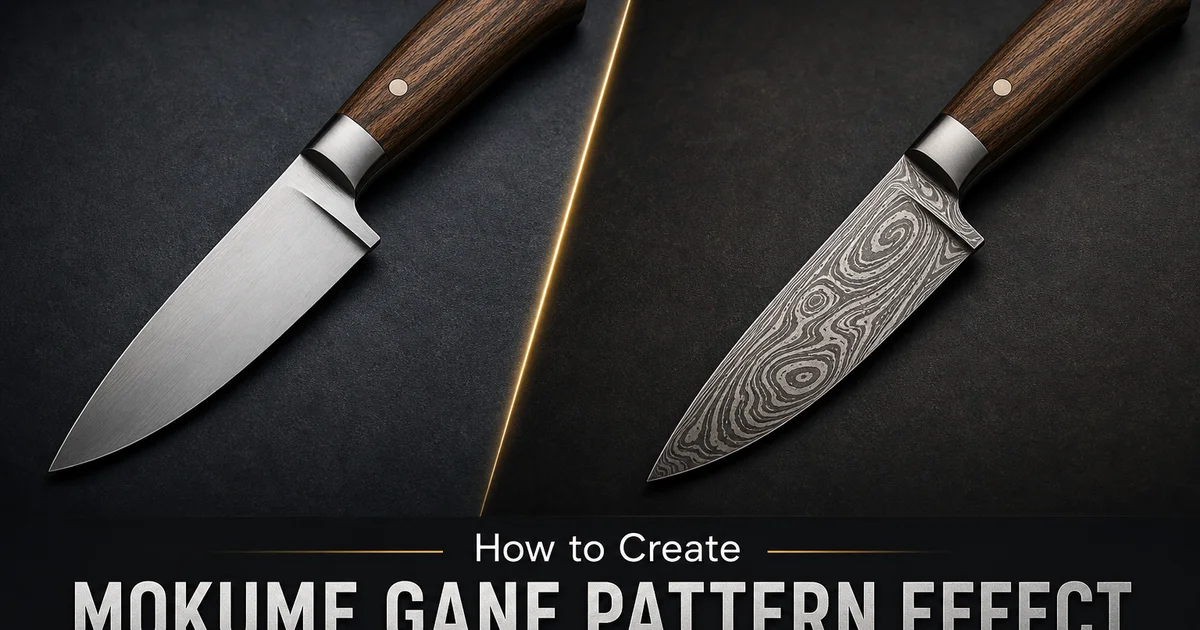
Mokume-gane is a centuries-old Japanese metalworking technique that fuses alternating layers of contrasting precious metals into a single billet, then manipulates that billet through carving, twisting, and forging to expose flowing organic grain patterns on the surface. The name translates to wood-grain metal, and the visual result resembles the natural growth rings of timber rendered in gold, silver, copper, and traditional Japanese alloys like shakudo and shibuichi. Translating this complex physical process into a convincing digital photo effect requires more than a simple texture overlay because authentic mokume-gane patterns follow the deterministic physics of how layered metal responds to specific forging operations.
AI-powered pattern generation solves this challenge by training on thousands of photographs of real mokume-gane pieces, learning the relationship between forging technique and resulting surface pattern, then applying that knowledge to transform ordinary photographs into images that genuinely resemble laminated precious metal surfaces. Unlike generic swirl or marble filters, the AI understands that a twist pattern should produce concentric elliptical grain figures, that a carve-and-flatten technique creates topographic contour lines, and that each metal in the stack has distinct color and reflectivity properties that must be preserved at every layer boundary.
This tutorial walks through the complete workflow for creating mokume-gane pattern effects using AI Filter and AI Enhance, from selecting the right source image and configuring metal layer presets to choosing pattern manipulation styles and refining surface finish for maximum realism. Whether you want to apply the aesthetic of Japanese mixed-metal craft to portrait photography, product shots, or abstract compositions, these techniques produce results grounded in the authentic visual language of one of the world's most sophisticated metalworking traditions.
- AI learns from real mokume-gane specimens to generate lamination patterns that follow authentic forging physics rather than applying random swirl effects.
- Metal combination presets replicate traditional pairings including gold-shakudo, silver-copper, and complex multi-alloy stacks with accurate color relationships.
- Three forging simulation modes — twist, carve-and-flatten, and fold — each produce the distinctive grain figures associated with that specific fabrication method.
- AI Enhance adds material-specific reflectivity at layer boundaries, replicating how different metals respond differently to polishing and patination.
- Layer count controls range from bold two-metal compositions to intricate stacks with dozens of thin alternating bands visible in the cross-section grain.
Understanding mokume-gane pattern physics for realistic digital effects
The visual patterns in mokume-gane are not decorative choices applied to a surface. They are the inevitable geometric consequence of how stacked metal layers deform under specific physical operations. When a smith twists a square billet of laminated metals, the rotation exposes progressively deeper layers at the corners while the center remains fairly undisturbed, creating concentric elliptical figures similar to looking at tree rings at an oblique angle. When a smith carves grooves into the flat surface of a laminated block and then hammers it flat again, the material that fills the carved depression comes from deeper layers, creating a pattern that maps the original groove geometry onto the exposed layer structure like topographic contour lines on a geological survey map.
Understanding these physical relationships is key for evaluating whether an AI-generated mokume-gane effect looks authentic. A convincing result should show grain figures that follow a consistent internal logic. The lines should flow smoothly without abrupt direction changes that would be physically impossible in real forged metal. Layer boundaries should maintain roughly consistent thickness because real metal laminations do not spontaneously thin or thicken without a corresponding change in the forging pressure applied to that region. The colors and reflectivities of adjacent metals should alternate in the correct sequence because you cannot rearrange the order of layers in a physical metal stack without disassembling and re-laminating the billet.
AI pattern generation respects these constraints because the training data consists of photographs of real mokume-gane pieces where these physical rules are always satisfied. The model learns that certain pattern geometries co-occur with certain layer arrangements and that boundaries between specific metals have characteristic visual qualities. This is at its core different from a procedural noise function or a marble texture generator, which can produce superficially similar swirling patterns but violates the physical logic at every scale when examined closely by someone familiar with actual metalwork.
- Twist patterns create concentric elliptical grain figures because rotation exposes progressively deeper metal layers from center to edge in a geometric sequence.
- Carve-and-flatten techniques produce topographic contour patterns by exposing different depth layers through selective material removal and re-compression.
- Authentic patterns maintain consistent layer thickness and smooth flow lines — abrupt changes or impossible layer orderings reveal a digital imitation.
- AI training on real mokume-gane photographs enforces physical constraints automatically, producing results that respect forging physics at every scale.
Configuring metal layer presets and lamination complexity
The visual impact of a mokume-gane pattern depends heavily on the contrast between the metals in the lamination stack. Traditional Japanese mokume-gane uses alloys specifically developed for their color range. Shakudo, a copper-gold alloy that develops a deep purplish-black patina, creates dramatic contrast against yellow gold or pale silver, while shibuichi, a copper-silver alloy with a subtle grey-violet surface, provides intermediate tones for more nuanced multi-layer compositions. The AI presets replicate these historically accurate color relationships, mapping each metal's characteristic hue, saturation, and surface reflectivity to the corresponding layer positions in the simulated stack.
Layer count greatly affects the visual character of the resulting pattern. A simple two-metal lamination with eight to twelve total layers produces bold, easily readable grain lines where each individual band is clearly visible and the alternating colors create strong graphic contrast. Increasing the layer count to thirty or more creates finer, more intricate patterns where the individual bands become thin lines that merge into flowing fields of blended color at normal viewing distance but reveal their individual layer structure when examined closely. Traditional Japanese smiths controlled this variable by repeatedly folding and re-welding their billets, doubling the layer count with each fold. A billet folded five times from an initial four-layer stack produces one hundred and twenty-eight individual layers.
For photographic applications, the optimal layer count depends on the output size and intended viewing context. Images destined for large-format printing or close examination benefit from higher layer counts that reward detailed inspection. Social media thumbnails and web graphics work better with lower layer counts that read clearly at small sizes. The AI filter provides a steady slider from minimal to maximum lamination complexity. Previewing at the intended output size helps you find the sweet spot where the pattern is complex enough to be convincing but not so dense that individual layers become indistinguishable noise.
- Shakudo creates dramatic purplish-black contrast against gold or silver, while shibuichi provides subtle grey-violet intermediate tones for complex compositions.
- Low layer counts of eight to twelve produce bold graphic patterns with individually visible bands, ideal for small-format and web-resolution outputs.
- High layer counts of thirty or more create fine intricate grain that rewards close inspection, suited for large-format prints and detailed photographic work.
- Preview at the intended output resolution to find the optimal complexity — dense laminations lose readability at thumbnail sizes while sparse stacks look simplistic when enlarged.
Applying forging simulation techniques for varied pattern effects
The twist simulation rotates the virtual laminated billet along its central axis, progressively exposing deeper layers from the center outward. The resulting pattern is a series of nested elliptical or circular figures that radiate from a central point, resembling the end-grain view of a cross-cut log. The visual effect is deeply organic and meditative, with each concentric ring representing a different metal layer in the original stack. The twist angle parameter controls how many complete rotations are applied. A quarter turn produces gentle elongated ellipses while multiple full rotations create tightly wound concentric circles. This technique works especially well on images with a clear central focal point because the grain figures naturally draw the viewer's eye inward along the concentric rings.
The carve-and-flatten simulation replicates the process of cutting channels, grooves, or depressions into the flat surface of a laminated block and then compressing the block back to a uniform thickness. Where material was removed, deeper layers rise to fill the void, creating a pattern that maps the original carving geometry onto the exposed layer structure. Linear grooves produce parallel stripe patterns, crossed grooves create plaid or grid effects. Freeform carved shapes produce flowing organic contours. The depth slider controls how deep the simulated carving penetrates the layer stack. Shallow cuts expose only the topmost few layers while deep cuts reach through many layers to create wide contour bands with complex multi-metal gradients.
The random fold simulation mimics the organic distortion created by repeatedly folding a metal sheet in irregular patterns and forging it flat again. Unlike the geometrically predictable twist and carve techniques, folding produces fluid, unpredictable shapes that flow across the surface like landscapes viewed from altitude. This technique generates the most naturalistic mokume-gane patterns and is the most common method used by modern studio jewelers. The fold complexity slider adjusts the number of simulated fold-and-forge cycles, from simple broad distortions to elaborate multi-fold patterns with the complex layered character of extensively worked traditional pieces.
- Twist simulation creates concentric ring patterns radiating from a center point, with the rotation angle controlling the tightness of the nested elliptical grain figures.
- Carve-and-flatten replicates channel cutting and re-compression, producing stripe, grid, or contour patterns depending on the simulated carving geometry and depth.
- Random fold generates the most naturalistic patterns through irregular distortion, mimicking the organic flowing shapes favored by contemporary studio jewelers.
- Each technique accepts intensity and complexity parameters that control the degree of layer distortion from subtle and understated to bold and dramatically patterned.
Refining surface finish and exporting for maximum realism
After the initial pattern generation, AI Enhance applies the finishing layer that transforms a flat pattern into a convincing metallic surface. Real mokume-gane pieces exhibit complex surface optics: each metal in the lamination responds differently to polishing, with gold achieving a high mirror finish, copper developing warm semi-matte reflectivity, shakudo absorbing light into its dark patina, and silver sits somewhere between gold and copper in reflective intensity. These differences create subtle variations in brightness and specularity across every layer boundary that the eye reads as evidence of genuine multi-metal construction even before consciously analyzing the pattern.
The boost step also refines the micro-texture within each metal band. Real forged metal is not perfectly smooth at the microscopic level. It carries the directional grain of hammer work, the subtle waviness of hand-polished surfaces, and the organic variations that distinguish handcrafted metalwork from machined surfaces. AI Enhance adds these textural cues at a scale just below conscious perception, contributing to the overall impression of realism without calling attention to themselves as individual details. The result is an image that feels like a photograph of real metal rather than a digital pattern applied to a photograph.
When exporting the finished image, resolution matters greatly for maintaining the illusion of real metalwork. The fine grain boundaries and micro-texture details that sell the effect are the first casualties of compression or downscaling. Export at the highest resolution your intended use case supports. When downscaling for web use, apply sharpening to preserve the crisp layer boundaries that distinguish mokume-gane from generic blur-and-swirl effects. For print applications, ensure the output resolution exceeds three hundred DPI at the intended print size so that individual metal layers remain distinct even under close inspection.
- Each metal type responds differently to simulated polishing — gold achieves high mirror finish while shakudo absorbs light into its characteristic dark patina.
- Micro-texture simulation adds directional hammer grain and hand-polishing waviness that distinguishes handcrafted metalwork from digitally generated patterns.
- Export at maximum resolution to preserve the fine grain boundaries and surface details that create the illusion of authentic multi-metal construction.
- Apply selective sharpening when downscaling for web use to maintain crisp layer boundaries that would otherwise blur into generic swirl effects.
How to do it
- 1
Upload your image and evaluate its composition for mokume-gane pattern mapping
Open your photograph in AI Filter and assess how its existing tonal gradients, contours, and color regions will translate into the flowing laminated metal grain trait of mokume-gane patterns. Images with smooth tonal transitions and organic shapes work best because the AI maps metal layer boundaries along natural contrast edges in the source photograph.
- 2
Choose a metal combination preset and configure lamination layers
Select from pattern presets that simulate historically accurate metal pairings such as gold-and-shakudo, copper-and-silver, or complex multi-alloy stacks including shibuichi and kuromido. Adjust the lamination layer count to control grain density, from bold two-metal stripes to intricate multi-layer compositions with dozens of visible bands.
- 3
Select a pattern manipulation technique to shape the grain figures
Apply a forging simulation style that determines how the virtual metal layers distort across your image. The twist technique produces concentric elliptical rings, the carve-and-flatten method generates topographic contour patterns. The fold technique creates organic flowing shapes. Each method follows the physical logic of real mokume-gane fabrication.
- 4
Refine surface finish and layer boundaries with AI Enhance
Use AI Enhance to sharpen the transitions between adjacent metal layers and apply material-specific surface qualities. Real mokume-gane exhibits distinct reflectivity differences between gold, shakudo, copper, and silver at every boundary. The boost step adds these micro-texture details and ensures thin alternating bands remain individually distinguishable.
- 5
Export and compare your result against traditional mokume-gane references
Save the finished image at full resolution and evaluate it against photographs of authentic mokume-gane jewelry and vessels. Verify that layer boundaries flow smoothly, the grain pattern follows a consistent forging logic, and each metal retains its distinct visual character throughout the composition. Adjust parameters as needed for realism.