
How to Create a Mishima Slip Inlay Effect with AI: Korean Ceramic Art Digitized
Learn how to create the Mishima slip inlay pottery effect using AI photo editing. Step-by-step tutorial covering stoneware tones, incised line patterns, white slip filling, and authentic ceramic textures.

Product Marketing
Reviewed by Magic Eraser Editorial ·
Table of Contents
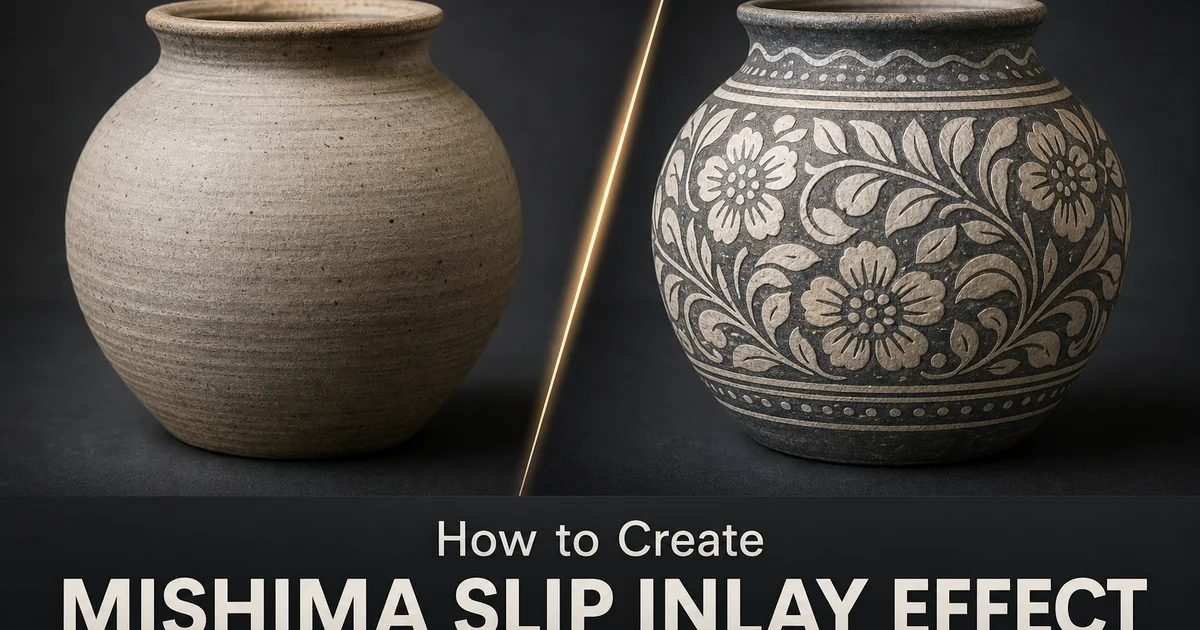
Mishima — also known as Mishima-de in Japanese or derived from the Korean Buncheong tradition — is a ceramic decoration technique where patterns are incised, stamped, or carved into leather-hard clay, then filled with contrasting slip (liquid clay) and scraped smooth. The result is a surface where fine white lines and patterns are set into a darker clay body, creating an effect that is at once delicate and bold. Originating in Korea during the Joseon dynasty and adopted by Japanese potters, the technique produces decorative surfaces that range from simple geometric repeats to complex figurative compositions of cranes, clouds, flowers, and waves.
Translating the Mishima look into digital art has in the past been very difficult because the effect depends on the interaction between two materials. The carved clay body and the inlaid slip — at a physical level. The white lines are not drawn on the surface. They are embedded in it, flush with the surrounding clay, catching light differently than painted or printed lines would. Creating this embedded quality in a flat digital image requires careful simulation of surface depth, material contrast. The subtle irregularities that come from handwork in a plastic material. Manual Photoshop techniques can achieve reasonable results but require advanced layer management and texture painting skills.
AI-powered tools make the Mishima effect accessible by automating the most technically demanding steps. Edge detection identifies the natural contour lines in a photograph and converts them into incised-line patterns with organic irregularity. Color change shifts the image into authentic stoneware tones. Texture generation mimics the physical surface qualities. The scraped areas, the glaze transparency, the material contrast between slip and clay body. The result captures the distinctive character of Mishima ware in a fraction of the time that manual digital techniques require.
- Transform photographs into Mishima-style ceramic art with incised line patterns filled with contrasting white slip against a dark stoneware body.
- AI edge detection converts natural image contours into organic hand-carved line patterns that avoid the mechanical precision of vector paths.
- Adjustable line weight and slip fill opacity control the visual intensity from subtle ceramic texture to bold graphic pattern.
- The stoneware color palette and surface texture simulation create convincing material quality that distinguishes this from simple line-art filters.
- Works across portraits, botanical subjects, architectural details, and geometric compositions with strong linear structure.
The history and visual language of Mishima ceramics
The Mishima technique evolved from Korean Buncheong ware of the fifteenth and sixteenth centuries. Potters decorated utilitarian stoneware with stamped, incised, and slip-inlaid patterns. The Korean originals featured bold, often whimsical decorations. Fish, lotus flowers, abstract rope-curtain patterns, and geometric stamps pressed in repeating arrays across the surface. When Japanese tea masters encountered these Korean wares, they prized the combination of rustic stoneware with refined decoration. Japanese potters adopted and refined the technique into what became known as Mishima-de, named after the Mishima shrine calendar whose densely printed text the fine inlay patterns supposedly resembled.
Visually, Mishima ware is defined by the contrast between the dark clay body. Often a gray, brown, or gray-green stoneware — and the white or cream slip that fills the incised lines. This contrast is modulated by the glaze applied over the decoration, most often a semi-transparent celadon or clear ash glaze that softens the stark white-on-dark contrast into something more muted and integrated. The glaze also creates a smooth, slightly glossy surface that unifies the carved lines and the surrounding clay into a single tactile plane. Understanding these visual layers — clay body, slip inlay. Transparent glaze — is key for creating a convincing digital simulation.
The pattern vocabulary of Mishima ranges from very geometric to freely organic. Stamped versions use small ceramic or wooden stamps pressed repeatedly into the clay to create allover patterns of circles, diamonds, chrysanthemums, or rope motifs. Carved versions feature freehand lines that follow the potter's design — willow branches, crane figures, cloud scrolls, or calligraphic characters. The most sophisticated pieces combine stamped backgrounds with carved focal motifs, creating a visual hierarchy of texture and pattern density. Each of these pattern types translates differently into the digital effect and offers different creative possibilities.
- Mishima evolved from Korean Buncheong ware, where stamped and incised stoneware was prized by Japanese tea masters for its rustic refinement.
- The visual effect depends on three layers: dark clay body, contrasting white slip inlay, and a semi-transparent glaze that softens and unifies the surface.
- Pattern types range from geometric stamp arrays to freehand carved motifs, each offering different creative possibilities in digital translation.
- Celadon or ash glaze over the inlay creates the muted, integrated surface quality that distinguishes Mishima from simple white-on-dark line art.
Building the stoneware foundation and generating incised patterns
The clay body change is the foundation of a convincing Mishima effect. Unlike Karatsu pottery's warm browns and ambers, Mishima stoneware tends toward cooler tones. Gray-green, blue-gray, and muted olive are trait. The AI color change needs to desaturate the image greatly while introducing this cool undertone, maintaining enough tonal variation to preserve the image content as distinct forms. Shadows should deepen toward dark charcoal with a green cast. Midtones settle into the trait gray-green that provides maximum contrast against the white slip lines.
The incised line generation is the most critical step in the process. AI edge detection identifies the strongest contour lines in the image. The outlines of a face in a portrait, the veins in a leaf, the architectural edges of a building — and converts them into lines that appear carved into the clay surface. The key to realism is irregularity. Real incised lines vary in width as the carving tool encounters different resistances in the clay, they wobble slightly as the potter's hand moves. They taper at their endpoints rather than starting and stopping abruptly. The AI should introduce these organic variations rather than producing clean, uniform lines.
Line density and selection require artistic judgment. Not every edge in the image should become an incised line. This would create an overwhelming tangle of marks that looks nothing like real Mishima ware. The effect works best when the AI selects the primary and secondary contour lines while ignoring the tertiary detail edges. Think of it as the difference between a careful contour drawing and a photocopy. Mishima decoration follows the major forms with deliberate, purposeful lines, leaving broad areas of undecorated clay body between them. Adjusting the edge detection threshold controls this balance between decorated and undecorated surface.
- Mishima stoneware tones are cooler than most Japanese pottery — gray-green, blue-gray, and muted olive provide the ideal slip-contrast background.
- AI edge detection must introduce organic line irregularity — width variation, subtle wobble, and tapered endpoints — to avoid a mechanical vector look.
- Selective line density is essential: primary and secondary contours should be rendered while tertiary detail edges are suppressed.
- The balance between decorated and undecorated clay surface determines whether the effect reads as authentic Mishima or as generic line art.
Slip filling, glaze simulation, and finishing the ceramic surface
Filling the incised lines with white slip is where the Mishima effect gains its distinctive character. In the physical process, liquid white clay is poured or brushed over the carved surface, pressed into every groove. Then the surface is scraped clean with a metal rib or wooden tool. This leaves white slip only in the carved lines, flush with the surrounding dark clay. The digital simulation must replicate the imperfections of this process. Areas where the slip did not fully fill a deep groove, edges where the scraping pulled slip slightly beyond the carved line, and spots where the slip surface sits slightly below the surrounding clay and catches a shadow.
The glaze layer is the finishing element that transforms the effect from a raw clay-and-slip surface into a finished ceramic piece. Most Mishima ware receives a semi-transparent glaze. Celadon green, clear, or pale blue — that pools slightly in surface depressions and thins over raised areas. This glaze modifies the stark contrast between white slip and dark clay into something softer and more unified. It also adds a subtle sheen that reads as the smooth, touchable surface of finished pottery. In the digital effect, this translates to a gentle overall color wash, slightly reduced contrast between the inlay lines and the clay body. A hint of surface gloss that varies across the image.
The final surface texture should convey the scraped, hand-finished quality of Mishima ware. After the excess slip is removed, the surface retains faint directional marks from the scraping tool. Horizontal or diagonal streaks that are barely visible but contribute to the handmade quality of the surface. These marks should be subtle enough that they read subconsciously rather than as an obvious overlay. Combined with the slight surface undulation of hand-formed clay, these finishing details create a surface that feels physically real and materially specific rather than generically filtered.
- Slip filling should include imperfections: incomplete groove fills, slight bleed beyond carved edges, and shadow-catching surface depressions.
- Semi-transparent glaze simulation softens the white-on-dark contrast and adds a unified sheen across the entire ceramic surface.
- Scraping tool marks provide subtle directional texture that contributes to the handmade quality without becoming an obvious overlay.
- The combined effect of clay, slip, glaze, and tool marks creates material specificity that distinguishes Mishima from generic line-art filters.
How to do it
- 1
Choose a photo with clear lines and good tonal contrast
Select an image with strong linear elements — architectural details, portrait features, botanical forms, or geometric patterns work best. Mishima slip inlay involves incising fine lines into clay and filling them with contrasting slip. Images with well-defined edges and clear tonal boundaries translate most convincingly into the effect. Avoid overly busy or low-contrast images where the incised line pattern would become confused or invisible.
- 2
Apply the stoneware clay body base tone with AI Filter
Use AI Filter to transform the image color palette into the trait gray-green stoneware body of traditional Mishima ware. Reduce saturation and shift the overall tone toward cool gray with a subtle green or blue undertone. The clay body should feel earthy and muted. Not lifeless, but restrained in a way that makes the white slip inlay stand out as the visual focal point. This base establishes the surface onto which all the decorative elements will be built.
- 3
Generate the incised line pattern using edge detection and AI Create
Use AI tools to detect the major edges and contour lines in your image, then render them as fine incised grooves in the clay surface. These lines should appear slightly irregular — hand-carved, not machine-cut — with minor variations in width and depth. In traditional Mishima, the artisan carves or stamps patterns into leather-hard clay. The digital lines should have the organic quality of a tool dragged through a resistant material rather than the precision of a vector path.
- 4
Fill the incised lines with contrasting white slip
Apply a white or cream-colored fill to the incised line pattern to simulate the slip inlay process. In traditional Mishima, liquid white clay is brushed or poured over the carved surface, filling the grooves. Then the excess is scraped away to leave white lines set into the darker clay body. The digital version should show this contrast clearly. Bright white lines against the gray-green clay — with slight imperfections where the slip fill is uneven or has pulled away from the groove edges during drying.
- 5
Add surface texture and export the finished Mishima effect
Apply a subtle overall surface texture to simulate the scraped and smoothed surface of finished Mishima ware. The areas between the slip-filled lines should show the faint marks of the scraping tool that removed excess slip. The surface should have a slightly matte quality with just a hint of the celadon-type glaze transparency that many Mishima pieces receive. Export at full resolution in PNG to preserve the fine line detail and subtle tonal contrasts of the slip inlay effect.
Sources
- Mishima Ware and the Art of Slip Inlay in Korean and Japanese Ceramics — The Metropolitan Museum of Art
- Buncheong Ware: Korean Stoneware and Slip Inlay Techniques — Korean Ceramics Foundation
- Surface Decoration Techniques in East Asian Ceramics — Victoria and Albert Museum