
How to Create Majolica Effect with AI — Magic Eraser
Transform photos into majolica-style tin-glazed pottery art using AI. Step-by-step guide covering istoriato narrative painting, Deruta luster, Faenza bianco, and Victorian majolica effects with authentic ceramic palettes.

Staff Writer
Reviewed by Magic Eraser Editorial ·
Table of Contents
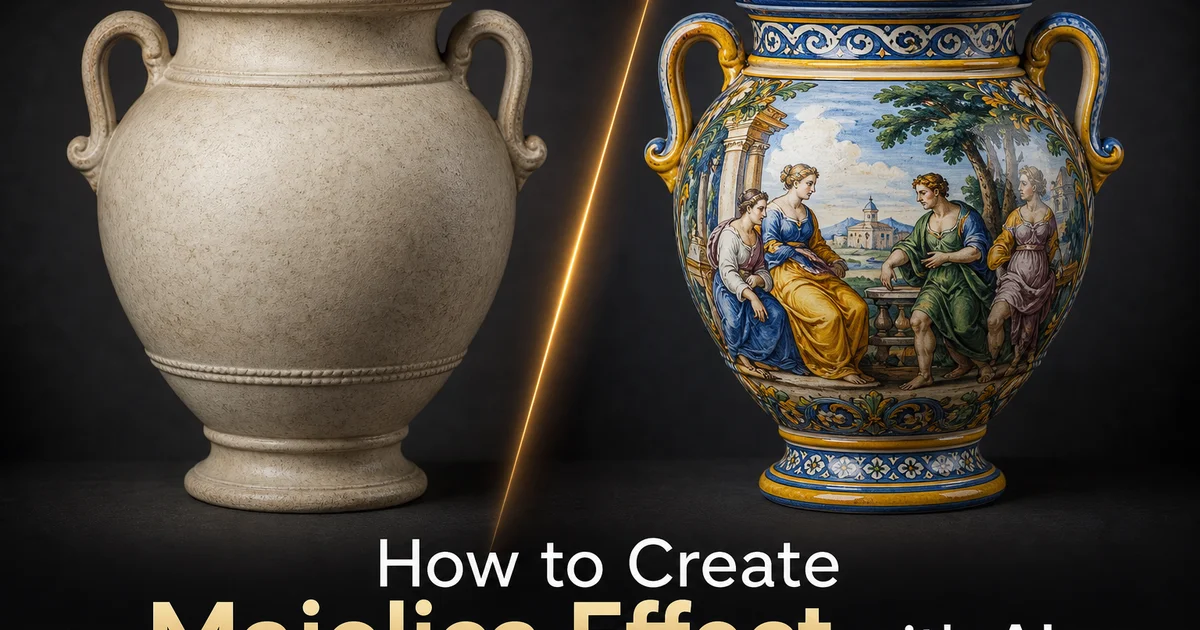
Majolica — also spelled maiolica in its Italian form — is one of the most vibrant and historically significant decorative art traditions in Western ceramics. The term encompasses tin-glazed earthenware produced across Italy, Spain, Portugal, the Netherlands. Eventually England from the medieval period through the Victorian era, characterized by an opaque white glaze surface decorated with bold polychrome painting using metal oxide pigments. The white tin glaze serves as a luminous ground that makes the painted colors appear vivid and saturated, similar to how gesso prepares a panel for oil painting. The greatest majolica pieces — the istoriato wares of Renaissance Urbino that depict mythological and historical scenes across entire plate surfaces — are considered among the finest achievements of European decorative painting, held in the collections of every major museum.
Creating majolica effects digitally has in the past required skilled digital painting that recreated the specific material qualities of tin-glazed ceramics from scratch. An artist would need to understand how pigments behave on an absorbent glaze surface. How colors bleed slightly at boundaries, how the white ground shows through thin applications, how the characteristic outline drawing in dark pigment defines forms, and how the limited palette of kiln-stable metal oxides constrains the available color range. This specialized knowledge placed convincing majolica simulation beyond the reach of most digital artists, confining it to a small number of ceramics illustrators and historical reproduction specialists.
AI-powered majolica conversion bridges this knowledge gap by encoding the material science and artistic conventions of the tradition into a change pipeline that operates on any input photograph. The AI understands that majolica is not a color filter but a complete material change. Converting photographic subjects into the visual language of tin-glazed ceramic decoration with its trait bold outlines, flat color fills, limited kiln-stable palette, absorbent surface interactions, and the specific relationship between white ground and painted decoration. This guide walks through using AI Filter and AI Enhance to create majolica effects that respect the historical tradition while transforming modern photographs into decorative ceramic art pieces.
- AI transforms photographs into authentic majolica-style decoration using historically accurate metal oxide pigment palettes. Cobalt blue, manganese purple, antimony yellow, copper green, and iron orange.
- Multiple substyle presets simulate regional and historical varieties including Urbino istoriato narrative painting, Deruta lustered ware, Faenza bianco sopra bianco, and Victorian polychrome majolica.
- Tin-glaze surface simulation replicates the characteristic quality of pigments sinking into an absorbent opaque white ground rather than sitting crisply on a smooth surface.
- Bold outline rendering in dark manganese or cobalt separates color areas with the confident hand-drawn contour quality that defines majolica decoration.
- AI Enhance restores crispness to decorative outlines and fine pattern details after transformation, preserving the graphic boldness that distinguishes the style.
The history and material science behind majolica decoration
Tin-glazed earthenware arrived in Italy from the Islamic world via Spain and the island of Majorca. From which the term majolica likely derives — during the medieval period. The technique involves coating fired clay with an opaque white glaze made from tin oxide and lead, then painting directly onto the unfired glaze surface before a second firing vitrifies the decoration for good into the glaze layer. This process creates the distinctive visual quality of majolica: colors that appear embedded in a luminous white matrix rather than sitting on top of a surface. The white ground functions like a built-in primer that makes every color appear more vivid than it would on bare clay, giving majolica its trait chromatic intensity.
The palette available to majolica painters was strictly constrained by chemistry. Only metal oxide pigments that could survive the extreme temperatures of a kiln firing could be used. Cobalt oxide produced blues ranging from pale sky to deep navy. Manganese oxide created purples, browns, and the dark outline color key to the decorative style. Antimony oxide yielded warm yellows. Copper oxide provided greens. Iron oxide gave oranges and rust reds. No pigment could produce true black, bright red, or pink. These colors were simply absent from the majolica painter's vocabulary. This material constraint gives majolica its distinctive look, so any digital simulation must respect these palette boundaries to appear authentic rather than generic.
The physical behavior of pigments on tin glaze further defines the style. Because the unfired glaze surface is absorbent, like damp plaster in fresco, the painter had to work quickly and confidently. Corrections were almost impossible because pigment soaked right away into the glaze layer. Lines had to be drawn with decisive single strokes. Color areas had to be filled smoothly because going over an area twice would create visible darker patches. This technical constraint is why majolica decoration has its characteristic bold, graphic quality — not by aesthetic choice, but by material necessity. The AI mimics this quality by rendering clean outlines with consistent weight and smooth color fills without the layered buildup typical of paint on non-absorbent surfaces.
- Tin-glazed earthenware creates colors embedded in a luminous white matrix rather than sitting on a surface, producing the characteristic chromatic vibrancy of majolica.
- Only kiln-stable metal oxide pigments can be used — cobalt blue, manganese purple, antimony yellow, copper green, and iron orange — with no true black, bright red, or pink available.
- The absorbent glaze surface demands quick, confident painting with no corrections, producing the bold graphic quality that defines the decorative style.
- The AI respects these material constraints, rendering clean decisive outlines and smooth color fills that match the physical behavior of pigments on tin glaze.
Regional substyles: from Urbino istoriato to Victorian majolica
The istoriato style that developed in Urbino during the early sixteenth century represents the pinnacle of majolica as fine art. Istoriato — meaning decorated with stories — transformed the plate or charger into a picture plane completely covered with narrative painting, often depicting scenes from classical mythology, biblical history, or modern literature. Master painters like Nicola da Urbino and Francesco Xanto Avelli created compositions of remarkable sophistication on curved ceramic surfaces, showing draftsmanship and color sense that rivaled modern panel painting. The AI's istoriato preset converts photographs into this all-over narrative painting style, treating the entire image as a steady painted scene with the characteristic warm palette, confident figure drawing, and landscape backgrounds of the Urbino workshops.
Deruta, a town in Umbria that remains a center of majolica production today, developed a distinctive style featuring metallic luster glazes that add an iridescent gold or ruby sheen to the painted surface. Deruta ware often combines bold central figures or heraldic designs with elaborate border patterns of arabesques, grotesques, and geometric motifs. The luster technique — achieved by a third firing in a reduction atmosphere with silver and copper compounds — produces a surface shimmer that no flat pigment can replicate. The AI mimics this metallic luster through selective specular highlighting that gives painted areas a warm reflective quality, most visible when the viewer imagines light moving across the curved surface of a ceramic piece.
Victorian majolica, pioneered by Minton in 1851, departed greatly from the Italian tradition by using colored lead glazes on molded forms rather than painting on flat tin-glazed surfaces. Minton, George Jones, and other Staffordshire manufacturers created exuberantly three-dimensional pieces. Garden seats shaped like tree trunks, teapots modeled as monkeys, serving dishes formed as overlapping leaves — covered in thick, richly colored glazes of deep green, cobalt blue, golden yellow, and chocolate brown. The AI's Victorian preset converts images into this saturated, sculptural aesthetic with heavier color application, pronounced modeling effects, and the glossy depth of thick lead glaze rather than the matte opacity of tin glaze.
- Urbino istoriato transforms the entire image into a continuous narrative painting in the Renaissance tradition, with sophisticated figure drawing and warm classical palettes.
- Deruta luster simulation adds metallic iridescent shimmer through selective specular highlighting that replicates the gold and ruby sheens of reduction-fired luster glazes.
- Victorian majolica presets apply the saturated, sculptural aesthetic of Minton and George Jones with thick lead glaze depth, pronounced modeling, and exuberant polychrome color.
- Each substyle preset adjusts palette, outline treatment, surface texture, and compositional conventions to match the specific regional and historical tradition.
Configuring authentic ceramic palettes and surface textures
The color palette is the most immediate visual signal that separates authentic-looking majolica from generic pottery effects. The AI enforces palette constraints derived from the actual chemistry of metal oxide pigments. Every color in the output maps to a pigment that could physically exist on tin-glazed earthenware. This means that photographic colors outside the achievable range are mapped to their nearest majolica equivalent: photographic reds shift toward iron orange or manganese brown, pinks become dilute manganese-purple. True blacks soften to dark manganese. The resulting palette feels both constrained and vibrant, exactly matching the visual experience of viewing authentic pieces where the limited color range is paradoxically part of what makes the decoration so striking.
Surface texture simulation converts the flat digital image into something that reads as a ceramic surface. The tin-glaze texture produces a soft, slightly irregular surface where the white ground shows varying opacity. Thicker where the glaze pooled during firing and thinner where it stretched over convex surfaces. Painted areas show the characteristic quality of pigment absorbed into the glaze: edges are slightly soft rather than razor-sharp, thin applications reveal the white ground beneath. Thickly applied pigment appears slightly raised and more saturated. Craze lines — the fine network of cracks that develops in glaze over time — can be added at variable intensity to suggest age and realism.
The relationship between the white ground and the painted decoration is fundamental to the majolica aesthetic and requires careful simulation. In authentic majolica, the white tin glaze is not a neutral background but an active visual element. It has warmth, slight translucency over the clay body, and subtle variation in thickness and opacity. The AI treats unpainted areas not as flat white but as a textured ceramic surface with these material qualities, ensuring that the white ground reads as tin glaze rather than paper. This material realism in the unpainted areas is what makes the overall image feel like a ceramic object rather than a painting that happens to use majolica colors.
- Palette constraints enforce historically accurate metal oxide pigment ranges, mapping photographic colors to their nearest kiln-stable equivalents for authentic visual results.
- Tin-glaze texture shows varying opacity, with pooled areas appearing thicker and stretched areas thinner, matching the physical behavior of glaze during kiln firing.
- Painted areas exhibit pigment absorption qualities — slightly soft edges, ground showing through thin applications, and raised saturated quality in thickly applied areas.
- The white tin-glaze ground is treated as an active ceramic surface with warmth and translucency rather than flat paper white, completing the material illusion.
Creative applications: wall art, tile design, and decorative collections
Majolica-transformed photographs translate naturally into wall art that bridges the gap between photography and decorative ceramics. A landscape photograph converted to istoriato style and printed on a circular panel becomes a decorative charger suitable for wall display in dining rooms and kitchens where the ceramic tradition has always had its strongest presence. Botanical photographs rendered in the Deruta style with metallic luster accents create decorative plates that pair with actual ceramic collections. Interior designers commission series of matched majolica-style prints. Four seasons, twelve months, and zodiac signs — that reference the historical tradition of majolica plate sets while using modern subjects and personal photographs as their source material.
Tile design is a natural extension of the majolica effect because architectural tilework has been a primary application of tin-glazed earthenware since the medieval period. The AI can convert photographs into tile-format compositions that respect the specific design conventions of ceramic tiles. Central medallion designs, repeating border patterns, four-tile and nine-tile compositions that create larger patterns when assembled, and the characteristic slight variation between individual tiles that gives handmade tilework its visual warmth. These digital tile designs can be used as references for actual ceramic production, as wallpaper patterns for architectural interiors, or as printed panels for kitchen and bathroom backsplash installations where real ceramic tiles would be impractical.
Educational and heritage applications use majolica transformation to connect modern audiences with historical decorative traditions. Museum gift shops offer visitors the experience of seeing their own photographs rendered in the style of the collection's majolica holdings. Cultural heritage organizations use the effect to create engaging social media content that draws attention to ceramics collections. Educators teaching art history use the change tool to help students understand the visual vocabulary of majolica by converting familiar modern images into the historical style, making the artistic conventions of outline, palette, and surface treatment immediately visible through comparison with the photographic original.
- Circular charger-format prints and decorative plate compositions pair with actual ceramic collections in dining rooms and kitchens where the tradition has historical precedent.
- Tile design compositions respect ceramic conventions — central medallions, repeating borders, multi-tile assemblies, and handmade variation — for both reference and printed installation use.
- Museum gift shops and heritage organizations use the effect for engaging social media content and visitor experiences connected to ceramics collections.
- Educational applications help art history students understand majolica's visual vocabulary by converting familiar images into the historical style for direct comparison.
How to do it
- 1
Upload your image and evaluate its suitability for majolica transformation
Open your photograph in AI Filter and assess its composition for majolica conversion. The majolica tradition favors clearly defined subjects against open backgrounds. Portraits, mythological scenes, heraldic compositions, botanical studies, and architectural views all translate naturally into the style. Images with strong contour lines and distinct areas of flat color convert most convincingly because tin-glazed earthenware decoration relies on bold outlines filled with opaque color rather than subtle tonal gradations. Photographs with heavy atmospheric perspective or soft-focus areas may lose their defining traits during conversion.
- 2
Select the majolica substyle and configure decorative parameters
Choose from presets that simulate the major regional and historical varieties of majolica. Deruta lustered ware with iridescent metallic glazes, Faenza white-ground bianco sopra bianco ware, Urbino istoriato narrative painting with pictorial scenes covering the entire surface, or the boldly colored Victorian majolica of Minton and George Jones. AI Filter identifies the subject matter and recommends the appropriate substyle: portraits and narrative scenes default to Urbino istoriato, floral subjects default to Deruta. Decorative patterns default to Faenza bianco. Adjust the outline weight and color saturation to match your preferred level of decorative boldness.
- 3
Configure the tin-glaze palette and surface characteristics
The majolica palette is defined by the metal oxide pigments that survive kiln firing on tin-glazed earthenware: cobalt blue, manganese purple, antimony yellow, copper green, and iron orange-rust. Select the palette warmth and saturation to simulate specific historical periods. Early Renaissance pieces use a restrained palette dominated by blue and yellow, while late Renaissance and Victorian pieces employ the full range at high saturation. Apply the tin-glaze surface texture to give the image the characteristic soft-focus quality of paint applied to an absorbent opaque white glaze ground. Pigments sink slightly into the surface rather than sitting crisply on top.
- 4
Enhance decorative details and sharpen outlines with AI Enhance
After the majolica transformation, use AI Enhance to restore crispness to the bold outline drawing that defines the style. Majolica decoration depends on confident contour lines drawn in dark manganese or cobalt that separate areas of flat color. If these outlines soften or blur, the characteristic graphic quality of the pottery is lost. Boost also improves the legibility of any text, inscriptions, or fine pattern work within the composition, ensuring these details remain readable at display sizes.
- 5
Export and compare against museum-quality majolica references
Save the finished image at full resolution and evaluate it alongside photographs of authentic majolica pieces in museum collections. Check that the color palette stays within the range achievable with historical metal oxide pigments. No neon colors, no true black, no photographic-looking gradients. Verify that the surface texture suggests ceramic rather than paper or canvas, that outlines have the confident hand-drawn quality of brush-applied decoration. Confirm that the overall composition follows the circular or shaped format typical of majolica plates, chargers, and tiles rather than a rectangular photographic frame.
Sources
- Italian Maiolica: Tin-Glazed Earthenware from the Fifteenth to Seventeenth Century — The Metropolitan Museum of Art
- Ceramic Glaze Simulation Using Physically Based Rendering Techniques — ACM Transactions on Graphics
- Maiolica in the Making: Technology and Decoration of Renaissance Ceramics — Victoria and Albert Museum