
How to Create Low-Poly Art from Photos with AI — Magic Eraser
Transform any photograph into striking geometric low-polygon art using AI. Step-by-step guide covering source selection, triangle density, edge-aware meshing, color palettes, and export for print, web, and social media.
SEO & Growth
Reviewed by Magic Eraser Editorial ·
Table of Contents
- Why source image selection matters more for low-poly than other styles
- Triangle density: finding the right level of geometric abstraction
- Edge-aware meshing: the technology that makes AI low-poly art work
- Color palettes and shading modes for different low-poly aesthetics
- Practical applications and export workflows
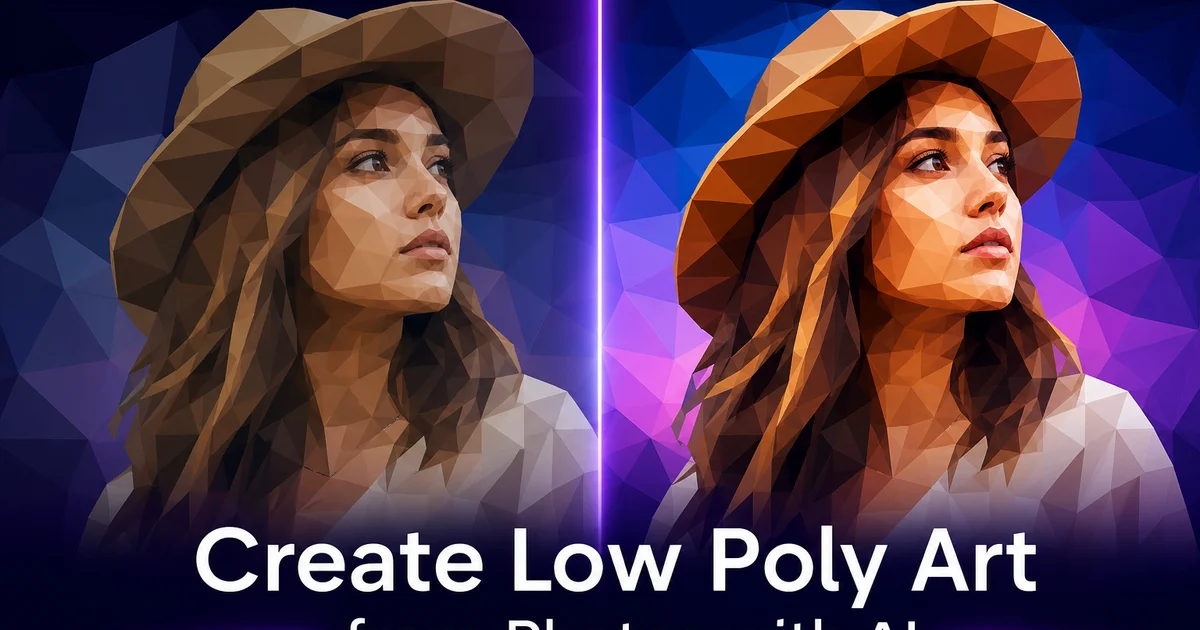
Low-poly art emerged from the constraints of early 3D computer graphics. Limited processing power forced game designers and digital artists to represent complex objects using as few polygons as possible. What began as a technical limitation became an intentional aesthetic. The faceted, crystalline look of low-polygon models developed its own visual appeal that persists decades after hardware constraints made it unneeded. Today low-poly art is a deliberate style choice used across illustration, graphic design, game art, poster design. Social media content, valued for its clean geometric elegance and the way it abstracts photographic reality into something that feels at once digital and handcrafted.
Creating low-poly art from photographs has in the past required specialized software and major manual effort. Artists would import a photo into a vector editor or 3D modeling tool, manually place vertices at key points across the image, connect those vertices into a triangular mesh. Then sample the color of each triangle from the underlying photograph. A detailed low-poly portrait might require placing and connecting several hundred vertices by hand. A process that takes hours of careful work and demands both artistic judgment about where to place geometric detail and technical skill with the triangulation tools. AI-powered conversion automates this entire process by using edge detection, color segmentation. Delaunay triangulation algorithms to generate optimized triangle meshes that follow the natural contours and color boundaries of any photograph.
This guide walks through the complete workflow for creating low-poly art using Magic Eraser's AI Filter tools. We cover source image selection, because the geometric simplification of low-poly conversion is far more aggressive than painterly style transfers and requires specific image qualities to produce good results. We explain triangle density controls and how polygon count affects the balance between abstraction and recognition. We cover edge-sensitive meshing, which is the key technology that makes AI low-poly conversion look intentional rather than random. And we explain color palette options and export formats for everything from Instagram posts to large-format gallery prints.
- AI low-poly conversion uses edge detection and Delaunay triangulation to generate triangle meshes that follow the natural contours and color boundaries of a photograph — not random uniform grids.
- Triangle density is the primary creative variable: low counts of 200 to 500 produce bold abstract art, medium counts of 500 to 1,500 balance geometry with recognition. High counts above 2,000 create mosaic-like detail.
- Edge sensitivity concentrates geometric detail where the human eye expects it. Eyes, jawlines, horizon lines — producing adaptive density that preserves subject recognition even at very low polygon counts.
- Flat-colored triangles with hard edges compress extremely efficiently in PNG and SVG formats, making low-poly art ideal for web, print, and merchandise at any scale.
- Source images need strong shapes, clear color zones, and good contrast — subtle tonal gradations become indistinct when reduced to flat-shaded geometric facets.
Why source image selection matters more for low-poly than other styles
Most AI art style transfers — watercolor, oil painting, pencil sketch — add visual complexity to a photograph by introducing new textures, brush strokes, or tonal variations. Low-poly conversion does the opposite. It aggressively simplifies the image, replacing steady tonal gradation with a finite set of flat-colored geometric facets. This means the source photograph must carry its key visual information in a form that survives extreme geometric abstraction. An image that depends on subtle color shifts, mood perspective, or fine textural detail will lose its identity when converted to a few hundred flat triangles.
The ideal low-poly source has three qualities: strong shapes with clear silhouettes, distinct color regions with definite boundaries. Good tonal contrast between the subject and its surroundings. Portraits with dramatic side lighting work exceptionally well because the sharp light-to-shadow transition across the face gives the triangulation algorithm a clear boundary to follow. The resulting faceted face reads as a stylized portrait rather than an abstract shape. Animal close-ups — a lion's mane, an eagle's head, a wolf in profile — are the single most popular low-poly subject for good reason: animals have strong silhouettes, fur and feather patterns create natural color zones. The geometric faceting gives them a crystalline, almost sculptural quality.
Landscapes work well when they have clear compositional layers. A distinct foreground, midground, and background with strong color contrast between them. A mountain reflected in a lake is a classic low-poly subject because the triangulation creates dramatic faceted peaks above and a mirrored geometric reflection below. Urban skylines translate well because buildings are already geometric. Subjects to avoid include close-up macro photography with uniform textures, heavily blurred images with shallow depth of field. Photographs where the subject blends into the background. If the subject is not right away distinct in a five-second glance at the original photo, it will be unrecognizable in low-poly form.
- Strong shapes with clear silhouettes give the triangulation algorithm definite boundaries, producing low-poly results that read as intentional art rather than random fragmentation.
- Dramatic lighting creates sharp light-to-shadow transitions that survive geometric simplification — side-lit portraits and backlit silhouettes are ideal sources.
- Animal portraits are the most popular low-poly subject because strong silhouettes and natural fur or feather patterns create clear color zones that translate into striking faceted geometry.
- Avoid macro textures, heavily blurred backgrounds, and images where the subject blends into its surroundings. If recognition takes more than five seconds, the subject will be lost in low-poly conversion.
Triangle density: finding the right level of geometric abstraction
The number of triangles in a low-poly conversion is the single most impactful creative decision. It controls the fundamental character of the resulting artwork. At the low end — 200 to 500 triangles — the image becomes a bold geometric abstraction where individual triangles are large enough to be right away visible and the subject is suggested rather than depicted. This ultra-low count produces the most dramatic, poster-worthy results but requires source images with very strong silhouettes because subtle details are completely lost. A face at 300 triangles is distinct only through its overall shape and the light-dark pattern across it, not through individual features.
The medium range of 500 to 1,500 triangles is where most low-poly art lives because it balances geometric abstraction with subject recognition. At this density, the triangulation mesh is fine enough to capture the major features of a face. Eye sockets, nose ridge, lip line — while still reading clearly as geometric art rather than a mosaic or pixelated photo. The individual triangles are visible but do not dominate the composition, creating a texture that feels crafted and intentional. This range works well for all subjects and is the safest default for your first experiments with any new source image.
High triangle counts above 2,000 push toward a mosaic-like effect where the individual triangles become very small and the image begins to look like a stained-glass version of the photograph. The geometric faceting is still visible but the overall impression shifts from abstract art toward stylized realism. This range preserves much more photographic detail. Individual eyelashes, texture in fabric, leaves on trees — at the cost of the bold geometric impact that defines low-poly art. High counts work well for large-format prints viewed at close distance. The small triangles reveal themselves as part of the viewing experience.
- Ultra-low counts of 200 to 500 triangles create bold, poster-worthy geometric abstractions where the subject is suggested by shape and color pattern rather than depicted in detail.
- The 500 to 1,500 range balances abstraction with recognition — major features are captured while the triangular mesh reads clearly as intentional geometric art.
- High counts above 2,000 triangles produce stained-glass or mosaic effects that preserve photographic detail at the cost of the bold geometric impact that defines low-poly art.
- Start at medium density and adjust: decrease for bolder abstraction and social media impact, increase for print applications where close-viewing reveals geometric detail.
Edge-aware meshing: the technology that makes AI low-poly art work
The fundamental difference between AI-generated low-poly art and naive triangulation is edge awareness. A uniform Delaunay triangulation treats every region of the image equally, distributing vertices in a regular pattern that ignores the visual content fully. The result is a triangulation where critical edges. The outline of a face, the horizon line, the boundary between a dark subject and a light background — are randomly crossed by triangles that blend colors from both sides of the boundary. This produces soft, muddy edges where the source image had crisp transitions. The low-poly result looks accidental rather than designed.
AI edge-aware meshing solves this by running edge detection on the source image before generating the triangulation. The algorithm identifies visually important boundaries. Contours, color transitions, high-contrast edges — and places vertices densely along those boundaries so that the resulting triangles align with the edges rather than crossing them. Triangles on one side of an edge contain only the colors from that side. Triangles on the other side contain only their own colors. The result is a low-poly image with crisp, faceted edges that preserve the sharpness of the original boundaries while simplifying everything else into larger, flatter triangles.
The practical effect of edge-aware meshing is that it produces adaptive triangle density without manual intervention. A portrait will have many small triangles clustered around the eyes, nose, and mouth. Where the most important visual information lives — and large triangles filling the forehead, cheeks, and background where tonal variation is gradual. This adaptive density is what gives expert low-poly art its trait look of precision and intentionality. It is also what allows low-poly conversion to work at surprisingly low triangle counts: because the limited polygon budget is spent where it matters most, even 300 to 400 triangles can produce a distinct, aesthetically pleasing result.
- Uniform triangulation ignores image content and produces muddy edges where triangles cross important boundaries — AI edge-aware meshing aligns triangles with detected contours and color transitions.
- Edge detection concentrates vertices along visually important boundaries so triangles on each side contain only their own colors, preserving the crispness of the original edges.
- Adaptive density is the hallmark of professional low-poly art — many small triangles where visual information is dense and large triangles where tonal variation is gradual.
- Edge-aware meshing is why AI conversion works at surprisingly low polygon counts: the limited budget is allocated to the most visually important regions of the image.
Color palettes and shading modes for different low-poly aesthetics
Each triangle in a low-poly image is filled with a single flat color. The method used to determine that color at its core changes the character of the result. Photorealistic color sampling averages the pixel colors within each triangle's region of the source photograph, producing a geometric version of the original image that retains the source's color relationships and lighting. The result feels like looking at the photograph through a crystalline lens. The colors are familiar but the steady tones have been replaced by discrete facets. This mode works best when the goal is a distinct low-poly portrait, landscape, or product image where the viewer should identify the original subject.
Stylized palette modes remap the source colors to a curated set of hues, pushing the result away from photographic accuracy and toward graphic design or illustration territory. A sunset gradient palette maps the full tonal range to warm oranges, pinks. Purples, turning any subject into something that feels like a desert landscape at golden hour. A neon cyberpunk palette maps to electric blues, hot pinks. Acid greens, producing a futuristic aesthetic regardless of the source material. A monochromatic palette reduces the image to shades of a single hue, creating a sculptural quality that emphasizes the geometry over the color.
Shading mode adds another layer of creative control. Flat shading fills each triangle with a single uniform color, producing the classic low-poly look with hard-edged facets and no gradation within triangles. Smooth shading interpolates colors between adjacent triangle vertices, softening the faceted look and producing a result that reads more like a geometric painting than a crystalline sculpture. Flat shading is more dramatic and right away distinct as low-poly art. Smooth shading produces more subtle, sophisticated results that work well for expert applications like business displays, editorial illustrations. Branded content where bold geometric faceting might feel too casual.
- Photorealistic sampling preserves the source photo's color relationships and lighting, producing geometric versions of the original that retain subject recognition.
- Stylized palettes — sunset, neon, monochrome — remap source colors to curated hue sets, transforming any subject into graphic design or illustration territory.
- Flat shading with hard-edged facets is the classic, instantly recognizable low-poly look; smooth shading interpolates between vertices for a softer, more painterly result.
- Match the palette and shading mode to the use case: photorealistic flat for social media impact, stylized smooth for editorial and professional applications.
Practical applications and export workflows
Low-poly art has become a staple of modern graphic design and content creation because its geometric clarity scales perfectly across formats and sizes. For social media, the bold shapes and flat colors create thumbnails and profile images that stand out in crowded feeds. A low-poly portrait as an avatar or a low-poly landscape as a header image right away signals a design-conscious sensibility. The style works mainly well for profile pictures because the geometric abstraction creates a consistent visual identity that is more distinctive than a photograph but more distinct than an illustration. Export as PNG at your platform's recommended dimensions with the triangle count in the medium range for optimal social media impact.
For print applications — posters, canvas prints, merchandise — low-poly art's flat colors and hard edges reproduce with perfect fidelity in CMYK printing processes. There is no gradient banding, no halftone dot interference. No color shift between screen preview and printed output because each triangle is a single flat color that maps directly to a printable CMYK value. If your export tool supports SVG or vector output, use it for print because vector geometry scales to any physical size. A low-poly poster printed at wall-mural scale will have edges as crisp as one printed on a postcard. For raster export, use 300 DPI at the final print dimensions.
Motion graphics and video are an emerging application for low-poly art. Animated transitions where a photograph gradually dissolves into its low-poly version. Or where the triangle count decreases frame by frame, abstracting the image in real time — create striking video content for YouTube intros, Instagram Reels, and display slides. Export a series of low-poly versions at decreasing triangle counts and composite them as keyframes in your video editor. The flat-shaded triangles also make excellent 2.5D parallax backgrounds: separate the low-poly image into foreground, midground. Background layers and animate them at different speeds for a dimensional effect that adds visual depth to otherwise static geometric art.
- Low-poly avatars and headers stand out on social media because geometric abstraction is more distinctive than photographs and more recognizable than illustrations.
- Flat-colored triangles reproduce perfectly in CMYK print — no gradient banding, halftone interference, or color shift between screen and paper.
- SVG or vector export enables infinite scaling for poster and mural-scale printing with edges as crisp as any physical size requires.
- Animated low-poly transitions — photographs dissolving into geometric facets — create striking video content for YouTube intros, Reels, and presentation slides.
How to do it
- 1
Select a photo with strong shapes, clear color regions, and good contrast
Low-poly art reduces steady photographic detail to a mesh of flat-shaded triangles. The conversion works best when the source image has well-defined shapes and distinct color zones. Portraits with dramatic lighting, landscape photos with bold sky-to-land transitions, and animal close-ups with strong silhouettes all translate well. Avoid images with uniform color fields or very fine textures. A foggy landscape with subtle tonal shifts will become an indistinct mass of similarly colored triangles. Open your image in Magic Eraser and crop to emphasize the strongest compositional element.
- 2
Apply the AI low-poly filter and set the initial triangle density
Navigate to AI Filter and select the low-poly art preset. The AI analyzes the image using edge detection and color clustering to generate a Delaunay triangulation mesh that follows the natural contours of the subject. Set the initial triangle density to medium — around 500 to 1,500 triangles for a standard photo. Lower counts produce a more abstract, geometric result where individual triangles are clearly visible. Higher counts create a mosaic-like effect that preserves more photographic detail while still reading as geometric art.
- 3
Adjust edge sensitivity to preserve important subject details
The edge sensitivity slider controls how aggressively the AI concentrates triangle vertices along detected edges in the image. Higher sensitivity places more vertices around eyes, jawlines, horizon lines. Other visually important boundaries, producing smaller triangles in detail-rich areas and larger triangles in uniform regions like sky or skin. This adaptive density is what separates AI-generated low-poly art from naive uniform triangulation. It preserves subject recognition even at very low polygon counts by allocating geometric detail where the human eye expects it.
- 4
Fine-tune the color palette and shading mode
Each triangle in a low-poly image is filled with a single flat color sampled from the source photograph. The palette mode control lets you choose between photorealistic sampling. Where each triangle gets the average color of the pixels it covers — and stylized palettes that map the source colors to a curated set of hues. Photorealistic mode produces results that read as geometric versions of the original photo. Stylized palettes — sunset gradients, neon cyberpunk, pastel minimal, or monochromatic schemes — push the result toward illustration and graphic design territory.
- 5
Export at the correct resolution and format for your intended use
Low-poly art consists fully of flat-colored geometric shapes with hard edges. Means it compresses very efficiently in both PNG and SVG formats. For web use and social media, export as PNG at your target dimensions. The hard edges stay perfectly crisp at any resolution. For print applications like posters, canvas prints, or merchandise, export as SVG if available. Vector output scales to any size without quality loss. For animated low-poly effects or video thumbnails, export at 4K resolution to ensure the triangle mesh remains sharp after platform compression.