
How to Create Long Exposure Effect with AI — Magic Eraser
Simulate stunning long exposure photography with AI. Step-by-step guide to creating silky water, cloud streaks, light trails, and star trails from ordinary photos without a tripod or ND filters.

Product Marketing
Reviewed by Magic Eraser Editorial ·
Table of Contents
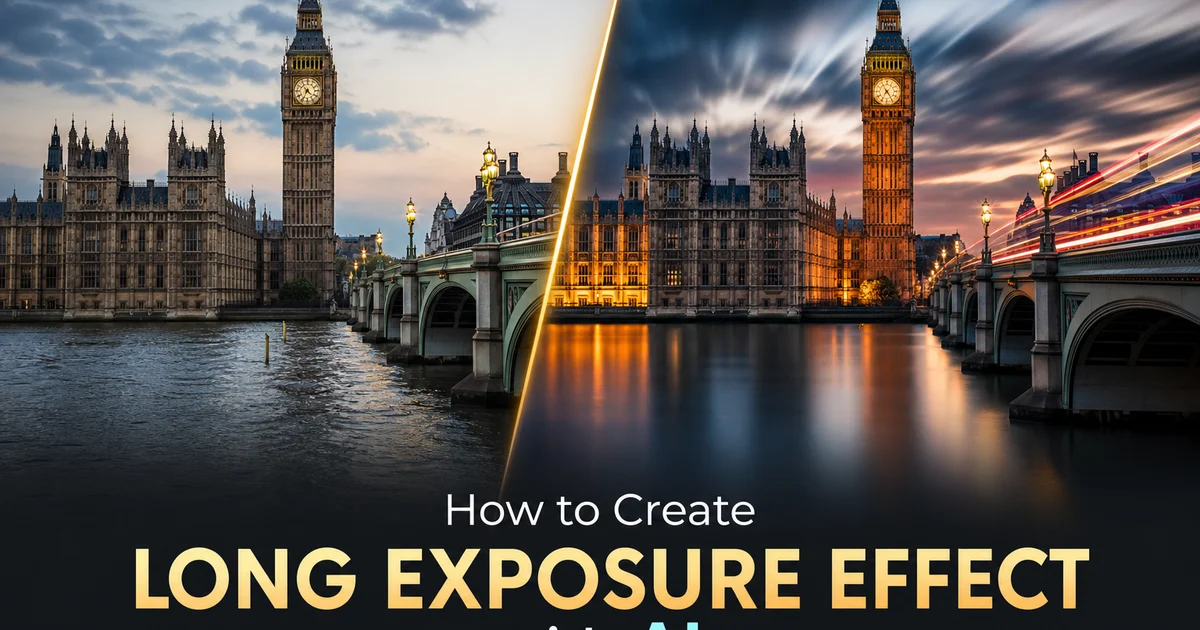
Long exposure photography produces some of the most visually stunning and emotionally evocative images in the medium. Silky waterfalls that look like liquid glass, cloud formations stretched into dramatic ribbons across the sky, vehicle headlights painting bright trails along winding roads, and star fields rotating in perfect concentric arcs around the celestial pole. These images captivate viewers because they reveal a version of reality that the human eye cannot perceive directly. Our visual system processes the world in steady real-time, refreshing roughly thirty times per second. We never see the accumulated effect of seconds or minutes of light gathering. Long exposure photographs collapse time into a single frame, showing us how motion accumulates and flows in ways that feel at once alien and deeply beautiful.
Capturing real long-exposure photographs requires specialized equipment and conditions that place the technique out of reach for most photographers in most situations. You need a sturdy tripod to hold the camera perfectly still during exposures that can last from one second to several minutes. You need neutral density filters — at its core sunglasses for the lens — to prevent overexposure during daylight long exposures. Calculating the correct ND filter strength for a given lighting condition is a technical skill in itself. You need calm conditions for the tripod, interesting motion in the scene. Often the patience to wait for the right combination of cloud movement, water flow, and light. Even expert landscape photographers often arrive at a location and find that conditions do not cooperate with their long-exposure vision for the scene.
AI-powered long-exposure simulation transforms any single photograph into a convincing long-exposure result by intelligently analyzing the scene, identifying which elements would move during an extended exposure. Applying physically accurate motion accumulation to those elements while keeping static features razor-sharp. This is not simple blur — the AI understands how water flows downhill and pools in eddies, how clouds stretch along prevailing wind lines, how vehicle lights follow road curvature. How different exposure durations produce different degrees of smoothing. This guide walks through using AI Filter and AI Enhance to create long-exposure effects that are indistinguishable from real multi-second captures, opening up a technique that was before gated by equipment and conditions to any photographer with any camera, including a smartphone.
- AI scene analysis automatically separates static elements like buildings and rocks from dynamic elements like water and clouds, applying long-exposure blur only where physically appropriate.
- Duration-based intensity controls translate exposure time into accurate blur traits. Two seconds smooths ripples, fifteen seconds creates glass-like surfaces, sixty seconds stretches clouds into streaks.
- Flow-aware water simulation preserves directional current patterns within the smoothing effect, preventing the uniform white-out that betrays artificial blur in water scenes.
- Sub-pixel boundary precision at static-dynamic transitions creates the razor-sharp edges between frozen architecture and silky motion that define professional long-exposure photography.
- AI Enhance maximizes sharpness in static regions after blur application, amplifying the visual contrast between stillness and motion for maximum dramatic impact.
How AI simulates light accumulation differently from simple blur filters
A real long-exposure photograph is not a blurred version of a short-exposure photograph. It is a at its core different image created by accumulating photons over an extended period. During a thirty-second exposure of a waterfall, the camera sensor records thousands of individual water droplet positions as they fall. The accumulated result is a smooth, luminous curtain of white because the constant stream of water deposits light evenly across its flow path. Dark gaps between individual water streams fill in as subsequent streams pass through them during the exposure. The result is brighter and more uniformly lit than any single instant of the scene. The temporal accumulation literally adds light from every moment within the exposure window.
Traditional blur filters do not replicate this accumulation process. They take the existing pixel values from a single instant and smear them spatially. Reduces detail without adding the luminous quality that comes from real temporal accumulation. A Gaussian blur applied to a waterfall makes it look soft and out of focus, but it does not produce the trait bright, milky quality of a real long exposure because no new light information is being added. Just existing information being spread around. The dark gaps between water streams remain dark in a blurred image because the filter has no knowledge that water will flow through those gaps in the next fraction of a second.
AI long-exposure simulation bridges this gap by predicting what a scene would look like if light were accumulated over time rather than captured in a single instant. The AI analyzes the visible motion patterns. The direction and speed of water flow, the trajectory of clouds, the curvature of a road with vehicle lights — and synthesizes what the accumulated result would look like over the specified duration. Water surfaces gain the trait luminous smoothness because the AI fills in temporal gaps by predicting intermediate flow states. Clouds stretch along their visible motion trajectory. The result has the bright, ethereal quality of genuine temporal accumulation rather than the flat, detail-depleted look of spatial blurring. The AI is mimicking a physical process rather than applying a mathematical filter.
- Real long exposures accumulate photons over time, producing images that are brighter and more uniformly lit than any single instant. Temporal accumulation literally adds light information from every moment.
- Traditional blur filters smear existing pixel values spatially without adding luminous quality, producing soft-focus results that lack the characteristic milky brightness of genuine long exposures.
- AI simulation predicts intermediate motion states and synthesizes what temporal accumulation would produce, filling in gaps between water streams and extending cloud formations along wind trajectories.
- The simulated result has the bright, ethereal quality of real photon accumulation rather than the flat, detail-depleted look of spatial Gaussian blurring applied to a single-frame capture.
Creating silky water effects: rivers, waterfalls, ocean waves, and fountains
Water is the most popular long-exposure subject because its change is the most dramatic and universally appealing. Choppy river rapids become smooth glass, crashing ocean waves dissolve into ethereal mist. Turbulent waterfalls transform into luminous white curtains. The AI handles each water type differently because they have distinct motion patterns. River water flows primarily in one direction with varying speeds — fast at center, slower near banks, turbulent around obstacles. The AI preserves this directional flow even as it smooths the surface texture, creating results where you can still see the river's current direction in the silk-like surface rather than a uniform white blur that erases all flow information.
Waterfalls present a unique challenge because the water moves vertically at high speed and breaks into distinct streams separated by gaps. At short equivalent exposures of two to four seconds, the AI smooths each individual stream while maintaining visible separation between them, creating a ribbon-like effect. At longer equivalent exposures of fifteen seconds or more, the individual streams merge into a single steady curtain as the accumulated flow fills the gaps between streams. This progression from distinct ribbons to unified curtain precisely mirrors what happens with real waterfall photography at different exposure durations. The AI's duration slider lets you choose exactly where on this spectrum your result falls.
Ocean waves require the most sophisticated simulation because they involve multiple simultaneous motion patterns. Incoming waves, retreating backwash, lateral longshore current, and the vertical rise and fall of the water surface. At moderate equivalent exposures of five to ten seconds, the AI smooths individual wave crests while keeping the overall pattern of incoming surf lines, creating a dreamy quality where you can still see wave formations approaching the shore. At very long equivalent exposures of sixty seconds or more, all individual wave structure dissolves into a flat, mirror-like surface or a soft, fog-like blur around rocks and headlands, creating the minimalist seascape aesthetic that fine art landscape photographers prize. The AI adjusts its simulation approach based on whether the ocean view is open water, a rocky coastline, or a sandy beach. The interaction between water and shore features greatly affects the accumulated result.
- River simulation preserves directional current flow within the smoothed surface, maintaining visible flow patterns rather than erasing all motion information into uniform white blur.
- Waterfall simulation transitions from distinct ribbon-like streams at short exposures to unified luminous curtains at long exposures, precisely mirroring real waterfall photography at different durations.
- Ocean simulation handles multiple simultaneous motion patterns. Incoming waves, retreating backwash, longshore current — adjusting results based on whether the view shows open water, rocky coast, or sandy beach.
- Duration control lets you choose exactly where on the smoothing spectrum your result falls, from subtle ripple reduction to complete glass-like surface transformation.
Simulating cloud streaks, light trails, and star trails
Cloud streaks are the second most popular long-exposure effect, transforming static, puffy cumulus formations into dramatic horizontal lines that sweep across the sky with a sense of powerful mood motion. The AI analyzes the visible cloud formations in the photograph and extends them along their implied wind direction, stretching each cloud into a linear streak whose length corresponds to the selected equivalent exposure duration. At thirty-second equivalents, clouds show moderate elongation that suggests a breezy day. At two-minute equivalents, clouds stretch into long, thin lines that dominate the sky with a sense of unstoppable mood force. The AI maintains the original cloud colors and tonal gradients within each streak. Dark storm clouds produce dark streaks, sunlit edges produce bright highlights — keeping the mood and lighting of the original sky while adding dramatic motion.
Light trails simulate the luminous paths that vehicle headlights and taillights create during real night-time long exposures. This effect requires the AI to do something at its core different from water and cloud simulation: rather than smoothing existing elements, it needs to synthesize fully new bright paths that extend from the visible light sources along plausible road trajectories. The AI identifies vehicles, streetlights, and other light sources in the scene, then extrapolates their motion paths based on road geometry, lane position, and traffic direction. White and yellow headlight trails extend forward from approaching vehicles, red taillight trails extend behind receding vehicles. Both follow the curvature of the road with natural perspective diminishment into the distance. The trails have the trait bright-core-with-soft-edges profile of real light trails. Their brightness is calibrated relative to the ambient lighting to match the visual balance of genuine night long-exposure photographs.
Star trail simulation requires the longest equivalent exposure durations. From fifteen minutes to several hours — and produces concentric arcs centered on the celestial pole as the Earth's rotation carries stars in circular paths across the sky. The AI identifies visible stars in night sky photographs and extends each star into an arc whose length and curvature correspond to the selected duration and the star's angular distance from the pole. Stars near the pole trace tight circles, while stars near the celestial equator trace long, gentle arcs. The AI preserves each star's original color. Blue-white for hot stars, yellow for sun-like stars, red for cool giants — creating colorful trails that reveal stellar temperature information invisible in point-source photographs. For circular star trail compositions, the AI ensures the rotation center aligns with the correct celestial pole for the hemisphere, producing astronomically accurate results.
- Cloud streak simulation extends formations along their implied wind direction, with streak length corresponding to equivalent exposure duration and original cloud colors preserved within each streak.
- Light trail synthesis creates bright headlight and taillight paths along road geometry, with correct color temperature, perspective diminishment. Bright-core-with-soft-edges profile matching real night exposures.
- Star trail simulation traces concentric arcs from the celestial pole, with arc length matching selected duration and original star colors preserved to reveal temperature information in the trails.
- All three simulations maintain physical plausibility. Cloud streaks follow wind direction, light trails follow road curvature, star arcs follow Earth rotation — ensuring results match viewer expectations from real photography.
Advanced techniques: combining effects and fine-tuning the simulation
Many strong long-exposure photographs combine multiple simultaneous effects. Silky water in the foreground, streaked clouds in the sky, and razor-sharp architecture in the middle ground. AI Filter enables this multi-element approach by letting you apply different equivalent exposure durations to different parts of the scene. The water might receive a fifteen-second treatment that smooths it to a glass-like surface. The clouds receive a sixty-second treatment that stretches them into dramatic streaks. In real photography, both effects would use the same exposure duration. The AI's ability to apply different durations to different elements opens creative possibilities that exceed what is physically possible with a single camera setting. Used with restraint, this selective duration control produces images that feel more dramatic than reality while remaining visually plausible.
Fine-tuning the boundary between long-exposure elements and sharp static elements is critical for convincing results. The transition zone where silky water meets sharp rocks, or where streaked clouds meet a crisp building roofline, must be pixel-perfect. AI Filter provides edge refinement controls that let you adjust the boundary detection sensitivity and the width of the transition zone. For water-rock boundaries, a tight transition produces the clean, surgical separation found in real long-exposure landscape photography. For cloud-mountain boundaries, a slightly wider transition accommodates the natural mood haze that softens distant horizons. Tree branches against a streaked sky require the most careful handling because individual branches create hundreds of tiny sharp-to-blurred boundaries. Any inconsistency in the masking becomes right away visible as artifacts against the smooth cloud streaks.
Post-processing the AI long-exposure result with matching adjustments can greatly enhance the final impact. Reducing the highlights in streaked cloud areas prevents blown-out white streaks and recovers subtle color gradients. Increasing the shadows in silky water reveals underlying rock texture beneath the smoothed surface, adding depth to what might otherwise look like a flat white plane. Color temperature adjustment can shift the mood from warm golden hour to cool blue hour. Since long-exposure photography is popular at both times of day, matching the color temperature to the intended time setting is key for realism. Finally, adding a subtle vignette draws the eye toward the center of the frame where the interplay between sharp and blurred elements is most dramatic, completing the expert long-exposure aesthetic.
- Multi-element simulation applies different equivalent exposure durations to different scene elements. Shorter for water smoothing, longer for cloud streaking — enabling effects that exceed single-exposure physical limitations.
- Edge refinement controls adjust boundary precision between static and dynamic regions, with tight transitions for water-rock edges and wider transitions for atmospheric cloud-mountain boundaries.
- Tree branches against streaked skies require the most careful masking because hundreds of tiny sharp-to-blurred boundaries must be individually accurate to avoid visible artifacts.
- Post-processing adjustments — highlight recovery in clouds, shadow lifting in water, color temperature matching. Vignetting — complete the expert long-exposure aesthetic and enhance dramatic impact.
How to do it
- 1
Upload your photo and identify elements that would blur during a long exposure
Open your image in AI Filter and examine the scene for elements that would move during a multi-second camera exposure. Water — rivers, waterfalls, ocean waves, fountains — is the most common long-exposure subject because its change from choppy texture to silky smoothness is right away distinct and universally appealing. Clouds are the second most popular target, stretching into dramatic streaks across the sky during exposures of thirty seconds or more. Vehicle lights create bright trails along roads, and crowds of people dissolve into ghostly smears. Identify which elements should receive the long-exposure treatment and which should remain tack-sharp. The contrast between frozen static elements and smoothly blurred motion is what gives long exposure photography its distinctive ethereal quality.
- 2
Select the long-exposure style and duration intensity
Choose the type of long-exposure effect you want to simulate. Silky water, cloud streaks, light trails, or crowd ghosting — and set the equivalent exposure duration. AI Filter translates duration settings into right blur traits: a two-second equivalent smooths water ripples while keeping general flow direction, a fifteen-second equivalent transforms choppy waves into glass-like surfaces. A sixty-second equivalent stretches clouds into dramatic parallel streaks across the entire sky. The AI calculates how each element in the scene would accumulate and blend over the specified duration based on its likely motion pattern, producing results that match the physical behavior of light accumulation during real long exposures rather than simply applying uniform blur.
- 3
Apply AI scene analysis to separate static and dynamic elements
The AI analyzes the scene to automatically distinguish between elements that would remain stationary during a long exposure and elements that would move. Buildings, rocks, bridges, and mountains are classified as static and remain perfectly sharp. Water, clouds, vehicles, and people are classified as dynamic and receive the simulated long-exposure blur. This classification happens with sub-pixel precision at the boundaries between static and dynamic elements. The waterline where a river meets a rocky bank, the roofline where a building meets the sky, the guardrail where a bridge meets flowing traffic below. Getting these boundaries right is critical because real long-exposure photographs have razor-sharp transitions between frozen architecture and silky water. Any softness at these edges right away betrays a digital simulation.
- 4
Use AI Enhance to boost sharpness and detail in the static regions
After the long-exposure simulation is applied, run AI Enhance on the static elements to maximize their sharpness and micro-contrast. In real long-exposure photography, the static elements benefit from the vibration-dampened tripod setup and often appear exceptionally crisp. Amplifies the visual contrast against the smooth, blurred motion. AI Enhance replicates this by sharpening edges, boosting texture detail in rocks and architecture. Increasing local contrast in the static zones. The enhanced sharpness of buildings, stone, and landscape features makes the silky water or streaked clouds look even more dramatic by comparison, creating the full dynamic range between stillness and motion that defines expert long-exposure work.
- 5
Export and evaluate the result for physical plausibility and artistic impact
Compare the AI-generated long exposure against reference photographs shot with equivalent real exposure times. Check that water surfaces have the trait milky smoothness without losing all directional flow. Real long-exposure water retains subtle directional texture that indicates current flow, and completely uniform white blurring looks unnatural. Verify that cloud streaks follow plausible wind directions and that their intensity is consistent across the sky. Ensure that light trails maintain their color and brightness along their full length without fading or fragmenting. Finally, confirm that the static elements are genuinely sharp and that no blur has leaked across the boundaries between dynamic and static regions, mainly at complex edges like tree branches against a streaked sky or rocks protruding from silky water.
Sources
- Long Exposure Photography: Techniques and Creative Applications — Cambridge in Colour
- Computational Long Exposure Photography Using Neural Networks — ACM Digital Library
- Temporal Accumulation Methods in Digital Imaging — IEEE Xplore