
How to Create Infrared Photo Effects with AI — Magic Eraser
Simulate the distinctive infrared photography look using AI. Step-by-step guide covering the Wood Effect, false-color and black-and-white infrared styles, channel swapping, halation glow, and export for web and print.

Product Marketing
Reviewed by Magic Eraser Editorial ·
Table of Contents
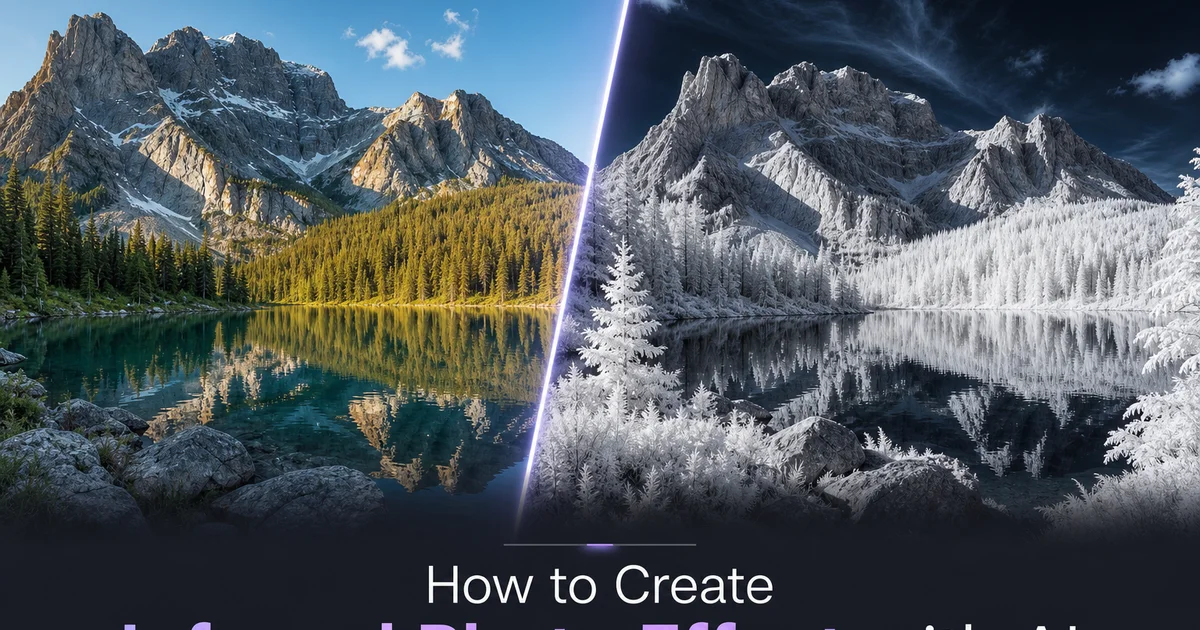
Infrared photography captures light beyond the visible spectrum, revealing a world that human eyes cannot see. Living vegetation, which absorbs most visible light for photosynthesis, reflects near-infrared wavelengths intensely. This phenomenon is called the Wood Effect, named after physicist Robert W. Wood who first documented it in 1910. In infrared images, green trees and grass appear brilliant white or bright pink, blue skies turn near-black. The entire landscape takes on an otherworldly, dreamlike quality that has fascinated photographers since the medium was first used for aerial reconnaissance and scientific imaging in the early twentieth century.
In the past, creating infrared photographs required specialized equipment: either infrared-sensitive film stock with proper lens filters, or a digital camera that has been permanently modified by removing the internal infrared-blocking filter from the sensor. Both approaches involve major cost and commitment. Infrared film is expensive and difficult to process, while camera conversion is irreversible and often costs several hundred dollars. Exposure times are longer because the filters block most visible light, autofocus becomes unreliable because the infrared focal point differs from the visible light focal point. The results are unpredictable until developed or reviewed on a computer screen.
AI-powered infrared simulation makes this distinctive aesthetic accessible without any specialized equipment. The AI has been trained on thousands of genuine infrared photographs captured with converted cameras and infrared film, learning the specific color relationships, tonal distributions, and optical traits, including the signature halation glow, that distinguish authentic infrared imagery from simple color manipulation in Photoshop. This guide walks through the complete workflow for creating convincing infrared effects using Magic Eraser's AI Filter, from source image selection through style choices, color refinement, halation control, and export improvement.
- The Wood Effect causes living vegetation to appear brilliant white or pink in infrared — the defining characteristic of the infrared photography aesthetic.
- AI infrared simulation is trained on genuine infrared photographs, reproducing authentic color channel relationships rather than applying simple color inversion or hue shifts.
- False-color infrared renders foliage in white, pink, or golden tones with deep blue skies; black-and-white infrared produces high-contrast monochrome with glowing white vegetation.
- Halation glow — the soft bloom around bright objects — is a genuine optical property of infrared capture caused by light scattering differently through lens elements.
- Export with embedded sRGB profiles for web consistency and communicate infrared color intent to print labs, as automated color correction may misinterpret the unusual palette.
Understanding the infrared aesthetic and the Wood Effect
The infrared look is not simply a color filter or a hue rotation applied to a normal photograph. It represents a fundamentally different way of capturing light. The brightness values of objects in the scene are determined by their infrared reflectance rather than their visible-light look. The most dramatic manifestation is the Wood Effect: chlorophyll in living vegetation is highly reflective in the near-infrared spectrum around 700 to 900 nanometers, causing healthy green foliage to appear brilliantly bright: white in black-and-white infrared, or vivid pink and golden in false-color infrared. Dead vegetation, artificial green surfaces like painted metal or plastic, and green clothing do not exhibit this effect because they lack chlorophyll, which is why AI infrared simulation must understand the semantic content of the image rather than simply transforming green pixels.
Skies in infrared photography appear much darker than in visible light because the atmosphere scatters shorter wavelengths more than longer ones. The same Rayleigh scattering makes skies blue in visible light; in the near-infrared spectrum, this scattering is minimal, so the sky appears much darker, often near-black in black-and-white infrared images. Clouds, however, remain bright because water droplets reflect infrared light well. This creates the dramatic contrast between deep dark skies and brilliant white clouds that is one of the most visually striking traits of infrared landscape photography.
Skin tones in infrared photography take on a smooth, porcelain-like quality because near-infrared light penetrates the outer layers of skin and is scattered by the tissue beneath, reducing the visibility of surface imperfections like blemishes, freckles, and pores. Veins near the surface become more visible because deoxygenated hemoglobin absorbs infrared light. Eyes appear dark and glossy because the iris absorbs infrared rather than reflecting it. These skin and portrait traits make infrared a distinctive choice for portraiture, though the primary application of the aesthetic has historically been landscapes and fine-art photography.
- The Wood Effect causes chlorophyll-containing vegetation to reflect near-infrared light intensely, appearing white or bright pink — artificial green surfaces do not exhibit this effect.
- Dark infrared skies result from minimal Rayleigh scattering at longer wavelengths, while clouds remain bright because water droplets reflect infrared effectively.
- Infrared light penetrates skin surface layers, producing the smooth porcelain quality in portraits while making subsurface veins more visible.
- AI infrared simulation must distinguish living vegetation from other green objects semantically, not just apply uniform color transformation to green pixels.
False-color versus black-and-white infrared styles
False-color infrared photography originated from Kodak Aerochrome film, a color infrared film developed for military aerial reconnaissance to distinguish living camouflage from artificial concealment. Aerochrome shifted infrared-reflecting vegetation to vivid magenta and red while rendering non-reflective surfaces in blue and cyan tones. This created surreal, psychedelic landscapes that were later adopted by fine-art photographers and became iconic through Richard Mosse's series documenting conflict in the Democratic Republic of Congo. The AI false-color infrared preset references this tradition, offering palette variations that range from the classic Aerochrome magenta-red to softer pink, golden, and amber interpretations.
Black-and-white infrared photography has a longer history and produces a more universally appealing aesthetic. Without the distraction of false color, the viewer focuses on the luminous quality of infrared-reflecting surfaces, the dramatic sky contrast, and the soft halation glow. The tonal range in black-and-white infrared tends to be broader than standard black-and-white photography because infrared reflectance values span a different range than visible-light reflectance, producing gradients and tonal separations that look unfamiliar and visually strong. Black-and-white infrared landscapes have a timeless, almost spiritual quality that has made them a staple of fine-art photography for decades.
The choice between false-color and black-and-white depends on the intended mood and application. False-color infrared is immediately striking and demands attention. It works well for social media content, album art, editorial features, and any context where visual impact and novelty are priorities. Black-and-white infrared is more subtle and contemplative, suiting gallery prints, book photography, architectural records, and contexts where the image needs to sustain extended viewing. Many photographers create both versions from the same source image, using false-color for commercial and social applications and black-and-white for fine-art output.
- False-color infrared originates from Kodak Aerochrome military film, which shifted vegetation to vivid magenta — later adopted by fine-art photographers like Richard Mosse.
- Black-and-white infrared offers broader tonal range than standard monochrome because infrared reflectance values produce unfamiliar gradients and separations.
- False-color works best for social media, album art, and editorial contexts prioritizing visual impact; black-and-white suits gallery prints and fine-art applications.
- Creating both versions from the same source image maximizes utility across commercial and fine-art channels.
Channel swapping and color temperature for authentic infrared color
The distinctive color palette of false-color infrared photography is not the result of a simple hue shift or color inversion. It emerges from specific relationships between the red, green, and blue channels that are unique to infrared capture. In a converted digital camera shooting infrared with a standard lens, the sensor records infrared light primarily in the red channel. Residual visible light is distributed across the green and blue channels. Custom white balance settings then redistribute these channel values. The classic infrared look is achieved by swapping the red and blue channels so that the infrared-bright vegetation shifts from red to blue and the residual sky color shifts from blue to red, then adjusting the white balance to taste.
The AI filter mimics this channel relationship by analyzing the semantic content of the image and applying channel changes that match the physics of infrared capture rather than arbitrary color manipulation. The channel swap slider lets you control the degree of red-blue exchange, from subtle warmth with minimal swap to full Aerochrome-style change at maximum. The color temperature control adjusts the overall white balance of the infrared conversion, shifting the palette between cool blue-dominant tones (mimicking a deep infrared filter with minimal visible light leakage) and warm amber-golden tones (mimicking a lighter infrared filter that allows some visible light to mix with the infrared signal).
Fine-tuning these controls is where the creative expression lives. There is no single correct infrared color palette. Different cameras, filters, films, and white balance settings produce different results, and all of them are legitimate infrared aesthetics. Some photographers prefer the cool, ethereal blue-and-white palette that emphasizes the otherworldly quality of the medium. Others prefer the warm, golden-and-pink palette that gives the scene a nostalgic, dreamlike warmth. Experiment with the sliders across their full range to discover the palette that best serves each particular image, keeping in mind that the most convincing results maintain consistent channel relationships across the entire image rather than applying different color shifts to different regions.
- Authentic infrared color emerges from red-blue channel swapping combined with custom white balance — not from simple hue rotation or color inversion.
- The channel swap slider controls the degree of red-blue exchange, from subtle warmth to full Aerochrome-style false-color transformation.
- Color temperature shifts the palette between cool blue-dominant tones (deep infrared filter simulation) and warm golden-amber tones (lighter filter with visible light mixing).
- The most convincing results maintain consistent channel relationships across the entire image rather than applying different color shifts to different regions.
Halation and glow: reproducing infrared optical characteristics
Halation is one of the most distinct and artistically important traits of infrared photography. Its presence or absence largely determines whether an infrared conversion looks authentic or like a simple color filter. In genuine infrared capture, near-infrared light refracts differently through glass lens elements than visible light, causing infrared-bright objects — mainly white foliage edges against dark skies — to produce a soft, luminous bloom that extends beyond their sharp boundaries. This is not the same as simple gaussian blur or lens diffusion. It is a wavelength-dependent optical effect that affects only the brightest infrared-reflecting areas of the image while leaving darker regions sharp.
The AI filter reproduces this effect by identifying high-contrast boundaries where infrared-bright content (vegetation, clouds, light-colored surfaces) meets infrared-dark content (sky, shadows, water) and applying a physically motivated glow that respects the directional and tonal properties of genuine infrared halation. The halation intensity slider controls the strength of this effect from subtle, where it adds a gentle luminosity to foliage edges — through moderate, where trees and clouds develop a visible aura — to dramatic, where the entire bright region blooms with an ethereal, almost radioactive glow that produces the surreal, otherworldly quality associated with the most iconic infrared fine-art photography.
Halation interacts with the choice between false-color and black-and-white modes in important ways. In black-and-white infrared, halation adds a dreamlike softness that enhances the contemplative, spiritual quality of the image. In false-color infrared, halation causes the bright vegetation colors to bleed into surrounding areas, creating soft colored gradients at the boundaries between foliage and sky that add to the psychedelic quality. In both modes, moderate halation is usually more effective than maximum halation because it preserves enough sharpness for the viewer to read the scene while adding the luminous quality that distinguishes infrared from a standard photograph with a color filter applied.
- Halation in infrared photography is a wavelength-dependent optical effect — infrared light refracts differently through glass, causing bright areas to bloom beyond their sharp boundaries.
- The AI filter identifies high-contrast infrared boundaries and applies physically motivated glow rather than uniform gaussian blur.
- In black-and-white mode, halation enhances dreamlike contemplative quality; in false-color mode, it creates soft colored gradients at foliage-sky boundaries.
- Moderate halation is usually more effective than maximum because it preserves scene readability while adding the luminous quality that distinguishes genuine infrared from color filters.
How to do it
- 1
Select a landscape or nature photograph with prominent vegetation and sky
Infrared photography transforms how organic materials appear because chlorophyll in living vegetation reflects near-infrared light intensely, producing the signature white or bright pink foliage known as the Wood Effect. For the most dramatic AI infrared conversion, choose images that contain large areas of green vegetation. Trees, grass, shrubs, gardens — alongside a clear or partly cloudy sky. The contrast between the bright infrared foliage and the darkened sky is the defining visual trait of the infrared look. Upload your source image to Magic Eraser and verify it has enough green content to produce a noticeable change.
- 2
Apply the infrared filter preset and choose between false-color and black-and-white modes
Navigate to AI Filter and select the infrared photography preset. Choose between two primary infrared styles: false-color infrared, which renders vegetation in bright white, pink, or golden tones while shifting skies to deep blue or near-black; and black-and-white infrared, which converts the scene to a high-contrast monochrome where foliage glows bright white and skies turn very dark. False-color infrared is more visually striking and immediately distinct, while black-and-white infrared produces a more timeless, fine-art aesthetic. Set the initial intensity to medium to evaluate the change before committing to stronger effects.
- 3
Adjust the channel swap and color temperature to refine the infrared palette
Authentic infrared photography involves specific color channel relationships that differ from simple color inversion. The AI filter provides channel swap controls that simulate the red-blue channel exchange trait of converted infrared cameras. Adjusting the color temperature slider shifts the overall palette between cooler blue-dominant tones and warmer golden-amber tones, both of which are valid infrared aesthetics depending on the camera filter and white balance used. Fine-tune these controls until the vegetation has the bright, luminous quality that distinguishes genuine infrared imagery from generic color manipulation.
- 4
Enhance the halation glow that characterizes infrared capture
One of the most distinctive qualities of infrared photography is a soft halation effect: a gentle glow around bright objects, mainly the edges of white foliage against dark skies. This occurs because infrared light scatters differently through lens elements than visible light, creating a dreamy bloom around high-contrast boundaries. Use the halation intensity slider to add this characteristic glow to your conversion. Subtle halation creates a romantic, ethereal atmosphere. Stronger halation produces the surreal, otherworldly quality that has made infrared photography popular for fine art and album cover imagery.
- 5
Export with appropriate color profile and format for your intended use
Infrared images have an unusual color gamut that can shift unpredictably across different screens and print processes. Export as PNG with an sRGB color profile embedded for web and social media to ensure the carefully crafted infrared palette displays consistently across devices. For fine-art prints, export as TIFF at 300 DPI with the Adobe RGB color profile to preserve the extended color range. Share with your print lab about the intended palette since the unusual colors can confuse automated color correction systems. Include a proof reference if possible so the printer understands that the white trees and dark skies are intentional.