
How to Create Encaustic Wax Effect with AI — Magic Eraser
Transform photos into encaustic hot wax paintings using AI style transfer. A step-by-step guide to wax layer translucency, surface texture, fusing effects, tool marks, and the luminous color depth unique to beeswax-damar medium.

Visual Arts Editor
Reviewed by Magic Eraser Editorial ·
Table of Contents
- How encaustic wax painting produces its distinctive luminous quality and how AI recreates it
- Surface texture simulation: fused layers, tool marks, and wax behavior
- Color properties of encaustic medium and achieving accurate pigment simulation
- Working with edges, transitions, and the soft focus of wax medium
- Creative applications: mixed-media encaustic, photo transfers, and collage effects
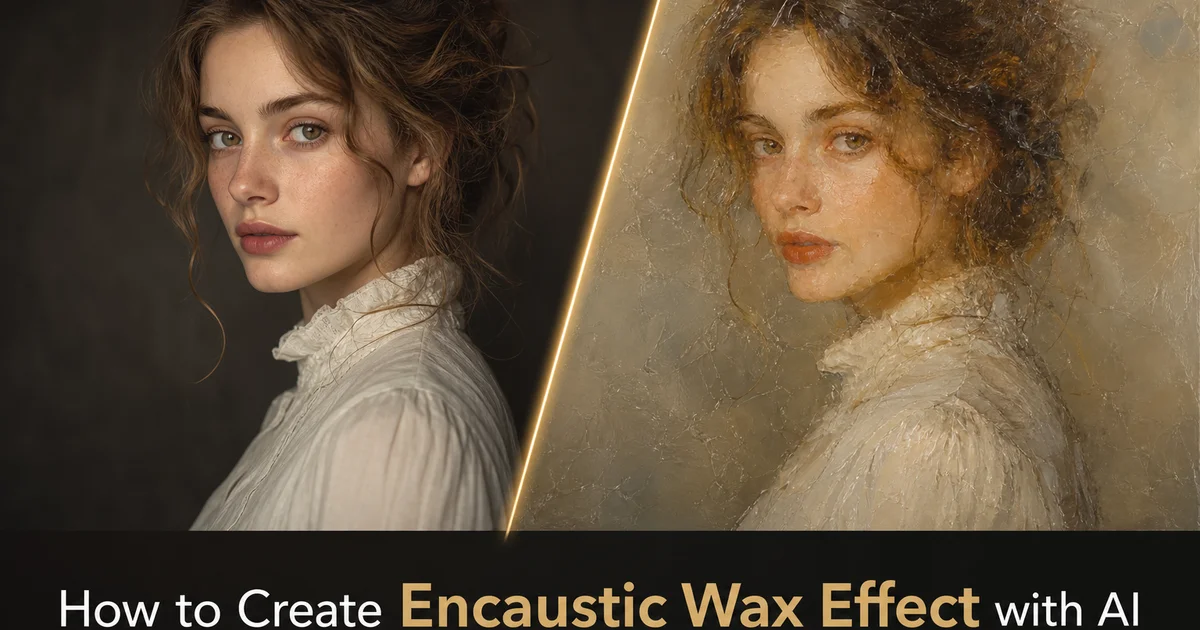
Encaustic painting is one of the oldest surviving art techniques, practiced since at least the fifth century BCE when Greek shipbuilders discovered that pigmented beeswax could protect wooden hulls while also producing strikingly beautiful colored surfaces. The Fayum mummy portraits of Roman-era Egypt, painted in encaustic wax nearly two thousand years ago, retain their vivid color and luminous depth today, a testament to the extraordinary durability and optical properties of the medium. What makes encaustic visually distinctive is the translucency of beeswax itself. Unlike oil or acrylic paint, which form opaque films that reflect light from their surface, encaustic allows light to penetrate into the wax layers, bounce off the pigment particles suspended within, and re-emerge with a luminous quality that seems to glow from within. This inner radiance cannot be replicated by any opaque painting medium and gives encaustic artwork a visual presence that is right away distinct.
Creating encaustic artwork in the physical world requires specialized equipment, ventilation, and large practice. The artist melts a mixture of beeswax and damar resin on a heated palette, mixes in dry pigment powder, and applies the molten wax to a rigid substrate. often wood panel — using heated brushes, palette knives, or other tools. Each layer must be fused to the layer beneath by reheating the surface with a heat gun, blow torch, or tacking iron. melting the wax just enough for the layers to bond without completely dissolving the underlying image. The process is inherently unpredictable — wax flows and drips, behaving according to temperature physics rather than the artist's precise control, and this material behavior contributes much of the medium's distinctive character. The setup needs, fire safety concerns, and ventilation needs make encaustic impractical for casual experimentation.
AI-powered encaustic conversion makes the luminous beauty of wax painting accessible without the physical needs by mimicking the optical and material properties of beeswax-damar medium. The AI understands that encaustic is not simply a texture overlay or a color filter. It is a multi-layered translucent medium where light interacts with each layer on its own, producing depth, luminosity, and color richness that emerge from the physical properties of wax. This guide walks through transforming photographs into convincing encaustic paintings using AI Filter and AI Enhance, covering layer configuration, surface texture simulation, fusing effects, and the finishing refinements that capture the trait inner glow of real beeswax artwork.
- AI mimics the optical properties of multi-layered translucent beeswax, producing the trait inner luminosity where light penetrates through wax layers and reflects from pigment particles within.
- Multiple encaustic presets cover smooth fused photorealistic styles, textured impasto surfaces, mixed-media collage approaches, and translucent color-field compositions.
- Surface texture controls replicate heated wax behavior including brush strokes in molten medium, palette knife ridges, heat gun fusing marks, and the bubbled texture of partially fused layers.
- Configurable layer count controls the trade-off between luminous depth and detail clarity — more layers produce richer saturation and glow at the cost of edge softness.
- Color saturation matches real wax paint, which is significantly more vivid than oil or acrylic because pigment is suspended in transparent medium rather than opaque binder.
How encaustic wax painting produces its distinctive luminous quality and how AI recreates it
The luminous quality of encaustic painting results from a specific physical interaction between light and semi-transparent beeswax medium. When light hits an encaustic surface, it does not simply reflect from the top. It enters the wax, which is translucent rather than opaque, and travels through the medium encountering pigment particles along the way. Some light reflects from particles in the upper layers, some penetrates deeper and reflects from the second or third layer. Some reaches the white substrate beneath all the wax and bounces back through every layer on its way out. This multi-depth reflection is what produces the inner glow. Light is literally returning to the viewer from multiple depths within the painting, creating a sense of illumination that seems to come from inside the artwork rather than from the surface.
Oil paint achieves a somewhat similar effect because linseed oil is also partially transparent. Encaustic takes the principle further because beeswax is more translucent than oil and each layer can be applied thinner while remaining structurally sound. A typical encaustic painting might have six to twenty distinct layers, each adding its own color contribution and each allowing some light to pass through to deeper layers. The cumulative effect is a color depth and saturation that exceeds what any single-layer application could produce, regardless of the medium. This is why encaustic paintings look distinctly different from even the most skillfully rendered oil paintings. The light interaction is at its core different.
AI encaustic conversion replicates this multi-layer light interaction computationally rather than optically. The algorithm decomposes the photograph into simulated wax layers, each with its own translucency value, pigment density, and color contribution. It then calculates how light would travel through these stacked layers, reflecting from each depth level and combining on the way back to the viewer. The result captures the characteristic encaustic glow: rich, saturated colors that appear to have depth and luminosity beyond what a flat digital surface should produce. The simulation is mainly effective because the mathematical model of light through translucent layers is well-understood physics, allowing the AI to produce optically accurate results rather than relying solely on learned aesthetic patterns.
- Light enters translucent beeswax and reflects from pigment particles at multiple depths, creating the inner glow that distinguishes encaustic from opaque painting media.
- Typical encaustic paintings contain six to twenty distinct layers, each contributing color and allowing light to pass through for cumulative depth and saturation.
- AI decomposes photographs into simulated translucent wax layers and calculates multi-depth light reflection for physically accurate luminous effects.
- The mathematical model of light through translucent layers produces optically correct results rather than relying solely on aesthetic pattern matching.
Surface texture simulation: fused layers, tool marks, and wax behavior
The surface of an encaustic painting is never perfectly smooth or uniformly textured. It is a record of the wax's physical behavior during application and fusing. When molten wax is brushed onto a panel, the brush leaves ridged marks that are broader and softer than those in oil or acrylic because the wax's viscosity and cooling behavior are different. As the wax cools from liquid to solid — which happens rapidly, within seconds of application — the brush marks freeze in place with rounded profiles rather than the sharp peaks that stiff oil paint produces. These frozen brush strokes are the dominant texture in many encaustic paintings and give the surface a trait organic, flowing quality.
The fusing process adds a second layer of texture on top of the brush marks. When the artist passes a heat gun or blow torch over the surface, the wax remelts at different rates depending on the thickness. Thin areas liquefy instantly and become glossy smooth, while thick impasto regions only soften at their peaks, creating a varied surface of smooth pools and textured ridges. Overheating causes the wax to flow unpredictably, pooling in low areas and pulling away from high spots, leaving behind a network of tiny bubbles and flow marks that are unique to encaustic. AI Filter mimics these fusing behaviors by analyzing the surface texture map and applying selective smoothing in thin areas while keeping and enhancing texture in thick regions, replicating the temperature-dependent behavior of real wax.
Tool marks beyond brush strokes contribute extra surface character. Palette knife marks create broad flat planes with sharp raised edges where the wax was pushed to the side. Scratching tools — related to the sgraffito technique — carve lines through hardened wax to reveal underlayers. Heated metal tools pressed into the surface create melted impressions with glossy concave centers. The AI provides tool mark overlays for each of these techniques, applied contextually based on the image content. Flat areas receive broad palette knife planes, detailed areas get fine brush texture. Edges receive incised line marks that suggest the hand of the artist guiding heated metal through solid wax.
- Brush marks in molten wax freeze with soft rounded profiles as the medium rapidly cools, distinct from the sharp peaks of oil paint impasto.
- Fusing simulation applies selective smoothing in thin areas while preserving texture in thick regions, replicating temperature-dependent wax remelting behavior.
- Palette knife planes, heated tool impressions, and sgraffito scratch marks are applied contextually — broad tools on flat areas, fine brushwork on detail, incised lines on edges.
- Bubble and flow mark artifacts from overheating are included in heavily fused areas, adding the unpredictable character of real heated wax behavior.
Color properties of encaustic medium and achieving accurate pigment simulation
The colors in encaustic painting behave differently from those in any other medium because of how pigment interacts with beeswax-damar resin. In oil paint, pigment is ground into a drying oil that forms a semi-transparent film. The oil yellows over time, gradually shifting the color. In acrylic, pigment is suspended in a plastic polymer that dries clear but slightly darkens the color compared to its wet look. In encaustic, pigment is mixed directly into molten beeswax blended with damar resin. Cools to a translucent solid that preserves the pigment's pure hue with remarkable fidelity. The beeswax does not yellow, does not shift, and does not substantially alter the pigment color. It simply suspends the pigment particles in a clear, luminous matrix that makes the color appear more vivid and saturated than it would in any other binder.
This color purity means that encaustic paintings are notably more saturated than equivalent subjects painted in oil or acrylic. A cadmium red in encaustic appears more intensely red because the transparent beeswax allows more light to reach the pigment and more reflected color to escape. Unlike oil, where the semi-opaque binder absorbs some of the reflected light before it reaches the viewer. AI Filter replicates this increased saturation as part of the encaustic conversion, boosting color intensity to match the purity of wax-suspended pigments. The boost is not uniform — earth tones receive moderate boost consistent with their naturally muted character. Bright cadmium and mineral pigments receive stronger saturation that matches their behavior in real encaustic medium.
Color mixing in encaustic often occurs optically through layer stacking rather than physically through palette mixing. An artist might apply a blue wax layer and then fuse a thin yellow wax layer on top. The viewer sees green, but it is a luminous optical green created by light passing through yellow and reflecting from blue, rather than the flat mixed green of combined pigments. This optical mixing produces richer, more complex colors than physical mixing because each layer retains its full saturation. AI Filter supports this approach by building up colors through simulated transparent layers rather than applying flat color values, capturing the distinctive chromatic richness that optical layer mixing produces in real encaustic work.
- Beeswax-damar resin suspends pigment without yellowing or color shifting, preserving purer hue and greater saturation than oil or acrylic binders.
- AI color enhancement is pigment-appropriate — earth tones receive moderate saturation boost while cadmium and mineral pigments receive stronger intensification matching their real encaustic behavior.
- Optical color mixing through stacked translucent layers produces richer, more complex colors than flat mixed pigment, a distinctive encaustic property the AI replicates.
- The translucent wax matrix allows more light to reach pigment particles and more reflected color to escape, creating measurably higher saturation than opaque media.
Working with edges, transitions, and the soft focus of wax medium
One of the most distinct traits of encaustic painting is the softness of edges and transitions between areas of different color. Because each layer of wax is applied hot and then fused with heat, the boundaries between color areas are never as sharp as those in oil or acrylic painting where the artist controls the brush edge precisely. When two areas of different-colored wax are fused, the heat causes slight intermixing at the boundary. The colors bleed into each other at the molecular level, creating a soft graduated edge rather than a hard line. This inherent edge softness gives encaustic paintings their dreamy, mood quality and is one of the primary visual cues that identifies the medium.
AI Filter applies edge softening that is calibrated to the encaustic style selected and the image content. In smooth fused encaustic, edges are quite soft. Approaching the softness of watercolor wet-on-wet blending — because thorough fusing melts adjacent color areas together greatly. In textured impasto encaustic, edges can be somewhat sharper because the thick wax layers are fused less aggressively, keeping more of the original application boundary. The AI identifies edges in the photograph that correspond to important subject boundaries and applies the right level of softening without dissolving the subject's recognizability. Minor detail edges receive more softening than major structural edges, keeping the overall composition while adding the mood quality of wax.
The relationship between edge softness and focal areas is critical for encaustic compositions that retain narrative or representational content from the source photograph. Physical encaustic painters who work from photographs on purpose maintain sharper edges in the focal area. Often the face in a portrait or the primary subject in a scene — while allowing edges to dissolve more completely in the periphery. This selective focus technique, which mirrors how the eye naturally perceives a scene, becomes a compositional tool rather than a technical limitation. AI Filter replicates this approach by analyzing the photograph's subject hierarchy and applying graduated edge softening from sharp in the focal area to very soft at the image boundaries, mimicking the intentional focus choices that skilled encaustic painters make.
- Heat fusing causes natural color intermixing at boundaries, creating the soft graduated edges that give encaustic its characteristic dreamy atmospheric quality.
- Edge softness varies by style — smooth fused encaustic approaches watercolor softness while textured impasto retains somewhat sharper color boundaries.
- Selective focus preserves sharper edges in the primary subject area while dissolving peripheral details, mirroring how physical encaustic painters work from photographs.
- Minor detail edges receive more softening than major structural edges, maintaining subject recognizability within the atmospheric quality of the wax medium.
Creative applications: mixed-media encaustic, photo transfers, and collage effects
Mixed-media encaustic is one of the most dynamic areas of modern art practice. AI conversion opens these combined techniques to anyone working with photographs. Physical mixed-media encaustic artists embed paper, fabric, found objects. Photographic transfers between wax layers, creating compositions where different materials visible through translucent wax create a sense of depth, history, and layered meaning. AI Filter mimics this approach by allowing you to designate areas of the photograph that should appear as embedded materials. Newspaper text visible through a translucent wax wash, fabric texture showing through a thin color layer, or photographic imagery partially obscured by milky wax buildup. The result captures the archaeological quality of mixed-media encaustic, where viewers peer through layers to discover hidden content.
Photo transfer encaustic is a specific mixed-media technique where a photographic print is physically adhered to the panel and then covered with layers of translucent wax. The photograph shows through the wax with a soft, dreamlike quality; the details are present but veiled, as if seen through frosted glass. Successive wax layers progressively obscure the image. The artist controls how much of the photograph remains visible by choosing how many layers to apply and how opaque to make the wax. AI Filter's photo transfer preset mimics this technique by applying a progressive translucent overlay to the photograph, keeping the underlying image while adding the milky, luminous veil of layered beeswax. The number of simulated wax layers determines the degree of obscuration, from a subtle glow to a nearly abstract color field where the original photograph is just barely discernible.
Collage encaustic compositions combine multiple photographs or image elements into a single wax-layered piece, with each element embedded at a different depth within the simulated wax stack. A portrait might be layered over a landscape, with the landscape visible through the translucent wax surrounding the figure, creating a visual metaphor of person and place. Text fragments can be embedded at middle layers, partially visible and partially obscured, adding literary or documentary content to a primarily visual composition. AI Filter supports multi-element collage by accepting multiple source images and compositing them at specified depth layers within the simulated wax structure, producing the visual complexity and layered meaning that physical mixed-media encaustic artists achieve through weeks of methodical wax application and fusing.
- Mixed-media encaustic simulation embeds designated areas as visible materials — newspaper, fabric, photographs — seen through translucent wax layers for archaeological depth.
- Photo transfer preset applies progressive translucent wax overlay that veils the source photograph with characteristic milky luminous quality at configurable opacity levels.
- Multi-element collage compositing places different source images at specified depth layers within the simulated wax stack for visual complexity and layered meaning.
- These combined techniques capture the contemporary mixed-media encaustic aesthetic where viewers peer through layers to discover hidden content and relationships.
How to do it
- 1
Upload your photo and evaluate its suitability for encaustic wax transformation
Open your image in AI Filter and assess the photograph for qualities that translate well into the encaustic medium. Encaustic painting is characterized by translucent layered wax, rich saturated color, and a luminous surface quality that comes from light penetrating and reflecting through multiple semi-transparent layers. Photographs with warm color palettes, atmospheric depth, and simple bold compositions convert most convincingly because they align with the natural strengths of wax as a painting medium. Highly detailed photographs with fine textures may lose some precision during conversion, which is right. Encaustic is a medium of soft edges, color depth, and luminous surfaces rather than sharp photographic detail.
- 2
Select the encaustic style preset and configure wax layer parameters
Choose from encaustic presets that simulate different wax painting approaches. Smooth fused layers for photorealistic encaustic, textured impasto for sculptural surface effects, mixed-media encaustic with embedded collage elements, or translucent color-field encaustic with luminous stacked layers. Configure the number of simulated wax layers, each adding depth and translucency to the final look. More layers produce richer color saturation and greater luminous depth but soften detail further. Fewer layers retain more photographic clarity at the expense of the trait wax glow.
- 3
Adjust surface texture to simulate heated wax behavior and tool marks
Control the surface texture parameters to replicate how heated beeswax-damar medium behaves when applied to a rigid substrate. The fusing temperature slider determines how smooth or textured the surface appears. High temperature produces smooth fused surfaces where wax layers melt together into a glassy finish, while low temperature leaves visible brush strokes, palette knife ridges, and the bubbled texture of wax that was only partially fused. Add tool mark overlays to simulate the characteristic marks left by heat guns, tacking irons, and blow torches that encaustic artists use to fuse layers.
- 4
Use AI Enhance to refine luminosity and color saturation in the wax layers
After the initial encaustic conversion, apply AI Enhance to optimize the luminous quality that is the hallmark of real encaustic artwork. Increase the translucency effect in lighter areas where light should penetrate through multiple wax layers, producing the characteristic inner glow. Ensure color saturation matches the rich, pigment-dense quality of real wax paint, which is often more saturated than oil or acrylic because the pigment is suspended in a transparent medium rather than an opaque binder.
- 5
Export the final encaustic composition and verify material authenticity
Save the completed image at full resolution and compare it with photographs of actual encaustic paintings in the chosen style. Verify that the surface texture shows the trait unevenness of layered wax rather than uniform digital smoothness. Check that the color has the depth and saturation of real wax pigment, that edges are properly soft where wax layers overlap, and that the overall luminous quality captures the way light interacts with semi-transparent beeswax medium. Adjust any parameters that produce results outside the physical capabilities of actual encaustic painting.
Sources
- Encaustic Art: The Complete Guide to Painting with Wax — R&F Handmade Paints
- Material Properties of Beeswax-Damar Encaustic Medium — Taylor & Francis — Studies in Conservation
- Texture Synthesis and Transfer Using Neural Networks — arXiv — Computer Vision and Pattern Recognition