
How to Create a Cyanotype Effect with AI — Magic Eraser
Create a cyanotype effect with AI from any photo. Learn how to tune Prussian blue tones, paper texture, hand-coated edges, toning variations, and final enhancement for a convincing sun-print look.
SEO & Growth
Reviewed by Magic Eraser Editorial ·
Table of Contents
- The photochemistry of cyanotype and how AI models the Prussian blue reaction
- Paper substrate and hand-coated sensitizer: simulating the handmade process
- Toning, bleaching, and alternative cyanotype chemistry variations
- Compositional strategies for effective cyanotype imagery
- Creative applications: wall art, wedding stationery, and experimental printmaking
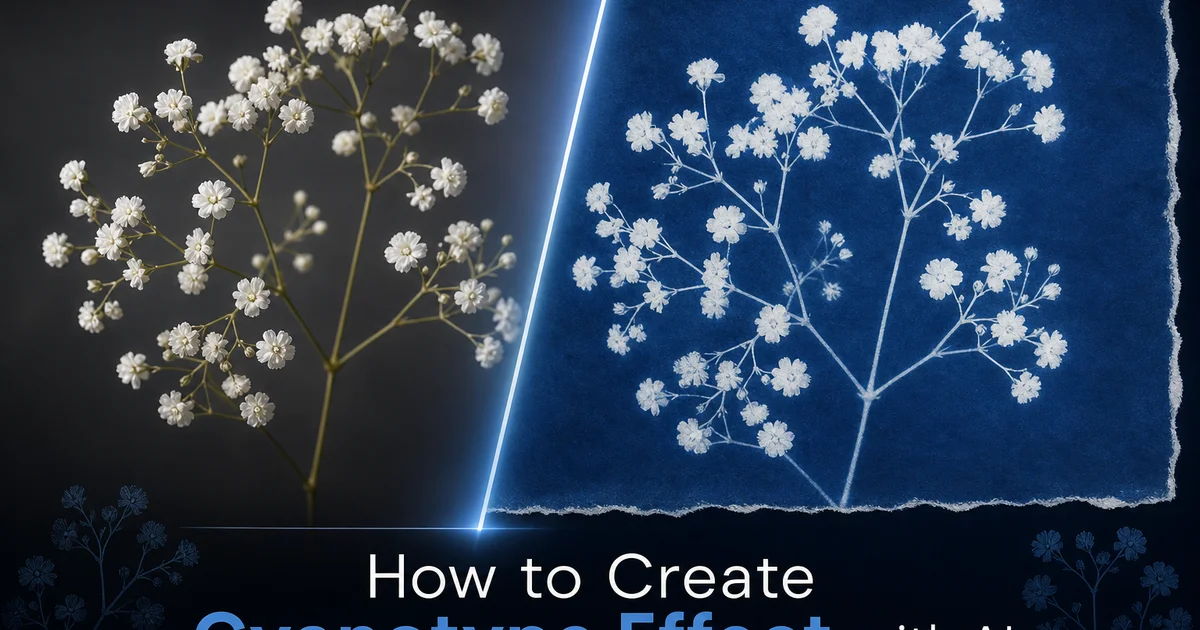
The cyanotype is one of photography's oldest processes, invented in 1842 by Sir John Herschel and famously used by Anna Atkins to create the first book illustrated with photographic images. Her meticulously detailed cyanotype impressions of British algae specimens. The process is elegantly simple: paper is coated with a solution of ferric ammonium citrate and potassium ferricyanide, allowed to dry in the dark, exposed to ultraviolet light through a negative or with objects placed directly on the surface. Then washed in water to reveal the trait Prussian blue image. Areas that received light turn deep blue as the iron salts undergo a photochemical reaction. Areas shielded from light wash away to leave the white of the paper. This simplicity — UV light, iron chemistry, water. Paper — is exactly what has kept cyanotype alive as an art form for nearly two centuries.
The visual appeal of cyanotype goes far beyond nostalgia for a historical process. The Prussian blue palette is inherently beautiful. Rich and saturated in the shadows, ethereal and delicate in the highlights, with a tonal range that compresses photographic reality into a monochromatic blue world that feels at once scientific and dreamlike. The paper substrate shows through the image, contributing its texture and tactile quality. The hand-coated sensitizer application leaves evidence of the human hand. Brush marks, uneven coverage, and the organic boundary where chemistry meets bare paper. Every cyanotype is unique because the handmade process introduces variations that mechanical reproduction cannot replicate. These qualities make cyanotype one of the most distinct and aesthetically distinctive photographic processes. They are precisely the qualities that AI must simulate to produce convincing digital cyanotypes.
AI-powered cyanotype conversion goes beyond simple blue-tinting by replicating the specific photochemistry, material properties. Handmade traits of the real process. The AI understands that cyanotype blue is Prussian blue. A specific iron-based pigment with particular spectral properties — not arbitrary digital blue. It mimics the way the photochemical coating interacts with different paper surfaces, the tonal curve of the sensitizer's response to UV exposure. The unique edge quality where coated and uncoated areas meet. This guide walks through creating authentic digital cyanotypes using AI Filter and AI Enhance, covering blue tonality, paper texture, coating traits, toning variations. The finishing details that make the difference between a blue-tinted photograph and a convincing cyanotype print.
- AI replicates the specific spectral properties of Prussian blue iron pigment rather than applying generic digital blue, matching the exact hue and saturation of real ferric ammonium citrate chemistry.
- Paper texture simulation shows how cyanotype chemistry pools in paper valleys and thins over peaks, producing the mottled handmade quality of actual sun-printed images.
- Hand-brushed coating irregularity introduces visible brush marks, thin edge spots, and the organic boundary where sensitized paper meets untreated white — signatures of the handmade process.
- Multiple toning presets simulate tea-toned warm blues, tannic acid green-blues, bleach-and-redevelop split tones, and standard untoned Prussian blue for different aesthetic effects.
- Tonal mapping preserves the cyanotype's characteristic contrast between deep saturated blue shadows and bright paper-white highlights that provide visual relief.
The photochemistry of cyanotype and how AI models the Prussian blue reaction
Understanding why cyanotype produces its particular blue is key for appreciating why accurate digital simulation requires more than a blue color filter. The cyanotype process relies on the photoreduction of ferric iron (Fe3+) to ferrous iron (Fe2+) under ultraviolet light exposure. The ferrous iron then reacts with potassium ferricyanide to form ferric ferrocyanide. Prussian blue, one of the first synthetic pigments in history. This specific iron compound has a distinctive spectral absorption profile that absorbs red and green light while reflecting and transmitting blue light at wavelengths centered around 450-490 nanometers. The resulting color is not just any blue. It is a specific, identifiable blue with particular warmth, depth, and saturation traits that trained eyes recognize right away.
AI cyanotype conversion begins by mapping the photograph's tonal values to the exposure response curve of the ferric ammonium citrate sensitizer. This curve is not linear — the sensitizer responds more slowly to initial light exposure and then accelerates, producing a trait S-shaped response that compresses both the highlights and the deep shadows while expanding the midtone range. This is why real cyanotypes have a distinct tonal quality that differs from a linear grayscale-to-blue conversion: the midtones are rendered with particular richness and separation while the extreme darks and lights are slightly compressed. The AI applies this chemically accurate response curve before mapping the resulting values to the Prussian blue spectrum, ensuring the tonal behavior matches the actual photochemical process.
The washing step in physical cyanotype production also affects the final look in ways the AI models. When the exposed print is rinsed in running water, the unexposed sensitizer. Which remains water-soluble — washes away, leaving white paper. But the wash is not perfectly selective: some partially exposed sensitizer at the boundaries of light and shadow areas washes away too, creating slightly softer edges than the original exposure produced. Deep blue areas may also lighten slightly at their margins as water undercuts the edges of fully exposed regions. This wash-related edge softening is a trait of wet-process photography that AI mimics by applying a subtle boundary relaxation to the converted image, softening the transition zones between blue and white in a way that matches water-washed cyanotype behavior rather than digital edge rendering.
- Prussian blue results from ferric ferrocyanide with specific spectral absorption at 450-490nm — a recognizable iron pigment, not arbitrary digital blue.
- The ferric ammonium citrate sensitizer has a non-linear S-shaped exposure response curve that compresses highlights and deep shadows while expanding midtone richness.
- AI applies the chemically accurate response curve before mapping to the Prussian blue spectrum, producing tonal behavior that matches real photochemical processing.
- Wash-related edge softening simulates how water undercuts partially exposed boundaries, creating the soft transitions characteristic of wet-process alternative photography.
Paper substrate and hand-coated sensitizer: simulating the handmade process
The paper substrate is not a passive carrier in cyanotype — it is an active participant in the image. The chemistry soaks into the paper fibers. The blue color develops within the paper itself rather than sitting on top of it as ink does. This means the paper's texture, absorbency, and fiber structure directly affect the image quality. Hot-pressed watercolor paper with its smooth, compressed surface produces even, controlled cyanotypes with clean edges and uniform tonal gradations. Ideal for detailed images where tonal precision matters. Cold-pressed paper with its visible tooth creates a textured image where the blue chemistry pools in the surface valleys and thins over the peaks, producing a mottled, organic quality that many fine art practitioners prefer for its handmade character.
Hand-coating the sensitizer solution introduces a second layer of material character that distinguishes fine art cyanotypes from industrially coated prints. An artist applying sensitizer with a wide brush creates visible brush marks. Parallel ridges where the brush was loaded with chemistry and thin areas where it was running dry. The edges of the coated area are never perfectly straight. They follow the organic path of the brush's final stroke, creating an irregular boundary where deep Prussian blue image gives way to uncoated white paper. Some areas may receive a double coat where the artist overlapped brush passes, producing darker results. Others may have coating holidays — small spots where the brush skipped over the paper texture, leaving white pinpoints within the blue image.
AI Filter mimics both paper texture and coating traits as independent parameters that interact with each other and with the image content. The paper texture affects how the simulated chemistry settles into the surface. Rough paper shows more coating variation than smooth paper, just as in reality. The coating brush mark overlay is generated procedurally rather than stamped from a fixed pattern. Every simulated cyanotype has unique brush traits. The coating boundary — that distinctive ragged edge where the blue meets white paper — is generated based on the selected brush width and application style, from careful even coating that extends to the paper edges to artistic applications that leave generous white margins and visible brush gesture at the border. These handmade indicators are what distinguish a convincing digital cyanotype from a blue-tinted rectangle.
- Paper texture directly affects image quality because the blue chemistry develops within paper fibers — smooth hot-pressed for precision, cold-pressed for mottled handmade character.
- Hand-coated sensitizer brush marks create visible ridges, thin spots, and the organic boundary edge where blue image transitions to uncoated white paper.
- Coating holidays — small uncoated spots where the brush skipped over paper texture — add authentic irregularity within the image area.
- Paper texture and coating parameters interact independently, with rough paper amplifying coating variation exactly as in physical cyanotype practice.
Toning, bleaching, and alternative cyanotype chemistry variations
While the standard cyanotype produces the iconic Prussian blue, artists have developed many post-processing treatments that alter the color, contrast, and character of the print. Tea toning is the most common: immersing a finished cyanotype in a strong brew of black tea converts some of the Prussian blue to a warmer blue-brown tone as the tannins in the tea react with the iron in the image. The degree of warming depends on the tea strength and immersion time. Light toning produces a subtle warmth that takes the edge off the cold Prussian blue, while extended toning can shift the image to a warm brown-blue that feels antique and aged. The tea also stains the white paper areas a warm cream color, eliminating the stark blue-and-white contrast in favor of a gentler blue-and-cream palette.
Bleaching with household chemicals produces more dramatic tonal shifts. Dilute hydrogen peroxide or washing soda partially dissolves the Prussian blue pigment, lightening the overall image and shifting the color toward a lighter, more cyan-leaning blue. If the bleached print is then re-exposed to UV light, it redevelops to a split-toned state where the deepest shadows return to full Prussian blue while the midtones and highlights remain shifted to the lighter bleached tone. This split-tone effect creates a wider apparent color range within the monochromatic palette, giving the cyanotype a more complex and nuanced look. AI Filter offers presets for each of these toning and bleaching treatments, applying the color shifts and tonal adjustments that match the specific chemistry of each process.
Alternative cyanotype formulations — sometimes called Cyanotype II or New Cyanotype — use different iron salt combinations to produce prints with enhanced tonal range, deeper maximum density, and slightly different blue hues. Mike Ware's formulation using ammonium iron(III) oxalate produces notably longer tonal scales and more delicate highlight detail than the classic Herschel formula. AI Filter's alternative chemistry preset adjusts the tonal response curve and maximum density to simulate this improved formulation, producing cyanotypes with richer shadow detail and more gradual highlight transitions. For artists who appreciate the finer points of alternative process photography, these chemistry-specific presets show the difference between a generic blue filter and a process-aware simulation that understands the photochemical foundations of each variation.
- Tea toning reacts tannins with the iron pigment, warming Prussian blue toward brown-blue and staining white paper areas to warm cream for an antique aesthetic.
- Bleach-and-redevelop creates split-tone effects where deep shadows return to Prussian blue while midtones retain lighter cyan-shifted bleached tones.
- Alternative cyanotype chemistry (Ware formulation) produces longer tonal scales and more delicate highlight detail than the classic Herschel formula.
- Chemistry-specific presets adjust tonal response curves and maximum density to match each real-world formulation rather than applying generic color filters.
Compositional strategies for effective cyanotype imagery
The cyanotype palette imposes compositional constraints that differ from full-color photography. Understanding these constraints is key for selecting photographs that will produce strong results. Because the entire tonal range is expressed in a single hue. Blue — the viewer cannot rely on color differences to separate elements. A red flower against green leaves is instantly readable in a color photograph. In cyanotype both the flower and the leaves may map to similar blue intensities, merging into an undifferentiated blue mass. Successful cyanotype subjects are those where tonal contrast, shape, and edge definition — not color — create visual separation. Silhouettes against bright sky, high-contrast architectural details, botanical specimens with intricate outlines. Portraits with strong directional lighting all convert well.
The botanical tradition of cyanotype, established by Anna Atkins in the 1840s, remains one of the most natural subjects for the process. Plants, leaves, flowers, and seeds placed directly on sensitized paper (the photogram technique) produce white silhouettes against blue backgrounds. The combination of organic form, intricate edge detail, and the translucency of thin plant material creates images of striking scientific beauty. AI Filter can simulate the photogram technique by converting a photograph of botanical subjects into an image that looks like a contact-printed cyanotype, with the plant rendered as a white to light blue shape against deep Prussian blue, including the translucent areas where thin leaves allow partial light passage.
Landscape and architectural subjects benefit from the cyanotype palette when the composition emphasizes shape and tonal structure over color detail. A sweeping landscape with distant mountains, clear sky gradation. Silhouetted foreground elements translates the mood depth of the scene into the blue-to-white tonal range with natural elegance. Architectural subjects with strong geometric lines and dramatic shadows become blueprint-like compositions that reference the historical use of cyanotype for architectural and engineering reproduction — the familiar blueprint. This connection to technical drawing gives cyanotype architecture images a conceptual depth that reinforces the visual content, making the process choice feel deliberate rather than merely aesthetic.
- Successful cyanotype subjects rely on tonal contrast, shape, and edge definition rather than color differences for visual separation in the monochromatic blue palette.
- Botanical photogram simulation renders plant subjects as white-to-light-blue silhouettes against deep Prussian blue, including translucent effects through thin leaf material.
- Landscape compositions translate atmospheric depth into the blue-white tonal range naturally, with sky gradation and silhouetted foreground elements reading clearly.
- Architectural subjects gain conceptual depth from the historical connection to engineering blueprints, making the cyanotype process choice feel deliberate and meaningful.
Creative applications: wall art, wedding stationery, and experimental printmaking
Cyanotype wall art has experienced a surge of interest as interior design trends embrace handmade, process-visible aesthetics that contrast with digital perfection. A large-format cyanotype print — with its visible brush-coated edges, paper texture. The luminous depth of Prussian blue — makes a commanding wall piece that reads as fine art rather than decoration. AI cyanotype conversion allows photographers to preview how their images will look in the cyanotype palette before committing to the physical printing process. For those who do not have access to UV light boxes and sensitizer chemicals, the digital simulation provides the aesthetic with high fidelity. Printing the digital cyanotype on textured fine art paper through an inkjet process produces results that closely approximate the look and feel of the real process.
Wedding and event stationery represents a growing commercial application for the cyanotype aesthetic. The romantic, ethereal quality of blue-and-white botanical cyanotypes translates beautifully to invitation suites, save-the-date cards, table numbers, and ceremony programs. Photographers convert wedding detail shots — bouquets, venue architecture, couple portraits — into cyanotype versions that become the visual theme unifying all stationery elements. The consistency of the monochromatic palette means that diverse photographic subjects share a cohesive visual identity when processed through the same cyanotype parameters. AI conversion makes this practical at wedding production timelines because the photographer can deliver a complete cyanotype-themed stationery image set within hours rather than the weeks that physical cyanotype printing would require.
Experimental artists combine the digital cyanotype conversion with physical printing and subsequent hand manipulation. Print the AI cyanotype on watercolor paper and then apply actual tea or coffee toning to the print, adding physical staining that interacts with the printed blue tones in unpredictable ways. Or print on fabric — cotton and linen accept inkjet printing and the cyanotype aesthetic translates naturally to textile surfaces for quilting, embroidery, and mixed-media fiber art. Some artists use the digital cyanotype as a starting point and then draw, paint, embroider, or collage on top of the print, using the blue image as a foundation layer that the physical additions interact with. This hybrid digital-physical workflow combines the precision and consistency of AI conversion with the unpredictability and tactile satisfaction of handwork.
- Large-format cyanotype wall art with visible brush-coated edges and paper texture reads as fine art, supported by digital preview before committing to physical printing.
- Wedding stationery uses cyanotype-themed images across invitations, programs, and table numbers for cohesive visual identity achievable on production timelines.
- Hybrid workflows print digital cyanotypes on watercolor paper or fabric, then add physical tea toning, drawing, embroidery, or collage for unpredictable mixed-media results.
- The monochromatic blue palette unifies diverse photographic subjects into a cohesive visual theme when processed through consistent cyanotype parameters.
How to do it
- 1
Upload your photo and evaluate its tonal range for cyanotype conversion
Open your image in AI Filter and assess whether the photograph has a broad tonal range with clear distinctions between highlights and shadows. Cyanotype is a monochromatic process that renders all values in shades of Prussian blue and white. There is no color information, only the mapping of brightness to blue intensity. Photographs with strong contrast, clear subject separation from backgrounds, and well-defined shapes convert most successfully. Low-contrast images with subtle tonal differences tend to produce flat cyanotypes where important details merge into uniform blue, losing the visual impact that makes the process strong.
- 2
Select the cyanotype preset and configure the Prussian blue tonality
Choose from cyanotype presets that simulate different chemical and exposure conditions. Classic deep Prussian blue from standard ferric ammonium citrate chemistry, the warmer blue-green tones of toned cyanotypes that have been treated with tea or tannic acid, the split-tone look of partially bleached and re-developed prints, and the cyan-heavy palette of overexposed prints. Adjust the maximum blue depth to control how dark the deepest shadows appear, from a light sky blue that suggests a brief exposure to the intense midnight Prussian blue of a fully developed print.
- 3
Adjust paper texture and chemical coating characteristics
Select a paper substrate that affects how the cyanotype chemistry appears on the surface. Smooth hot-pressed watercolor paper produces even blue tones with clean edges. Rough cold-pressed paper creates a visibly textured surface where the chemical coating pools in paper valleys and thins over peaks, producing the mottled, handmade quality trait of fine art cyanotypes. Add coating irregularity to simulate hand-brushed chemical application, where the sensitizer was unevenly spread across the paper, leaving visible brush marks, thin spots at the edges. The distinctive border where the coated area meets untreated white paper.
- 4
Use AI Enhance to optimize tonal separation and highlight clarity
After the initial cyanotype conversion, apply AI Enhance to ensure the full tonal range of the blue palette is used well. Separate the shadow values to prevent dark areas from collapsing into uniform deep blue. Ensure highlights retain the bright paper-white that provides visual relief in the composition. Real cyanotypes derive much of their beauty from the contrast between deep Prussian blue shadows and the crisp white of unexposed paper. The boost step ensures this contrast is maximized without losing detail in either extreme.
- 5
Export the final cyanotype and compare against authentic sun-printed references
Save the completed image at full resolution and compare it with photographs of actual cyanotype prints. Verify that the blue tone matches real Prussian blue rather than a generic digital blue, that the paper texture is visible and contributes to the handmade quality, that the tonal range spans from paper white to deep blue with smooth gradation between. That any coating irregularities look authentic to hand-brushed sensitizer application. Check that highlights are achieved through absence of blue rather than added white, matching how real cyanotypes work where unexposed areas remain the natural paper color.
Sources
- Sir John Herschel and the Invention of the Cyanotype Process — Royal Society
- Anna Atkins: Photographs of British Algae — Cyanotype Impressions — New York Public Library
- Alternative Photographic Processes: Cyanotype Chemistry and Practice — AlternativePhotography.com