
How to Create Celadon Glaze Effect with AI — Magic Eraser
Transform photos into celadon glaze-style artwork using AI. Step-by-step guide covering jade-green palettes, crackle patterns, glaze pooling effects, and authentic ceramic surface textures.
SEO & Growth
Reviewed by Magic Eraser Editorial ·
Table of Contents
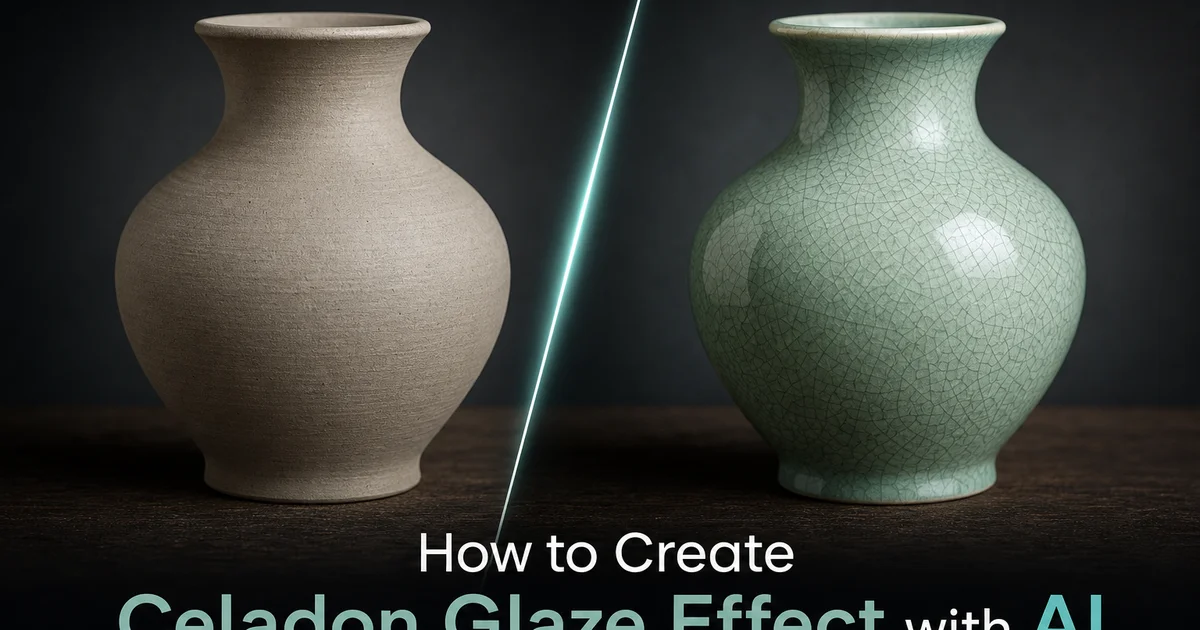
Celadon is one of the most revered ceramic traditions in human history, originating in China during the Eastern Han Dynasty around the first century CE and reaching its artistic zenith in the Song Dynasty kilns of Longquan, Yaozhou, and the legendary Ru ware workshops that produced ceramics for the imperial court. The defining trait of celadon is its glaze — a translucent iron-oxide formulation that, when fired in a reduction atmosphere where oxygen is deliberately starved from the kiln, transforms from muddy brown into the luminous jade-green that has captivated collectors for nearly two millennia.
Recreating the celadon aesthetic in digital photography has historically required either photographing actual celadon pieces or painstakingly hand-painting the effect. Simple green color overlays fail completely because celadon is a complex optical phenomenon involving translucency, depth variation, surface crackle patterns, and the way glaze thickness changes how light interacts with the iron-oxide colorant.
AI-powered celadon conversion changes this by training on thousands of museum-quality celadon photographs to learn the visual grammar of the glaze. This guide walks through using AI Filter to transform photographs into celadon-inspired artwork, covering historical sub-style selection, color balance, craquelure simulation, pooling effects, and surface texture finishing.
- AI Filter maps photographic tonal values to celadon's compressed jade-green palette, preserving subject detail while replacing full-spectrum color with iron-oxide green depth variation.
- Historical sub-style presets reference specific traditions: Longquan olive-jade, Jingdezhen qingbai blue-tint, Goryeo grey-green, and Ru ware ice-crackle — each with distinct color temperature and surface character.
- Crazing simulation overlays authentic crackle patterns ranging from barely visible ice-crackle to bold dark-stained craquelure, matching the cooling-rate fracture networks of real celadon glazes.
- Glaze pooling effects darken recesses and thin over raised areas, creating the three-dimensional depth that distinguishes celadon's translucent optical character from flat green coloring.
- Ceramic surface texture finishing replaces flat digital appearance with the waxy, light-penetrating quality of reduction-fired glaze that defines celadon's aesthetic distinction.
Understanding celadon: the science and history behind the jade-green glaze
Celadon's distinctive color originates from a precise chemical interaction between iron oxide in the glaze formulation and the reduction atmosphere maintained in the kiln during firing. In an oxidizing atmosphere, iron oxide produces brown tones, but when the kiln atmosphere is starved of oxygen, the iron oxide transitions from ferric oxide (Fe2O3) to ferrous oxide (FeO), producing the green coloration.
The historical geography of celadon spans East Asia across more than a millennium of continuous production. Longquan celadons are prized for their thick, deeply saturated jade-green glazes. Yaozhou celadons feature carved decoration under olive-green glazes. Ru ware produced fewer than one hundred surviving pieces with a distinctive pale blue-grey-green glaze. Korean Goryeo celadons developed a parallel tradition with grey-green glazes.
The optical properties that make celadon visually distinctive are precisely what make it challenging to simulate digitally. Unlike opaque glazes that reflect light from their surface, celadon glazes are translucent: light enters the glaze layer, scatters through suspended particles, and reflects back from the interface between glaze and clay body. AI conversion must address translucency, depth variation, angle-dependent color, and craquelure.
- Iron oxide in reduction atmosphere converts from ferric (Fe2O3) to ferrous (FeO) oxide, producing celadon's green from the same chemistry that makes oxidized earthenware brown.
- Historical traditions span Longquan jade-green, Yaozhou olive-green, Ru ware blue-grey, and Goryeo grey-green — each with distinct iron concentration and firing parameters.
- Translucent glaze creates depth by scattering light through suspended particles and microscopic bubbles rather than reflecting from an opaque surface.
- Crackle patterns form as the glaze contracts faster than the clay body during cooling, creating networks from barely visible ice-crackle to bold stained craquelure.
Configuring the celadon palette: color mapping and tonal compression
The first technical challenge in celadon conversion is compressing the full tonal range of a photograph into the narrow palette that celadon occupies. Celadon's tonal relationships are nonlinear: dark shadows become deeply saturated black-green where thick glaze absorbs light, while highlights become pale translucent zones where thin glaze barely colors the light passing through.
AI Filter's celadon presets handle this by analyzing the source image's luminosity histogram and applying a custom transfer curve that compresses the tonal range while maintaining perceptual relationships between different luminosity zones. You can fine-tune shadow hue, midtone saturation, and highlight tint for precise matching to a specific celadon tradition.
The most common mistake in celadon conversion is applying too much saturation. Historical celadons are characterized by restraint: the green is present but muted, softened by light scattering through the glaze layer. Pull the saturation back from what looks correct on screen, then pull it back further.
- Celadon's tonal mapping is nonlinear: dark areas become deeply saturated black-green from thick glaze, while highlights become pale translucent zones.
- Custom transfer curves compress the luminosity histogram while maintaining perceptual relationships between different luminosity zones.
- Shadow hue, midtone saturation, and highlight tint controls allow precise matching to Longquan jade, Yaozhou olive, Ru ware blue-grey, or Goryeo grey-green palettes.
- The most common error is excessive saturation — authentic celadon reads as muted and complex rather than vivid.
Craquelure simulation: generating authentic crackle patterns
Crackle patterns — known technically as craquelure or crazing — are among the most distinctive features of celadon ceramics. Crazing occurs because the glaze and clay body have different thermal expansion coefficients, and the resulting stress fractures the glaze into a network of fine cracks during cooling.
AI Filter generates craquelure by analyzing the source image's surface geometry: flat areas receive uniform crackle networks, curved surfaces receive directionally biased patterns, and edges receive concentrated stress-fracture lines. Density control adjusts from fine ice-crackle to bold crackle, while line darkness controls natural crazing versus deliberately stained decorative craquelure.
The interaction between craquelure and the underlying image requires careful calibration. AI Filter uses an automatic detail-preservation mask that reduces crackle visibility over high-frequency subject areas like faces and text while maintaining full crackle density over smooth backgrounds.
- Crazing results from differential thermal contraction between glaze and clay body during kiln cooling, producing stress-fracture networks governed by physical principles.
- Surface geometry analysis places uniform networks on flat areas, directional patterns on curves, and concentrated stress lines near edges.
- Crackle density ranges from Ru ware ice-crackle to bold Ge ware spacing, with line darkness controlling natural crazing or deliberately stained decorative craquelure.
- Detail-preservation masking automatically reduces crackle visibility over high-frequency subject areas while maintaining full density over smooth backgrounds.
Glaze pooling, translucency effects, and final surface finishing
Glaze pooling gives celadon its three-dimensional quality. During firing, glaze melts and flows under gravity, collecting thickly in carved channels and lower areas while thinning over raised decoration and sharp edges, creating a gradient of color depth across the surface. AI Filter mimics this using the source image's depth map.
Translucency simulation adds the final layer of optical realism. AI Filter applies a subtle subsurface-scattering effect that softens hard edges and creates a gentle luminous quality in areas of medium glaze thickness. The effect is deliberately subtle — over-application makes the image look blurred rather than glazed.
The final surface finishing step applies a micro-texture that replicates the physical surface of fired celadon glaze: a slight orange-peel texture from molten glaze viscosity, tiny pinholes from gas bubbles, and the edges of crackle lines. This micro-texture grounds the celadon effect in physical reality.
- Depth-map analysis identifies where glaze would pool and thin, creating natural color-depth gradients across the image.
- Subsurface-scattering simulation adds the soft luminous quality of light diffusing through translucent glass rather than reflecting off an opaque surface.
- Translucency calibration requires restraint — over-application produces blur rather than the subtle impression of light interacting with a glass-like ceramic medium.
- Micro-texture finishing adds orange-peel surface variation, gas-bubble pinholes, and crackle-edge ridges for physical realism.
How to do it
- 1
Upload your photo and evaluate its tonal range for celadon conversion
Open your image in AI Filter and assess how the existing tonal values will translate into the narrow luminosity range of celadon glaze. Images with strong tonal contrast and interesting textural detail convert most successfully.
- 2
Select the celadon glaze preset and configure the green-blue balance
Choose from celadon sub-styles: Longquan deep olive-jade, Jingdezhen blue-tinted qingbai, Goryeo grey-green, or Ru pale ice-crackle. Adjust the blue-green balance slider to position the palette between warmer olive and cooler sky-blue tones.
- 3
Apply the characteristic crackle pattern and glaze depth variation
Enable the crazing simulation to overlay the fine network of crackle lines. Adjust crackle density, line darkness, and pattern scale from barely visible ice-crackle to bold dark-stained craquelure.
- 4
Add pooling effects and tonal depth where glaze gathers in recesses
Configure glaze pooling that darkens areas where celadon glaze would naturally collect: in carved channels, around relief elements, and at the base of forms where gravity draws molten glaze during firing.
- 5
Export with surface texture and verify against historical references
Apply the final ceramic surface texture that replaces the flat digital look with the waxy, translucent quality of reduction-fired celadon glaze. Save at full resolution.
Sources
- Celadon Glazes: A Systematic Study of Lime, Calcium, and Iron Interactions in Reduction Firing — Ceramic Arts Daily
- Song Dynasty Celadons: The Pinnacle of Chinese Ceramic Art — The Metropolitan Museum of Art
- Neural Style Transfer for Ceramic Surface Simulation: Methods and Applications — arXiv — Computer Vision and Pattern Recognition