
How to Create a Burin Engraving Effect with AI Photo Editing — Magic Eraser
Transform photos into copper-plate burin engravings using AI style transfer. Step-by-step guide covering intaglio crosshatching, banknote-style portraits, Dürer technique, and tonal variation through line density.

Product Marketing
Reviewed by Magic Eraser Editorial ·
Table of Contents
- How AI burin engraving differs from traditional line-art filters
- Selecting engraving styles: banknote portraiture, Dürer crosshatch, and stipple techniques
- Controlling line density, crosshatch angles, and tonal depth
- Paper and ink simulation for authentic print reproduction appearance
- Creative applications: portraits, currency-style compositions, and fine art reproductions
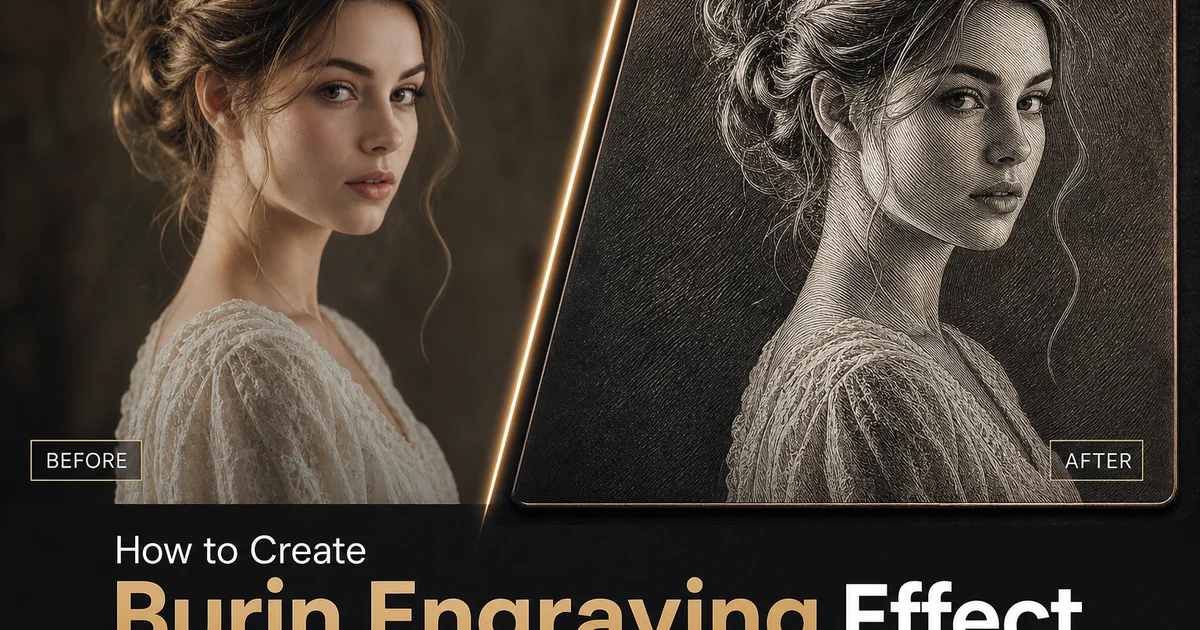
Burin engraving is among the most technically demanding and visually distinctive forms of printmaking, with a lineage stretching from fifteenth-century goldsmiths through Albrecht Dürer's revolutionary woodcuts and copper plates to the intricate security portraits on modern banknotes. The burin — a steel shaft ground to a sharp point — cuts clean V-shaped grooves directly into a polished copper plate, producing lines with a characteristic swell-and-taper quality.
Recreating the burin engraving look digitally has historically been an exercise in frustration. Simple edge-detection filters produce uniform lines that lack the variable width, deliberate direction, and accumulated density that define real engraving.
AI-powered engraving conversion changes this by analyzing the three-dimensional structure, surface orientation, and material properties of each element in the photograph before generating any lines. The AI generates crosshatch systems where the angle between line sets varies to match the curvature of the underlying surface.
- AI analyzes three-dimensional surface orientation to generate burin lines that follow facial contours, fabric drape, and architectural geometry, replicating the form-describing line logic of master engravers.
- Multiple engraving presets simulate distinct historical techniques including fine parallel banknote portraiture, Dürer-style bold crosshatch, stipple engraving, and mixed intaglio combining line types.
- Crosshatch density and angle controls determine how photographic tonal values translate into line patterns, from widely spaced highlights to deeply layered shadow networks.
- Tonal mapping curves let you choose between dramatic high-contrast engravings with stark transitions and subtle engravings with gradual tonal progressions.
- AI Enhance refines line quality to simulate the swell-and-taper character of real burin strokes, including the slight edge irregularity caused by tool resistance against copper.
How AI burin engraving differs from traditional line-art filters
Traditional approaches to creating engraving effects convert to grayscale, detect edges, apply threshold, and overlay a parallel line pattern. The results bear a superficial resemblance but lack every quality that makes real engraving powerful.
AI burin engraving begins with depth estimation and surface normal calculation, determining how every surface is oriented in three-dimensional space. The AI treats the image as a three-dimensional scene rather than a flat array of pixel values.
The difference is most visible in handling transitions between light and shadow. AI generates smooth transitions by gradually increasing line density and introducing extra crosshatch angle sets — the same mechanisms real engravers use.
- Traditional filters apply fixed-direction lines with uniform weight, ignoring the three-dimensional form that real engraving systematically describes.
- AI calculates surface normals and depth for every region, generating line directions that follow facial curvature, fabric drape, and architectural geometry.
- Tonal transitions use gradually increasing line density and progressive crosshatch layering rather than abrupt threshold jumps.
- AI distinguishes between shadow boundaries and actual contours, assigning appropriate line treatment to each.
Selecting engraving styles: banknote portraiture, Dürer crosshatch, and stipple techniques
Banknote-style engraving uses parallel lines that follow the contours of the face with meticulous precision, building tonal values entirely through variations in line width and spacing.
Dürer-style crosshatch engraving takes a more expressive approach, using bold intersecting line sets at varying angles to build dramatic tonal contrasts with visible artistic energy.
Stipple engraving replaces continuous lines with dots of varying size and spacing, producing the softest, most photographic-looking engravings.
- Banknote portraiture uses contour-following parallel lines with width tied to local brightness — wider in shadows, narrower in highlights.
- Dürer-style crosshatch employs bold intersecting line sets with controlled variation in pressure and angle, creating dramatic tonal contrasts.
- Stipple engraving builds tone through dot density rather than lines, producing the softest engraving effect suited to subtle skin tones.
- Mixed-technique compositions combine stipple in delicate areas with line engraving in structured regions.
Controlling line density, crosshatch angles, and tonal depth
Line density is the primary mechanism through which burin engraving represents tonal value. Widely spaced lines for highlights, closer lines for midtones, and overlapping line sets for shadows.
The angle between crosshatch sets determines the visual character of the engraving. Classical engraving uses 30-45 degrees, banknote engraving favors 45-degree diamond patterns.
Tonal depth control determines the absolute range from airy proof-like engravings to rich inky prints.
- Line spacing maps directly to photographic brightness — wide spacing for highlights, close spacing for midtones, overlapping line sets for shadows.
- Crosshatch angles can be set independently for primary, secondary, and tertiary line sets.
- Banknote engraving favors 45-degree diamond crosshatch while Dürer-style work uses more acute 20-30 degree angles.
- Tonal depth controls the absolute range from airy open proof-like engravings to rich inky prints.
Paper and ink simulation for authentic print reproduction appearance
The visual character of a burin engraving is shaped by the paper and ink as much as by the lines. Different papers absorb ink differently, and AI Filter offers paper simulations that replicate these physical interactions.
Ink behavior simulation controls how engraved lines appear to have been printed — from fresh crisp impressions to the softer character of a well-used plate.
Plate tone adds a subtle warmth layer that distinguishes a real print from sterile digital reproduction.
- Paper simulation replicates how ink interacts with different surfaces — smooth hot-pressed for crisp detail, laid paper for historical authenticity.
- Ink behavior ranges from pristine first-edition crispness to characterful plate-wear softness.
- Plate tone adds a subtle warm veil that master printers deliberately leave to enhance atmospheric quality.
- Sepia and brown-black ink tones replicate historical formulations for warm period character.
Creative applications: portraits, currency-style compositions, and fine art reproductions
Portrait engraving is the genre most closely associated with burin technique. A banknote-style engraving portrait acquires institutional gravitas for corporate and commemorative applications.
Currency-style compositions extend beyond portraits to include geometric lathe-work borders, fine-line background patterns, and decorative scroll elements inspired by banknote aesthetics.
Fine art reproduction through engraving conversion creates layered historical references — a digital tool mimicking a print technique originally used to reproduce artworks.
- Banknote-style portrait engravings add institutional gravitas for corporate leadership pages, commemorative prints, and currency-inspired projects.
- Currency-inspired compositions include guilloche borders, lathe-work patterns, and ornamental flourishes replicating security printing aesthetics.
- Reproductive engraving conversion references the historical tradition of disseminating artwork through printed engravings.
- Each face receives individually generated contour-following line work based on its specific topology.
How to do it
- 1
Upload your photo and assess its suitability for burin engraving conversion
Open your image in AI Filter and evaluate its tonal structure for compatibility with intaglio engraving techniques. Burin engraving translates every tonal value into variations in line density, width, and spacing.
- 2
Select the burin engraving style and configure line characteristics
Choose from engraving presets that simulate different historical burin techniques: fine parallel line engraving, bold crosshatch, stipple engraving, and mixed intaglio. AI Filter recommends the technique best suited to the subject.
- 3
Adjust crosshatch density and tonal mapping for authentic intaglio appearance
Control how the AI translates photographic tonal values into engraved line patterns. The tonal mapping curve determines whether you get dramatic high-contrast engravings or subtle engravings with graduated tonal progressions.
- 4
Use AI Enhance to refine line crispness and eliminate digital artifacts
Apply AI Enhance to sharpen individual lines and ensure they read as cleanly cut metal rather than digitally generated vectors. AI Enhance tightens the lines to better approximate the physical qualities of real burin strokes.
- 5
Export the finished engraving and verify against historical reference prints
Save at full resolution and compare with photographs of actual burin engravings. Check that line direction follows the three-dimensional contours of the subject and that tonal transitions are achieved through gradual changes in line density.
Sources
- The Intelligent Hand: The Craft of the Engraver — Victoria and Albert Museum
- Neural Style Transfer for Line Art and Engraving Effects — arXiv — Computer Vision and Pattern Recognition
- Albrecht Dürer and the Art of Intaglio Printmaking — The Metropolitan Museum of Art