
AI Photo Editing for Pool Contractors: Portfolio Photos, Water Color Correction, and Marketing
Learn how pool builders and contractors use AI photo editing to correct water color, create before-and-after project comparisons, and remove construction site clutter. Build portfolio marketing that wins new clients.
SEO & Growth
Reviewed by Magic Eraser Editorial ·
Table of Contents
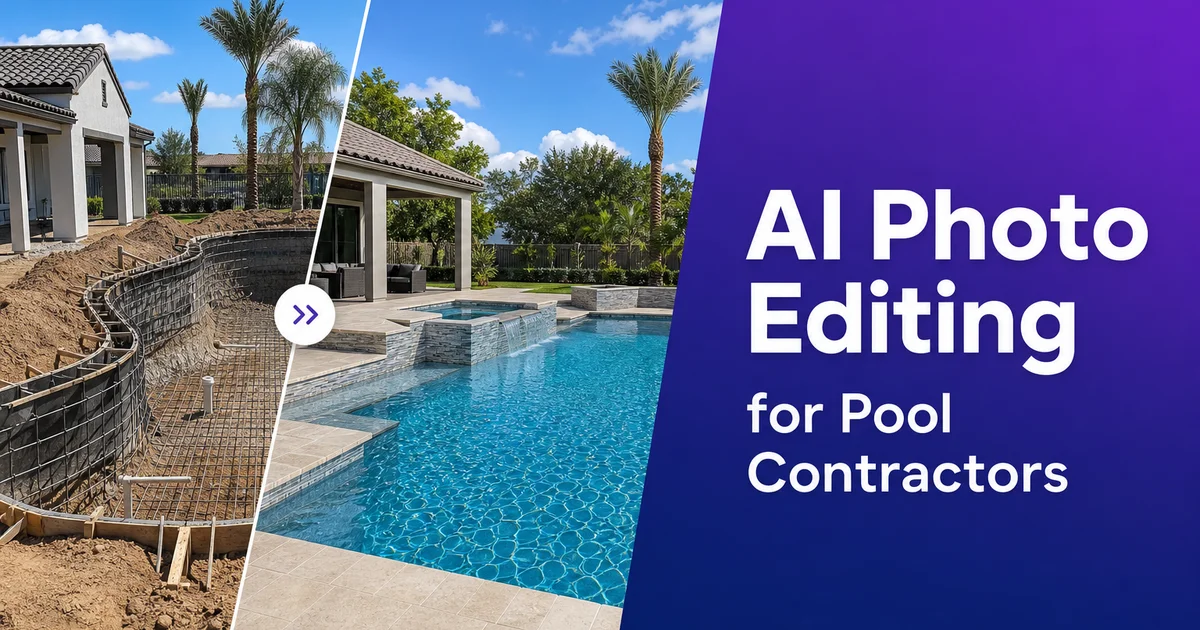
Pool construction is a visual business. Homeowners deciding to invest thirty thousand to one hundred and fifty thousand dollars in a backyard pool want to see what they are buying. The contractor's portfolio is where that decision often begins. A stunning photo of a completed pool with vivid turquoise water, clean hardscape, and lush surrounding landscaping tells a prospect exactly what this contractor can deliver. A mediocre photo of the same pool — gray water, visible construction debris in the corner, washed-out midday lighting — tells the prospect to keep scrolling to the next contractor on the list.
The gap between how a finished pool looks in person and how it looks in an unedited photograph is wider than in almost any other home improvement category. Water is one of the most difficult subjects to photograph accurately because it at once reflects the sky, transmits light into its depth, and refracts everything beneath the surface. Camera sensors struggle with the dynamic range between bright sky reflections on the surface and the deep shadows beneath the water line. The result is photos where the water — the entire point of the project — looks nothing like the vivid, inviting color the homeowner sees standing at the pool edge.
AI photo editing closes this gap efficiently enough that every pool contractor can maintain an expert portfolio without hiring a photographer for every project. AI Enhance corrects water color and balances the extreme dynamic range of pool scenes. Magic Eraser removes the construction site reality that lingers in project photos. AI Filters apply a consistent visual style across your portfolio so every project looks like it belongs to the same high-quality brand. This guide covers how pool builders and contractors use these tools to turn job site photos into the marketing assets that win the next contract.
- AI Enhance corrects water color that cameras misrender as gray or muddy green back to vivid turquoise or deep blue.
- Magic Eraser removes construction debris, safety fencing, dumpsters, and neighbor intrusions from finished project photos.
- Before-and-after pairs with consistent color processing create honest, compelling transformation comparisons.
- Pool photos taken during golden hour and enhanced with AI produce portfolio images competitive with professional photography.
- Consistent, professional project photos across your website, Google Business Profile, and social media build the credibility that converts prospects into consultations.
Why pool photos fail and how AI corrects water color and dynamic range
Water is among the most challenging photographic subjects because it behaves optically unlike any solid surface. The surface at once reflects the sky above and transmits light into the colored volume below. The balance between reflection and transmission shifts with viewing angle, time of day, and water depth. A pool's color comes from the interaction of sunlight with the pool finish — plaster, pebble, tile, or vinyl — filtered through the water column above it. The camera sees a composite of sky reflection, surface glare, transmitted color from the pool floor, and it rarely resolves this into the vivid, uniform color that the human eye perceives because our visual system processes water look through experience and expectation in ways a camera sensor cannot.
The practical result is that pool water in raw photographs looks washed out, gray, greenish, or inconsistently colored across the surface. The shallow shelf reads as a completely different color than the deep end. Reflections of trees or structures create dark patches that break up the water surface. The camera's auto white balance adjusts for the dominant sky color and shifts the water away from its true look. These are not problems of bad photography. They are inherent limitations of how cameras capture water, and even expert architectural photographers spend major time correcting water color in post-processing.
AI Enhance addresses water color correction by understanding that pool water has an expected color range determined by the pool finish type and lighting conditions. It restores vivid, consistent water color across the entire pool surface, from the shallow tanning ledge through the main body to the deepest point. It balances the exposure between the bright surrounding deck and the darker water body so that both are visible and detailed in the same image. It reduces the surface glare that creates unwanted hot spots while keeping enough reflection to maintain the water's natural luminous quality. A single boost pass produces the water color that the homeowner sees in person and that the contractor needs in their portfolio.
- Pool water's simultaneous reflection and transmission create a composite that cameras rarely render accurately.
- Auto white balance shifts water color away from true appearance, producing gray or greenish tones in raw captures.
- AI Enhance restores vivid, consistent water color from the shallow shelf through the deep end in a single pass.
- Exposure balancing ensures both the bright surrounding deck and the darker water body are visible and detailed.
Removing construction site reality from finished project photos
Every pool build is a major construction project. The visual evidence of that construction lingers in photographs taken during and shortly after completion. Orange safety fencing around the excavation perimeter. Stacked pallets of pavers or coping stone waiting for installation. A portable toilet at the far end of the yard. The excavator track marks in the lawn that have not yet been regraded. PVC pipe stubs waiting for final plumbing connections. Electrical conduit runs not yet buried. Temporary fencing, dumpsters, and tool trailers parked in the driveway that appears in the background of backyard shots.
Magic Eraser removes these elements cleanly, filling the space with contextually right surroundings. Grass where the dumpster was, clean deck surface where the tool cart sat, uninterrupted fence line where the portable toilet blocked the view. For in-progress records photos that you want to repurpose for marketing, the tool removes the construction context while keeping the pool itself in its current state of completion. This lets you show the tile detail during installation, the pool shell before filling, or the decking pattern during layout without the visual noise of an active job site.
The neighbor's house, an adjacent parking area, or a utility easement visible behind the fence is another common issue in backyard pool photography. These intrusions break the illusion that the pool exists in its own private paradise, which is exactly the aspiration your marketing should evoke. Magic Eraser can remove rooflines, vehicles, and structures visible above or through fencing, replacing them with sky, trees, or fence continuation that maintains the private oasis feeling. The result is a portfolio image that sells the dream of backyard living rather than documenting the reality of suburban lot lines.
- Construction debris — safety fencing, pallets, portable toilets, dumpsters — is cleanly removed and filled with appropriate context.
- In-progress documentation photos can be repurposed for marketing by removing construction context while preserving the pool.
- Neighbor structures and utility intrusions visible above fence lines are replaced with sky or vegetation to maintain the private oasis feeling.
- The goal is a portfolio image that sells the aspiration of backyard living, not a documentation shot of a construction project.
Before-and-after comparisons that drive consultation requests
Before-and-after photos are the most powerful content format for pool contractors because they show the transformative impact of the work in a way that finished-only photos cannot. A bare, flat backyard with patchy grass next to the same space with a stunning pool, stone deck, fire pit, and mature landscaping tells a prospect that their own unremarkable yard could become something extraordinary. Pool renovation projects — replastering, coping replacement, deck resurfacing, and equipment upgrades — are even more dependent on before-and-after comparisons because the improvement is relative to the existing condition rather than an empty canvas.
The challenge with before-and-after pairs is visual consistency. The before photo was often taken months earlier, possibly with a different phone, at a different time of day, in different weather conditions. Without processing, the comparison looks like two unrelated photographs rather than a change story. AI Enhance applied to both images with the same settings normalizes the white balance, exposure, and color saturation so the pair reads as the same location at two points in time. The before photo should look clear and accurate, not artificially dark or degraded — so the change feels honest and the quality of the finished work speaks for itself.
Compose before-and-after pairs for every project and organize them by project type on your website: new construction, renovation, commercial, and specialty features like infinity edges, swim-up bars, and grotto waterfalls. Each pair should include a brief description of the project scope and timeline. This organized portfolio becomes your most effective lead generation asset because prospects self-select by finding projects similar to what they want and seeing the change your company delivered. The photo quality of these pairs — vibrant water, clean surroundings, consistent lighting — determines whether the prospect requests a consultation or moves on to a competitor whose portfolio looks more expert.
- Before-and-after pairs demonstrate transformative impact that finished-only photos cannot communicate.
- Applying the same AI Enhance settings to both photos normalizes lighting and color for a consistent comparison.
- Organizing pairs by project type lets prospects self-select by finding projects similar to their vision.
- Honest, clear before photos paired with vivid after photos build trust and drive consultation requests.
Building a portfolio that wins contracts across every marketing channel
Pool contractors compete in a market where the average project value is high enough that homeowners research extensively before contacting anyone. They check Google Business Profile listings, browse contractor websites, scroll through Instagram and Pinterest for design inspiration, and read reviews on Houzz and Yelp. At every touchpoint, photos determine whether your company makes the short list. A contractor with twenty stunning project photos across these platforms outcompetes a contractor with twice the experience but poor visual marketing, because the homeowner cannot evaluate craftsmanship from a text description. They need to see the work.
Build your portfolio systematically by photographing every completed project with a consistent workflow. Capture the pool at golden hour for hero images and at midday for detail shots that show tile patterns, coping profiles, and finish texture. Process every set through AI Enhance for water color and lighting correction, Magic Eraser for site cleanup, and your chosen AI Filter for brand-consistent color grading. This produces eight to twelve polished images per project that populate your website gallery, Google Business Profile, Instagram grid, Pinterest boards, and proposal displays.
Pin your best images to Pinterest with keyword-rich descriptions. Pinterest functions as a visual search engine where homeowners actively searching for pool design ideas discover contractors through their project photos. Post in-progress and completed project photos to Instagram with local hashtags and geotags that reach homeowners in your service area. Update your Google Business Profile photos monthly with recent projects. Google rewards active profiles with better visibility in local search results. Every channel reinforces the others, and the consistent visual quality enabled by AI editing makes your brand distinct across all of them.
- Homeowners research extensively across multiple platforms before contacting pool contractors — photos drive every shortlist decision.
- A consistent photo workflow per project produces eight to twelve polished images for all marketing channels.
- Pinterest functions as a visual search engine where homeowners discover contractors through keyword-rich project photos.
- Monthly Google Business Profile photo updates improve local search visibility and signal an active, current business.
How to do it
- 1
Photograph the pool project at optimal lighting conditions
Capture pool photos during the golden hour. The first and last hour of sunlight — when warm directional light produces rich color and long shadows that emphasize the pool's depth and surface texture. Shoot from multiple angles including an elevated perspective that shows the full pool shape and surrounding hardscape in relation to the home. For in-progress construction records, photograph at midday when even overhead light reveals every detail of tile work, coping. Finish texture without harsh shadows obscuring craftsmanship.
- 2
Correct water color and surface reflections with AI Enhance
Upload pool photos and apply AI Enhance to correct the water color, which cameras frequently misrender. Pool water appears turquoise, deep blue, or emerald in person but photographs as washed-out gray or muddy green because the camera's white balance and exposure cannot handle the simultaneous brightness of sky reflections and the depth of the water body. AI Enhance restores the vivid water color that homeowners fell in love with during the design consultation while balancing the exposure across the surrounding deck, landscaping, and structure.
- 3
Remove construction debris and site clutter from project photos
Use Magic Eraser to remove the visual evidence of an active construction site. Orange safety fencing, stacked pallets of materials, portable toilets, dumpsters, hoses, pumps, and tool carts that are present during every pool build but belong nowhere in a portfolio image. Remove temporary utility lines, surveyor stakes, and the neighbor's fence or roofline that intrudes into the frame. The goal is to isolate the finished pool and its immediate setting as if the construction process never happened.
- 4
Create consistent before-and-after comparisons
Process the before photo — the bare backyard or old pool — with the same AI Enhance color profile as the after photo so the comparison reads as a change of the space rather than two photos taken with different cameras on different days. Ensure consistent white balance, saturation, and contrast between the pair. The before photo should look accurate and clear, not artificially degraded. The change feels honest and the craftsmanship speaks for itself.
- 5
Export for portfolio, social media, and lead generation landing pages
Save the final images at full resolution for your website portfolio and print proposals. Export square-crop versions for Instagram and Pinterest where pool photos generate high engagement. Create wide-format hero images for your Google Business Profile and Facebook cover photos. Consistent, expert pool photography across every digital touchpoint builds the credibility that converts browsing homeowners into consultation requests.