
AI Photo Editing for Camping and Outdoor Brands
How outdoor and camping brands use AI photo editing to enhance product photography, clean up field shots, maintain visual consistency, and build a strong brand presence across e-commerce and social media.

Product Marketing
Reviewed by Magic Eraser Editorial ·
Table of Contents
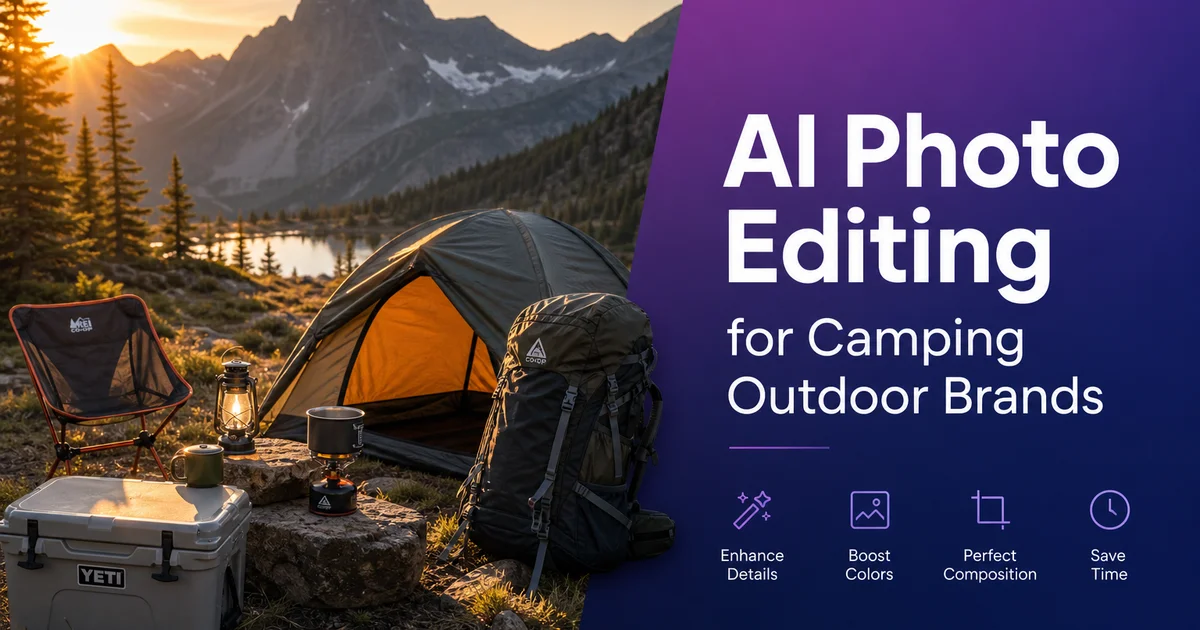
Outdoor and camping brands face a unique photography challenge: their products are designed to be used in beautiful but uncontrollable settings. A tent pitched in the Rockies, a backpack on an alpine trail, a camp stove on a river bank. These authentic field settings produce strong photos, but they also introduce variables that studio photography eliminates. Weather changes in minutes, shadows shift as the sun moves, other hikers and their gear wander into the frame. The products themselves pick up real-world dirt and wear during the shoot.
The outdoor industry has grown substantially, with the Outdoor Industry Association reporting that outdoor recreation generates over $862 billion in annual consumer spending in the United States alone. Competition is intense, and the brands that win attention online are the ones with the strongest visual storytelling. A product photo needs to show both what the gear looks like and what the experience of using it feels like. That dual need makes photo editing not just a cosmetic step but a core part of brand communication.
AI photo editing tools give outdoor brands the ability to clean up field photography without losing the realism that makes it strong. Remove the distractions, enhance the light, apply consistent brand toning. And keep every grain of dirt, every rock texture, every genuine mountain backdrop that tells the real story of your products in the wild.
- Magic Eraser removes other campers' gear, litter, power lines, and competing brand logos from outdoor scenes.
- AI Enhance corrects the wildly variable lighting conditions of outdoor field photography.
- AI Filter creates consistent brand toning across entire product catalogs shot in different locations and seasons.
- Authentic outdoor settings outperform studio shots for engagement and conversion in the outdoor industry.
- A streamlined AI editing workflow makes it practical to shoot during short weather windows and still produce polished results.
The authenticity challenge in outdoor product photography
Outdoor consumers value realism. They can spot a stock-photo campsite or a Photoshop-composited product on a mountain backdrop instantly, and the reaction is negative. The outdoor community is built on genuine experience, and marketing that fakes it loses credibility. This means outdoor brands need to shoot their products in real settings. Actual campsites, actual trails, actual rivers — which produces authentic results but also produces messy, inconsistent, distraction-filled photos.
A two-day product shoot at a national forest campground might yield hundreds of raw photos. Only a fraction will be immediately usable. In many shots, a neighboring campsite's blue tarp is visible behind your tent. In others, a trail marker or sign post intersects with your backpack. A gorgeous sunrise shot of your camp stove might have a power line cutting across the sky. The lighting changes from golden to flat to harsh across a single morning session. These are not failures of photography — they are the reality of shooting in uncontrolled settings.
AI editing preserves the authentic setting while removing the uncontrollable distractions. The campsite remains real. The mountain remains real. The lighting gets enhanced to its best version, not replaced. The competing brand's cooler visible three feet behind your tent gets erased. The result is an idealized version of a genuine moment, which is exactly what outdoor marketing should share.
- Outdoor consumers detect and distrust fake environments — authentic field photography is essential.
- Uncontrolled shooting conditions introduce distractions: other people's gear, signs, power lines, litter.
- AI editing removes distractions while preserving the genuine landscapes and textures that build authenticity.
- The goal is an idealized version of a real moment, not a fabricated studio scene.
Cleaning up field photography with Magic Eraser
The most common distractions in outdoor product photography are other people and their stuff. A campground is shared space. Even in the backcountry, you may encounter other hikers, trail markers, or evidence of human presence that you want to exclude from a product shot. Magic Eraser handles these removals by analyzing the surrounding natural setting. Rock texture, grass patterns, tree bark, sky gradients — and generating replacement content that matches seamlessly.
Pay particular attention to competing brand logos. A field photo of your tent with another brand's cooler visible in the corner can create a confusing brand message at best and free advertising for a competitor at worst. Similarly, remove any visible price tags, packaging, or retail elements that remain on products during a field shoot. The photo should show the product as the customer will experience it. In use, in nature, free from retail and commercial clutter.
Natural debris and imperfections are judgment calls. A few fallen leaves near your tent add realism. A pile of litter in the background detracts. Mud splatter on a boot might be authentic. Mud obscuring the logo and key design details hurts the product display. The guiding principle is: remove anything that distracts from the product or the experience, keep anything that reinforces the realism of the setting.
Correcting variable outdoor lighting
Lighting is the single biggest variable in outdoor photography. The golden hour light that photographers love lasts about forty-five minutes. Cloud cover rolls in and out unpredictably. Dense forest canopy creates dappled light with extreme contrast between sunlit and shaded areas. Mountain settings shift from front-lit to back-lit as the sun moves behind peaks. A product shoot that starts in perfect light can deteriorate within an hour.
AI Enhance addresses these lighting challenges without the heavy-handed look of traditional HDR processing. It lifts shadow detail in areas where tent interiors or backpack undersides go dark, brings down overblown highlights where the sky or reflective surfaces blow out, and balances the overall exposure so the product reads clearly within the scene. The result looks like the photo was taken in ideal lighting conditions, even when the actual conditions were compromised.
Color correction is equally important for outdoor brands. Overcast skies add a blue-gray cast that makes warm-toned products (brown leather, orange nylon, earth-tone fabrics) look dull and cold. Dense tree canopy filters light green, shifting skin tones and neutral-colored products. AI Enhance neutralizes these environmental color casts while keeping the natural color palette of the landscape. Your tan canvas tent should look tan, not blue-gray, and the pine forest behind it should look green, not yellow-green.
- Golden hour light lasts roughly 45 minutes — AI Enhance recovers shots taken outside optimal lighting windows.
- Shadow and highlight recovery reveals product detail in high-contrast forest and mountain environments.
- Color correction neutralizes the blue-gray cast of overcast skies and the green shift from forest canopy.
- Results look like ideal natural lighting, not artificial HDR processing.
Building visual brand consistency with AI Filter
Outdoor brands shoot in dozens of different locations across multiple seasons. Each location has different ambient color, light quality, and mood. Without post-processing, a brand's product catalog looks like a random collection of photos from different trips. Because that is exactly what it is. Visual inconsistency undermines brand perception, making the catalog feel disorganized rather than curated.
AI Filter creates a consistent visual signature across your entire catalog. Choose a filter style that matches your brand positioning. Warm and inviting for family camping brands, cool and dramatic for alpine mountaineering brands, muted and earthy for heritage and bushcraft brands — and apply it to every product and lifestyle photo. This consistent toning ties together images shot in Arizona desert, Pacific Northwest rain forest, and Colorado alpine terrain into a single cohesive visual identity.
Apply your chosen filter after all other editing is complete. First remove distractions with Magic Eraser, then correct lighting with AI Enhance, then apply the brand filter as the final step. This order ensures the filter is working with clean, well-exposed images and produces consistent results. Save your filter settings as a brand standard so every team member and freelance photographer who contributes to your visual library produces output that matches.
Seasonal content and campaign photography
Outdoor brands have natural seasonal content cycles. Spring hiking, summer camping, fall backpacking, winter snow sports — and each season requires fresh visual content. AI editing makes it practical to produce polished content from every field outing, not just dedicated photo shoots. A product manager testing a new tent design on a weekend trip can capture usable marketing photos with a phone and have them edited to brand standard by Monday morning.
This throughput advantage is mainly valuable for social media. Outdoor brands need a constant stream of fresh content to maintain engagement. An Instagram account that posts only from quarterly expert shoots will have gaps of weeks between posts. An account that edits and posts from every team outing, customer submission, and product test maintains the consistent posting cadence that algorithms and followers both reward.
Customer-submitted field photos are another rich content source. Outdoor enthusiasts photograph their gear in incredible locations that your brand could never afford to send a photographer. With the customer's permission, AI editing can clean up and enhance these submissions to meet your brand visual standard, then feature them on your social channels and website. This user-generated content builds community and provides authentic social proof that no studio shoot can replicate.
- Every field outing — product tests, team trips, trade shows — becomes a potential source of marketing content.
- Consistent AI editing workflow enables weekly or daily social media posting, not just quarterly campaign bursts.
- Customer-submitted field photos provide authentic content from locations your team has never visited.
- Seasonal visual refreshes keep your catalog and social feeds current without dedicated reshoots.
How to do it
- 1
Capture products in authentic outdoor settings
Photograph your gear — tents, backpacks, camp stoves, sleeping bags — in actual outdoor settings whenever possible. Real dirt, real sunlight, and real landscapes lend realism that studio shots cannot replicate. Shoot during golden hour (the hour after sunrise or before sunset) for warm, flattering light that makes both the product and the landscape look strong.
- 2
Remove unwanted elements with Magic Eraser
Outdoor photos often include distractions: other campers' gear in the background, litter on the trail, power lines cutting across a mountain vista, brand logos on competing products visible in the scene. Use Magic Eraser to brush away these distractions while keeping the natural landscape. The AI reconstructs rocks, grass, sky, and terrain naturally.
- 3
Enhance lighting and color with AI Enhance
Outdoor shooting conditions vary wildly. Overcast skies flatten colors and reduce contrast. Harsh midday sun creates deep shadows under tent overhangs and backpack straps. AI Enhance balances exposure, recovers shadow detail, and restores the vivid colors of nature. Blue skies, green forests, warm earth tones — that drew customers to the outdoor lifestyle in the first place.
- 4
Apply mood and atmosphere with AI Filter
Use AI Filter to create consistent visual branding across your product catalog. A warm, golden tone evokes summer camping. A cool, crisp look suits winter mountaineering. A desaturated earthy palette works for heritage-style brands. Choose a filter style that matches your brand identity and apply it consistently across all product and lifestyle photos for a cohesive catalog aesthetic.
- 5
Export for e-commerce, social media, and print
Save each edited image in multiple formats: high-resolution versions for your website product pages and print catalogs, square crops for Instagram and marketplace listings, vertical crops for Pinterest and Stories. Optimized web versions for fast page loading. Consistent formatting across channels reinforces expert brand perception.
Sources
- Outdoor Recreation Economy Report — Outdoor Industry Association
- E-Commerce Product Photography Standards — Shopify
- Consumer Trust and Product Image Quality in Online Retail — Nielsen Norman Group