
How to Create a Shakudo Patina Effect with AI: Japanese Gold-Copper Alloy Style
Learn how to create stunning shakudo patina effects from ordinary photos using AI. Step-by-step tutorial covering the deep blue-black and gold palette of traditional Japanese gold-copper alloy metalwork.
SEO & Growth
Reviewed by Magic Eraser Editorial ·
Table of Contents
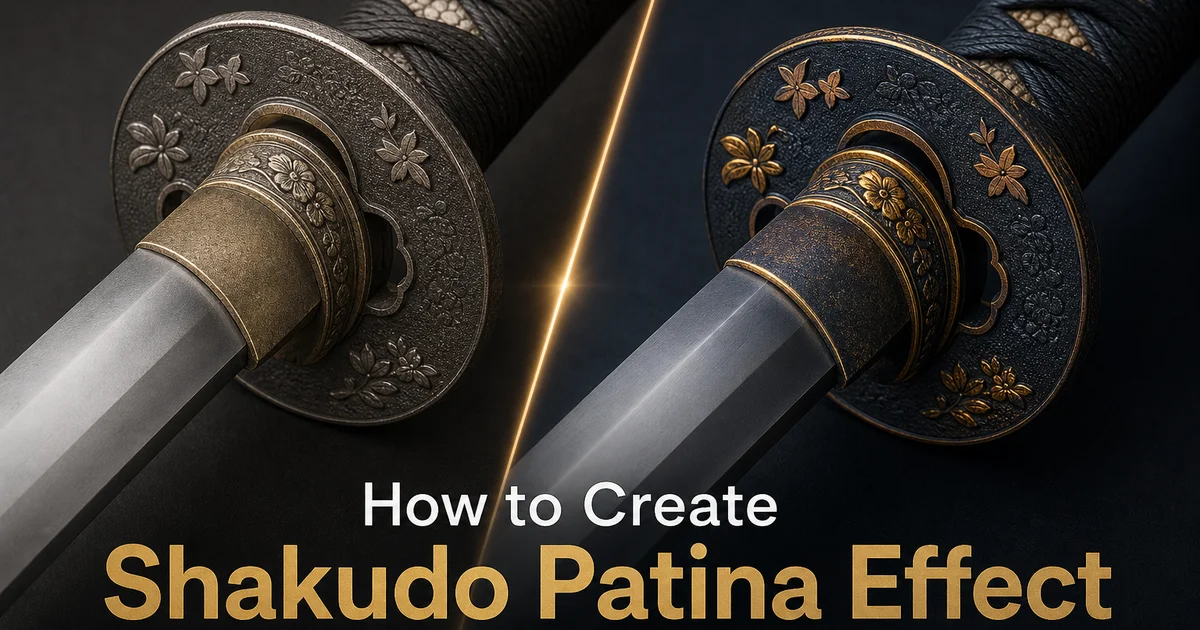
Shakudo is a traditional Japanese alloy of gold and copper, prized for the extraordinary deep blue-black patina it develops when treated with a chemical process called niiro. For centuries, Japanese metalworkers used shakudo to create sword fittings, decorative panels, and jewelry where the dark, lustrous surface provided a dramatic contrast to gold and silver inlay work. The color ranges from a warm purple-black to an almost midnight blue, depending on the gold content and the specific patination chemicals used. A palette that has no equivalent in Western metalworking traditions.
Recreating this distinctive aesthetic in photography in the past required either photographing actual shakudo pieces under carefully controlled lighting or spending hours in Photoshop manually painting color overlays, adjusting curves for specific tonal ranges. Layering texture maps to simulate the material's distinctive surface quality. The challenge was always getting the color right. Shakudo is not simply dark metal with gold highlights, but a specific chromatic quality where blue-black and warm gold interact in ways that depend on surface geometry, viewing angle, and light direction.
AI-powered photo editing tools now make it possible to apply shakudo-inspired patina effects to any photograph with metallic or textured surfaces. The AI analyzes the image's surface geometry, lighting direction, and material traits to apply the blue-black patina and gold highlights in a physically plausible way, concentrating dark tones on flat areas and warm highlights on raised edges, exactly as a real niiro treatment would affect a three-dimensional surface. This tutorial walks through the complete process from image selection to final export.
- Transform metallic surfaces in photos into the distinctive deep blue-black and gold palette of traditional Japanese shakudo alloy.
- AI analyzes surface geometry and lighting to apply patina selectively — dark on flat areas, gold on raised edges — matching real niiro treatment behavior.
- Adjustable patina depth lets you dial from subtle surface darkening to full museum-quality aged appearance.
- Works on jewelry, sculptures, architectural metalwork, and any photo with textured surfaces that benefit from the shakudo aesthetic.
- Export in PNG to preserve the full tonal range of the subtle blue-black to gold gradations.
Understanding shakudo and why the effect is distinctive
Shakudo often contains between 4% and 10% gold mixed with copper, though the exact ratio varied by workshop and historical period. What makes shakudo visually unique is not the alloy composition itself but the patination process. Niiro involves immersing the metal in a traditional solution made from rokusho (copper acetate), plum vinegar, and other ingredients. This chemical treatment selectively oxidizes the surface, producing a color that ranges from deep purple-black to blue-black depending on the gold content, surface preparation, and treatment duration. Higher gold content generally produces darker, more blue-toned patina.
The reason shakudo patina is so visually striking is the contrast between the treated surface and untreated or polished areas. Japanese metalworkers exploited this contrast on purpose, carving or inlaying gold and silver details into a shakudo ground so the bright metal stood against the dark patina, or polishing raised areas of a shakudo surface so they caught light while the recessed background remained dark. This interplay between deep dark surfaces and bright metallic highlights is the defining visual signature of shakudo. It is what the AI effect aims to replicate.
In photography, the shakudo aesthetic translates into a specific tonal quality: deep, rich shadows with a blue or purple undertone rather than neutral gray or warm brown, paired with warm gold highlights that appear to glow against the dark background. This is at its core different from simple desaturation or black-and-gold color grading. The blue-black quality of the shadows and the specific warmth of the highlights create a material impression that suggests actual metal rather than a color filter applied over a photograph.
- Shakudo alloy contains 4-10% gold in copper, with the specific ratio affecting the final patina color from purple-black to blue-black.
- The niiro patination process selectively oxidizes the surface, creating colors impossible to achieve through paint or simple oxidation alone.
- The defining visual signature is the contrast between deep blue-black patina and bright gold or silver highlights on raised surfaces.
- The AI effect replicates this material-specific tonal quality rather than applying generic dark-and-gold color grading.
Selecting the right source image for shakudo effects
The shakudo patina effect works best on images that already contain metallic surfaces, textured objects, or subjects with clear three-dimensional form. Jewelry photography is an obvious fit. Rings, pendants, bracelets, and earrings with visible surface detail transform convincingly because the AI can map the patina to actual surface geometry. But the effect extends well beyond jewelry. Architectural details like door handles, railings, decorative fixtures, and bronze sculptures all respond well because they have the surface complexity and lighting variation that makes the patina treatment look authentic.
Portraits with metallic accessories or armor-like elements work surprisingly well. The shakudo effect applied to a model wearing metal jewelry, a cosplay outfit with metallic armor pieces, or a fashion shoot with metallic fabric creates a dramatic aesthetic that blends the human subject with the metalwork quality. The AI distinguishes between skin tones and metallic surfaces, applying the patina selectively to materials that would plausibly be metal while keeping the skin looking natural. Though you can override this for a fully stylized, metallic-figure aesthetic.
Images to avoid are those with large flat areas of uniform color and no surface texture. The shakudo effect relies on surface variation to create the interplay between patina and highlights. A smooth gradient sky, a solid-color wall, or a blurred background offers no texture for the patina to interact with, resulting in a flat color wash rather than a convincing material effect. Similarly, very brightly lit images with blown-out highlights lack the shadow detail needed for the deep blue-black tones to develop properly. Moderate, directional lighting produces the best results.
- Metallic objects, jewelry, sculptures, and architectural details with visible surface texture produce the most convincing results.
- Portraits with metallic accessories work well — the AI distinguishes skin from metal and applies patina selectively.
- Avoid flat, textureless areas — the effect needs surface variation to create authentic patina-highlight interplay.
- Moderate, directional lighting provides the shadow detail needed for deep blue-black patina tones to develop properly.
Fine-tuning the patina for different artistic goals
The depth slider controls how far the patination effect extends into the surface tones. At low settings, only the deepest shadows shift toward blue-black while midtones and highlights retain most of their original character. This creates a subtle aged quality that suggests shakudo influence without dominating the image. It works well for product photography where you want a touch of Japanese metalwork elegance without obscuring the product itself. At maximum depth, the entire tonal range shifts into the shakudo palette, producing an image that looks like it was rendered fully in the traditional alloy.
Gold highlight intensity deserves separate attention because it controls the counterpoint to the dark patina. In traditional shakudo work, the gold content in the alloy causes certain areas to resist patination, mainly raised edges and polished surfaces. The highlight intensity slider mimics this behavior. At higher values, more of the surface retains warm gold tones, creating greater contrast against the dark patina. At lower values, the gold nearly disappears into the blue-black, producing a more uniformly dark, aged look like a heavily patinated museum piece that has not been polished in decades.
For creative projects, experiment with combining the shakudo palette with other Japanese metalwork-inspired effects. Adding subtle gold leaf texture to specific areas can simulate the nunome-zogan inlay technique. Introducing silver-toned highlights alongside the gold creates a shibuichi-like mixed-metal look. The shakudo base palette is versatile enough to serve as a foundation for broader Japanese metalwork aesthetics. The AI's surface-aware application ensures that extra treatments follow the same physical logic as the base patina.
- Low patina depth creates subtle aged elegance suitable for product photography; maximum depth produces full shakudo-palette transformation.
- Gold highlight intensity controls how much warm metal shows through the dark patina, mimicking real alloy resistance to chemical treatment.
- Combine with gold leaf or silver highlights to simulate related Japanese techniques like nunome-zogan inlay or shibuichi mixed-metal effects.
- The AI's surface-aware application ensures that stacked treatments follow physically plausible light and material behavior.
Exporting and using shakudo-styled images
The tonal subtlety of the shakudo palette makes export format and color management especially important. The deep blue-black tones occupy a narrow band of the color space where small compression artifacts become visible as banding or color shifts. PNG export preserves every tonal gradation accurately, making it the mandatory choice for print-quality outputs and portfolio displays. For web use where file size matters, WebP at quality 90 or higher is an acceptable compromise that preserves most of the tonal nuance while reducing file size greatly compared to PNG.
Screen calibration affects how shakudo-styled images appear to different viewers. The blue undertone in the patina can shift toward purple on warm-calibrated screens or toward green on cool-calibrated screens. If you are producing images for a client or publication where color accuracy matters, embed an sRGB color profile in the export file and provide viewing notes. For social media use where you cannot control viewing conditions, slightly increase the blue channel saturation to ensure the blue-black reads correctly even on screens with warm bias.
The shakudo aesthetic works across many applications beyond fine art photography. Product photography for luxury goods gains an immediate sense of craftsmanship and heritage. Fashion photography with metallic elements becomes more editorial. Branding and packaging design benefits from the unique color palette that stands apart from the typical gold-and-black or silver-and-black luxury treatments. Even social media content benefits from the distinctive look. The shakudo palette is uncommon enough in digital imagery that it stops scrolling and invites closer inspection.
- Use PNG for print and portfolio work to preserve the narrow tonal range of deep blue-black patina without banding artifacts.
- WebP at quality 90+ offers acceptable web compression while maintaining most of the tonal subtlety for online display.
- Embed sRGB color profiles and boost blue channel saturation slightly to compensate for warm-biased viewer screens.
- The shakudo palette works for luxury product photography, editorial fashion, brand design, and social media where the uncommon aesthetic stops scrolling.
How to do it
- 1
Select a photo with metallic or textured surfaces
Choose an image that features metallic objects, jewelry, sculptures, or surfaces with visible texture. Shakudo patina effects work best on photos with clear material surfaces where the deep blue-black and gold tones can simulate the look of a treated gold-copper alloy. Portraits with metallic accessories, still lifes with metal objects, or architectural details with bronze or copper elements are ideal starting points.
- 2
Apply the shakudo color palette using AI Filter
Open the image in AI Filter and configure a custom color grading that maps to the distinctive shakudo palette. Deep blue-black with warm gold accents. The tool analyzes surface geometry and light reflection patterns to apply the patina selectively, concentrating the dark oxidized tones on flat surfaces while keeping warm gold highlights on raised edges and polished areas, just as a real niiro chemical treatment would affect a shakudo alloy.
- 3
Adjust patina depth and highlight distribution
Fine-tune the balance between the dark patina base and the gold accent highlights. Increase patina depth for a more aged, museum-quality look with richer blue-black tones dominating the surface. Reduce it for a lighter treatment that preserves more of the original gold-copper warmth. Adjust highlight placement to emphasize edges and raised details — areas that would naturally resist patina buildup on a real shakudo piece.
- 4
Enhance surface texture and micro-detail
Use AI Enhance to bring out the fine surface texture that makes the shakudo effect believable. Real shakudo surfaces show subtle hammer marks, polishing strokes, and grain structure beneath the patina. Increase local contrast and micro-detail to simulate these material traits. The combination of deep color treatment and visible surface texture creates a result that reads as genuine metalwork rather than a flat color overlay.
- 5
Export the finished shakudo patina image
Save the final image in PNG format to preserve the full tonal range of the deep blue-black patina and warm gold highlights. The subtle color gradations in shakudo effects are sensitive to JPEG compression artifacts, which can flatten the distinction between the darkest patina tones and introduce banding in the gold-to-black transitions. For social media, export at platform-native dimensions and consider a slight contrast boost to compensate for screen viewing conditions.
Sources
- Shakudo: The Art of Japanese Decorative Alloys — The Metropolitan Museum of Art
- Patination Techniques in Japanese Metalwork — Victoria and Albert Museum
- Color Science of Copper-Gold Alloy Surface Treatments — Journal of Colloid and Interface Science