
How to Create Photo Composites with AI: Blending, Expanding, and Seamless Scene Building
Learn how to combine multiple photos into seamless composites using AI Fill, AI Expand, and Background Eraser. A step-by-step guide to subject isolation, scene blending, lighting matching, and composite workflow for creative and marketing photography.
SEO & Growth
Reviewed by Magic Eraser Editorial ·
Table of Contents
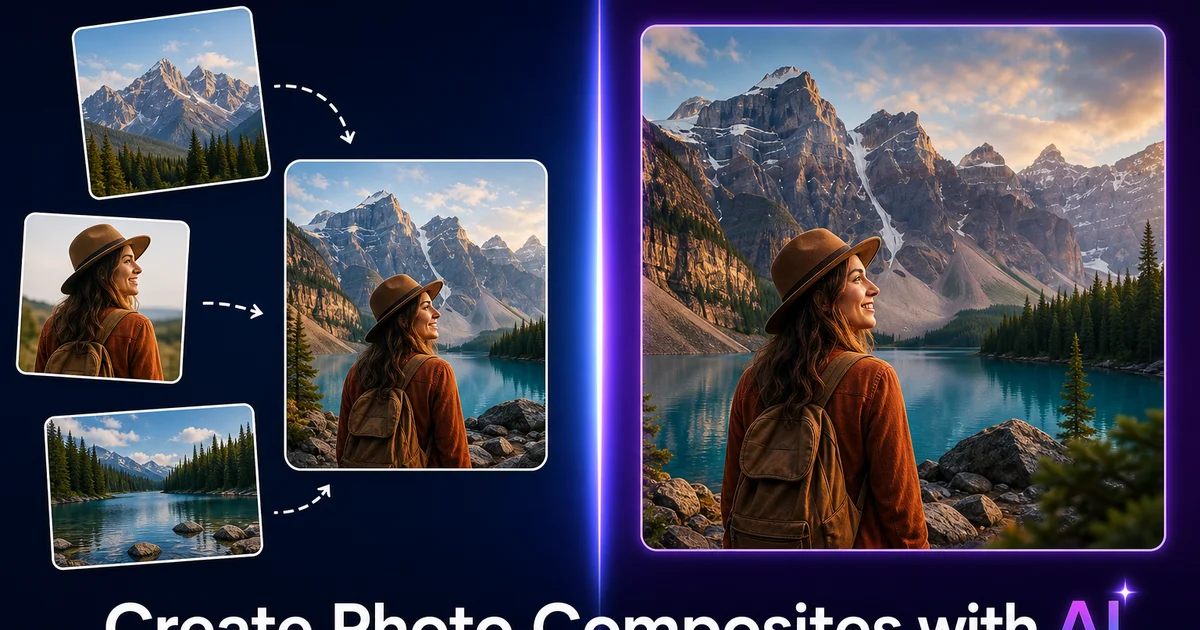
Photo compositing — the art of combining elements from multiple photographs into a single seamless image — has been a staple of creative and commercial photography since the earliest days of darkroom double exposures. Today, composites are everywhere: the product floating against a lifestyle background in an e-commerce hero image, the real estate photo where the dull sky has been replaced with dramatic clouds, the fantasy portrait where a model stands in a setting that does not exist in any single photograph. The technique's power lies in its ability to create images that no single camera click could capture.
In the past, convincing composites required expert-level skill in Photoshop. Hours spent masking edges pixel by pixel, manually painting shadows that match the destination scene's light direction, color-grading the composited subject to match the ambient tones of the new setting, and feathering edges to match the scene's depth of field. A single expert composite could take four to eight hours. The result was only as good as the artist's ability to perceive and replicate the subtle lighting cues that make a composite believable or obviously fake.
AI photo editing tools have changed the compositing workflow at its core. Background Eraser isolates subjects with precision that matches manual masking at a fraction of the time. AI Fill blends composited elements with lighting-aware edge matching and shadow generation. AI Expand creates extra scene context when the destination photo needs more room. This guide walks through the complete AI compositing workflow. From subject isolation through scene building to final seam cleanup — covering both creative composites for artistic projects and practical composites for marketing and commercial photography.
- Background Eraser isolates subjects with AI edge detection that handles hair, fur, and transparent materials with precision.
- AI Fill blends composited subjects into destination scenes with matched lighting direction, color temperature, and shadow generation.
- AI Expand generates additional environmental context around composites for wide-format marketing layouts.
- Seam artifacts where multiple source photos overlap are fixed with targeted AI Fill applications on each transition zone.
- Rapid composite variations enable A/B testing of the same subject in multiple scene contexts for marketing campaigns.
Subject isolation and edge quality with Background Eraser
The quality of a composite stands or falls on the quality of the subject isolation. A perfectly lit and color-matched composite still looks fake if the subject's edges are jagged, have visible halos from the original background color bleeding through, or clip fine details like individual hair strands, fur fibers, or semi-transparent fabric edges. Traditional manual masking addresses these challenges through painstaking pixel-level work. Refining edge masks, painting in individual hair strands, and using channel-based selections to separate semi-transparent elements from their backgrounds. This step alone can consume half the total compositing time.
Background Eraser's AI edge detection processes these complex boundaries in seconds. The tool identifies the semantic boundary between subject and background, then applies edge refinement that preserves fine details at scales smaller than what most manual maskers would attempt. Hair is separated strand by strand against the original background, with the original background color removed from the semi-transparent edge pixels rather than simply masked away. Fur maintains its natural feathered edge without the hard cutout look that screams composite. Transparent and translucent materials — glass, sheer fabric, smoke — retain their transparency data so the destination scene shows through correctly.
The key to high-quality isolation is choosing source photos where the subject has reasonable contrast against the background. Background Eraser handles complex cases, but a subject photographed against a similarly colored background (a person in a dark coat against a dark wall) will always produce less precise edge separation than one with clear subject-background contrast. Planning your source photography with eventual compositing in mind. Shooting subjects against contrasting backgrounds when possible — maximizes the edge quality that AI tools can achieve and reduces the need for manual edge cleanup after isolation.
- Edge quality is the single most important factor in composite believability, more than lighting or color matching.
- AI edge detection separates individual hair strands, fur fibers, and semi-transparent materials in seconds.
- Background color bleed in edge pixels is removed rather than masked, preventing halo artifacts in the composite.
- Source photos with good subject-background contrast produce the best isolation results for compositing.
Lighting matching and shadow generation with AI Fill
The human eye is extraordinarily sensitive to lighting inconsistencies. A composited subject with light falling from the left placed into a scene where every other element is lit from the right triggers an immediate uncanny-valley response, even in viewers who cannot consciously identify what is wrong. Similarly, a subject without a proper contact shadow appears to float above the ground plane. A subject with hard-edged shadows in a scene with soft, diffused lighting looks artificial. These lighting cues are what separate amateur composites from expert ones.
AI Fill addresses lighting consistency during the blending step. When the isolated subject is placed into the destination scene, AI Fill analyzes the existing light direction by examining the shadows, highlights, and gradient patterns in the destination image. It then adjusts the edge blending of the composited subject to be consistent with that light direction. Brightening the side of the subject facing the light source and subtly darkening the opposite side. It generates contact shadows beneath the subject that match the softness, direction, and intensity of other shadows in the scene, grounding the subject in the setting.
For composites where the subject's original lighting clearly contradicts the destination scene, AI Fill performs localized tone adjustments that shift the subject's apparent lighting without altering its fundamental look. This is not a full relighting. The tool cannot move specular highlights on a face or reverse the direction of a shadow cast by a nose — but it can shift the overall luminance gradient across the subject to be broadly consistent with the destination scene's ambient lighting. For most compositing scenarios, mainly product photography and environmental portraits, this ambient lighting adjustment is enough to create a convincing result.
- Lighting direction mismatch between subject and scene is the most common cause of obviously fake composites.
- AI Fill analyzes destination scene shadows and gradients to determine light direction and match the subject accordingly.
- Contact shadows are generated automatically with direction, softness, and intensity matched to the destination scene.
- Ambient luminance gradients across the subject are shifted to match the destination lighting without altering the subject's identity.
Scene expansion and environmental context with AI Expand
A common compositing challenge is running out of canvas. The destination scene provides the right setting, lighting, and mood, but it is too tightly cropped to accommodate the composited subject at the right scale, or it does not extend far enough in one direction for the intended layout. Manually extending a scene requires painting extra setting that matches the existing textures, perspective, and lighting. Work that requires both artistic skill and major time. For a sky extension, the gradient and cloud patterns must continue naturally. For ground extension, the grass, sand, concrete, or flooring texture must tile without visible repetition.
AI Expand generates scene extensions that match the existing image content along every visual axis. Texture, color, lighting direction, perspective convergence, and depth of field gradient. Extending a landscape scene adds more sky with consistent cloud patterns, more foreground with matching terrain texture. More peripheral setting with right depth-of-field blur. The generated content is not a simple mirror or tile of existing pixels. It is new content created to be visually steady with the original image, including variations in texture and detail that prevent the mechanical look of repeated patterns.
For compositors, AI Expand is most valuable when creating wide-format outputs from portrait-oriented source images. A website hero banner requires a 16:9 or wider aspect ratio. The best destination scene might be a vertically composed photograph. AI Expand converts it to the required aspect ratio by generating extra setting on both sides, keeping the original scene as the visual center and creating supporting context that makes the final composite look like it was captured with a wide-angle lens rather than stitched together from a narrower frame.
- Destination scenes are often too tightly cropped for the intended composite layout, requiring canvas extension.
- AI Expand generates environmentally consistent content — matching textures, perspective, and depth of field — rather than tiling or mirroring.
- Wide-format marketing layouts benefit from portrait-to-landscape conversion that preserves the original scene as the visual center.
- Generated extensions include natural variation in texture and detail, preventing the mechanical look of repeated patterns.
Multi-image seam cleanup and transition blending
Advanced composites that combine three or more source photographs — a background scene, a primary subject, secondary environmental elements, and perhaps a foreground frame — produce multiple transition zones where different image sources meet. Even when each element is individually well-isolated and properly placed, the transitions between them can reveal the composite nature of the image. Grass textures from two different photos have different blade sizes and patterns. Sky gradients shift in hue at the boundary where one source image ends and another begins. Ground surfaces show subtle changes in grain, color temperature, or shadow density at seam lines.
AI Fill excels at transition repair because it generates new content that bridges the gap between two existing textures rather than blending them mechanically. When applied to a seam between two grass textures, it creates new grass that includes visual traits from both sides. Blade size, color, density — transitioning smoothly from one to the other over a natural-looking gradient. For sky seams, it generates gradient content that connects the two source skies without the banding artifacts that simple gradient blending produces. The result is a transition zone that appears organic rather than composited.
The sequential approach to seam cleanup matters for quality. Processing each transition zone one by one allows AI Fill to analyze the specific textures on either side of each seam and generate context-right bridging content. Processing all seams at once risks the tool generating generic fill that ignores the specific needs of each transition. Smooth fill where textured fill is needed, or warm-toned fill where the surrounding context is cool. Checking each seam after processing it ensures that the transition is convincing before moving to the next. If a particular seam needs a second pass, only that area is reprocessed rather than the entire composite.
- Multi-source composites produce seams where different textures, gradients, and color temperatures meet at image boundaries.
- AI Fill generates bridging content that transitions between two source textures organically rather than blending mechanically.
- Sequential seam processing produces better results than batch processing because each transition receives context-specific fill.
- Sky seams, ground seams, and texture seams each require different fill approaches that individual processing enables.
Composite variations and A/B testing for marketing workflows
One of the most practical applications of AI compositing is creating multiple variations of the same subject in different scenes for marketing performance testing. Traditional compositing made this approach impractical. If a single composite took eight hours, creating four variations meant thirty-two hours of editing for what amounts to the same product in four different contexts. Marketing teams that needed scene variations either shot the product in each location physically (expensive and time-consuming) or settled for a single composite and hoped it would perform well.
The AI compositing workflow compresses variation creation to the point where it becomes a standard part of the production process rather than a luxury. Once a product or subject is isolated with Background Eraser, placing it into four different destination scenes and blending each with AI Fill takes minutes per variation. The lighting matching and shadow generation happen automatically for each scene. A product composited into a kitchen scene receives warm, ambient lighting while the same product composited into a minimalist studio scene receives clean, directional lighting — all without manual adjustment.
Marketing teams use these variations for systematic A/B testing: the same product in a lifestyle context versus a clean studio background, in an outdoor scene versus an indoor scene, with a warm color palette versus a cool one. Each variation goes into an ad platform or landing page test. Performance data reveals which visual context drives the highest click-through and conversion rates. This data-driven approach to visual marketing was always theoretically optimal but was practically impossible when each variation required hours of manual compositing work. AI tools make the theory practical.
- Traditional compositing costs made scene variation testing impractical, limiting marketing teams to single-context imagery.
- AI tools compress variation creation from hours to minutes per scene, making systematic A/B testing standard rather than exceptional.
- Lighting matching adapts automatically per destination scene, so each variation looks native to its environment without manual adjustment.
- Performance data from composite variations reveals which visual contexts drive higher click-through and conversion rates.
How to do it
- 1
Isolate the subject from the source photo using Background Eraser and plan the composite layout
Start by identifying the subject you want to place into a new scene — a person, product, animal, or object. Upload the source photo to Background Eraser. It uses AI edge detection to separate the subject from its original background with precision around complex edges like hair, fur, transparent objects, and fine details. Download the isolated subject as a transparent-background image. Before combining it with the destination scene, consider the lighting direction, perspective angle, and relative scale between the subject and the target setting. A composite fails when the subject's shadow falls in a direction inconsistent with the scene's light source, or when the perspective suggests the subject is floating rather than grounded in the space.
- 2
Use AI Fill to seamlessly blend the isolated subject into the destination scene with matched lighting and shadows
Place the isolated subject onto the destination image and use AI Fill to blend the edges where the subject meets the new background. AI Fill analyzes the destination scene's lighting direction, color temperature, and ambient tones, then adjusts the edge blending to match. It generates contact shadows beneath the subject that match the scene's shadow direction and softness. It feathers the edges of the subject to match the depth of field in the destination photo. The result is a subject that appears to exist within the scene rather than pasted on top of it. The hallmark of a convincing composite.
- 3
Extend the composite scene using AI Expand to create additional environmental context around the combined image
Many composites benefit from extra scene context that was not present in either source image. If the destination photo was tightly cropped, use AI Expand to generate extra sky, ground, or setting around the edges of the composite. AI Expand matches the existing scene's texture, lighting, and perspective as it generates new content, creating a wider frame that gives the composite room to breathe. This is mainly useful for composites intended for wide-format uses like website hero banners, social media covers, or print layouts where the original destination photo is not wide enough for the required aspect ratio.
- 4
Apply AI Fill to fix seam artifacts and blend transition zones where multiple source photos overlap
Complex composites that combine three or more source photos often produce visible seams where different images meet. Common issues include mismatched grass textures, inconsistent sky gradients, or color shifts where two photos with slightly different white balance overlap. Select the transition zone and apply AI Fill. It generates new content that smoothly bridges the gap between the two source textures. Run this on each seam one by one rather than all at once, checking each blend before moving to the next. The sequential approach ensures that each transition zone receives context-right fill rather than a generic blend that ignores the specific textures on either side of the seam.
- 5
Use Background Eraser and AI Fill to create multiple composite variations for A/B testing in marketing campaigns
Once the primary composite is complete, creating variations takes minutes rather than hours. Use Background Eraser to isolate the same subject and place it into two or three different destination scenes. Apply AI Fill to blend each variation with matched lighting and shadows. This rapid variation workflow is valuable for marketing teams that need to A/B test different visual contexts. The same product photographed in a studio can be composited into a kitchen scene, an outdoor scene, and a minimalist flat-lay, with each variation ready for performance testing. The AI handles the lighting matching and edge blending that would make manual composite variations prohibitively time-consuming.