
How to Remove People from Travel Photos: A Step-by-Step AI Guide
Learn how to remove strangers and crowds from travel photos using AI. Step-by-step guide for cleaning up landmark shots, beach photos, street scenes, and architectural photography with Magic Eraser.
Content Writer
Reviewed by Magic Eraser Editorial ·
Table of Contents
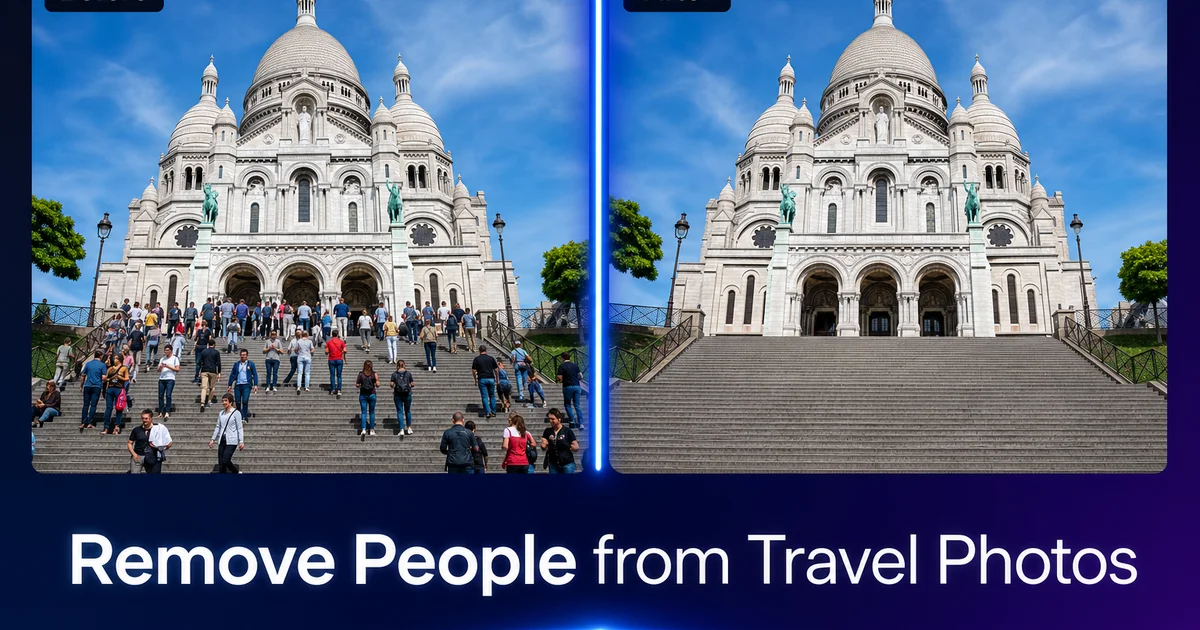
You traveled thousands of miles to stand in front of the Colosseum, the Eiffel Tower, or a pristine beach in Thailand. When you review your photos, every single one includes strangers walking through the frame, tour groups posing in front of the landmark, or crowds that make it impossible to see the architecture you came to photograph. It is the most universal frustration in travel photography — you cannot control who else is at a public landmark.
Waiting for a clear shot is sometimes possible at dawn or during off-season visits. For most travelers on fixed itineraries, the crowd is simply part of the reality. The UNWTO reports that international tourist arrivals have rebounded to record levels, meaning popular destinations are more crowded than ever. The photo you want — just you and the landmark, or just the landmark itself — rarely exists in camera.
AI object removal changes this. Magic Eraser lets you brush over unwanted people and the AI reconstructs the background behind them. The cobblestones, the building facade, the ocean horizon — as if those people were never there. This guide covers the complete technique, from shooting strategies that make removal easier to handling complex crowd scenes with overlapping figures.
- AI object removal reconstructs backgrounds behind removed people by analyzing surrounding texture, color, and structural patterns.
- Taking multiple shots from the same position gives the AI more clean background context to work with.
- Remove entire figures including shadows and reflections — partial removal creates visible ghost artifacts.
- Groups standing close together should be removed as one selection rather than individual figures.
- Second-pass corrections on small problem areas produce cleaner results than redoing the entire removal.
- The technique works on any travel scenario: landmarks, beaches, street scenes, museums, and nature trails.
Why crowds ruin travel photos and what you can do about it
The fundamental problem is that popular places are popular. The Trevi Fountain draws 1,000 visitors per hour during peak season. Machu Picchu admits 4,500 people daily. Santorini's caldera viewpoints are shoulder-to-shoulder from May through October. You cannot reasonably expect an empty frame at these locations during normal visiting hours. Planning your entire trip around dawn wake-up calls is not always feasible or desirable.
Traditional photography advice suggests waiting for gaps in foot traffic, using long exposures to blur moving people into ghostly streaks, or shooting from unusual angles that exclude the crowd. These techniques work in specific situations, but they require tripods, neutral density filters, and time that most travelers do not have. On a guided tour with 45 minutes at each stop, you take what you can get.
AI removal is the practical solution for the photos you actually take. Rather than constraining your experience to get the perfect shot in camera, photograph freely and remove distractions afterward. The result is the photo you envisioned. The landmark, the architecture, the landscape — without the crowd that happened to be there at the same time.
- Popular landmarks draw hundreds or thousands of visitors per hour — empty frames are rare during normal hours.
- Traditional solutions like long exposures and dawn shoots require equipment and schedule flexibility most travelers lack.
- AI removal lets you photograph freely and clean up afterward, preserving the travel experience without photo anxiety.
Shooting techniques that make AI removal easier
While AI removal is powerful enough to handle most crowd situations, a few shooting habits greatly improve the results. The single most effective technique is taking multiple shots of the same composition over a span of two to three minutes. People move, and areas that were blocked by a person in one shot are often visible in another. The AI uses the information in your photo to reconstruct removed areas. Having reference shots where the background is partially visible gives you cleaner starting material.
Composition also helps. When possible, frame your shot so that the most architecturally complex or detailed area of the background is not obscured by the largest group of people. A person standing in front of a plain wall is trivially easy to remove. A person standing in front of an intricate carved doorway requires the AI to reconstruct complex geometric patterns, which is harder and occasionally imperfect.
Avoid backlit situations where people become dark silhouettes against a bright background. Silhouetted figures are easy for the AI to identify. The tonal transition between the dark silhouette and the bright background can leave a subtle halo after removal. Shooting so that the light falls on the scene — morning light for east-facing subjects, afternoon light for west-facing ones — produces flatter tonal transitions that remove more cleanly.
Removing individuals versus groups
Single people in open space are the easiest removal scenario. One person walking across a plaza, a jogger on a beach, a stranger sitting on a bench. Brush over them, and the AI fills in the ground, water, or seat behind them seamlessly. Even when the person partially overlaps an architectural feature like a column or railing, the AI often reconstructs the occluded structure correctly because architectural patterns are regular and predictable.
Groups introduce complexity because people overlap each other. When three friends pose together, their arms may interlink, their shadows merge. Their bodies occlude different parts of the background. The most effective approach is to select the entire group as one brush stroke rather than trying to remove people separately. Removing one person from a group often leaves a visible gap or a partial limb floating in the frame. The AI tries to reconstruct the person who was standing behind the one you removed.
Dense crowds — think Times Square or the steps of the Sacre-Coeur — push the AI hardest because there is very little visible background for it to reference. In these extreme cases, work in layers: remove the foreground people first, let the AI reconstruct, then remove the next layer of people that were behind them. Two or three passes can clear even a very crowded scene, though some texture artifacts may appear in areas where the crowd was densest.
- Single figures in open space are the easiest and cleanest removal — one brush stroke, one pass.
- Select entire groups at once rather than removing individuals, which leaves partial limbs and gaps.
- For dense crowds, remove in layers — foreground first, then progressively deeper into the scene.
Common travel scenes and how to handle them
Beach photos are among the easiest to clean up because sand and water are naturally repeated textures. People walking along the waterline, sunbathers in the background, boats you did not want. All remove cleanly because the AI has abundant texture data to fill the gaps. The only challenge is wet sand, where footprints and shadows create specific patterns. Removing a person but leaving their footprints looks odd, so brush over both the person and their visible footprint trail.
Landmark and monument shots with stone or brick backgrounds are straightforward for the AI because masonry patterns are regular and predictable. The AI reconstructs courses of brick, stone joints, column fluting, and paving patterns with high accuracy. Windows, doors, and decorative elements that are partially hidden by people are usually reconstructed correctly because architectural symmetry provides strong visual clues.
Street scenes with shops, signs, and varied textures are harder. Each building, awning, and storefront has unique detail, so the AI has less pattern regularity to work with. The best approach is to remove people who are standing in front of visually simple areas. Blank walls, pavement, sky — and accept that people in front of complex storefronts may require a second pass and closer inspection.
Nature and landscape photos are forgiving because organic textures — grass, rocks, tree bark, leaf canopy — are inherently irregular. A slight variation in the reconstructed texture is invisible because the real texture was already variable. Hikers on trails, people at waterfall viewpoints, and swimmers in natural pools all remove cleanly.
Handling shadows, reflections, and edge cases
Shadows are the most commonly missed element in people removal. You brush over the person but forget their shadow extending across the pavement. The result is a mysteriously disembodied shadow with no source. Always look for and include shadows in your brush selection. In strong midday sun, shadows are short and directly beneath the figure. In morning or evening light, shadows can be long and extend several feet from the person. Check the entire shadow before processing.
Reflections appear on wet surfaces, polished floors, glass storefronts, and bodies of water. A person standing on wet pavement after rain has both a shadow and a reflection. A person walking past a shop window appears in the glass. If you remove the person but not the reflection, the result is a ghostly mirror image that right away looks wrong. Zoom out after each removal to check for reflections you may have missed.
Partial occlusion is when a person partially blocks another element you want to keep. A park bench, a bicycle, a railing, a statue. The AI generally handles these well because it can infer the shape of common objects. But unusual objects or objects that are mostly hidden may reconstruct incorrectly. In these cases, check the result carefully and use a targeted second pass on just the transition area between the removed person and the object they were overlapping.
- Always include shadows in your brush selection — strong light creates long shadows that are easy to miss.
- Check for reflections on wet surfaces, polished floors, and glass after each removal.
- Partial occlusion of benches, railings, and statues usually reconstructs correctly but deserves close inspection.
Ethical considerations and when to leave people in
Removing strangers from your personal travel photos for social media or a home photo album is fully reasonable. You are improving your personal memory of the experience, not misrepresenting a public place. No ethical issue exists in wanting your vacation photos to show the Colosseum without a tour group blocking the arches.
The line becomes relevant in expert contexts. Travel bloggers and influencers who remove crowds to make a destination appear empty may set unrealistic expectations for followers. A photo of Santorini with no people suggests a tranquil experience that does not match the reality of peak-season travel. If you are publishing travel content expertly, consider disclosing edits or including candid crowd shots alongside your cleaned-up hero images.
Street photography as an art form has different norms. Many street photographers consider the human presence key to the image — the person is the subject, not the distraction. Removing people from a street photograph changes its nature from documentary to architectural. Neither approach is wrong, but understanding the distinction helps you make intentional choices about when removal serves the image and when the people are actually what makes it interesting.
- Removing strangers from personal travel photos is entirely reasonable and requires no disclosure.
- Professional travel content creators should consider transparency about crowd removal to set realistic expectations.
- In street photography, people are often the subject — removal changes the image from documentary to architectural.
How to do it
- 1
Take multiple shots of the same scene
When photographing a popular landmark or destination, take 5-10 photos over a few minutes from the same position. People move between shots, giving the AI more clean background to work with and improving removal quality. Lock your phone or camera position if possible.
- 2
Open your photo in Magic Eraser
Select the travel photo where unwanted people are most visible. Pinch to zoom into the area where strangers appear so you can see the full extent of each person and their shadow against the background.
- 3
Brush over the people you want to remove
Use the brush tool to paint over each unwanted person, including their shadow and any reflection on wet surfaces. Cover the entire figure from head to feet — partial coverage leaves ghost artifacts. For groups of people standing close together, brush over the entire group in one selection rather than removing people one at a time.
- 4
Review the AI reconstruction
After the AI fills in the removed area, zoom in to check that the background reconstruction looks natural. Examine the ground plane where feet were standing, the horizon line behind torsos, and any architectural detail that was partially occluded. Most removals look seamless on the first pass.
- 5
Handle difficult areas with a second pass
If the AI left a faint shadow, a slight texture mismatch, or an incomplete pattern reconstruction, brush over the specific problem area for a second pass. Smaller, targeted corrections produce cleaner results than re-doing the entire removal.
- 6
Enhance and export the final image
Save the cleaned photo at full resolution. For social media, no further editing is needed. For prints or portfolio use, a quick pass through AI Enhance can sharpen architectural detail and balance exposure across the newly reconstructed areas.
Sources
- UNWTO Tourism Highlights: International Tourism Trends — United Nations World Tourism Organization
- Travel Photography Survey: What Ruins the Perfect Shot — Instagram Creators