
Magic Eraser + TikTok: Scroll-Stopping Covers and Shop Photos
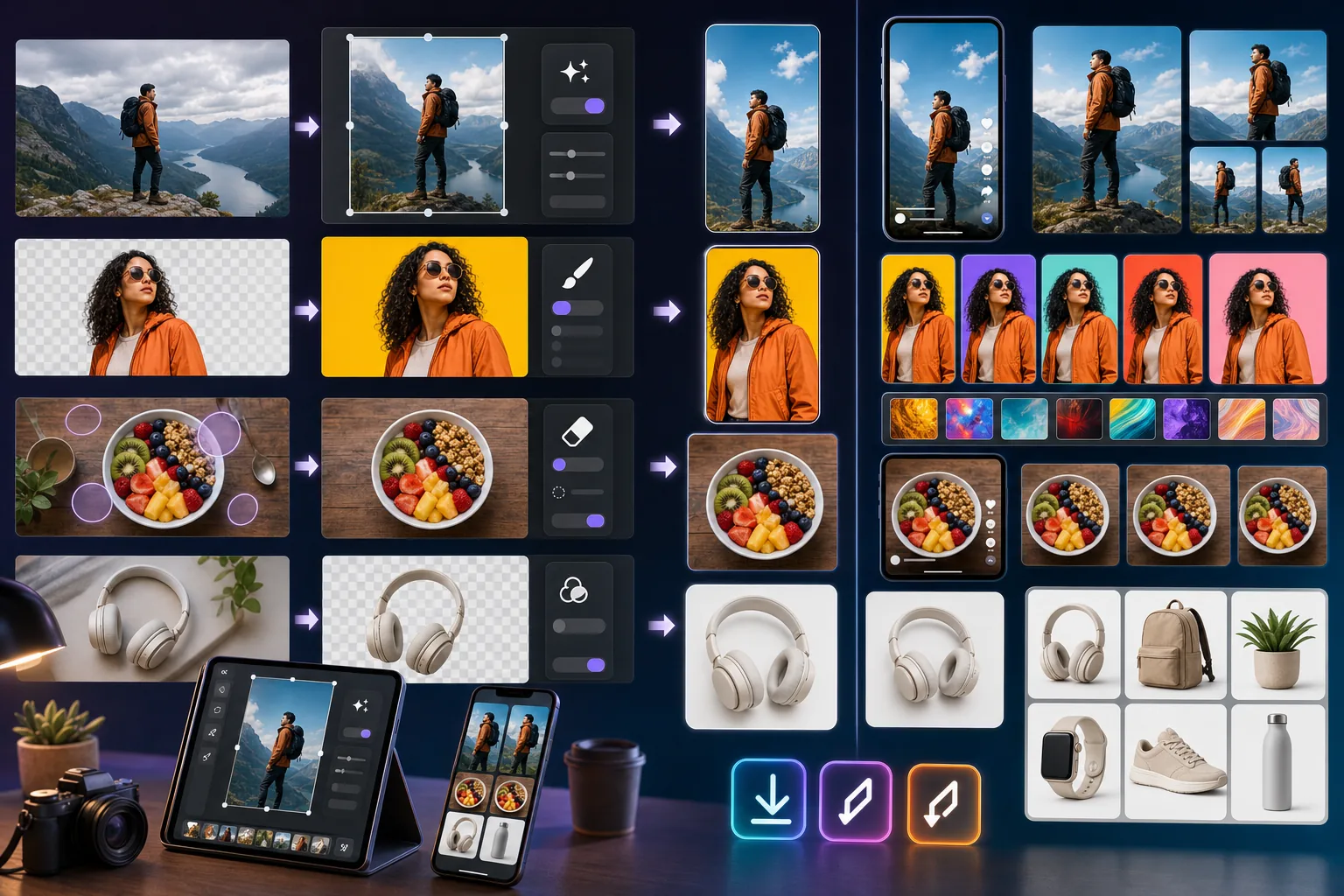
TikTok is a vertical-feed scroll environment where cover photos, in-feed thumbnails, and Shop product shots decide whether viewers stop or scroll. Magic Eraser preps high-contrast 9:16 covers, removes distractions from base photos, and enhances TikTok Shop product listings so every post earns its place in the feed.
About TikTok
TikTok is a short-form video platform with over a billion monthly active users, structured around a vertical full-screen feed where thumbnails and the first 1-2 seconds of every video decide engagement. TikTok Shop has emerged as one of the fastest-growing social commerce platforms, with cover photos and product images directly affecting click-through to listings.
Benefits
Punchy color grades that pop in the vertical feed
TikTok's full-screen vertical feed is a high-contrast environment where muted color palettes disappear. Magic Eraser's AI Filter pushes saturation and contrast for thumbnail and cover photos that stop the scroll — the same color discipline that wins on YouTube and Instagram Reels, applied to TikTok's specific dimensions.
Distraction-free covers via AI background isolation
Background Eraser isolates the subject for cover photos so the focal point stays sharp at thumbnail scale. Replace cluttered real-world backgrounds with brand-consistent solid colors, gradients, or thematic surfaces that signal the video's topic in under 1 second of feed exposure.
Clean TikTok Shop product photos
TikTok Shop product listings sit alongside competitors in the same feed environment as creator content. Magic Eraser handles the same product photo workflow as for Shopify and Amazon — background cleanup, lighting enhancement, distraction removal — exported at TikTok Shop's preferred 1080×1080 specs.
9:16 vertical exports from any base photo
Most photos start as landscape or square. AI Fill outpaints landscape photos to fill the 9:16 vertical canvas without losing the main subject — useful for repurposing existing brand photography into vertical TikTok covers and Stories without a reshoot.
How to Use Magic Eraser with TikTok
Pick the base photo and define the cover hypothesis
Before opening the editor, write one line: 'Viewers searching [topic] will tap this cover because it promises [payoff].' The hypothesis drives every editing decision — saturation level, framing crop, text-overlay treatment, choice of which thumbnail moment to use.
Isolate the subject with Background Eraser
Upload the base photo and run Background Eraser. The subject isolates in 15-30 seconds. Replace the background with a high-contrast solid color, simple gradient, or thematic element that signals the video's topic — never a competing focal point.
Color-grade with AI Filter for vertical-feed contrast
Push saturation +30-50% above the natural photo, drop ambient shadow recovery, increase contrast by +15-20%. The output should look mildly over-saturated when viewed in isolation on a clean monitor — that's correct calibration for the actual TikTok feed environment.
Expand to 9:16 with AI Fill if the base is landscape or square
If the base photo is landscape or square, use AI Fill to outpaint vertically so the cover fills TikTok's 1080×1920 9:16 canvas. The AI extends the background naturally without distorting the main subject, which is the cleanest way to repurpose existing photography for vertical-feed environments.
Export and upload to TikTok
Export the cover photo at 1080×1920 (9:16 vertical) for cover-photo uploads, or 1080×1080 (1:1 square) for TikTok Shop product listings. Upload through TikTok's web Studio or the mobile app — both accept JPEG and PNG at the standard specs.
Frequently Asked Questions
Does Magic Eraser connect directly to TikTok?
+
Magic Eraser works as the photo-prep step before uploading to TikTok. Edit and enhance the cover or product photo in Magic Eraser, export at the right specs (1080×1920 for vertical covers, 1080×1080 for Shop listings), and upload through TikTok's web Studio or mobile app.
What's the right photo size for a TikTok cover?
+
TikTok cover photos display at 9:16 aspect ratio in the vertical feed. Export your cover at 1080×1920 (full HD vertical) for best quality. TikTok Shop product photos display at 1:1 square in listings — export those at 1080×1080 minimum. Magic Eraser preserves full resolution and AI Enhance can upscale smaller photos if your base shot is below these specs.
How do I make TikTok covers stop the scroll?
+
Three things matter most: high-saturation color contrast (AI Filter +30-50% saturation, drop shadow recovery, increase contrast) so the cover pops in the vertical feed, parseable subject within 1 second (Background Eraser + clean replacement background, no competing focal points), and 3-5 word text overlay if any (largest text ≥80-100 pixels at 1080×1920 export to stay readable in feed).
Can I turn a landscape photo into a 9:16 TikTok cover without losing the subject?
+
Yes. AI Fill outpaints the photo vertically, extending the existing background above and below the subject so the cover fills the 1080×1920 canvas without cropping the main subject out. The result is cleaner than letting TikTok auto-crop a landscape upload (which often cuts off important parts of the subject) and faster than reshooting in portrait orientation.
Does this work for TikTok Shop product listings too?
+
Yes. TikTok Shop product listings sit in the same feed environment as creator content, so they need the same scroll-stopping discipline. Use Background Eraser for clean product cutouts, AI Enhance for detail recovery, AI Filter for color punch, and export at 1080×1080 (Shop's preferred square format). The same workflow that wins on Shopify and Amazon transfers cleanly to TikTok Shop, with the added benefit of TikTok-specific color saturation for in-feed visibility.
Can I edit photos on my phone before posting to TikTok?
+
Yes. Magic Eraser's iOS and Android apps support the full workflow (Background Eraser, AI Filter, AI Fill, AI Enhance) on mobile, which means you can edit covers on the same device you use to post. For creators shooting and posting from their phone in the same session, mobile-to-mobile editing avoids the desktop-to-mobile transfer step entirely.
Does this approach work for Instagram Reels and YouTube Shorts too?
+
Yes. Instagram Reels and YouTube Shorts use the same 9:16 vertical feed environment with the same scroll-stopping dynamics as TikTok. The color discipline (high-saturation against dark and light feed modes), subject framing (clear focal point, no competing background), and 3-5 word text overlay apply identically. Many creators ship the same cover image across all three platforms with minor caption-text adjustments.
Ship scroll-stopping TikTok covers in under 10 minutes
Try Magic Eraser free to isolate subjects, color-grade for vertical-feed contrast, and expand any photo to 9:16 — the workflow that turns base photos into TikTok covers that earn their place in the feed.
Try Magic Eraser freeRelated use cases
See how professionals use these tools in real-world workflows.
Listing photos cluttered with personal items, parked cars, or construction equipment can turn buyers away. Magic Eraser uses AI to clean up your property photos instantly — no Photoshop skills required.
Product listings need clear images before shoppers can judge the item. Magic Eraser helps sellers remove messy backgrounds, table edges, labels, props, glare, and other distractions so each product photo is easier to review before publishing.
Photobombers ruining your travel pics? Messy backgrounds killing your selfie game? Stop wasting hours in Photoshop. Magic Eraser removes distractions, cleans up cluttered shots, and expands your photos to fit any platform format — all in one tap.
Related comparisons
See how Magic Eraser compares to similar tools.
TouchRetouch is a popular paid mobile app for removing objects and blemishes. Magic Eraser offers free AI-powered editing on any device with no install required. See how they compare across features, pricing, and ease of use.
Cleanup.pictures is a free web tool with one generic eraser brush. Magic Eraser gives you 100+ purpose-built removal tools — one for emoji, glasses, watermarks, sky, power lines, and dozens more — plus background removal, AI enhance, and mobile apps, in 16 languages. See how breadth changes the result.
remove.bg is the market leader for background removal, offering a powerful API and integrations with Photoshop and Figma. Magic Eraser goes further with eight AI-powered editing tools — from object removal and generative fill to AI enhance and design — all in one editor.
Two powerful AI photo editors with different strengths. Magic Eraser offers a broader set of generative AI tools for creative editing, while Photoroom excels at e-commerce product photography and batch processing. See which fits your workflow.
Related articles
Tips, guides, and tutorials related to this topic.
Learn how to use Magic Eraser to remove objects, people, text, and distractions from photos with cleaner AI editing results.
Learn how to remove people from photos using AI in seconds. Step-by-step guide for travel photos, real estate shots, and product images.
Step-by-step guide to removing watermarks from your own photos using AI. Learn when it is appropriate, the best techniques, and how Magic Eraser handles it.
Other integrations
Explore more platforms that work with Magic Eraser.