
Magic Eraser + LinkedIn: Profile-Ready Photos for Recruiters and Network
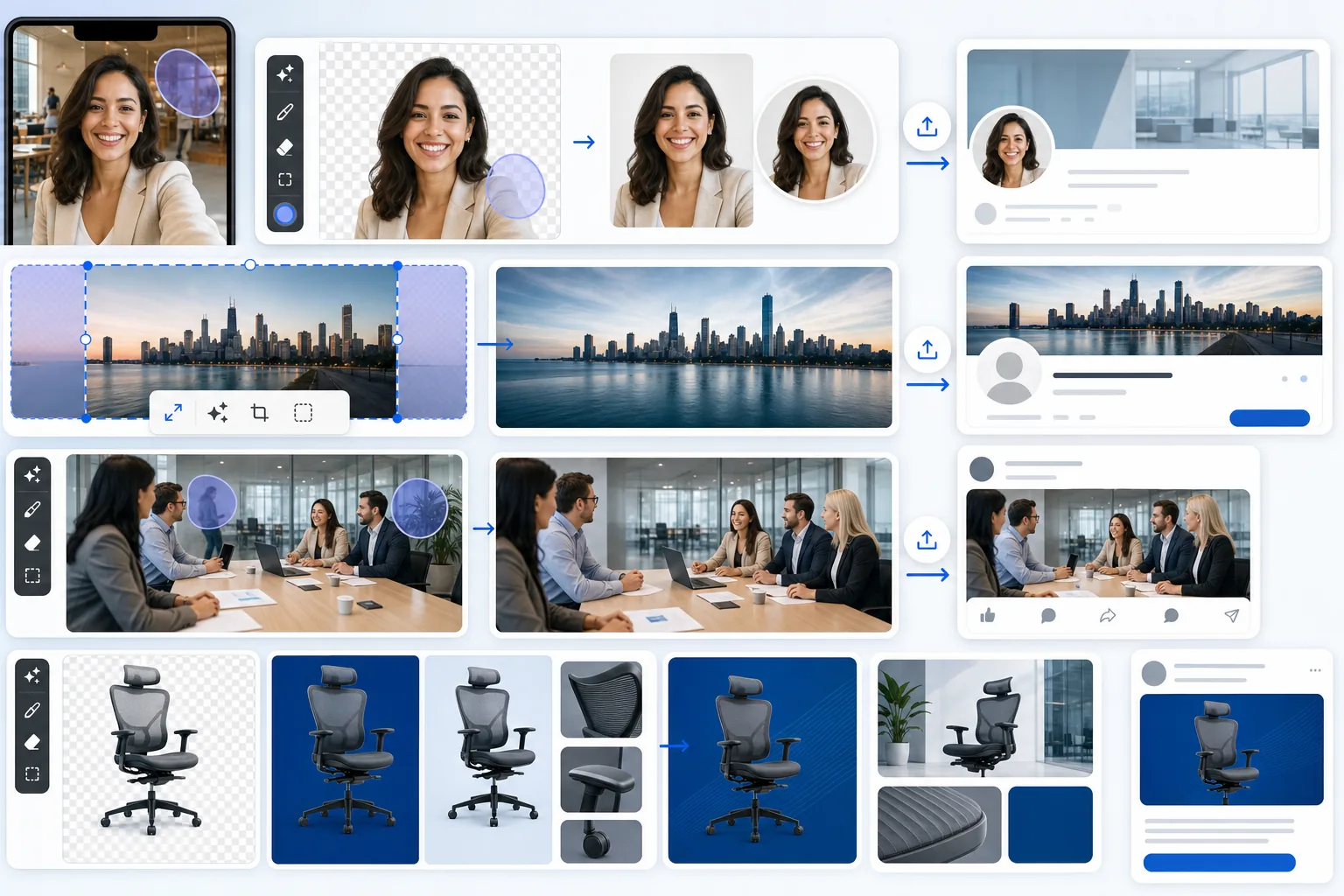
Prepare polished visuals for each part of your LinkedIn presence: profile photos, banner images, posts, and company-page content. Magic Eraser removes distracting backgrounds and objects, improves image quality, and helps frame assets for LinkedIn. It is not a direct LinkedIn connection: export the finished image, then upload it in LinkedIn.
About LinkedIn
LinkedIn is the dominant professional network with over 1 billion members across 200+ countries, used for recruiting, job searching, professional networking, B2B sales, employer branding, and thought leadership. The platform's visual surfaces — profile photo (400×400), banner image (1584×396), post images (1200×627 recommended), company page banner (1192×220), and document thumbnails — collectively define how a profile or company is perceived in feed and search results.
Benefits
Recruiter-grade profile photos from a phone selfie
LinkedIn profile photos render at 400×400 in most surfaces (profile page, search results, comment threads) and at smaller sizes (100×100, 50×50) in feed and notifications. Magic Eraser turns a phone-selfie source into a recruiter-grade profile photo: Background Eraser swaps the casual home or office background for a clean solid color matching the user's industry (neutral gray for corporate, white for creative, navy for finance), AI Enhance upscales and sharpens for the 400×400 crisp render, and a consistent face-centered crop ensures the photo reads well at all five LinkedIn rendering sizes. No studio session needed.
Banner images at LinkedIn's 1584×396 dimension
LinkedIn banner images sit at 1584×396 (4:1 aspect ratio, the widest of any major social platform) and define the visual identity of every profile and company page. Magic Eraser preps banners by AI Fill outpainting landscape phone photos to the 4:1 ultra-wide aspect, Background Eraser for clean isolated subjects on brand-color backgrounds, and AI Filter for color-grading consistency with the profile photo. The result is a banner that reads as cohesive with the rest of the profile rather than a stretched phone photo that LinkedIn auto-crops badly.
Post images with the distractions removed
LinkedIn post images perform best at 1200×627 (1.91:1, the same aspect Facebook uses) and need to read clearly in the feed at 552×290 displayed size. Magic Eraser cleans post images by removing distractions (background clutter, unintended people in the frame, competitor brand marks captured in conference shots, watermarks from stock-photo sources used as drafts), enhancing low-light phone-camera shots from conferences and meetings, and color-grading for visual consistency across a personal-brand post series. Posts with clean visuals get 2-3x the dwell time of posts with cluttered ones.
Company page content with consistent visual identity
Company pages have multiple image surfaces — company banner (1192×220), product showcase images, document thumbnails, video thumbnails for embedded posts, and employee post visuals when they tag the company. Magic Eraser handles the company-side image prep: AI Fill for outpainting hero shots to the 1192×220 ultra-wide banner, Background Eraser for clean product cutouts on company-color backgrounds, AI Enhance for upscaling product photos to retina-display resolution, and consistent AI Filter color grading across every employee-tagged post for brand recognition in the LinkedIn feed.
How to Use Magic Eraser with LinkedIn
Identify the image's role on LinkedIn
Before opening any editor, decide what the image is doing on LinkedIn: profile photo (400×400 square, cropped to a circle in most surfaces), banner image (1584×396 ultra-wide), post image (1200×627 recommended), company banner (1192×220), document thumbnail (variable), or video cover (1280×720 minimum). Each role has different optimal dimensions, framing, and editing priorities — profile photos need face-centered cropping that survives the circle mask, banners need 4:1 ultra-wide framing, post images need 1.91:1 feed-friendly framing.
Run the appropriate Magic Eraser tool
For profile photos: Background Eraser to swap the source background for a clean solid color, AI Enhance to upscale and sharpen the phone-selfie source to 400×400 crispness, and a 1:1 face-centered crop. For banner images: AI Fill to outpaint landscape phone shots to the 4:1 ultra-wide aspect, Background Eraser for clean isolated subjects, AI Filter for brand-consistent color grading. For post images: Magic Eraser brush over distractions, AI Enhance for low-light conference and meeting shots, AI Filter for consistent personal-brand color grading. For company-page content: the full editing canvas with batch-edit for product-shot consistency.
Export at the right resolution for the role
Profile photo: 400×400 minimum, 800×800 recommended for retina sharpness. Banner image: 1584×396 exact (LinkedIn does not resize). Post image: 1200×627 recommended (LinkedIn supports up to 4096×4096 but renders at 552×290 in feed, so 1200×627 is the practical sweet spot). Company banner: 1192×220 exact. Document and video thumbnails: match the source content's native aspect ratio. LinkedIn accepts JPEG and PNG — PNG for graphics with text or transparent backgrounds, JPEG for photographic content where file size matters.
Upload to LinkedIn via the profile editor or via the LinkedIn API
For individual profile updates: upload through the LinkedIn profile editor (Edit profile → Profile photo / Add background) or company page admin tools. For programmatic posting at scale (employer-branding campaigns, multi-poster content calendars, ad creative rotations): use the LinkedIn Marketing API to attach images to scheduled posts and ad creative variants. The image-prep step happens once in Magic Eraser; the upload step is whatever fits the existing LinkedIn workflow.
Refresh images on a 6-12 month cadence for active profiles
LinkedIn profile photos and banners should refresh on a 6-12 month cadence for active job-seekers, content creators, and recruiters because a stale profile photo (more than 18 months old) signals an inactive profile in LinkedIn Search ranking. The refresh workflow is fast: take a new phone selfie, run the same Magic Eraser background-color and color-grade preset that was applied to the original (presets are saved on the user's Magic Eraser account), and upload the new version. The continuity preserves the visual brand while keeping the photo current.
Frequently Asked Questions
Does Magic Eraser connect directly to LinkedIn?
+
Magic Eraser works as the image-prep step before uploading to LinkedIn. Edit the profile photo, banner, post image, or company-page content in Magic Eraser, export at LinkedIn's recommended dimensions, and upload through LinkedIn's profile editor or via the LinkedIn Marketing API. For teams running employer-branding campaigns or multi-poster content calendars, the API path fits cleanly into existing automation.
Can I turn a phone selfie into a LinkedIn-quality profile photo?
+
Yes — this is the most common LinkedIn use case for Magic Eraser. Take a phone selfie in even natural light (window light works well), open Magic Eraser, run Background Eraser to swap the home or office background for a clean solid color (neutral gray, white, or navy depending on industry), run AI Enhance to upscale and sharpen the source, and crop to a 1:1 face-centered square. The result is comparable to a $150-300 professional headshot session at zero cost and 2-3 minutes of work. For a deeper walkthrough see the blog post `linkedin-headshots-from-phone-selfie`.
What's the right size for a LinkedIn banner image?
+
LinkedIn displays banner images at 1584×396 (4:1 aspect ratio, the widest of any major social platform). Export at that exact size — LinkedIn does not resize, so anything other than 1584×396 will get cropped or letterboxed. If your source is a landscape phone photo or a stock-photo widescreen image, use AI Fill to outpaint to the 4:1 aspect before uploading. The most common LinkedIn banner mistake is using a 16:9 or 3:1 image and letting LinkedIn crop, which often cuts off the most important parts of the composition.
How often should I update my LinkedIn profile photo?
+
For active job-seekers, content creators, recruiters, and B2B sellers: every 6-12 months. LinkedIn's search ranking algorithm reads profile freshness signals including profile-photo age (via face-recognition continuity comparing the current photo to historical ones) and a profile photo that hasn't updated in 18+ months gets a small negative weight. For executives and senior roles where the photo represents brand continuity over years, every 18-24 months is acceptable; for early-career candidates and active recruiters, every 6-12 months is the practical cadence.
Can I use Magic Eraser to prep visuals for LinkedIn ads?
+
Yes. LinkedIn ad creative specs include Single Image Ad (1200×627 or 1200×1200), Carousel Ad (1080×1080 per card, 2-10 cards), Video Ad (1280×720 cover image), and Document Ad (1200×627 thumbnail). Magic Eraser preps all of these formats with the appropriate dimension and aspect ratio. For A/B-testing ad creatives at scale, batch-edit produces 5-10 creative variants from one source shot in a single session — useful when testing color grades, background treatments, or distraction levels against LinkedIn's audience-targeting variables.
Does this work for LinkedIn document posts and SlideShare-style content?
+
Yes. LinkedIn document posts (PDFs displayed as swipeable carousels in feed) need clean visual covers and consistent slide images. Magic Eraser preps the cover image (1200×627 recommended) and the individual slide images for consistency. For company-page document posts (sales decks, whitepapers, research reports embedded in feed), the prep workflow handles cover-image quality, slide-thumbnail consistency, and product-shot cleanup for any embedded screenshots or photography in the document itself.
What image formats does LinkedIn accept?
+
LinkedIn accepts JPEG, PNG, and GIF (animated) for posts and profile images. WebP is supported in some surfaces but JPEG and PNG are the safe defaults. Use PNG for graphics with text, brand logos, or transparent backgrounds (clean profile photo cutouts work well as PNG). Use JPEG for photographic content where file size matters — LinkedIn caps profile-photo uploads at 8 MB and post images at 5 MB, so JPEG compression at quality 80-85 is the practical sweet spot. Magic Eraser exports both formats at the right quality settings.
Ship LinkedIn-ready images without the studio session
Magic Eraser preps every LinkedIn image type — profile photo, banner, post visual, company-page content, ad creative — in 2-3 minutes per asset. Try the free tier on web, iOS, or Android.
Try Magic Eraser freeRelated use cases
See how professionals use these tools in real-world workflows.
Listing photos cluttered with personal items, parked cars, or construction equipment can turn buyers away. Magic Eraser uses AI to clean up your property photos instantly — no Photoshop skills required.
Product listings need clear images before shoppers can judge the item. Magic Eraser helps sellers remove messy backgrounds, table edges, labels, props, glare, and other distractions so each product photo is easier to review before publishing.
Photobombers ruining your travel pics? Messy backgrounds killing your selfie game? Stop wasting hours in Photoshop. Magic Eraser removes distractions, cleans up cluttered shots, and expands your photos to fit any platform format — all in one tap.
Related comparisons
See how Magic Eraser compares to similar tools.
TouchRetouch is a popular paid mobile app for removing objects and blemishes. Magic Eraser offers free AI-powered editing on any device with no install required. See how they compare across features, pricing, and ease of use.
Cleanup.pictures is a free web tool with one generic eraser brush. Magic Eraser gives you 100+ purpose-built removal tools — one for emoji, glasses, watermarks, sky, power lines, and dozens more — plus background removal, AI enhance, and mobile apps, in 16 languages. See how breadth changes the result.
remove.bg is the market leader for background removal, offering a powerful API and integrations with Photoshop and Figma. Magic Eraser goes further with eight AI-powered editing tools — from object removal and generative fill to AI enhance and design — all in one editor.
Two powerful AI photo editors with different strengths. Magic Eraser offers a broader set of generative AI tools for creative editing, while Photoroom excels at e-commerce product photography and batch processing. See which fits your workflow.
Related articles
Tips, guides, and tutorials related to this topic.
Learn how to use Magic Eraser to remove objects, people, text, and distractions from photos with cleaner AI editing results.
Learn how to remove people from photos using AI in seconds. Step-by-step guide for travel photos, real estate shots, and product images.
Step-by-step guide to removing watermarks from your own photos using AI. Learn when it is appropriate, the best techniques, and how Magic Eraser handles it.
Other integrations
Explore more platforms that work with Magic Eraser.