
Skip to content

Remove objects from photos with a fast AI editing workflow

Use Magic Eraser's AI object remover to erase unwanted objects, people, text, or clutter from photos in seconds. Clean up product images, portraits, travel shots, and social media content with natural-looking results.

Magic Eraser Remove Objects is an AI-powered tool that erases unwanted objects, people, text, and visual clutter from photos in seconds. Users brush over the area to remove and the AI reconstructs the background automatically, producing clean, natural-looking results for product shots, travel photos, portraits, and social media content.

Remove Unwanted Objects from Product Photos with AI

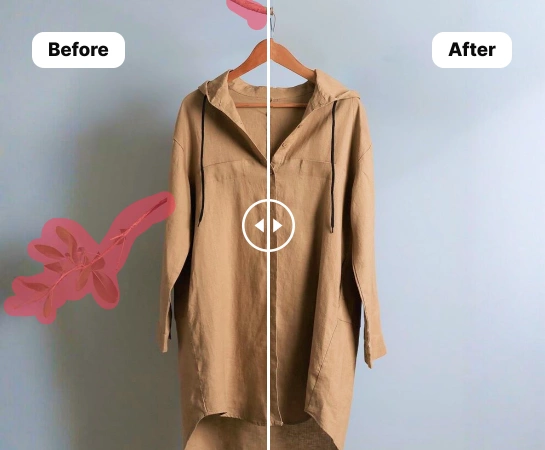
Save time cleaning up product photos with AI-powered object removal. Create polished, professional images for your e-commerce store and Amazon listings without tedious manual editing. Just swipe over the area you want to erase, and the AI photo eraser will handle the rest. It instantly rebuilds the background for a smooth, natural-looking result.

Open remove object editor
Remove unwanted objects from product photos
Natural cleanup

Cut costs and move faster with AI photo retouching

Traditional photo editing can be time-consuming, costly, and hard to scale consistently. Whether you’re an independent seller or an expanding brand, retouch product images in bulk with an AI object remover. E-commerce teams and marketplaces using AI-powered product photography tools are cutting editing costs by over 93% and bringing new products to market up to 4x faster.

Open remove object editor
AI retouch example
Up to 4x faster

Remove unwanted objects from every kind of product photo

No matter what you sell, create clean, high-converting e-commerce images at scale. From fashion and furniture to beauty products and food, remove people, props, or distracting background clutter from any type of product photo. Prepare polished visuals for your online store or marketplace while keeping a consistent brand style across every sales channel.

Open remove object editor
Multiple product categories
Fashion to food

Increase sales with end-to-end AI product photography

Losing sales because inconsistent e-commerce visuals confuse customers? With the right AI photo editing tools, you can do more than remove unwanted objects and keep every image aligned with your brand. Create custom backgrounds that fit your visual style, place products in lifestyle or real-world scenes, and instantly resize images for marketplaces, ads, and social media. From object removal to AI backgrounds, virtual models, and product staging, get everything you need to create studio-quality product photography in one platform.

Open remove object editor
Studio quality product photo
One platform

How to remove objects from a picture with AI

Step 1

Select an image

Choose the product photo you want to remove an object from. Upload it to the photo editor. Magic Eraser supports multiple image dimensions and PNG or JPG files.

Step 2

Highlight the unwanted object

Use the brush tool to swipe over the object you want to remove from your picture, adjusting the brush size as needed. The AI detects the unwanted object and erases distracting elements.

Step 3

Click Remove

After highlighting the unwanted area, trigger the Remove button to let the AI erase the object and rebuild the background automatically with a clean, realistic result.

Step 4

Download your new product photo

Download your image as a PNG, JPEG, or WEBP file, then upload it to your website, marketplace listing, or repurpose it for social media selling.

All the AI image editing tools you need

Explore the main editing capabilities currently available in Magic Eraser Web, from cleanup and enhancement to generation and design.

Remove Objects

Erase unwanted people, props, text, or distractions from your image with AI-powered cleanup.

AI Enhance

Improve image quality, detail, and overall clarity with fast AI enhancement tools.

Remove Background

Cut out the subject and replace the background with a cleaner scene in one workflow.

AI Expand

Extend image edges and create more room for new layouts or wider compositions.

Design

Add text and build lightweight design layouts directly on top of your images.

AI Create

Generate fresh visuals from prompts to create new image directions with AI.

AI Filter

Apply AI-powered style and look transformations to refresh the mood of your image.

AI Fill

Replace selected areas and rebuild missing parts with a more natural visual result.

What users are saying about Magic Eraser

These comments are drawn from real user reviews describing object removal, background cleanup, resizing, and fast editing workflows inside Magic Eraser.

"Needed to remove text from a picture, that was straight across to figures in the photo. Everything that I searched for would only allow me to extract the text but not remove it, until I found this! Even though I'm only doing the 7-day trial this is going to help me edit quite a few of the pictures that I have I'm really impressed!"

Mz J1πX1
February 17, 2025 • 1,151 helpful

"EXCELLENT!!! I'm making a collage of my grandkids playing sports. This Magic Eraser App allows me to remove ALL the unwanted objects, backgrounds and more. It's makes the work so easy and fast."

M Metellus
February 14, 2026 • 24 helpful

"Magic Eraser is, in my experience, one of the most impressive and practical photo editing features available today. It transforms ordinary photos into polished, professional-looking images with minimal effort and zero technical expertise."

Master stanoo Stanoo
February 15, 2026 • 13 helpful

"I love this app. I'm getting pictures ready for a funeral and this app made it so easy and so quick, resizing and removing backgrounds is what I used. If you want an easy app, this is it!"

RockyMtnGobblers
March 15, 2026

Frequently asked questions

Upload a photo, brush over the object you want to remove, then tap Remove. Magic Eraser rebuilds the cleared area automatically so the result looks cleaner and more natural.

Yes. You can use it to remove people, text, logos, small distractions, or messy background details from product photos, portraits, travel shots, and everyday images.

Yes. After you highlight the unwanted area and run the remove action, the app uses AI Fill to recreate the missing background instead of leaving an empty cutout.

Yes. In addition to object removal, Magic Eraser Web also includes tools like Remove Background, AI Enhance, AI Expand, AI Fill, AI Filter, and Design depending on the workflow you need.

The main flow is simple: upload your image, highlight what you want to change, run the edit, review the result, and export the final image. It is designed to keep cleanup fast without heavy manual retouching.

Other comparisons

See how Magic Eraser compares to other photo editing tools.

Magic Eraser vs TouchRetouch: Which Object Remover Is Better?

TouchRetouch is a popular paid mobile app for removing objects and blemishes. Magic Eraser offers free AI-powered editing on any device with no install required. See how they compare across features, pricing, and ease of use.

Magic Eraser vs Cleanup.pictures

Cleanup.pictures is a free web tool for quick object removal. Magic Eraser goes further with 8 AI-powered editing tools, mobile apps, and advanced processing. See how the two compare.

Magic Eraser vs Photoroom

Two powerful AI photo editors with different strengths. Magic Eraser offers a broader set of generative AI tools for creative editing, while Photoroom excels at e-commerce product photography and batch processing. See which fits your workflow.

Best AI Photo Editors in 2025 — Compared

We tested and compared the top AI photo editing tools so you don't have to. From object removal to background replacement, see which editor delivers the best results for your workflow.

Magic Eraser vs Photoshop: Which Photo Editor Fits Faster Workflows?

Photoshop is the industry standard for deep image editing, but many people only need fast object removal, clean backgrounds, and AI-powered fixes. Magic Eraser focuses on those jobs with a lighter workflow that works in seconds on web and mobile.

Magic Eraser vs Canva: Which Editor Is Better for Photo Cleanup?

Canva is excellent for layouts and social graphics, but many users need faster object removal, cleaner background edits, and stronger AI photo tools. This comparison shows where Magic Eraser fits better for image-first workflows.

Related use cases

See how professionals use these tools in real-world workflows.

Remove Unwanted Objects from Real Estate Photos in Seconds

Listing photos cluttered with personal items, parked cars, or construction equipment can turn buyers away. Magic Eraser uses AI to clean up your property photos instantly — no Photoshop skills required.

Clean Product Photos That Actually Sell

Blurry backgrounds and cluttered product shots cost you sales every day. Magic Eraser helps you create clean, professional product images in seconds — no Photoshop skills required. Just upload, erase distractions, and list with confidence.

Edit Photos for Instagram, TikTok & Social Media with AI

Photobombers ruining your travel pics? Messy backgrounds killing your selfie game? Stop wasting hours in Photoshop. Magic Eraser removes distractions, cleans up cluttered shots, and expands your photos to fit any platform format — all in one tap.

Remove text, captions, date stamps, and overlays from any photo

Dealing with screenshots cluttered by captions, old photos stamped with dates, or images covered in text overlays? Magic Eraser's AI text remover erases unwanted text from any image and rebuilds the background naturally, so your photos look clean and professional.

Wedding Photo Editing Made Faster with AI

Wedding photos deserve perfection, but manual retouching takes hours. Magic Eraser helps photographers and couples remove distracting elements, clean backgrounds, and enhance details so every shot looks its best.

Car Photo Editing for Dealerships and Sellers

Vehicle listings with clean, professional photos sell faster. Magic Eraser helps dealers, private sellers, and automotive marketers remove background clutter, fix reflections, and enhance car images without a photo studio.

Food Photography Cleanup with AI Editing

Great food photos drive orders and engagement, but messy tables, utensils, and background clutter ruin the shot. Magic Eraser helps restaurants, food bloggers, and delivery platforms clean up food images fast.

Pet Photo Editing with AI Tools

Pet photos rarely come out the way you want. The dog moves, the cat is half in shadow, the background is full of clutter. Magic Eraser handles all of that in seconds — background swaps, leash removal, blur cleanup, sharper fur — without manual masking or expensive software.

Virtual Staging with AI

Empty listings sit on the market longer because buyers struggle to visualize the space. Virtual staging with AI fills the rooms with furniture in the style your buyer wants — modern, transitional, coastal, traditional — in minutes per room instead of days. Magic Eraser handles the pre-staging cleanup (paint touch-ups, painter's tape, debris) and the post-staging polish (lighting refinement, edge cleanup).

Restaurant Menu Photo Editing

Dish photos move delivery and dine-in revenue more than menu copy ever will. Magic Eraser turns phone-shot food photos into delivery-platform-ready images: clean the cluttered table, enhance the dish, swap to a brand-consistent background, and export to DoorDash, Uber Eats, Yelp, and Instagram specs without a food photographer.

YouTube Thumbnail Editing for Creators

YouTube thumbnails decide 50-70% of the click decision in the first 1-2 seconds of feed exposure. Magic Eraser handles the workflow that lets creators ship higher-CTR thumbnails in 25-40 minutes per video: subject isolation via Background Eraser, dark-mode-feed color contrast via AI Filter, clean text-overlay surfaces via AI Fill, and 2-3 distinct variants ready for YouTube's native Test & Compare in under 30 minutes.

Travel Photo Editing for Trip Recaps and Memory Books

Travel photos are the most-edited and most-shared images on most cameras — and the hardest to fix manually. Crowds at every landmark, harsh midday sun, lens glare from phone cameras pressed against bus windows, dim interiors, and decades-old film scans that finally need restoration. Magic Eraser handles every common travel-photo failure mode in seconds, on the same phone you took the photo with.

Dental Practice Photo Editing: Clinical Cases, Team Headshots & Patient Marketing

Dental practices rely on visual proof more than almost any other healthcare vertical — prospective patients evaluate smile transformations, office environment, and team professionalism before ever calling the front desk. The challenge is that clinical photography happens under operatory lighting with clamps, bibs, cheek retractors, and background clutter that undermines the professional impression the photo needs to convey. Magic Eraser cleans up clinical before-and-after shots, standardizes team headshots against consistent backgrounds, and prepares office interior photos for Google Business Profile, social media, and website use — all while keeping the dental team focused on patient care rather than photo production.

Insurance Claims Photo Enhancement: Clearer Damage Documentation, Faster Settlements

Insurance claims live and die on photographic evidence — adjusters, underwriters, and claims examiners make coverage and settlement decisions based on photos that were often taken in poor lighting, at awkward angles, with smartphones, by stressed policyholders moments after a loss event. The gap between what the damage actually looks like and what the claims photo conveys is a direct source of disputes, delays, and underpayments. Magic Eraser and AI Enhance bridge that gap by improving photo clarity, removing irrelevant visual distractions, and ensuring damage details are visible enough to support accurate assessment without altering the evidentiary content of the image.

Museum & Archive Photo Digitization: Restore, Enhance, and Share Historical Collections

Cultural institutions worldwide are racing to digitize fragile photograph collections before physical deterioration makes them unrecoverable — but raw scans of century-old prints arrive with fading, foxing, tears, stains, scratches, and color shifts that make them unsuitable for public-facing digital collections, educational materials, or exhibition displays. The traditional restoration workflow requires a trained conservator spending 30-90 minutes per image in Photoshop, which makes large-scale digitization projects cost-prohibitive. AI Enhance and Magic Eraser reduce per-image restoration time to 2-5 minutes, making it practical to process collections of thousands of photographs within realistic institutional budgets and timelines.

Interior Design Portfolio: Clean Rooms, Correct Lighting & Extend Compositions

An interior designer's portfolio is the primary sales tool for landing new clients — prospective homeowners and commercial clients evaluate design sensibility, style range, and attention to detail entirely through project photography. The challenge is that completed projects are photographed in occupied spaces where client belongings, everyday clutter, power cords, and personal items compete with the design work for visual attention. Magic Eraser removes the distractions that undermine design photography, AI Enhance corrects the mixed-lighting conditions endemic to interior spaces, and AI Fill extends tight compositions to show the full spatial context of the design.

School Yearbook Photo Production: Consistent Portraits, Better Event Photos & Clean Candids

School yearbook production means processing 300-2,000+ student portraits, 200-500 event and activity photos, and dozens of candid shots into a cohesive publication — typically managed by a yearbook advisor and a student committee working on a compressed timeline with limited editing skills and no professional photo-production budget. The biggest visual challenge is consistency: portrait photos arrive from picture day with varying background quality, event photos are shot by student photographers in gymnasium lighting, and candids include background clutter that distracts from the moment being captured. Background Eraser, AI Enhance, and Magic Eraser make it possible to produce a professionally consistent yearbook without professional editing skills or budget.

Fitness Trainer Transformation Photos: Consistent Before-Afters That Convert Clients

Transformation photos are the single most persuasive marketing asset a personal trainer or fitness coach has — prospective clients make enrollment decisions based on visual proof that the training program delivers real results for real people. The challenge is that before photos are typically taken with a smartphone in a gym locker room or home bathroom with poor lighting, cluttered backgrounds, and no attention to composition, while after photos are taken weeks or months later in a different location with different lighting. The inconsistency between before and after conditions makes it harder for viewers to evaluate the actual physical transformation. AI Enhance and Magic Eraser standardize lighting, backgrounds, and clarity so the before-and-after comparison communicates the real results without visual noise.

Tattoo Artist Portfolio: Sharp Ink Detail, Clean Backgrounds & Accurate Color

A tattoo artist's portfolio is the primary factor clients use when choosing an artist — prospective clients scroll through Instagram feeds and portfolio websites evaluating line quality, color saturation, shading technique, and style fit before they ever contact the shop. The gap between the tattoo's actual quality and what the portfolio photo conveys costs artists bookings every day. Studio lighting creates glare on fresh ink and skin, smartphone cameras soften the fine line detail that distinguishes skilled work, and studio backgrounds with equipment, ink bottles, and supply clutter distract from the artwork. AI Enhance and Magic Eraser close this gap so the portfolio photo represents the tattoo's actual quality.

Vintage Car Restoration Documentation: Progress Photos, Detail Captures & Sale-Ready Shots

Documenting a classic car restoration from disassembly through completion serves three critical purposes: proving the scope and quality of work to the owner or future buyer, building the build-thread content that attracts new restoration commissions, and satisfying the photographic-evidence requirements for concours judging and marque-club certifications. The challenge is that restoration shops are optimized for metalwork and paint, not photography — the lighting is industrial, the backgrounds are cluttered with parts, tools, and other projects, and the person capturing the photos is usually the restorer between work steps rather than a photographer. AI Enhance and Magic Eraser transform shop-floor documentation captures into presentation-quality photos that serve all three purposes.

Construction Progress Photos: Clearer Documentation for Clients, Lenders & Marketing

Construction progress photography serves multiple critical functions simultaneously — client update reports, lender draw-request documentation, subcontractor coordination records, dispute resolution evidence, code-inspection support, and the firm's portfolio marketing. The photos are captured by project managers and superintendents on smartphones during site walks, in conditions optimized for building rather than photography: dust, scaffolding, temporary lighting, weather exposure, and the constant visual clutter of an active construction site. Magic Eraser and AI Enhance transform these site-walk captures into documentation that communicates clearly to every audience — clients, lenders, inspectors, attorneys, and prospective customers — without requiring a photographer on the project budget.

Jewelry Photography: Clean Backgrounds, Gemstone Detail & Catalog Consistency

Jewelry is one of the most photographically demanding product categories — customers purchasing a $200 ring or a $5,000 necklace online are making the decision almost entirely from photos, and they expect to see the precise color of the gemstone, the quality of the metalwork, the clasp mechanism, and the scale on a human hand or neck. The technical challenge is that jewelry is small, reflective, and transparent in ways that confuse smartphone cameras and even entry-level DSLRs: gemstones refract light unpredictably, polished metal reflects everything in the environment, and the scale demands macro-level sharpness that consumer cameras struggle to deliver. Background Eraser, AI Enhance, and Magic Eraser solve the three core jewelry-photography problems — background consistency, detail sharpness, and reflection cleanup — so independent jewelers and Etsy sellers can produce catalog-quality product photos without a dedicated studio.

Genealogy Photo Restoration: Rescue Family History from Faded, Damaged Photographs

Family photographs are often the most emotionally significant artifacts in a genealogy research project — they put faces to the names on census records, give physical context to the immigration stories, and connect living family members to ancestors they never met. But the physical photographs that carry this connection are deteriorating in shoeboxes, albums with acid-adhesive pages, and envelopes passed between relatives over decades. Fading, water damage, foxing, torn edges, and surface scratches make many of these photos difficult to share in their current condition. AI Enhance and Magic Eraser restore scanned family photos to a quality that can be shared with relatives, published in family history books, displayed at reunions, and preserved digitally for generations that will never see the physical originals.

Event Photographer Workflow: Conferences, Galas, Corporate & Social Events

Event photographers face a unique production bottleneck: hundreds to thousands of images captured in a single session under mixed lighting, crowded venues, and unpredictable conditions — all due for delivery within 24-72 hours. The margin between a profitable event photography business and an unsustainable one lives in post-production speed. Magic Eraser handles the repetitive cleanup work — removing photobombers, exit signs, stray cables, and branded clutter from venue backgrounds — so you can focus on color grading and creative selects instead of pixel-level retouching.

Property Management Photos: Rental Listings, Inspections & Maintenance Documentation

Property managers are not photographers — but they photograph more frequently than most professionals. Every unit turn requires listing photos, every move-in and move-out needs inspection documentation, every maintenance issue demands visual evidence, and every owner report benefits from property-condition imagery. Across a portfolio of 20-200 units, that is thousands of photos per year captured on phone cameras under fluorescent lighting in occupied or half-turned units. Magic Eraser transforms phone-camera property photos into listing-ready imagery and clear maintenance documentation without hiring photographers for routine work.

Sports Photography: Action Shots, Team Photos & Athlete Portraits

Sports photography demands technical precision under the worst possible conditions — fast-moving subjects under stadium mixed lighting, shooting through chain-link fences and safety netting, capturing peak action moments at 1/1000s+ shutter speeds that force high ISO and thin depth of field. The captures that survive the cull often need significant post-production: fence removal, noise reduction from high-ISO shooting, distraction cleanup from sideline clutter, and enhancement to recover detail the camera sacrificed for shutter speed. Magic Eraser and AI Enhance handle these sports-specific post-production challenges so the final images match the intensity of the moment captured.

Antique Dealer Catalog Photos: Inventory, Auctions & Online Sales

Antique dealers move inventory constantly — acquiring at estate sales, auctions, and picker networks, then listing across multiple platforms (eBay, Ruby Lane, Etsy, 1stDibs, Chairish, LiveAuctioneers, their own website) with photos that must communicate condition, provenance quality, and value. The photography challenge is unique: items are photographed in cluttered booths, packed storage units, and show floors where isolating a single item visually is nearly impossible without a dedicated studio setup most dealers do not have. Magic Eraser's toolset handles the antique dealer's specific photo challenges — isolating items from cluttered backgrounds, enhancing detail in patina and maker's marks, and removing price tags and display clutter for clean catalog presentation.

Hair Salon Portfolio: Stylists, Colorists & Barbershops

For hair stylists and colorists, the portfolio is the primary client-acquisition tool. New clients choose their stylist based on Instagram galleries, Google Business Profile photos, and the salon's website portfolio. The quality of these photos directly determines whether a potential client books a $150-$400 color appointment or scrolls past. The problem is that salon environments — mirrors reflecting the photographer, mixed warm and cool lighting that shifts color perception, cluttered station backgrounds, and other clients in frame — fight against accurate color representation at every turn. Magic Eraser's toolset solves the specific visual challenges that prevent salon photos from showcasing the actual quality of the work.

Landscape Contractor Portfolio: Hardscape, Design & Lawn Care Projects

Landscape contractors sell their next project based on photos of their last one. Homeowners evaluating contractors compare portfolio images side by side — the contractor whose patio installation, retaining wall, or planting design looks cleanest and most professional in photos wins the bid, often regardless of price difference. The challenge is that landscape work is photographed on active job sites and in real neighborhoods where construction debris, neighbor clutter, parked cars, trash cans, garden hoses, and utility boxes all compete for attention in the frame. Magic Eraser removes the real-world distractions that undermine portfolio presentation, while AI Enhance compensates for overcast skies and harsh midday shadows that flatten the dimensionality of hardscape and planting work.

Online Dating Photos: Better Profile Pictures for Tinder, Hinge, Bumble & More

On dating apps, the profile photo is evaluated in 1-3 seconds during a swipe. The lighting, sharpness, composition, and background quality of the photo influence the swipe decision as much as physical attractiveness — a well-lit, clear photo with a clean background consistently outperforms a better-looking person photographed poorly. The problem is that most people do not have a library of high-quality solo photos with clean backgrounds and flattering lighting. They have group shots where they need to be isolated, photos with exes who need to be removed, and dimly-lit bar or restaurant photos that are their only recent full-body shots. Magic Eraser's toolset handles these specific dating-photo challenges without creating misleading or catfish-level alterations.

Funeral & Memorial Photos: Obituary Portraits, Tributes & Remembrance

When a family is preparing for a funeral or memorial service, the search for the right photos happens under the worst possible emotional and time conditions. The ideal portrait — the one that captures the person as their family wants to remember them — is often a decades-old print, a faded snapshot from a family gathering, or the only good photo from a period when the person was healthy and vibrant. These source photos frequently need significant restoration: fading, color shifts, physical damage, and low resolution from the era they were captured. AI Enhance restores memorial photos with the dignity and care the moment requires, while Magic Eraser removes unwanted elements to create the portrait the family envisions.

Thrift & Resale Photos: Poshmark, Depop, Mercari & eBay Listings

Resale is a volume business — successful Poshmark, Depop, Mercari, and eBay clothing sellers list 20-100+ items per week, each requiring 4-8 photos that compete against both other resellers and brand-direct retail listings. The visual gap between a reseller's bedroom flat-lay and a brand's studio product shot is the gap between a quick scroll-past and a sale. Background Eraser and Magic Eraser close that gap at the speed and scale resale economics demand, turning phone photos of thrift-sourced inventory into marketplace-competitive product listings without a studio, a lightbox, or per-item editing time that would destroy the margin on a $15 shirt.

Common removals with this tool

Quick guides for specific things people remove most often.

Remove a person from a photoRemove a watermark from a photoRemove a sticker from a photoRemove a logo from a photoRemove a date stamp from a photoRemove tourists from photosRemove clutter from photosRemove power lines from photosRemove crowds from photosRemove cars from photosRemove dust from photosRemove photobombs from photosRemove graffiti from photosRemove scaffolding from photosRemove braces from photosRemove wires and cables from photosRemove fingerprints and smudges from photosRemove stains and spills from photosRemove skin blemishes from photosRemove fences from photosRemove wrinkles from photosRemove acne from photosRemove lens flare from photosRemove trash cans from photosRemove vehicles from photosRemove construction from photosRemove weeds from photosRemove cables from photosRemove scratches from photosRemove tattoo from photoRemove red eye from photosRemove emoji from photosRemove glasses from photosRemove moles from photosRemove sunburn from photosRemove rain from photosRemove fog and haze from photosRemove flash from photosRemove scars from photosRemove noise from photosRemove dark circles from photosRemove stray hair from photosRemove teeth stains from photosRemove piercings from photosRemove leash from pet photosRemove signs from photosRemove antennas from photosRemove banners from photosRemove bird droppings from photosRemove cracks from photosRemove fire hydrants from photosRemove meters from photosRemove mailboxes from photosRemove manhole covers from photosRemove tree stumps from photosRemove security cameras from photosRemove sprinklers from photosRemove oil stains from photosRemove electrical boxes from photosRemove hoses from photosRemove shopping carts from photosRemove port-a-potties from photosRemove dumpsters from photosRemove satellite dishes from photosRemove air conditioners from photosRemove utility poles from photosRemove trash bags from photosRemove ladders from photosRemove peeling paint from photosRemove cobwebs from photosRemove rust from photosRemove extension cords from photosRemove lawn equipment from photosRemove pool equipment from photosRemove damaged gutters from photosRemove phone numbers from photosRemove traffic cones from photosRemove bollards from photosRemove trash bins from scenic photosRemove parking meters from photosRemove fire escapes from building photosRemove barricades from photosRemove porta-johns from construction site photosRemove garden hoses from lawn and garden photosRemove birdbaths from garden and yard photosRemove downspouts from building exteriorsRemove speed bumps from photosRemove storm drains from photosRemove mailbox posts from photosRemove propane tanks from photosRemove satellite antennas from photosRemove window AC units from photosRemove clotheslines from photosRemove outdoor speakers from photosRemove chimney caps from photosRemove dryer vents from photos

Related guides

Explore more guides and editorial content related to this workflow.