
Magic Eraser + Photoshop: クイック クリーンアップ、詳細な編集
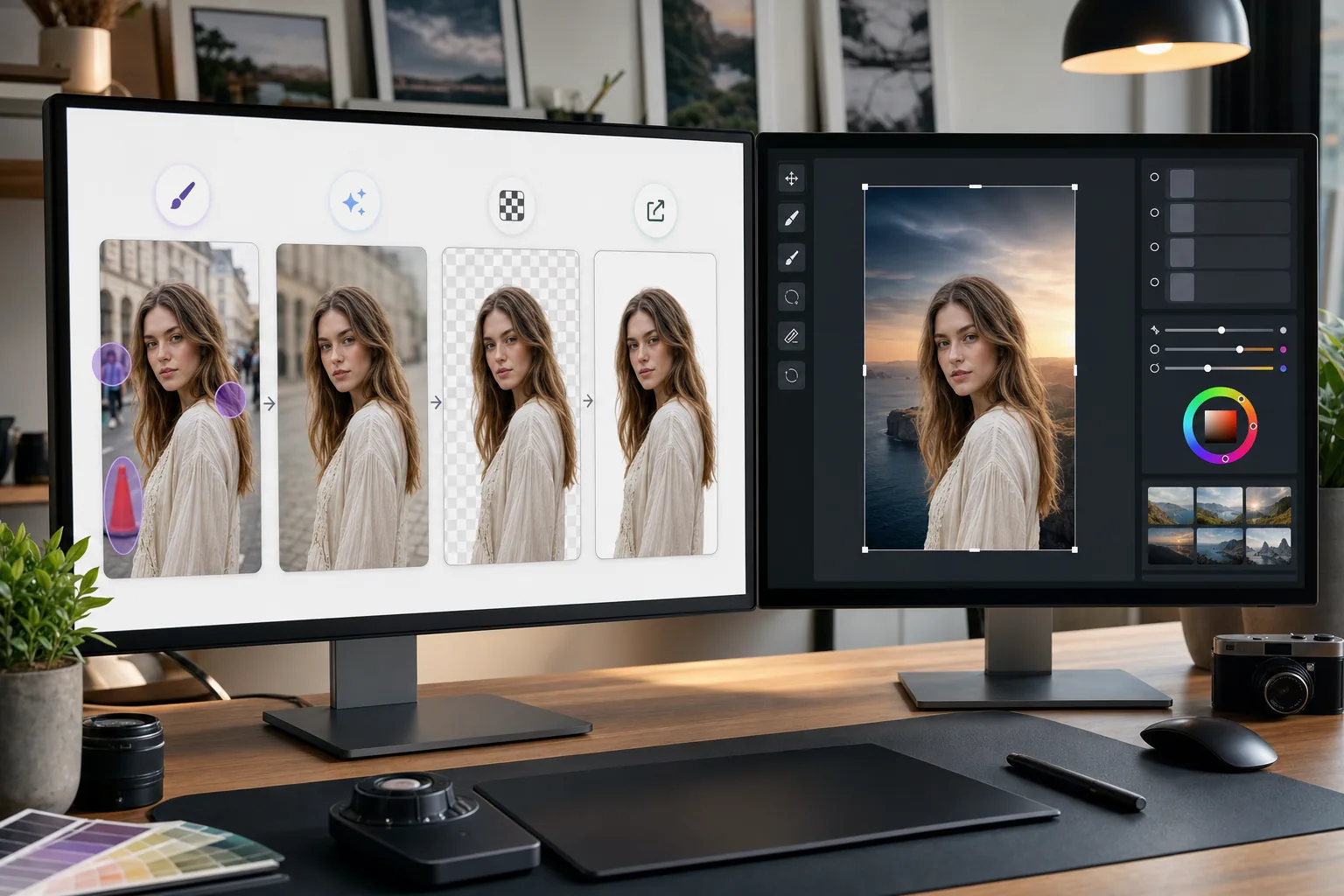
Photoshop は、詳細な画像編集のための業界標準です。 Magic Eraser は、背景の削除、オブジェクトの消去、AI による隙間の埋めなどの簡単なクリーンアップ タスクを処理するため、Photoshop での細かい作業にすぐに取りかかることができます。
概要 Adobe Photoshop
Adobe Photoshop は、世界中の写真家、デザイナー、デジタル アーティストによって使用されているプロ仕様の画像編集ソフトウェアです。合成、レタッチ、Color correction、ピクセルレベルの編集のための高度なツールを提供します。
メリット
詳細な編集前のクリーンアップの高速化
Photoshop のクローン スタンプや修復ブラシを使って単純な作業に時間を費やす代わりに、Magic Eraser を使用して不要なオブジェクトや邪魔なものを数秒で削除します。
ワンクリックで背景を削除
Magic Eraser の AI を活用した背景除去機能により、対象者を即座に分離します。透明 PNG を Photoshop にインポートして、合成や高度なマスキングを行います。
AI を活用した不足領域の補完
Magic Eraser の AI フィルを使用して、オブジェクトを削除した後に領域をインテリジェントに再構築します。結果は、Photoshop の改良のためのクリーンな出発点となります。
単純なタスクのためのアクセス可能な代替手段
すべての画像に Photoshop のフルパワーが必要なわけではありません。ブラウザで Magic Eraser を使用して簡単な修正を行い、高度なツールセットが必要な作業のために Photoshop を予約してください。
Photoshop で Magic Eraser を使用する方法
Magic Eraser にアップロード
ブラウザで Magic Eraser を開き、Photoshop で編集する前に初期クリーンアップが必要な画像をアップロードします。
クイッククリーンアップを実行する
背景を削除したり、不要なオブジェクトを消去したり、AI 塗りつぶしを使用して、Photoshop では時間がかかる簡単な編集を処理します。
完全な品質でエクスポートする
透明度を維持する場合は、クリーンアップされたイメージを PNG としてダウンロードし、不透明なイメージの場合は高品質 JPEG としてダウンロードします。
細かい作業のためにPhotoshopで開いてください
処理された画像を Photoshop にインポートし、高度な編集、レタッチ、合成、またはカラー グレーディングを続行します。
よくある質問
Magic Eraser は Photoshop と直接連携しますか?
+
いいえ。このページで紹介しているのは手動の書き出し・読み込み手順であり、Photoshop プラグインや直接連携ではありません。Magic Eraser で画像を編集し、PNG または JPEG でダウンロードしてから Photoshop で開きます。
すでに Photoshop を持っているのに、なぜ Magic Eraser を使用するのですか?
+
Magic Eraser は、Photoshop を起動せずに、簡単なクリーンアップ タスクを数秒で処理します。背景の削除、オブジェクトの消去、基本的なクリーンアップが高速化され、実際に必要な作業に Photoshop を自由に使用できるようになります。
Magic Eraser は Photoshop に代わるものですか?
+
いいえ、Magic Eraser は、AI 主導のタスクを迅速に処理することで Photoshop を補完します。 Photoshop は、詳細なレタッチ、合成、カラー作業、ピクセルレベルの編集に引き続き不可欠です。
2 つのツール間で使用できるファイル形式は何ですか?
+
Magic Eraser から PNG (透明) または高品質 JPEG としてエクスポートします。どちらの形式も、完全な品質を維持したまま Photoshop に直接インポートされます。
Magic Eraser の背景除去は Photoshop と同じくらい正確ですか?
+
ほとんどの被写体では、Magic Eraser の AI 背景除去により、ワンクリックできれいな結果が得られます。うっすらとした髪などの非常に細かいディテールを持つ画像の場合は、Photoshop でエッジをさらに調整することをお勧めします。
PSD ファイルで Magic Eraser を使用できますか?
+
Magic Eraser は、JPEG、PNG、WebP などの標準画像形式で動作します。 Photoshop からフラット化された画像をエクスポートし、Magic Eraser で処理してから、PSD プロジェクトに戻します。
Photoshop ワークフローをスピードアップします
Photoshop の詳細な編集に入る前に、素早い背景の削除、オブジェクトの消去、AI 塗りつぶしを行う Magic Eraser を無料でお試しください。
Magic Eraser を無料でお試しください関連するユースケース
プロフェッショナルが実際のワークフローでこれらのツールをどのように活用しているかをご覧ください。
生活感あふれる私物や路上駐車、工事機材が写り込んだ物件写真は、内見意欲を下げてしまいます。Magic Eraserを使えば、Photoshopのスキルがなくても瞬時にきれいな物件写真に仕上がります。
背景がごちゃごちゃした商品写真では、お客様はすぐにスクロールして通り過ぎてしまいます。Magic Eraserなら、プロ品質の商品画像を数秒で作成できます。Photoshopのスキルは不要。アップロードして、不要な部分を消して、すぐに出品しましょう。
旅行写真に知らない人が写り込んでいませんか?自撮りの背景がごちゃごちゃしていませんか?Photoshopで何時間もかける必要はもうありません。Magic Eraserなら不要なオブジェクトの除去、背景のクリーンアップ、各プラットフォーム向けのリサイズがワンタップで完了します。
関連する比較
Magic Eraserと類似ツールの比較をご覧ください。
TouchRetouchはオブジェクトや傷の除去に特化した人気の有料モバイルアプリです。Magic Eraserはインストール不要で、あらゆるデバイスから無料でAI編集が利用できます。機能、価格、使いやすさを比較してみましょう。
Cleanup.picturesはオブジェクト除去に特化した無料ウェブツールです。Magic Eraserは8つのAI編集ツール、モバイルアプリ、高度な処理機能を備えています。両者の違いをご覧ください。
remove.bgは背景除去の業界リーダーで、強力なAPIとPhotoshop・Figmaプラグインを提供しています。Magic Eraserはオブジェクト除去、生成塗りつぶし、AI高画質化、デザインなど8つのAIツールを1つのエディターに統合しています。
異なる強みを持つ2つの強力なAI写真エディター。Magic Eraserはより幅広いジェネレーティブAIツールを提供し、Photoroomはeコマース商品撮影とバッチ処理に優れています。あなたのワークフローに合うのはどちらか確認しましょう。
他の連携
Magic Eraserと連携できる他のプラットフォームをご覧ください。