
ECサイト向けに商品写真へリアルな影を追加する方法
AIで商品写真に自然な影を追加。Eコマース向けプロフェッショナルな影生成のステップバイステップガイド:商品切り抜き、AI Fill、よくある影のミスの回避方法。
SEO & Growth
レビュー担当 Magic Eraser Editorial ·
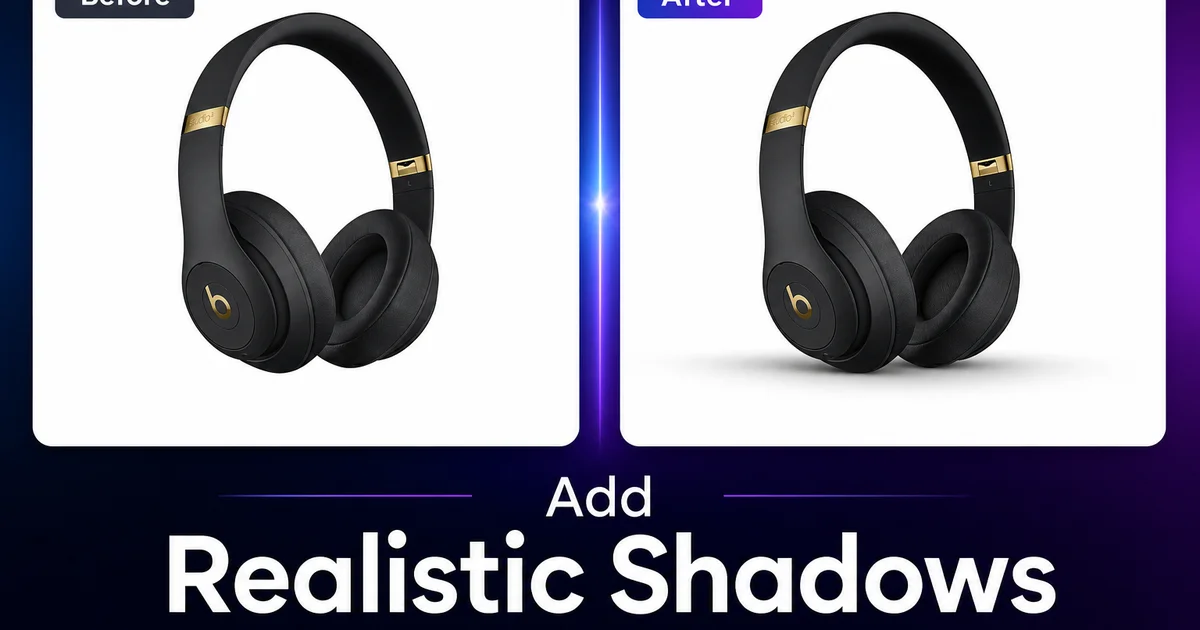
白背景に置かれた、影のない商品写真はどこか不自然に見えます。多くの人はその理由をうまく言葉にできません。影が欠けているとは指摘しないものの、商品が宙に浮いて、どこにも固定されておらず、わずかに非現実的だと感じてしまうのです。物理的な現実では、あらゆる物体は影を落とします。EC の商品掲載が影のない商品を見せると、見る人の脳は、目にしているものと予期しているものとの間にある微妙な矛盾を感じ取ります。その矛盾が、掲載の品質感と信頼性を低下させます。
問題は、すべての EC 出品者がマーケットプレイスの基準を満たすために行わなければならない背景の除去が、元の影まで一緒に取り除いてしまうことです。Background Eraser は透明背景できれいな切り抜きを提供しますが、その切り抜きを白背景に置くと、まさに前述の宙に浮いた商品画像になります。欠けている工程が影の生成です。商品を面に接地させる自然な影を加え直し、見る人が掲載を信頼するための視覚的なリアリティを取り戻すのです。
このチュートリアルでは、リアルな影を備えた EC 商品画像を作成するための完全なワークフローを解説します。背景除去とエッジの整え方から、影の生成、そしてマーケットプレイスの仕様に準拠した書き出しまでをカバーします。
- Background Eraser は、あらゆる撮影環境から商品をクリーンで精密なエッジ抽出で切り離します。
- Magic Eraser は、切り抜きから背景の映り込み、色かぶり、固定用の痕跡を取り除きます。
- AI Fill は、正しい接地部の濃さ、エッジの柔らかさ、光源の一貫性を備えた影を生成します。
- 自然な影のある商品は、宙に浮いた切り抜きよりも高品質で信頼できると受け取られます。
- 商品カタログ全体で一貫した影の向きは、まとまりのあるプロフェッショナルなブランド表現を生み出します。
Eコマースのコンバージョンに影が重要な理由
EC 商品ページのアイトラッキング調査では、見る人がページのどの要素よりも商品画像に多くの時間を費やすことが示されています。タイトル、価格、レビュー、説明文よりも長くです。商品画像は購入判断が始まる場所であり、影はその判断において特定の役割を果たします。影は商品を面に固定し、知覚される重みと物理的な存在感を与えます。影がないと商品は宙に浮いて見え、画像が作り物である、あるいは実物が写真と違うかもしれないという微妙な感覚を生み出します。
Baymard Institute の調査は、商品画像が実際の商品とは無関係に品質の知覚へ影響を与えることを裏付けています。同一の二つの商品 — 同じブランド、同じ仕様、同じ価格 — でも、一方がプロらしく照明され影で接地した写真で、もう一方が白背景の平らで影のない切り抜きの場合、買い手は異なる品質評価を下します。影のある商品は常に高品質と評価され、買い手はその掲載に対してより高い購入意欲を示します。
Amazon、Etsy、eBay、Shopify などのマーケットプレイス出品者にとって、これは商品写真の品質が検索結果からのクリック率と商品ページでのコンバージョン率の両方に直接影響することを意味します。影は装飾的な細部ではなく、カタログ内のすべての掲載で積み重なるコンバージョン要因です。
- 見る人は、タイトルや価格、レビュー、説明文よりも商品画像に多くの時間を費やします。
- 影は商品を面に固定し、知覚される重みと物理的な存在感を生み出します。
- 同一の商品でも、平らな切り抜きより自然な影とともに見せた方が高い品質評価を受けます。
- 影の品質は、検索からのクリック率と商品ページのコンバージョン率の両方に影響します。
シャドウ作業のための商品切り抜き準備
影の生成工程が自然に見えるのは、その下に置かれる切り抜きがきれいな場合だけです。準備は Background Eraser で元の写真から商品を抽出することから始まります。それが背景紙の上か、キッチンのテーブルか、その場しのぎのセットアップで撮られたかは問いません。抽出では商品のエッジの特性に対応する必要があります。電子機器やパッケージのような硬い製品の硬いエッジ、布やニット製品の柔らかいエッジ、そしてガラスや透明プラスチックの複雑な半透明のエッジです。
抽出後は、切り抜きを最大ズームで点検します。とりわけ影と接する商品の底面です。ここは元の撮影に由来するノイズが最も目立つ場所です。商品が置かれていた色付き面からの色かぶりの線、立てるために使った接着用パテのかけら、光沢面に映り込んだ元の背景、あるいは Background Eraser が背景からは正しく除外したものの商品側に誤って取り込んだ元の照明の影の断片などです。Magic Eraser はこれらの後処理をすべて扱います。
接地エッジ、つまり影の面に乗っているように見える商品の底面には特に注意を払ってください。このエッジがぎざぎざしていたり、背景のピクセルが残っていたり、輪郭が不均一だったりすると、影がどれほど自然でも商品から切り離されて見えてしまいます。このエッジを整えるためにかける数秒が、構図全体を救います。
- Background Eraser は、硬い製品の硬いエッジ、布の柔らかいエッジ、半透明のガラスを扱います。
- 色かぶり、接着用パテ、影の断片がないか、商品の底面を最大ズームで点検します。
- 接地エッジを丁寧に整えましょう。ぎざぎざした底面のエッジは、どんな影も切り離されて見せてしまいます。
- 光沢のある商品面には、除去が必要な元の背景の映り込みが残ることがあります。
AI Fillで自然な影を生成
リアルな商品の影には、互いに滑らかに移り変わる三つの明確なゾーンがあります。接地影は最も暗い領域で、商品が面に触れる地点の真下に位置します。物体と面の間に光が回り込む隙間がないため、この影は比較的くっきりとしたエッジを持ちます。投影影は光源と反対の方向へ商品から伸び、遠ざかるにつれて柔らかく透明になっていきます。環境影は最も繊細な要素で、商品のすぐ周囲の面がごくかすかに暗くなるもので、商品の存在によって環境光が減ることを表します。
AI Fill がこうした物理原則に従った影を生成できるのは、本物のスタジオ照明で撮られた数百万枚の商品写真で学習されているからです。AI Fill を使って商品の切り抜きの下に影を加えると、ツールは商品の形状を評価し、リアルな光源がどこに置かれるかを推定して、正しい接地部の濃度、エッジの柔らかさのグラデーション、環境的な拡散を備えた影を生成します。その結果は、商品がきれいな面でプロの照明のもと撮影されたかのように見えます。影が本物のスタジオの影と同じ物理に従っているからです。
カタログ全体での一貫性には、すべての商品で同じ影の向きと強さを保つことが必要です。光源が左上か右上から来ていることを示す影の角度を選びましょう。これらは、人が日常で経験する頭上からの照明に合致するため、最も自然に見える位置です。カタログのすべての商品に同じ処理を適用してください。顧客がある掲載から次の掲載へと見ていくとき、一貫した影の向きが、プロらしさと細部へのこだわりを伝えるまとまった視覚的ブランドを生み出します。
- 自然な影には三つのゾーンがあります。暗い接地影、柔らかくなる投影影、そして繊細な環境影です。
- AI Fill は商品の形状を評価し、物理的に正しい影の濃度とエッジの柔らかさを生成します。
- 左上または右上からの光の角度が、最も自然に見える商品の影を生み出します。
- カタログのすべての商品で一貫した影の向きは、まとまりのあるプロフェッショナルな視覚的ブランドを生み出します。
よくある影のミスとその回避方法
最も多い失敗はドロップシャドウを加えることです。一定の不透明度と硬い、あるいは均一にぼかしたエッジを持つ、商品の下の均質な暗い楕円です。ドロップシャドウはあらゆるグラフィックデザインツールの既定の効果ですが、本物の影はそのように振る舞わないため、明らかに人工的に見えます。本物の影は物体が面に近いところで濃く、物体が曲がったり離れたりするところで薄くなります。ドロップシャドウはどこでも同じ濃さです。商品写真にドロップシャドウを使うと、顧客は問題を言葉にできなくても気づきます。
二つ目の失敗は、商品写真間での光の向きの不一致です。ある商品の影が右下に落ち、次の商品の影が左下に落ちていると、顧客の目はその不一致をすぐに察知します。写真が別々の出所 — 別のカメラマン、別のブランド、別の手の掛け方 — から来たように見えてしまいます。この不一致は、あなたが築こうとしているプロらしい印象を損ないます。カタログ全体で単一の影の向きを徹底すれば、完全に避けられます。
三つ目の失敗は、商品に合っていない影の強さです。スマホケースやアクセサリーのような軽い商品は、繊細で控えめな影を落とすべきです。鋳鉄のフライパンや工具箱のような重い商品は、より濃くはっきりした影を落とすべきです。繊細なイヤリングが電動ドリルと同じ影の重さを持つと、どちらも不自然に見えます。AI Fill は商品の視覚的な質量に比例した影を生成することでこれに対応します。手動で影を調整する場合は、この重さの関係を念頭に置いてください。
- 均質なドロップシャドウは避けましょう。本物の影は面からの距離に応じて濃度が変化します。
- 視覚的な一貫性を保つため、すべての商品で単一の影の向きを徹底しましょう。
- 影の強さを商品の重さに合わせましょう。軽いものには繊細な影、重いものにはより濃い影を。
- AI Fill は比例した影を自動生成し、最も多い手作業のミスをなくします。
How to do it
- 1
Remove the original background with Background Eraser
Start by isolating the product from its original shooting setting. Background Eraser extracts the product with clean edges. Including difficult materials like translucent glass, fuzzy fabric, and thin wires — and delivers a PNG with a transparent background. This clean cutout is the foundation for the shadow work that follows. Ensure the extraction captures all product edges cleanly, mainly at the base where the shadow will originate.
- 2
Clean up any remaining artifacts with Magic Eraser
Inspect the cutout at full zoom and use Magic Eraser to remove any remnants from the original shooting setup. Reflections of the old background visible in glossy surfaces, color spill from colored backdrops onto the product edges, bits of mounting putty or support stands at the product base, and any shadow fragments from the original lighting that were captured as part of the product outline.
- 3
Place the product on a clean white or light background
Position the cutout on a pure white background for marketplace listings or on a light gradient for lifestyle-oriented product pages. Align the product base with the horizontal plane where the shadow will fall. Leave adequate space below and to the side of the product for the shadow to extend naturally. The composition should look like the product is resting on a surface, not floating in space.
- 4
Generate a natural shadow with AI Fill
Use AI Fill to add a shadow beneath and behind the product that matches realistic lighting conditions. A natural product shadow has three traits: it is darkest directly beneath the product where it contacts the surface, it softens and becomes more transparent as it extends away from the product. Its angle is consistent with a single overhead or angled light source. AI Fill generates shadows that follow these physical principles, producing a result that looks like the product was expertly photographed on a clean surface.
- 5
Export for marketplace listings and product pages
Save the final image at the resolution and dimensions required by your selling platform. Amazon requires at least 1000 pixels on the longest side, with 2000 pixels recommended for zoom features. Export a pure white background version for marketplace main images and a version with a subtle gradient for brand website product pages. Maintain consistent shadow direction and intensity across all products in your catalog for an expert, cohesive visual display.
参考資料
- Amazon Product Image Requirements: Technical Standards and Best Practices — Amazon Seller Central
- Product Photography Lighting: Creating Natural Shadows for E-Commerce — Shopify
- How Shadows Affect Purchase Decisions in Online Shopping — Baymard Institute