Genealogy Photo Restoration: Rescue Family History from Faded, Damaged Photographs
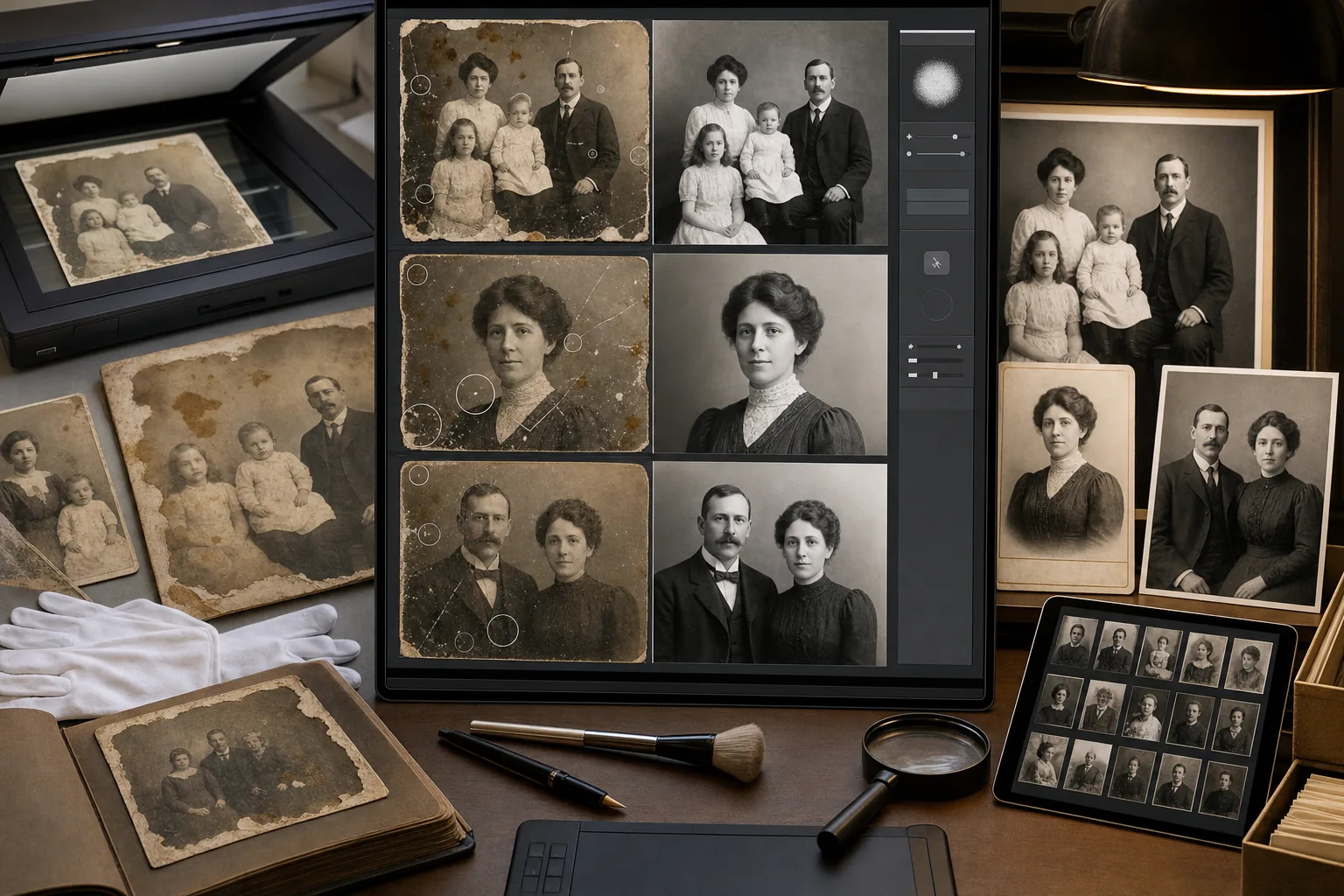
Family photographs are often the most emotionally significant artifacts in a genealogy research project — they put faces to the names on census records, give physical context to the immigration stories, and connect living family members to ancestors they never met. But the physical photographs that carry this connection are deteriorating in shoeboxes, albums with acid-adhesive pages, and envelopes passed between relatives over decades. Fading, water damage, foxing, torn edges, and surface scratches make many of these photos difficult to share in their current condition. AI Enhance and Magic Eraser restore scanned family photos to a quality that can be shared with relatives, published in family history books, displayed at reunions, and preserved digitally for generations that will never see the physical originals.
今すぐ試すDecades of improper storage have degraded the photographs beyond casual recognition
Family photos stored in attics, basements, and non-archival albums for 40-100+ years exhibit predictable deterioration patterns: emulsion fading that reduces the tonal range to a narrow band of light browns, yellowing from acid in the paper and album adhesive, water damage from flooding or humidity that causes staining and emulsion separation, foxing spots from fungal growth in humid storage conditions, and surface scratches from handling without protective sleeves. When great-grandmother's wedding portrait is a faded brown rectangle with water stains obscuring the faces, it can't fulfill its role as a family-history artifact — the emotional connection requires the subjects to be recognizable.
Scanning introduces its own artifacts on top of the physical damage
Home flatbed scanning of deteriorated photographs adds scanning artifacts to the existing physical damage: moiré patterns from scanning halftone-printed photos (common for newspaper clippings and some commercial prints), dust and fiber specks magnified from the scanner glass, Newton rings from glossy prints making uneven contact with the scanner bed, and color-cast shifts from the scanner's light source interacting with the yellowed emulsion. These scanning artifacts layer on top of the physical deterioration, creating a compounding quality problem that makes the raw scan even less usable than the physical photo appears to the naked eye.
Professional restoration is priced per-image at rates that don't scale to a full collection
Professional photo-restoration services charge $25-75 per standard image and $75-200+ for heavily damaged photographs. A genealogy researcher who has collected 50-200 family photographs spanning four to six generations faces a restoration budget of $2,500-$15,000+ at those rates — an investment that few hobbyist genealogists can justify, even when the emotional and historical value is significant. The result is that most genealogy photo collections remain unrestored, shared only as raw scans with apologetic captions about the condition, and the visual dimension of the family history remains inaccessible to relatives who would otherwise engage with it.
使い方
Scan the physical photographs at high resolution before any restoration
Scan each photograph at 600 DPI minimum (1200 DPI for small-format originals like wallet-size prints and cabinet cards) on a clean flatbed scanner. Handle the originals with cotton gloves or clean dry hands. For photographs stuck in albums with acid adhesive, scan them in the album rather than risking damage by removing them — the scanner captures the photo as-is, and restoration will address the adhesive yellowing and page-edge artifacts digitally. Save each scan as a TIFF or maximum-quality JPEG. This scan becomes your preservation master — the digital record of the physical artifact's current condition.
Run AI Enhance to restore faded tonal range and correct color deterioration
Open each scanned photo in AI Enhance to address the most impactful deterioration effect: fading. The AI restores the tonal range that has compressed over decades — bringing back the full spectrum from deep blacks to bright highlights in black-and-white photos, and correcting the yellow-brown color shift in originally black-and-white photos that have browned with age. For color photographs from the 1960s-1980s, correct the characteristic magenta or cyan dye-fade that affects different color-print processes at different rates. The result is a photo that shows the faces, clothing, and setting details that decades of fading have obscured.
Use Magic Eraser to remove physical damage artifacts
After tonal restoration makes the image legible, use Magic Eraser to remove the localized physical damage: water stain borders and discoloration, foxing spots, scratch lines, tape marks from previous amateur repair attempts, scanner dust and fiber artifacts, album-adhesive residue marks, torn-edge artifacts, and any creases visible in the scan. The AI reconstructs the damaged areas from surrounding image context. For faces — the highest-priority area in genealogy photos — work carefully around facial features to ensure the reconstruction looks natural and recognizably like the person.
Share restored photos with family and preserve for future generations
Export restored photos at multiple resolutions for different sharing contexts: full-resolution files for the family archive and future printing, 2000px web-resolution for family-history websites (FamilySearch, Ancestry galleries, personal genealogy sites), 1080px for sharing in family group chats and social media, and 300 DPI at the target print size for family-history books, reunion displays, and framed prints. Accompany each restored photo with whatever genealogy metadata you've established — names, dates, location, relationships, and the source of the original photo — so the visual and documentary records travel together.
よくある質問
Should I keep the original unrestored scan alongside the restored version?+
Absolutely — always preserve the unmodified scan as the archival record. The original scan documents the photograph's physical condition and carries information that the restoration modifies (the exact shade of fading, the location of damage, the original tonal range). Future generations or professional archivists may want to assess the physical artifact's condition through the scan or apply future restoration technology that exceeds current capabilities. Store both versions with clear file-naming conventions: 'smith-wedding-1923-original-scan.tiff' and 'smith-wedding-1923-restored.tiff'.
Can AI restoration make faces recognizable in severely faded photographs?+
In many cases, yes — AI enhancement can recover facial detail that is physically present in the photographic emulsion but visually suppressed by fading to the point where the face appears nearly blank to the casual viewer. The AI amplifies the remaining tonal differences in the faded emulsion to reconstruct the visible contrast that was originally there. However, if the emulsion has chemically deteriorated past a threshold — if the silver or dye has literally detached from the paper — there may not be enough tonal information remaining for any technology to recover. Enhancement works best on gradually faded photographs rather than chemically destroyed ones.
How should I handle photos where I don't know who the subjects are?+
Restore them anyway — restored photos are far more likely to be identified by family members than deteriorated ones. A faded brown rectangle elicits no recognition; a restored image showing clear facial features, clothing style, setting, and period details gives relatives the visual information they need to make an identification. Share restored unknown-subject photos in family group communications with whatever contextual clues you have (which relative's collection the photo came from, any writing on the back, the approximate era based on clothing or photographic format). More family photos are identified after digital sharing than sitting in a single relative's shoebox.
What's the best way to organize a large genealogy photo collection digitally?+
Organize by family line and generation, with a consistent file-naming convention that embeds the key genealogy information: 'surname-firstname-year-occasion-format.tiff' (e.g., 'johnson-margaret-1945-wedding-cabinet-card.tiff'). Create a parallel spreadsheet or database with additional metadata for each photo: subject names, estimated date, location, event, photographer if known, original-photo dimensions and format, physical condition, source relative, and restoration status. Cloud storage (Google Drive, Dropbox, iCloud) with shared folders enables distributed family access while maintaining a single organized archive. Back up to at least two independent storage locations.
関連するユースケース
プロフェッショナルが実際のワークフローでこれらのツールをどのように活用しているかをご覧ください。
生活感あふれる私物や路上駐車、工事機材が写り込んだ物件写真は、内見意欲を下げてしまいます。Magic Eraserを使えば、Photoshopのスキルがなくても瞬時にきれいな物件写真に仕上がります。
背景がごちゃごちゃした商品写真では、お客様はすぐにスクロールして通り過ぎてしまいます。Magic Eraserなら、プロ品質の商品画像を数秒で作成できます。Photoshopのスキルは不要。アップロードして、不要な部分を消して、すぐに出品しましょう。
旅行写真に知らない人が写り込んでいませんか?自撮りの背景がごちゃごちゃしていませんか?Photoshopで何時間もかける必要はもうありません。Magic Eraserなら不要なオブジェクトの除去、背景のクリーンアップ、各プラットフォーム向けのリサイズがワンタップで完了します。
パスポートやビザの証明写真は、背景が不適切だと毎日何千枚も却下されています。Magic Eraserなら数秒で背景を除去し、白、ライトグレー、ブルーなど必要な色に置き換えられます。
キャプションだらけのスクリーンショット、日付が焼き込まれた古い写真、テキストで覆われた画像にお困りですか?Magic EraserのAIテキスト除去ツールが不要なテキストを消去し、背景を自然に再構築して、きれいでプロフェッショナルな写真に仕上げます。
競合と同じストックフォトにうんざりしていませんか?投稿ごとにデザイナーに高額な費用を払うのはもうやめましょう。AI Createはテキストプロンプトからオリジナルのイラスト、アートワーク、ビジュアルを生成し、AI FilterとAI Enhanceで完璧に仕上げます。毎日、あらゆるプラットフォーム向けのユニークなコンテンツを。
Wedding photos deserve perfection, but manual retouching takes hours. Magic Eraser helps photographers and couples remove distracting elements, clean backgrounds, and enhance details so every shot looks its best.
Yearbook photos need consistent backgrounds, even lighting, and clean portraits. Magic Eraser helps schools, studios, and parents get professional-looking results without expensive retouching workflows.
Vehicle listings with clean, professional photos sell faster. Magic Eraser helps dealers, private sellers, and automotive marketers remove background clutter, fix reflections, and enhance car images without a photo studio.
Great food photos drive orders and engagement, but messy tables, utensils, and background clutter ruin the shot. Magic Eraser helps restaurants, food bloggers, and delivery platforms clean up food images fast.
A clean, professional headshot matters for LinkedIn profiles, team pages, and corporate directories. Magic Eraser helps individuals and companies produce polished portraits without a studio reshoot.
Pet photos rarely come out the way you want. The dog moves, the cat is half in shadow, the background is full of clutter. Magic Eraser handles all of that in seconds — background swaps, leash removal, blur cleanup, sharper fur — without manual masking or expensive software.
Empty listings sit on the market longer because buyers struggle to visualize the space. Virtual staging with AI fills the rooms with furniture in the style your buyer wants — modern, transitional, coastal, traditional — in minutes per room instead of days. Magic Eraser handles the pre-staging cleanup (paint touch-ups, painter's tape, debris) and the post-staging polish (lighting refinement, edge cleanup).
Dish photos move delivery and dine-in revenue more than menu copy ever will. Magic Eraser turns phone-shot food photos into delivery-platform-ready images: clean the cluttered table, enhance the dish, swap to a brand-consistent background, and export to DoorDash, Uber Eats, Yelp, and Instagram specs without a food photographer.
YouTube thumbnails decide 50-70% of the click decision in the first 1-2 seconds of feed exposure. Magic Eraser handles the workflow that lets creators ship higher-CTR thumbnails in 25-40 minutes per video: subject isolation via Background Eraser, dark-mode-feed color contrast via AI Filter, clean text-overlay surfaces via AI Fill, and 2-3 distinct variants ready for YouTube's native Test & Compare in under 30 minutes.
Travel photos are the most-edited and most-shared images on most cameras — and the hardest to fix manually. Crowds at every landmark, harsh midday sun, lens glare from phone cameras pressed against bus windows, dim interiors, and decades-old film scans that finally need restoration. Magic Eraser handles every common travel-photo failure mode in seconds, on the same phone you took the photo with.
Pinterest is a visual search engine, not a social feed — pins keep earning impressions for 6-18 months on evergreens and 2-5 years on seasonal evergreens like holiday recipes and gift guides. That long-tail traffic only compounds if every pin is built for the 2:3 vertical canvas at 1000×1500 displayed at ~320px on mobile (85%+ of Pinterest traffic). Magic Eraser's AI tools turn a landscape source photo library into pin-ready vertical compositions in 2-3 minutes per pin instead of 20-40 minutes in Photoshop.
Online course businesses live or die by their visual production quality. The sales-page hero photo, the instructor headshot in the bio section, the in-lesson screenshots, the social-promo carousels driving traffic to the sales page, and the email-newsletter inline imagery in the launch sequence — every one of those surfaces directly affects conversion, completion, and refund rates. Magic Eraser handles the full course-creator image workflow without a designer on staff, on the same laptop or phone you record courses with.
Podcasting is a uniquely visual-poor medium that lives or dies by its visual surfaces. The cover art is the most-viewed surface of every podcast brand, displayed at 56-100px in feed where new listeners decide whether to tap in under a second. The supporting graphic set per episode (Instagram squares, Stories, TikTok, YouTube audiogram covers, email-newsletter inline imagery) is where the show's growth happens between episodes. Magic Eraser handles the full podcaster visual stack — 3000×3000 cover art, host-portrait libraries, per-episode guest graphics, per-season AI refreshes, supporting graphic sets — without a designer on staff, on the laptop or phone you record episodes with.
Indie authors compete with traditional publishing on Amazon's discovery surface where the same algorithms, the same readers, and the same 100-150px mobile-thumbnail decision window apply equally to both. The difference is the production budget — traditional publishers have in-house art departments and marketing teams; indie authors have to handle covers, author headshots, BookTok and Instagram promo, A+ Content modules, and series-consistent visual identity themselves. Magic Eraser preps the full self-published author visual stack — book covers that survive the thumbnail render, author headshots for back covers and bios, social-promo across BookTok / Instagram / Pinterest, Amazon A+ Content modules, and series-consistent presets across 3-12 books — in minutes per asset instead of $400-1500 of designer time per book.
Newsletter writing in 2026 is platform-fragmented across Substack (35M+ subscribers), beehiiv, ConvertKit, Ghost, and Beehiiv-adjacent indie tools — and the visual surfaces have multiplied with each platform's discovery features (Substack Notes, beehiiv Boost, Ghost's recommendation network). Newsletter writers need post hero images that survive every platform's render pipeline, author photos that work across bylines and email signatures, microblog imagery for the discovery-driving feed surfaces, and email-newsletter inline graphics that render across Gmail / Apple Mail / Outlook. Magic Eraser preps the full newsletter visual stack — phone-to-publish in minutes per asset — without a designer on staff.
Dental practices rely on visual proof more than almost any other healthcare vertical — prospective patients evaluate smile transformations, office environment, and team professionalism before ever calling the front desk. The challenge is that clinical photography happens under operatory lighting with clamps, bibs, cheek retractors, and background clutter that undermines the professional impression the photo needs to convey. Magic Eraser cleans up clinical before-and-after shots, standardizes team headshots against consistent backgrounds, and prepares office interior photos for Google Business Profile, social media, and website use — all while keeping the dental team focused on patient care rather than photo production.
Insurance claims live and die on photographic evidence — adjusters, underwriters, and claims examiners make coverage and settlement decisions based on photos that were often taken in poor lighting, at awkward angles, with smartphones, by stressed policyholders moments after a loss event. The gap between what the damage actually looks like and what the claims photo conveys is a direct source of disputes, delays, and underpayments. Magic Eraser and AI Enhance bridge that gap by improving photo clarity, removing irrelevant visual distractions, and ensuring damage details are visible enough to support accurate assessment without altering the evidentiary content of the image.
Cultural institutions worldwide are racing to digitize fragile photograph collections before physical deterioration makes them unrecoverable — but raw scans of century-old prints arrive with fading, foxing, tears, stains, scratches, and color shifts that make them unsuitable for public-facing digital collections, educational materials, or exhibition displays. The traditional restoration workflow requires a trained conservator spending 30-90 minutes per image in Photoshop, which makes large-scale digitization projects cost-prohibitive. AI Enhance and Magic Eraser reduce per-image restoration time to 2-5 minutes, making it practical to process collections of thousands of photographs within realistic institutional budgets and timelines.
Fashion influencers operate in a visual-first economy where feed consistency, photo quality, and content volume directly determine brand-partnership rates, follower growth, and affiliate revenue. The production reality is that most outfit shoots happen in bedrooms, parking lots, coffee shops, and hotel lobbies — not studios — and the gap between where the photo was taken and where it needs to look like it was taken is the core editing challenge. Background Eraser, AI Filter, and AI Enhance transform location-constrained outfit photos into feed-consistent, brand-ready content at the volume Instagram's algorithm and brand partners demand.
An interior designer's portfolio is the primary sales tool for landing new clients — prospective homeowners and commercial clients evaluate design sensibility, style range, and attention to detail entirely through project photography. The challenge is that completed projects are photographed in occupied spaces where client belongings, everyday clutter, power cords, and personal items compete with the design work for visual attention. Magic Eraser removes the distractions that undermine design photography, AI Enhance corrects the mixed-lighting conditions endemic to interior spaces, and AI Fill extends tight compositions to show the full spatial context of the design.
School yearbook production means processing 300-2,000+ student portraits, 200-500 event and activity photos, and dozens of candid shots into a cohesive publication — typically managed by a yearbook advisor and a student committee working on a compressed timeline with limited editing skills and no professional photo-production budget. The biggest visual challenge is consistency: portrait photos arrive from picture day with varying background quality, event photos are shot by student photographers in gymnasium lighting, and candids include background clutter that distracts from the moment being captured. Background Eraser, AI Enhance, and Magic Eraser make it possible to produce a professionally consistent yearbook without professional editing skills or budget.
Nonprofits compete for donor attention in the same visual channels as brands with six-figure marketing budgets — Instagram, email, direct mail, and event presentations. The photos that drive donations are the ones that show impact clearly and emotionally: the community garden thriving, the after-school program in action, the families served by the food bank. But most nonprofits capture these moments with volunteers' smartphones in unglamorous settings, and the resulting photos need significant cleanup before they're suitable for donor-facing communications. Background Eraser, AI Enhance, and design tools bridge the gap between volunteer-captured reality and donor-ready visual storytelling without requiring a graphic designer on staff.
Transformation photos are the single most persuasive marketing asset a personal trainer or fitness coach has — prospective clients make enrollment decisions based on visual proof that the training program delivers real results for real people. The challenge is that before photos are typically taken with a smartphone in a gym locker room or home bathroom with poor lighting, cluttered backgrounds, and no attention to composition, while after photos are taken weeks or months later in a different location with different lighting. The inconsistency between before and after conditions makes it harder for viewers to evaluate the actual physical transformation. AI Enhance and Magic Eraser standardize lighting, backgrounds, and clarity so the before-and-after comparison communicates the real results without visual noise.
A tattoo artist's portfolio is the primary factor clients use when choosing an artist — prospective clients scroll through Instagram feeds and portfolio websites evaluating line quality, color saturation, shading technique, and style fit before they ever contact the shop. The gap between the tattoo's actual quality and what the portfolio photo conveys costs artists bookings every day. Studio lighting creates glare on fresh ink and skin, smartphone cameras soften the fine line detail that distinguishes skilled work, and studio backgrounds with equipment, ink bottles, and supply clutter distract from the artwork. AI Enhance and Magic Eraser close this gap so the portfolio photo represents the tattoo's actual quality.
Documenting a classic car restoration from disassembly through completion serves three critical purposes: proving the scope and quality of work to the owner or future buyer, building the build-thread content that attracts new restoration commissions, and satisfying the photographic-evidence requirements for concours judging and marque-club certifications. The challenge is that restoration shops are optimized for metalwork and paint, not photography — the lighting is industrial, the backgrounds are cluttered with parts, tools, and other projects, and the person capturing the photos is usually the restorer between work steps rather than a photographer. AI Enhance and Magic Eraser transform shop-floor documentation captures into presentation-quality photos that serve all three purposes.
Construction progress photography serves multiple critical functions simultaneously — client update reports, lender draw-request documentation, subcontractor coordination records, dispute resolution evidence, code-inspection support, and the firm's portfolio marketing. The photos are captured by project managers and superintendents on smartphones during site walks, in conditions optimized for building rather than photography: dust, scaffolding, temporary lighting, weather exposure, and the constant visual clutter of an active construction site. Magic Eraser and AI Enhance transform these site-walk captures into documentation that communicates clearly to every audience — clients, lenders, inspectors, attorneys, and prospective customers — without requiring a photographer on the project budget.
Jewelry is one of the most photographically demanding product categories — customers purchasing a $200 ring or a $5,000 necklace online are making the decision almost entirely from photos, and they expect to see the precise color of the gemstone, the quality of the metalwork, the clasp mechanism, and the scale on a human hand or neck. The technical challenge is that jewelry is small, reflective, and transparent in ways that confuse smartphone cameras and even entry-level DSLRs: gemstones refract light unpredictably, polished metal reflects everything in the environment, and the scale demands macro-level sharpness that consumer cameras struggle to deliver. Background Eraser, AI Enhance, and Magic Eraser solve the three core jewelry-photography problems — background consistency, detail sharpness, and reflection cleanup — so independent jewelers and Etsy sellers can produce catalog-quality product photos without a dedicated studio.
Online plant sales have grown into a multi-billion-dollar category, and nurseries competing for orders on their own e-commerce sites, Etsy, Amazon, and wholesale platforms need product photos that accurately represent foliage color, plant health, and specimen size — the three attributes customers evaluate when deciding whether to pay $12 for a 4-inch pot or $85 for a specimen-size plant. The photography challenge is that plants are photographed in greenhouse environments with filtered light, surrounded by hundreds of other plants competing for visual attention, and the foliage color that defines a cultivar's appeal shifts dramatically under different light temperatures. Background Eraser and AI Enhance produce the clean, color-accurate catalog photography that drives online plant sales without requiring a photo studio separate from the growing operation.
Event photographers face a unique production bottleneck: hundreds to thousands of images captured in a single session under mixed lighting, crowded venues, and unpredictable conditions — all due for delivery within 24-72 hours. The margin between a profitable event photography business and an unsustainable one lives in post-production speed. Magic Eraser handles the repetitive cleanup work — removing photobombers, exit signs, stray cables, and branded clutter from venue backgrounds — so you can focus on color grading and creative selects instead of pixel-level retouching.
Property managers are not photographers — but they photograph more frequently than most professionals. Every unit turn requires listing photos, every move-in and move-out needs inspection documentation, every maintenance issue demands visual evidence, and every owner report benefits from property-condition imagery. Across a portfolio of 20-200 units, that is thousands of photos per year captured on phone cameras under fluorescent lighting in occupied or half-turned units. Magic Eraser transforms phone-camera property photos into listing-ready imagery and clear maintenance documentation without hiring photographers for routine work.
Selling prints is the most accessible recurring-revenue stream for visual artists — but the gap between a painting on the wall and a print-ready digital file is wider than most artists expect. Phone and DSLR captures of physical artwork introduce color shifts, glare, uneven lighting, and resolution limits that degrade reproduction quality at print sizes above 8x10 inches. AI Enhance recovers detail and upscales artwork captures to large-format print resolution, while AI Expand extends the canvas for aspect ratios that differ from the original — letting artists sell a single painting as a 24x36 poster, a 16x20 matted print, and a 1:1 square canvas wrap without cropping or distorting the composition.
Sports photography demands technical precision under the worst possible conditions — fast-moving subjects under stadium mixed lighting, shooting through chain-link fences and safety netting, capturing peak action moments at 1/1000s+ shutter speeds that force high ISO and thin depth of field. The captures that survive the cull often need significant post-production: fence removal, noise reduction from high-ISO shooting, distraction cleanup from sideline clutter, and enhancement to recover detail the camera sacrificed for shutter speed. Magic Eraser and AI Enhance handle these sports-specific post-production challenges so the final images match the intensity of the moment captured.
Veterinary practices live and die by trust — pet owners choose their vet based on perceived warmth, competence, and genuine care for animals. The visual communication of that trust happens through the practice's website, social media, and Google Business Profile, where photos of happy patients, caring staff, and a clean welcoming facility signal everything words cannot. The problem is that veterinary clinics are clinical environments: stainless steel tables, medical equipment, fluorescent overhead lighting, and animals that are often anxious or restrained. Magic Eraser's Background Eraser and AI Enhance transform clinical snapshots into the warm, approachable imagery that builds the trust pet owners are looking for.
Antique dealers move inventory constantly — acquiring at estate sales, auctions, and picker networks, then listing across multiple platforms (eBay, Ruby Lane, Etsy, 1stDibs, Chairish, LiveAuctioneers, their own website) with photos that must communicate condition, provenance quality, and value. The photography challenge is unique: items are photographed in cluttered booths, packed storage units, and show floors where isolating a single item visually is nearly impossible without a dedicated studio setup most dealers do not have. Magic Eraser's toolset handles the antique dealer's specific photo challenges — isolating items from cluttered backgrounds, enhancing detail in patina and maker's marks, and removing price tags and display clutter for clean catalog presentation.
Daycare centers and preschools take more photos than almost any other small business — daily activity documentation for parents, enrollment marketing for their website and social media, seasonal event documentation, and milestone celebrations. The challenge is that classrooms are visually chaotic environments: primary-colored furniture, cluttered art stations, snack remnants, cubbies overflowing with backpacks, and other children who may not have photo release permission in the background. Background Eraser creates clean, warm compositions that focus on the activity and the child, while AI Enhance corrects the fluorescent classroom lighting that makes every phone photo look institutional.
For hair stylists and colorists, the portfolio is the primary client-acquisition tool. New clients choose their stylist based on Instagram galleries, Google Business Profile photos, and the salon's website portfolio. The quality of these photos directly determines whether a potential client books a $150-$400 color appointment or scrolls past. The problem is that salon environments — mirrors reflecting the photographer, mixed warm and cool lighting that shifts color perception, cluttered station backgrounds, and other clients in frame — fight against accurate color representation at every turn. Magic Eraser's toolset solves the specific visual challenges that prevent salon photos from showcasing the actual quality of the work.
Landscape contractors sell their next project based on photos of their last one. Homeowners evaluating contractors compare portfolio images side by side — the contractor whose patio installation, retaining wall, or planting design looks cleanest and most professional in photos wins the bid, often regardless of price difference. The challenge is that landscape work is photographed on active job sites and in real neighborhoods where construction debris, neighbor clutter, parked cars, trash cans, garden hoses, and utility boxes all compete for attention in the frame. Magic Eraser removes the real-world distractions that undermine portfolio presentation, while AI Enhance compensates for overcast skies and harsh midday shadows that flatten the dimensionality of hardscape and planting work.
On dating apps, the profile photo is evaluated in 1-3 seconds during a swipe. The lighting, sharpness, composition, and background quality of the photo influence the swipe decision as much as physical attractiveness — a well-lit, clear photo with a clean background consistently outperforms a better-looking person photographed poorly. The problem is that most people do not have a library of high-quality solo photos with clean backgrounds and flattering lighting. They have group shots where they need to be isolated, photos with exes who need to be removed, and dimly-lit bar or restaurant photos that are their only recent full-body shots. Magic Eraser's toolset handles these specific dating-photo challenges without creating misleading or catfish-level alterations.
When a family is preparing for a funeral or memorial service, the search for the right photos happens under the worst possible emotional and time conditions. The ideal portrait — the one that captures the person as their family wants to remember them — is often a decades-old print, a faded snapshot from a family gathering, or the only good photo from a period when the person was healthy and vibrant. These source photos frequently need significant restoration: fading, color shifts, physical damage, and low resolution from the era they were captured. AI Enhance restores memorial photos with the dignity and care the moment requires, while Magic Eraser removes unwanted elements to create the portrait the family envisions.
Resale is a volume business — successful Poshmark, Depop, Mercari, and eBay clothing sellers list 20-100+ items per week, each requiring 4-8 photos that compete against both other resellers and brand-direct retail listings. The visual gap between a reseller's bedroom flat-lay and a brand's studio product shot is the gap between a quick scroll-past and a sale. Background Eraser and Magic Eraser close that gap at the speed and scale resale economics demand, turning phone photos of thrift-sourced inventory into marketplace-competitive product listings without a studio, a lightbox, or per-item editing time that would destroy the margin on a $15 shirt.
Handmade sellers compete against mass-produced alternatives on visual presentation — and the price premium of handcrafted work only holds when the product photos communicate the material quality, craftsmanship detail, and tactile appeal that distinguish a $45 handmade ceramic mug from a $12 factory version. Most makers photograph their work on kitchen tables, workshop benches, or craft-fair booth surfaces using phone cameras that flatten texture and lose the material detail that justifies the price. Background Eraser creates clean, professional product presentations, while AI Enhance reveals the wood grain, fiber texture, glaze variation, and handmade character that makes the work worth the premium.
Musicians and bands need a constant supply of visual assets — electronic press kit photos for venue and festival submissions, social media content to maintain audience engagement between releases, gig posters and flyers for upcoming shows, and merchandise designs for an increasingly important revenue stream. Professional photo shoots cost $300-$1,500 per session, and the results age quickly as lineups change, looks evolve, and the visual identity needs refreshing for each release cycle. Background Eraser isolates band and artist photos from venue and rehearsal-space clutter. AI Filter applies stylized treatments that establish visual identity. AI Enhance recovers detail from low-light live performance captures. Together, they maintain a professional visual presence on the budget reality of working musicians.
関連する比較
Magic Eraserと類似ツールの比較をご覧ください。
TouchRetouchはオブジェクトや傷の除去に特化した人気の有料モバイルアプリです。Magic Eraserはインストール不要で、あらゆるデバイスから無料でAI編集が利用できます。機能、価格、使いやすさを比較してみましょう。
Cleanup.picturesはオブジェクト除去に特化した無料ウェブツールです。Magic Eraserは8つのAI編集ツール、モバイルアプリ、高度な処理機能を備えています。両者の違いをご覧ください。
remove.bgは背景除去の業界リーダーで、強力なAPIとPhotoshop・Figmaプラグインを提供しています。Magic Eraserはオブジェクト除去、生成塗りつぶし、AI高画質化、デザインなど8つのAIツールを1つのエディターに統合しています。
異なる強みを持つ2つの強力なAI写真エディター。Magic Eraserはより幅広いジェネレーティブAIツールを提供し、Photoroomはeコマース商品撮影とバッチ処理に優れています。あなたのワークフローに合うのはどちらか確認しましょう。